How to Use RabbitMQ in Go
Time to read:
December 03, 2025
Written by
Reviewed by
AI generated summary
- Use RabbitMQ with Go to decouple services and handle traffic spikes.
- Set up RabbitMQ using Docker, then create REST API and worker services with Go.
- Publish messages to RabbitMQ queues and use Twilio to send real-time SMS notifications.
This summary was generated by AI.
How to use rabbitmq in go
Building modern apps isn’t just about getting them to work anymore, they also need to be fast, reliable, and built to withstand failure. Why? Because services fail, traffic spikes happen, and direct connections between components can quickly turn into a tangled mess of tight-coupling and bottlenecks.
That’s where message brokers like RabbitMQ come in. RabbitMQ works like a cloud-based post office for your apps. With the right design, it can help decouple services, handle traffic spikes, and keep things running when parts of your system go down.
In this article, we’ll take a look at how to use RabbitMQ to build a more resilient system, step by step. You’ll set up RabbitMQ using Docker, create a REST API in Go that publishes messages, build a background worker that listens for messages, and use Twilio to send SMS notifications when new events arrive. Each piece is wired together through queues — giving you a decoupled, fault-tolerant, and more scalable architecture you can actually build on.
What is RabbitMQ?
RabbitMQ is an open-source, distributed message broker that works like a cloud-based post office. It was developed in 2007 and is used to enable asynchronous communication between microservices. RabbitMQ supports multiple messaging protocols such as AMQP 0-9-1, STOMP, and MQTT, making it flexible for different integration needs.
It also helps decouple services by letting them communicate through queues rather than direct connections. That means services can publish messages without needing to know who will consume them or how they’ll be processed.
The role of RabbitMQ
RabbitMQ does a lot more than just pass messages around. It's a critical part of making real systems more reliable and scalable. Let's break down the key roles RabbitMQ plays behind the scenes.
- Message broker: RabbitMQ acts as the central communication hub, receiving messages from publishers and routing them to the appropriate consumers.
- Decoupling: Services don't need to know about each other's existence or implementation details. They only need to understand the message format.
- Load balancing: Messages can be distributed across multiple instances of the same service, allowing horizontal scaling.
- Buffering: RabbitMQ absorbs traffic spikes by storing messages when consumers can't process them fast enough.
- Reliability: Messages persist even if consumers are temporarily unavailable, ensuring no work is lost.
- Message patterns: RabbitMQ supports various messaging patterns such as point-to-point, publish/subscribe, request/reply, and worker queues.
- Flow control: RabbitMQ can manage message flow, preventing overwhelmed services from being flooded with more work than they can handle.
This architecture enables robust, scalable systems where each component can be developed, deployed, and scaled independently without compromising the overall system's integrity.
To see how all of these roles come together in a real-world scenario. Imagine you’re building an e-commerce platform with multiple services handling different tasks. When a customer places an order:
- The order service must record the purchase
- The inventory service updates stock levels
- The payment service processes the transaction
- The notification service sends a confirmation
- The shipping service prepares the delivery
Without a message broker, these services would need to call each other directly, which makes them tightly coupled. If just one service like notification goes down, the entire order process could fail.
With RabbitMQ in place, things work differently. The order service doesn’t talk to other services directly, but instead, it will publish a message to something called an exchange. An exchange is a routing component in RabbitMQ that decides where the message should go. Each interested service, like shipping or notifications, subscribes to these messages using its own queue.
If the notification service is offline, RabbitMQ keeps its messages safely in its queue until it comes back online and other services keep running like nothing happened.
Prerequisites
- Knowledge of Go
- Go version 1.22 or higher
- A Twilio account (either free or paid). If you are new to Twilio, click here to create a free account.
- A Twilio phone number
- Docker Desktop
Set up the project directory
Create a new directory for your project and initialize a new Go module by running these commands, wherever you keep your Go projects:
Add the environment variables
Now, you're going to create environment variables for each of the credentials that you retrieved earlier, so that you don't store them directly in the application's source.
To do this, create a .env file in your project's main folder, and copy the following into it:
Get your Twilio credentials
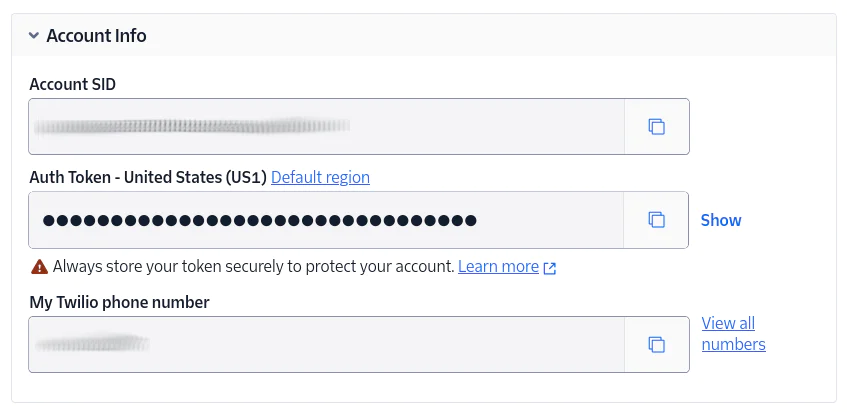
Log in to the Twilio Console. From the Account Info panel of the main dashboard, copy your Account SID, Auth Token, and phone number. Again, store them somewhere safe, for the time being.
Install the required dependencies
You next need to install the following dependencies:
- github.com/gorilla/mux: This is an HTTP router for Go that makes it easier to define routes, handle URL parameters, and organize your endpoints cleanly
- github.com/rabbitmq/amqp091-go: This is the official Go client for RabbitMQ that lets you publish and consume messages using the AMQP 0.9.1 protocol. In this project, it will be used to send messages between services asynchronously
- github.com/twilio/twilio-go: This is the official Twilio Helper Library for Go, which allows you to interact with Twilio services like SMS, voice, and other communication tools pretty easily. For this project, it will be used to send SMS notifications to the product owner whenever a new review is submitted
- github.com/joho/godotenv: The GoDotEnv package will help us manage our environment variables
To install all those dependencies in your Go project, run the following command from the root of your project. This will download all the packages and add them to your go.mod and go.sum files for you to import into your code.
RabbitMQ will be set up using Docker, providing a local message broker to queue and route SMS messages between services.
Create a file called compose.yml in your project’s top-level directory and paste the following into it:
Create a shared RabbitMQ utility
A utility function is needed to handle RabbitMQ setup since the connection, channel creation, and queue declaration code will be nearly identical across all three Go files. This utility will help eliminate code duplication and make our application easier to maintain as it grows.
Create a subdirectory called utils in the project’s root directory. Inside it, create a file called rabbitmq.go. Add the following code to it:
The code above creates a reusable utility package that encapsulates all the common RabbitMQ setup logic. The SetupRabbitMQ() function handles connecting to RabbitMQ, opening a channel, and declaring the queue in one call, while the RabbitMQConnection struct keeps all these components together with a convenient Close() method for cleanup.
Publish a message to RabbitMQ
Before wiring everything up, let’s test the basics by writing a small Go script that pushes a sample SMS message into a RabbitMQ queue.
Create a directory called send in the project’s top-level directory. Inside it, create a file called send.go. Add the following code:
The code above connects to a local RabbitMQ server and sends an SMS payload as a JSON message to a queue named "sms-queue". It also defines a simple SMS struct with a phone number and message, serializes it to JSON, and publishes it to the queue using ch.PublishWithContext().
Create a REST API to publish SMS messages to RabbitMQ
Now, let’s build a simple HTTP API using Go that accepts SMS requests and publishes them to the RabbitMQ queue called "sms-queue". This makes it easy to trigger messages from external systems. Create a directory called producer in the project’s top-level directory. Inside it, create a file called send_api.go. Then, add the following code to the new file:
The code above creates a simple REST API that listens for POST requests on /send-sms, validates and encodes the incoming SMS data, and publishes it to a RabbitMQ queue. It acts as a bridge between external HTTP clients and the internal messaging system.
Create a worker to consume messages and send SMS via Twilio
You need a worker that listens for new messages on the "sms-queue", decodes them, and sends the SMS using Twilio. This will complete the async workflow and decouple your messaging system from direct SMS delivery.
Create a directory called receive in the project’s top-level directory.Inside it, create a file called receive.go. Then, add the following code to the new file:
The code above sets up a worker service that listens for incoming SMS jobs from the "sms-queue" in RabbitMQ. When a message is received, it parses the JSON payload, then uses Twilio’s Programmable Messaging API to send the SMS. Messages are acknowledged only after a successful send, and any failure triggers either rejection or requeueing. This approach ensures reliable, fault-tolerant message handling.
Test the application
To test the application, you first need to start RabbitMQ using Docker by running this command:
Next, in your terminal, change into the receive directory and run the receive.go file to listen for messages from the "sms-queue" and send them via Twilio:
You should see the following printed to the terminal:
Open up another terminal, and change into the producer directory to run the send_api.go file with the following command:
This will start an HTTP API at http://localhost:8080.
Lastly, to send the SMS, open another terminal and change into the send directory to run the send.go file:
You should see something like:
You will then receive an SMS on your phone number saying Hello from Go via Twilio:

That’s how to use RabbitMQ in Go
In this article, you set up RabbitMQ locally using Docker, created a simple REST API in Go to publish SMS messages into a queue, and built a worker that listens for those messages and sends SMS notifications through Twilio. Along the way, you saw how RabbitMQ helps decouple services, manage traffic spikes, and make your system more reliable.
RabbitMQ makes it much easier to build systems that are fast, reliable, and ready to handle real-world messiness like traffic spikes, service downtime, or scaling challenges. By combining RabbitMQ with Go and Twilio, you now have a simple but powerful setup that can queue messages safely, decouple critical services, and trigger real-time actions like sending SMS notifications.
Temitope Taiwo Oyedele is a software engineer and technical writer. He likes to write about things he’s learned and experienced.
Related Posts
-
 AI-powered agents for contact center in Australia: containment quality, not deflectionAliakbar Lokhandwala
 -
AI-powered agents for contact center in India: what they can and cannot doAliakbar Lokhandwala
-
AI-powered agents for contact center in Philippines: what the term actually meansAliakbar Lokhandwala
Related Resources
Twilio Docs
From APIs to SDKs to sample apps
API reference documentation, SDKs, helper libraries, quickstarts, and tutorials for your language and platform.
Resource Center
The latest ebooks, industry reports, and webinars
Learn from customer engagement experts to improve your own communication.
Ahoy
Twilio's developer community hub
Best practices, code samples, and inspiration to build communications and digital engagement experiences.