Automating Twilio Auth Token Detection and Rotation with TruffleHog, Tines, and Slack
Time to read:
September 21, 2026
Written by
Reviewed by
Sensitive data such as passwords, API keys, and authentication tokens can easily fall into the hands of malicious actors if left unprotected. For example, hardcoding your Twilio Auth Token in GitHub or exposing it in plaintext leaves your communication systems exposed to an account takeover, severe toll fraud, and unauthorized exploitation. However, deploying an automated alert and rotation system using Slack and Tines allows you to dramatically reinforce your application's defense mechanisms. This automated strategy optimizes your incident response capabilities, empowering your team to update compromised credentials swiftly, securely, and seamlessly, neutralizing potential threats from accidental leaks.
Prerequisites
The examples in this post demonstrate core concepts of secret detection and rotation using a hypothetical but realistic scenario. These prerequisites are what I used to build this demonstration, but may vary depending on how your app/environment is set up.
- A free Twilio account
- A Tines account
- Get started for free
- A Slack App with the proper scopers (link below)
- The Trufflehog CLI installed
- A local filesystem containing files of pseudocode with Twilio Auth Tokens hardcoded in plaintext 😥
- If you really want to follow along with my examples, please don’t use your prod account - see the test credentials doc to help limit the blast radius of silly tests and wonky prototypes
Tools Being Used
This automated architecture, along with comparable security workflows, depends on seamless integration and communication across multiple distinct platforms.
TruffleHog
TruffleHog is a secret-scanning engine, available in both open-source CLIand Enterprise versions, designed to automate the discovery and resolution of exposed secrets across a variety of sources. Included in the latest version of TruffleHog are two Twilio detectors - one for Auth Tokens and one for API Keys and Secrets (more on those later).
How TruffleHog Works
TruffleHog functions by pairing pattern matching with live verification. For instance, when identifying a potential Twilio Account SID and Auth Token, it executes an API request to validate if the credential is active. It seamlessly handles diverse secret formats, including plaintext, base64-encoded strings, and zipped file contents. In this scenario, our primary emphasis is on detecting Twilio Secrets.
Executing the TruffleHog CLI across a local filesystem is straightforward:
Beyond local directories, you can also audit other repositories and platforms such as GitHub, Google Drive, and Slack. For example, to scan a remote Git repository for verified keys, use:
A standard verification output displays key metadata as follows:
This data can be structured into alternative formats like JSON or GitHub Actions.
Additionally, TruffleHog Enterprise users can leverage a REST API to query historical findings or implement notifiers to alert a webhook whenever secrets are uncovered.
Tines
Serving as a security automation platform, Tines leverages a visual, node-based programming language to coordinate complex security workflows. It integrates data from a litany of tools to analyze alerts and execute automated responses with virtually no manual intervention. If you are familiar with services such as PureData, MaxMSP, Davinci Resolve Fusion, TouchDesigner, or Twilio Studio, you should feel very comfortable with Tines.
How Tines Ingests Secret Detections
Tines is scanner-agnostic. The specific scanner matters less than the ability to move the exposure event into Tines. Because Tines can ingest data from webhooks, query APIs, and interact with databases, you are not locked into any specific secret detection tool. You can import channel detection data from TruffleHog, GitHub Secret Scanning, Semgrep, Wiz, Snyk, etc. into Tines using these primary methods:
- Webhook Ingestion: If the scanner supports outgoing webhooks, it can push JSON payloads containing the exposure details directly to a Tines Webhook action URL.
- API/CLI Integration: For CLI-based detection, you can pipe the scanner's JSON output directly to a Tines Webhook node via an HTTP POST request (e.g., using curl or a custom script).
- Built in Templates: Tines offers seamless connections to various Security Information and Event Management (SIEM) systems and secret scanning tools that make integration much easier
Slack App
A Slack App is a configured collection of URLs and settings that allows your automation platform (such as Tines) to interface with your Slack instance. Instead of operating on behalf of a human, it functions as a "bot," providing a dedicated and consistent identity for your security workflows within Slack.
Interactivity URL
The Interactivity URL is the webhook endpoint defined in your Slack App that allows Slack to send data back to an automation platform when a user interacts with the application.
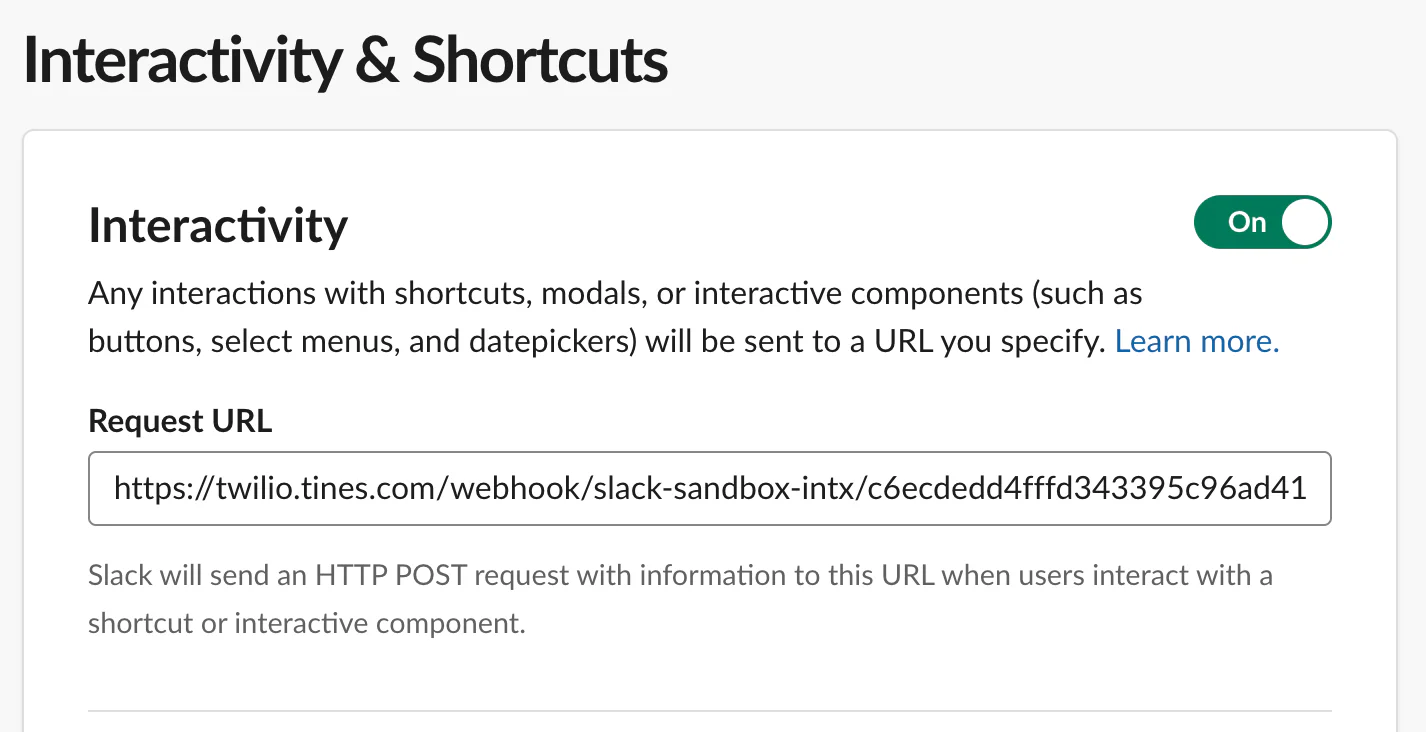
The Interactivity URL serves as the destination for events triggered by interactive UI elements, such as buttons or modal submissions. When a user clicks a button, Slack sends an Interaction Payloadto this URL containing the interaction context.
An example View Interaction Payload:
Slash Command
A Slash Command is an interactive entry point that allows users to trigger automation or initiate workflows directly from within Slack by typing a specific command starting with a forward slash (e.g., /my-secrets).
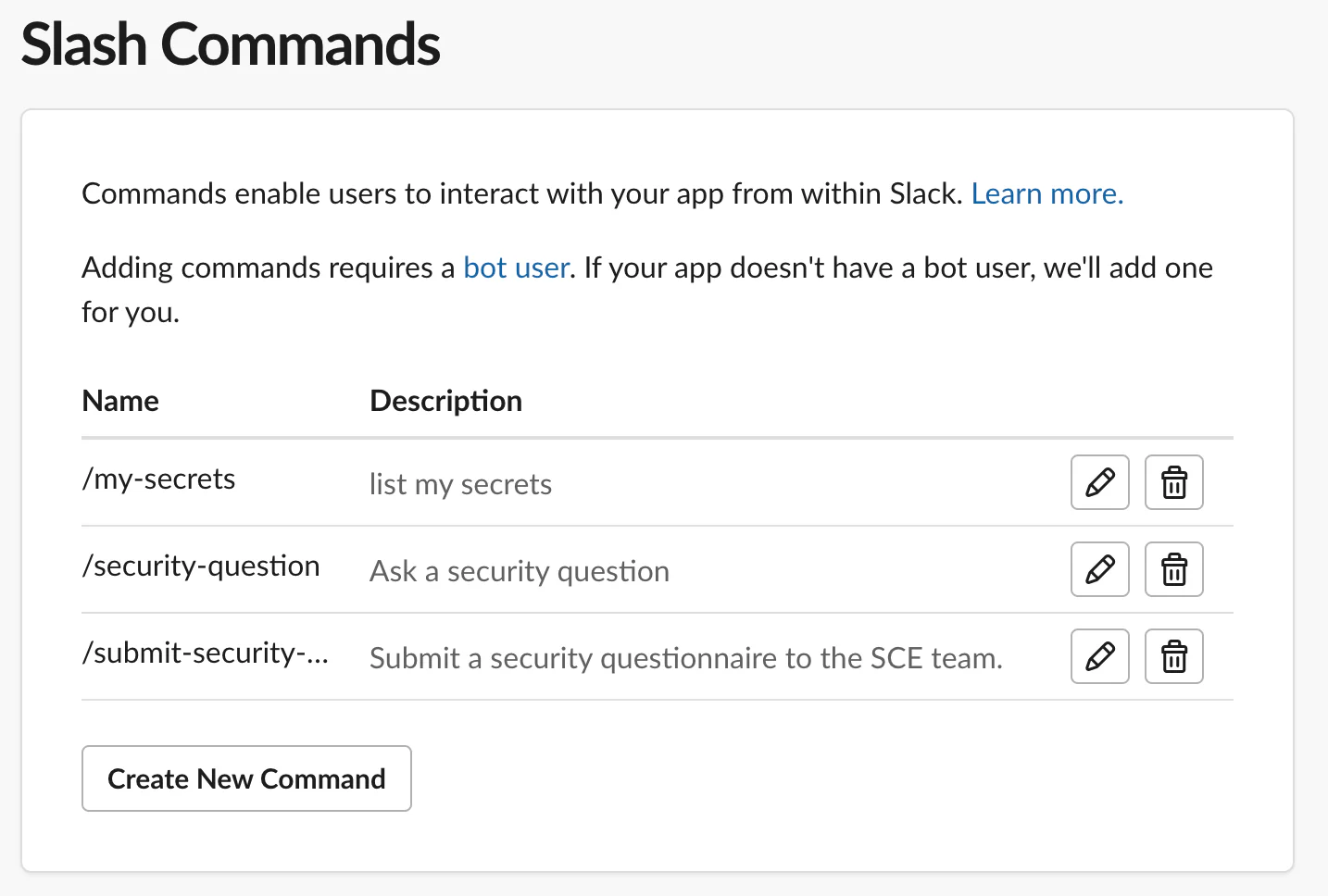
Configuration involves both setting up the interface in Slack and securing the endpoint in your automation platform:
You define the slash command within the Slash Commands section of your Slack App settings. This includes:
- Command: The string users type with any number of option arguments (e.g.,
/my-secrets validated). - Request URL: The destination endpoint where Slack sends the command payload (e.g., a Tines Webhook URL).
- Description/Usage Hint: Text that helps users understand what the command does when they start typing it.
When a slash command is invoked, the JSON payload sent by Slack typically includes:
user_idanduser_name: Identifies who invoked the command.channel_idandchannel_name: Indicates where the command was triggered.command: The specific command invoked.text: The content following the slash command (e.g., the security question).response_url: A temporary URL used to send delayed responses back to the user.
OAuth/ Permissions
OAuth is the security protocol used to grant the Slack App controlled access to a Slack workspace's data and features. When you first set up your Slack App, an administrator or user goes through an authorization handshake. Upon approval, Slack issues an OAuth access token which Tines uses to authenticate Slack API requests.
Instead of giving an application unrestricted access to a workspace, Slack uses Scopes (permissions) to limit what an app can do.
- Scopes : These define exactly what your app is permitted to do and define the "blast radius" of an app. For example:
chat:write: Necessary if your app needs to post alerts, rotating secrets, or remediation messages into a channel.chat:write.dm: Required if you choose to notify a specific "code owner" directly via DM rather than posting in a public channel.users:read: Required if your workflow needs to look up a user to tag them in an alert.
- The Principle of Least Privilege: Only the scopes essential for the app’s functionality should be granted.
- Credential Management: The OAuth token generated by this process is as sensitive as your Twilio Auth Token or any other API key, secret, password, etc. Like any secret, it must be stored in your Tines Credential Vaultand never hardcoded in your workflow.
Twilio REST API
The Twilio Accounts and AuthToken APIs serve as the programmatic interface for managing your Twilio Account’s settings, specifically providing endpoints dedicated to Auth Token Rotation.
- Secondary Auth Token Create: Creates a secondary token that works simultaneously with the current primary auth token
- Secondary Auth Token Update: This action deletes the current primary auth token and promotes the secondary Auth Token to primary
- Secondary Auth Token Delete: Deletes the secondary token, rendering it useless and the account relies on the current primary auth token
- List Accounts: List all accounts or fetch a specific account with the current primary auth token returned in the response
Auth token rotation is a critical security practice that replaces existing credentials with new ones. If a token is detected in a log, GitHub repo, or Slack channel, rotation immediately invalidates the compromised secret, effectively "killing" the access window for an attacker. By utilizing the API to generate a secondary token while the primary remains active, organizations can update systems without causing immediate service outages.
🚀 Scenario: Safeguarding LogiShip Customer Subaccounts
To illustrate this workflow, we will follow a realistic hypothetical scenario. LogiShip is a B2B logistics platform that uses Twilio Subaccounts to provide secure, isolated communication channels (like automated SMS delivery updates) for its valued customers.
The Incident
During a high-pressure debugging session for a new "Route Optimization" service, a LogiShip integration engineer is testing a local script to verify telephony workflows. To quickly replicate an issue, they hardcode a client’s active Twilio Auth Token into the local test file. In the chaos, the engineer accidentally saves the file locally without cleaning up the hardcoded credential.
If left exposed, this token could allow an attacker to hijack the client’s messaging channels, access sensitive delivery logs, or trigger expensive international toll fraud.
Basic Workflow
This four-phase lifecycle defines a scalable architecture for proactive secret management. Although this guide demonstrates the process using TruffleHog, Tines, and Slack, the underlying framework is fully modular. Feel free to adapt these examples directly, or tailor the logic to align with your organization’s unique technical requirements.
- Phase 1: Detection
- TruffleHog detects secrets and sends a report to Tines
- Phase 2: Analysis
- Tines logic parses, analyzes, and prepares the detection report for human remediation
- Phase 3: Notification
- Tines uses the Slack API to send a detection alert to a private Slack channel monitored by teams responsible for token ownership
- Phase 4: Remediation
- Credential owners can immediately rotate exposed tokens directly within Slack or trigger Tines integrations to create scheduled maintenance tickets in CRMs and project tracking tools.
Let’s begin
Feel free to follow along directly, or adapt and customize the concepts being illustrated for your own app’s architecture and needs.
Phase 1: Detection
Sensitive strings such as Auth Tokens, API Keys, passwords, and even phone numbers are hard coded into apps all the time. It happens, and is hard to avoid.
For this example, LogiShip’s security team might run a simple script using the TruffleHog CLI to scan a local filesystem, such as the one below.
The script starts by running the following TruffleHog command over the specified directory:
The --exclude-paths flag looks at a .txt file for files and directories to avoid scanning. For instance, I don’t need to waste time scanning my python venv directory for these samples.
And the output looks something like this:
For this post, I didn’t want to push actual credentials to GitHub, so I used a local filesystem to demonstrate the functionality.
In your environment, you may use another tool or SIEM with secret detection capability. Whatever the case is, the first phase in Twilio Auth Token Rotation automation is detection.
Phase 2: Analysis
The Secret Detection phase identifies that a potential problem exists. The Secret Analysis phase determines how to handle the problem, ensuring the response is secure, efficient, and user-friendly. A scanner can produce duplicates or false positives, so an analysis provides the necessary parsing, and context-enriching for properly actionable alerts.
Once Tines receives the detection report, it processes the information through a logic pipeline:
- Ingestion & Validation: The Tines Webhook node receives the payload. To ensure security, you must implement Webhook Signature Validation at this first node, verifying that the request truly originated from your scanner and preventing unauthorized traffic.
- Processing & Parsing: Tines parses the JSON payload to identify the specific secret type and the associated owner. If the payload contains multiple exposures, Tines splits these into individual events, creating a " Tines record" for each to track state.
- Data Minimization & Encryption: To keep event history clean and secure, Tines processes the data in memory and discards unnecessary fields. Any sensitive data (like an
account_sidor a raw token) is encrypted usingTINES_ENCRYPTbefore being stored as a record, ensuring sensitive details are never saved in plain text. - Alerting & Interactive Remediation: Tines sends an interactive alert via Slack, providing the user with clear remediation options.
- Automated Execution: The user can immediately rotate the exposed auth token, or cut a ticket to schedule the rotation for later.
Regardless of how the exposed secrets are detected, the key to automation is getting the data into Tines.
LogiShip Security’s detection script hits a Tines incoming webhook with the detection report in JSON format.
Webhook Signature Validation
The Tines Incoming Webhook node sits and waits for webhook events from TruffleHog (or a SIEM, etc.). This URL is protected somewhat via an obscure path, but it is still open to the public internet. Signature Validation is implemented to ensure only requests that come from expected sources are processed.
This python snippet constructs an HMAC-SHA256 signature and attaches it to request headers so the receiving Tines webhook can verify the sender's identity and detect tampered or replayed events.
Define the secret and request headers in the sending application's configuration (e.g., the TruffleHog scanner script or custom SIEM integration), storing sensitive information like the secret in an environment variable or secrets manager
A simple formula can be utilized right when Tines receives a webhook. If the signatures don't match, no further events are triggered within the Tines Story.

If the signature is validated, Tines logic can begin!
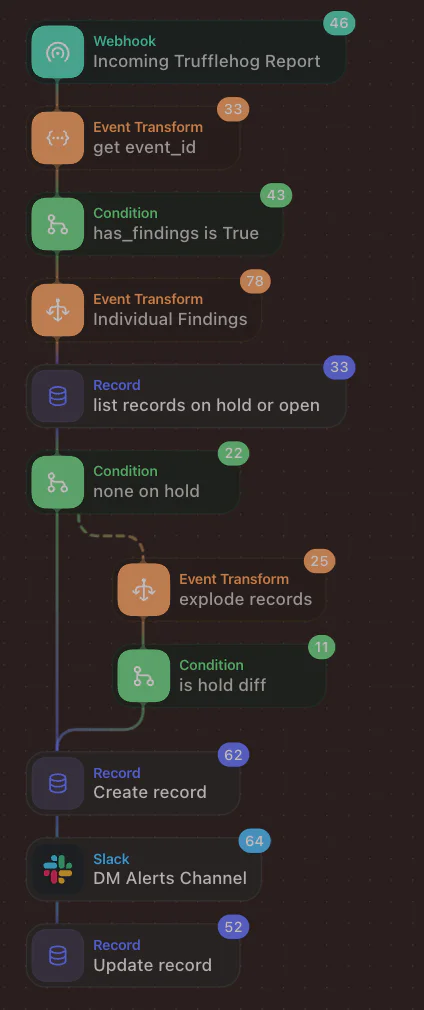
After validation of the webhook signature, we check if the detection report contains valid findings. If so, an Event Transform action is used to explode each detection into its own event.
Before proceeding, the records are queried to see if any of these findings have already been addressed by this automation. If no detections are open or on hold, we create a new record with the following fields from the TruffleHog detections script.
- account_sid
- verified
- rawvs
- file
This information is needed for reference later, but we don’t want to store plaintext auth tokens in Tines Records and logs and exacerbate the issue we are trying to solve.
TINES_ENCRYPT is used to safely store this sensitive information for reference.
If any detections are open or on hold, we compare our new finding to the existing record to make sure it is the same, and not a new exposure of the same auth token.
The detection report could contain more than one exposure, so we want to ensure we have one Slack message per secret detected.
The information in the detection report is used to construct a Slack alert using the Block Kit.
A few notes on constructing messages with Slack Block Kit:
- Action ID: A unique identifier for interactive components (like buttons). When a user engages with the alert message, Slack returns this ID to the Tines webhook, enabling the story to route the interaction to the correct logic. By concatenating unique identifiers (such as the specific record ID) into the Action ID, Tines can precisely track state across multiple records.
- Block ID: A unique anchor for individual sections within your message. These identifiers serve two main purposes: providing Tines with critical context about where the user clicked and enables the automation to update specific parts of a message dynamically.
Phase 3: Notification
Notifications serve as the bridge between automated detection and human intervention. By utilizing the Slack Block Kit, Security Ops teams or credential owners can take immediate action directly within the notification itself.
Once populated, the Slack message looks like this:
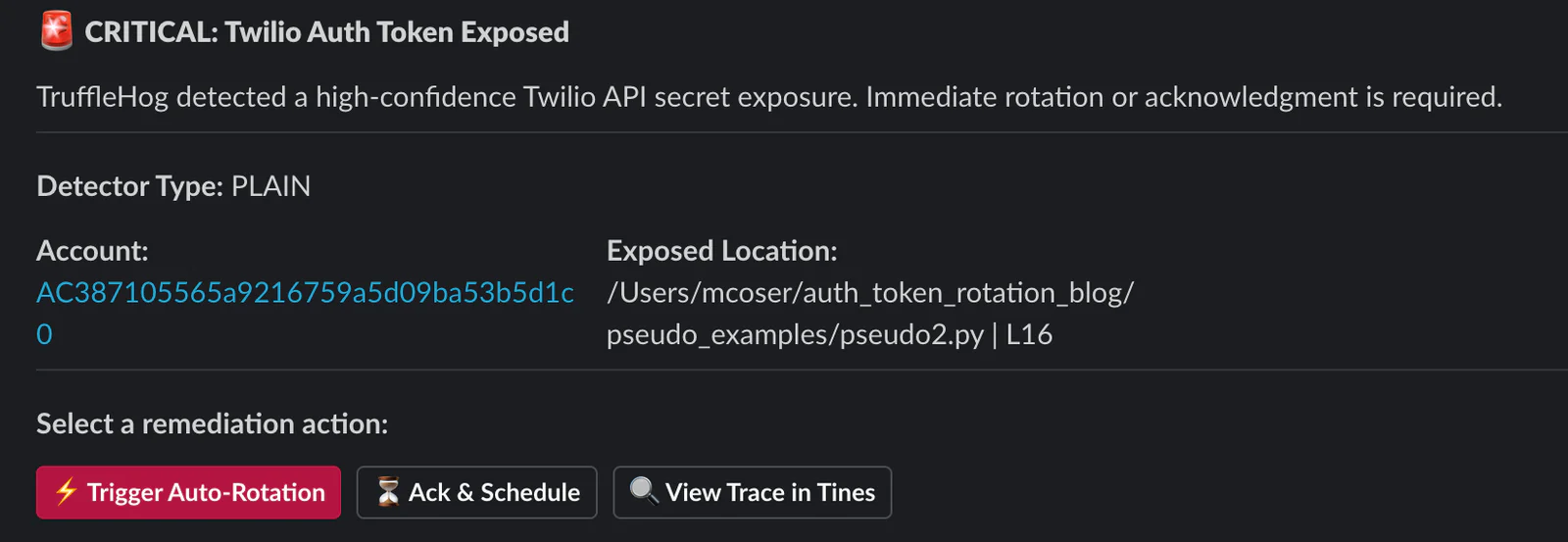
Key Elements
blocks: The root array that acts as the container for the message structure. Every element of the message (header, section, action) is a sub-element within this array.header: Provides immediate, high-visibility labeling to anchor the user's attentionsection(fields): Used here to display key-value pairs (like Account SID and file path). This is critical for context, as it tells the developer exactly what and where the issue is without making them dig into logs.actions: The engine of the interactive workflow. It contains the buttons ( Rotate, Ack & Schedule, View Trace).action_id: This is the most important field for your backend. When a user clicks a button, Slack sends thisaction_idpayload back to your Tines webhook. Tines uses this unique string to route the action to the correct remediation logic.block_id: a unique string identifier assigned to a specific individual block within the message. While it isn't strictly required for every block, it is a powerful tool for structuring and managing your interactive messages, especially when using an automation platform like Tines.confirm: A safety mechanism built into the button. It forces the user to see a secondary warning ("Confirm Token Rotation") before executing a high-impact
Phase 4: Remediation
Ultimately, regardless of how an exposed Auth Token is identified, evaluated, or flagged, the crucial concluding step is executing token rotation and neutralizing the vulnerability.
Once a rotation action is authorized inside Slack, the automation platform initiates a protected, multi-phase sequence that generates a secondary Auth Token and elevates it to primary — immediately invalidating the leaked credential.
For this workflow demonstration, the interactive Slack alert provides three distinct pathways:
- 1. Trigger Auto RotationSelecting this option initiates an HTTP POST request to the Twilio Auth Token API to provision a secondary auth token. Following creation, a user-facing modal dialog presents the fresh token so it can be deployed across active applications. During this transitional phase, the compromised primary token and the new secondary token function concurrently. This dual-token support guarantees zero downtime and a seamless transition.
Within this secondary modal, responders have two choices:
- Promote Token: The secondary auth token is formally elevated to the primary slot, which revokes and deactivates the exposed credential. This operation should only occur once the new secondary secret has been successfully distributed throughout your stack.
- Cancel: If the modal is closed without promotion, the newly created secondary auth token is automatically purged, and the interactive Slack notification reverts to its baseline state, leaving the exposed token unchanged.
- 2. Ack & Schedule
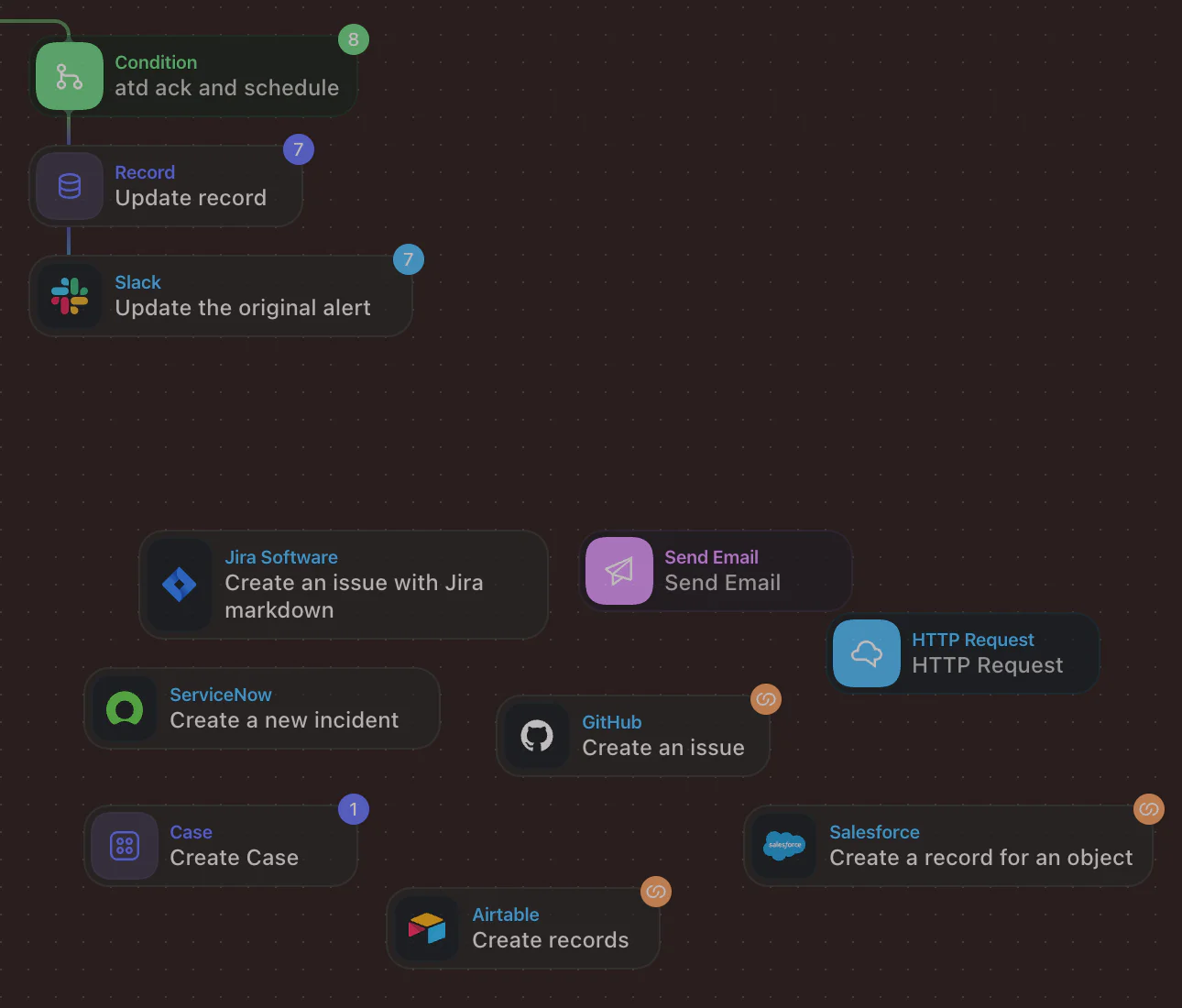
Engaging the Ack & Schedule mechanism allows the responder to explicitly acknowledge the active security alert.Simultaneously, the Tines record is updated to prevent duplicate detection reports from spawning redundant Slack alerts.
- 3. View Trace in Tines
Engaging this button launches a link directly to the specific story run, streamlining any troubleshooting.
Furthermore, Tines allows for scheduled actions via cron expressions. The LogiShip Security team can take advantage of this feature to routinely distribute follow-up alerts regarding unresolved findings that are currently acknowledged and on hold.
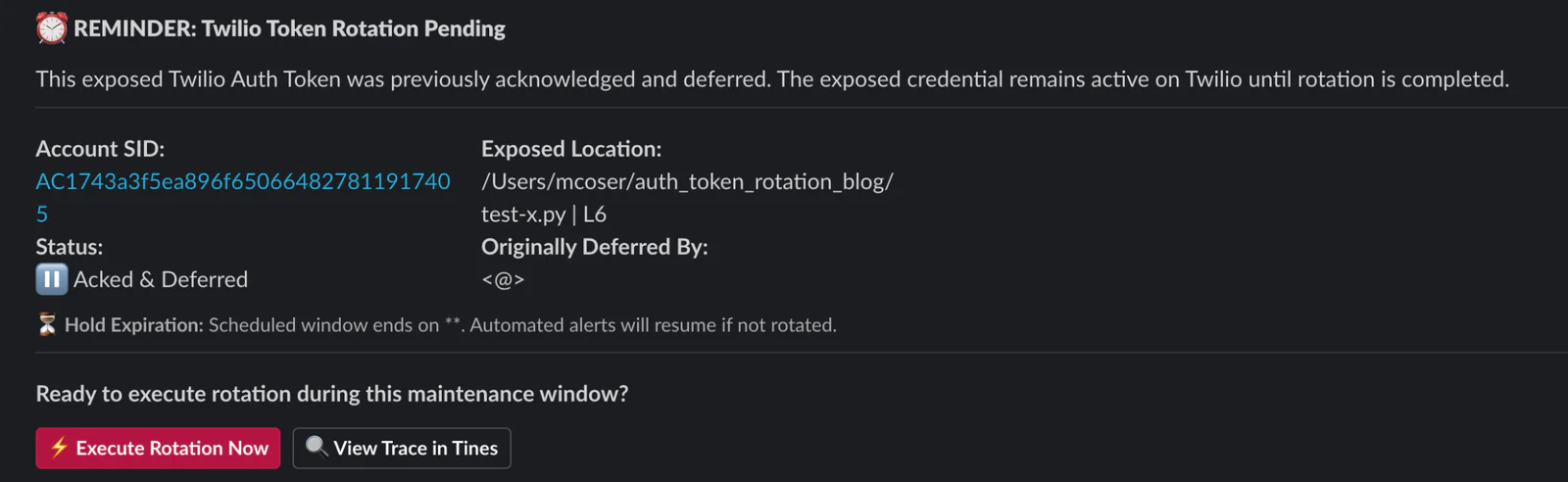
Best Practice: Dynamically Modifying Slack Alerts
Modifying the active Slack message at each stage of the remediation lifecycle is vital for maintaining visibility. Consider a situation where you are actively handling an exposure alert, the Auth Token modal is open, and you are deploying the new credential to your codebase. If a team mate reviews the alerts channel, they require a clear indicator that the incident is already under active remediation.
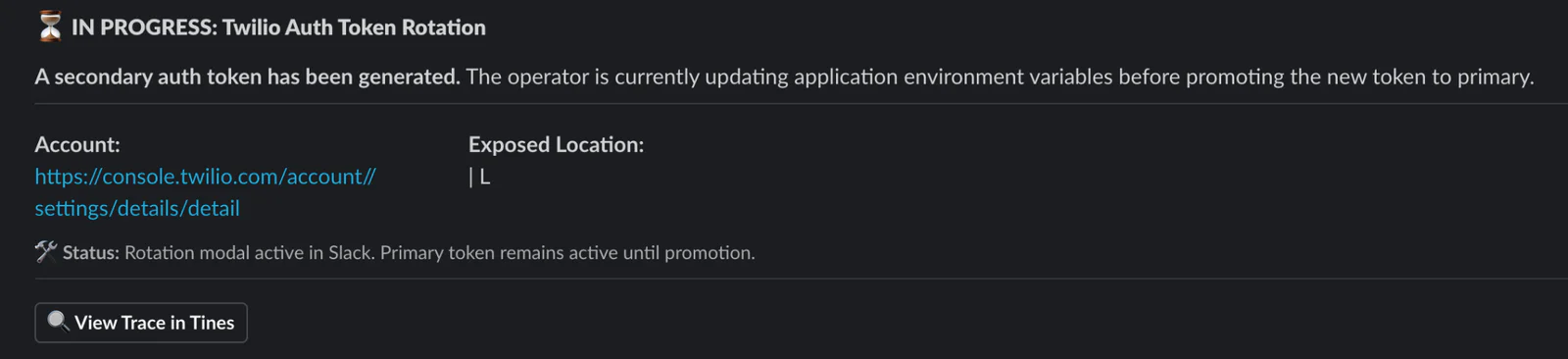
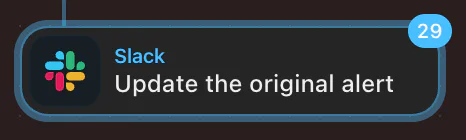
To achieve this in our workflow, we use a built-in Slack node to dynamically update the underlying message blocks immediately as each action progresses.
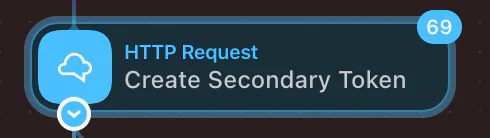
In your application, you may choose to rotate and remediate a different way. Twilio’s Auth Token API offers a flexible way to handle auth token rotation that applies to your app. In Tines, the HTTP Request action is used to send an HTTP request to any endpoint, with multiple options like auth, headers, and payload type.
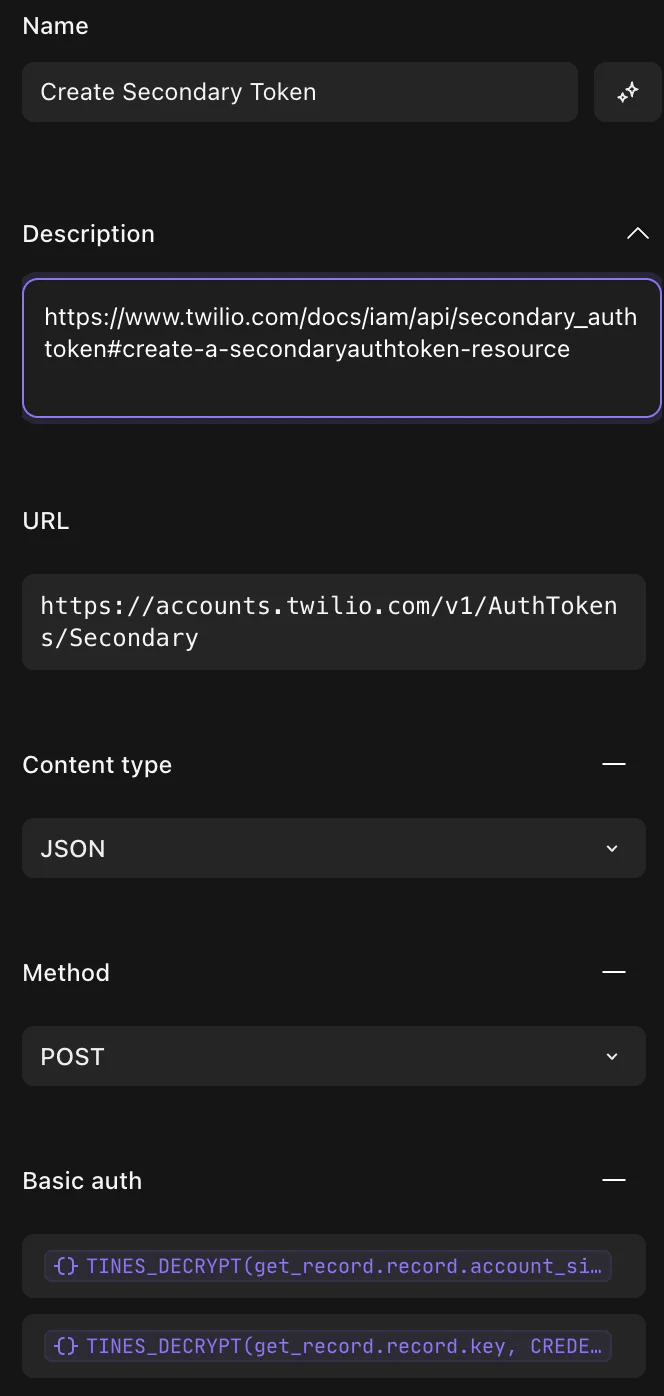
The key concepts at work to keep in mind during the Remediation phase is:
- Both secondary and primary auth tokens can be used simultaneously for API requests until the secondary is promoted
- Develop and follow your internal process for updating auth tokens quickly
Because the LogiShip teams operate rapidly, exposing the secondary auth token within a temporary Slack modal provides a practical way to copy and paste it into their credential locker during code remediation. Since this method mirrors how the auth token appears in the Twilio Console, and sensitive info is masked within Tines Records and Logs, it introduces little to no risk exposure.
However, depending on your unique environment, you might prefer an alternative approach such as automatically uploading the newly generated auth token to your password vault and providing a temporary Tines Page URL with the secure link inside the notification text instead.
Why would someone click "Ack & Schedule" instead of "Rotate Now"?
In production, changing an auth token might require a planned deployment or coordination with an external customer managing their own backend integration. Clicking Ack & Schedule acknowledges the breach, creates a ticket for tracking, and mutes redundant alerts while the fix is scheduled during a maintenance window.
From there, remediation possibilities are highly configurable. In a production environment, the LogiShip Security team can easily orchestrate ticket creation to track the remediation lifecycle. Tines integrates with SIEMs, project management systems, and CRMs, handles raw HTTP requests to third-party endpoints, ingests webhooks from anywhere on the net, and supports internal incident tracking via Tines Cases.
Conclusion
By implementing an automated detection and rotation pipeline like this, you will have successfully moved toward a resilient, proactive workflow that secures your Twilio app, just like LogiShip! You now possess the knowledge to detect exposures, safely analyze them, and architect the remediation of compromised tokens directly through Slack without interrupting your development flow. To further strengthen your security posture, explore the Twilio Accounts API documentation for deeper configuration options or visit the Tines Library to discover additional pre-built automation templates to build from.
Calls to Action
✅For authenticating with Twilio's REST APIs, API keys are actually the preferred method. As you migrate your applications away from Auth Tokens, apply these same foundational concepts to automate the detection and rotation of your API Key/Secret pairs.
✅Leverage this architecture to establish your own proactive token rotation framework. Rather than waiting for a secret to be exposed, complement your reactive security strategies by building an automated process that regularly updates credentials ahead of time.
✅Explore the following supplemental materials to expand your understanding.
- Trufflehog apikey detector
- Twilio API Key docs
- Proactive Steps for Customers Experiencing Account Takeover
- Twilio Fraud Response Guide
- Twilio Anti-Fraud Developer Guide
- Signature Validation Blog By Matt Coser
- Monitoring and Alerting Blog by Matt Coser
Matt Coser is a Senior Field Security Engineer at Twilio. His focus is on telecom security, and empowering Twilio’s customers to build safely. Contact him on LinkedIn to connect and discuss more.


Related Resources
Twilio Docs
From APIs to SDKs to sample apps
API reference documentation, SDKs, helper libraries, quickstarts, and tutorials for your language and platform.
Resource Center
The latest ebooks, industry reports, and webinars
Learn from customer engagement experts to improve your own communication.
Ahoy
Twilio's developer community hub
Best practices, code samples, and inspiration to build communications and digital engagement experiences.