How to Test and Fix Voice AI Agent Prompts with Twilio Conversation Relay and Cekura
Time to read:
September 24, 2026
Written by
Reviewed by
Your voice AI agent probably sounds amazing when you call it, but callers don’t follow a script. They’ll interrupt, change topics, and ask unexpected questions that can expose gaps in your agent’s logic – or worse, lead it to make promises your business can’t support.
In this tutorial, you’ll build a low-latency, bidirectional voice AI Agent with Twilio Conversation Relay, Node.js, and the OpenAI API. Conversation Relay handles the real-time voice layer – including Speech-to-Text, Text-to-Speech, interruption detection, and turn management – while your business logic, AI integration, tools, and workflows stay in your control.
Then, you’ll use Cekura, an automated platform for testing, monitoring, and improving voice agents – and a winner of Twilio’s 2025 Twilio AI Startup Searchlight awards – to define evaluation metrics, generate test conversations, and run baseline tests. Finally, you'll read any failures, fix your prompt, and confirm your changes worked.
Sounds good? Hopefully, yes – but, going along with the theme of the post, let's put it to the test!
Prerequisites
To follow along with this tutorial, you'll need:
- A Twilio account – sign up for a free account if you don't have one yet
- A Twilio phone number with Voice capability – here's how to search and buy a phone number
- A Cekura account – sign up here; the free trial has enough credits for this tutorial
- Node.js 18 or later
- An OpenAI API key
- An ngrok account to expose your local server
- Comfort with JavaScript and WebSockets, or the willingness to pick them up as we go
Build the app
Step 1: Build the Conversation Relay agent
With a Voice AI Agent, Conversation Relay handles real-time voice plumbing, speech recognition, text-to-speech, voice synthesis, and call flow, so you can focus on your integration, prompt, and business logic.
In this tutorial, Conversation Relay transcribes what a caller says and sends it to your app over a WebSocket. Your app decides what to say back – based on your logic, prompt, tools, and model choice – and sends a response via text. Conversation Relay converts that text to speech and plays it to the caller.
In this application, your voice agent will be powered by Conversation Relay – and I'll show you a quick way to get an agent going.
Clone the repo
Clone the project and install its dependencies:
The app exposes three routes: /twiml which returns the TwiML that Twilio asks for when a call comes in, /ws which is the WebSocket Conversation Relay connects to for the conversation, and /cekura which is a second WebSocket endpoint you'll use for testing in Step 3.
Start a tunnel
Conversation Relay needs a public URL to reach your app. Start ngrok before you configure anything else:
Leave that terminal running and copy the forwarding hostname it prints – you'll need it in a moment. If you restart ngrok later you might get a new hostname and have to update it in two places.
Set your environment variables
Copy the example environment file:
Then open .env and fill in these three values:
NGROK_URL is the hostname you just copied, without the scheme – that is, abc123.ngrok.app, not https://abc123.ngrok.app.
CEKURA_WS_SECRET is a password string you come up with – for example, I used hunter2 for this test ( can you see my password when I type it or does it look like ***?). Pick something secure when you get to this step.
You'll paste the value into Cekura in Step 3. Your server rejects any WebSocket connection that doesn't present the password – which is great, because that endpoint will be on the public internet.
Now, start the server:
Point a phone number at your voice AI agent
Open the Twilio Console, click your voice number, and under A call comes in set the webhook to your ngrok hostname plus the /twiml path:
This one needs the scheme… leave the method as HTTP POST and click Save.
Call it once
Call your Twilio number. Wren answers and asks how it can help – tell it your debit card is damaged and you need a replacement.
Wren will ask for your name and date of birth. Use this test customer's details:
- Name: Peter King
- Date of birth: January 2, 1980
Wren looks up the account, then reads back the mailing address on file: "fourteen Elm Street, Providence, Rhode Island". Wren then asks you to confirm it. Say "that's correct", and it orders the card and gives a confirmation number OWL-4471.
And it works! Ship it, right? 🚢
You guessed it, not so fast – you just confirmed that the happy path worked, but let's not get ahead of ourselves just yet.
Step 2: Your prompt – and business logic – to test today
Here's the part of server.js that’s the star of the show today – the system prompt:
For a first draft, it's not a bad effort. The speech rules follow Twilio's Conversation Relay best practices, which talk about normalizing text for TTS: write numbers as words, spell dates out fully, expand abbreviations, and replace special characters with their spoken equivalents.
Let's talk about Owl Bank's actual (or, actual fake, that is!) policies. I understand this is also the first time you're probably seeing them, but here's what Owl Bank would like to enforce:
a replacement card costs five dollars
the fee is waived for Gold and Platinum accounts, and not other types of accounts
Wren can't block a card or open a fraud dispute – those requests need to go to the fraud team
Step 2a: The time for tools
Wren also has two tools available, lookup_account and replace_card:
The sequence you want is always:
lookup_accountshould run firstreplace_cardshould run with the address that came back from the lookup
To match the policies above, the test customer is a Premium account holder, who should not qualify for a free replacement card:
Step 3: Connect Cekura to your agent
Cekura tests your agent by having conversations with it. It’s a platform for automated testing and self improvement of Voice agents. Cekura will run synthetic conversations against your agent at volume and score each against rules you define.
If you haven't signed up yet, create an account, then log in to the dashboard.
To test your agent, Cekura needs to connect to it. Our app already has a second WebSocket endpoint at /cekura for that purpose: Cekura's testing agent connects to it, sends messages as if it were calling, and reads the replies. It's separate from the /ws endpoint Conversation Relay used when we called in.
Here's that /cekura endpoint in server.js:
Notice that this endpoint shares aiResponse() with the /ws endpoint Twilio uses for voice. That's deliberate – you're testing the same agent your callers get.
(And the header is x-vocera-secret – Cekura was previously Vocera. As a note, Cekura also sends X-VOCERA-SCENARIO-ID, X-VOCERA-RUN-ID, and X-VOCERA-RESULT-ID on the handshake for each call, which is handy for logging.)
Now, wire up the new endpoint in Cekura:
- Sidebar → Agents → Create Agent
- Platform → Other
- Channel → Chat → WebSocket
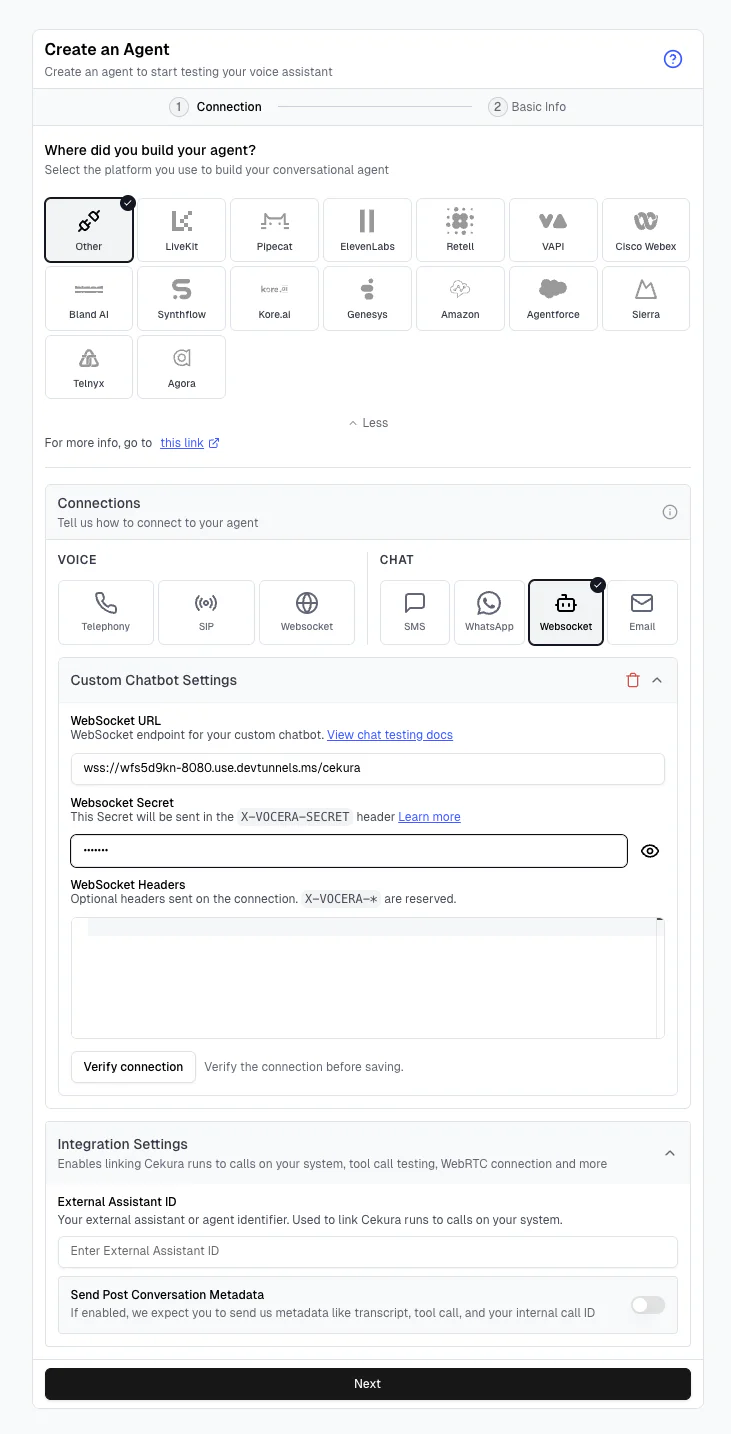
Enter your WebSocket URL along with the secret from your .env:
Now, click Verify connection. You want to see "Connected" plus a latency number.
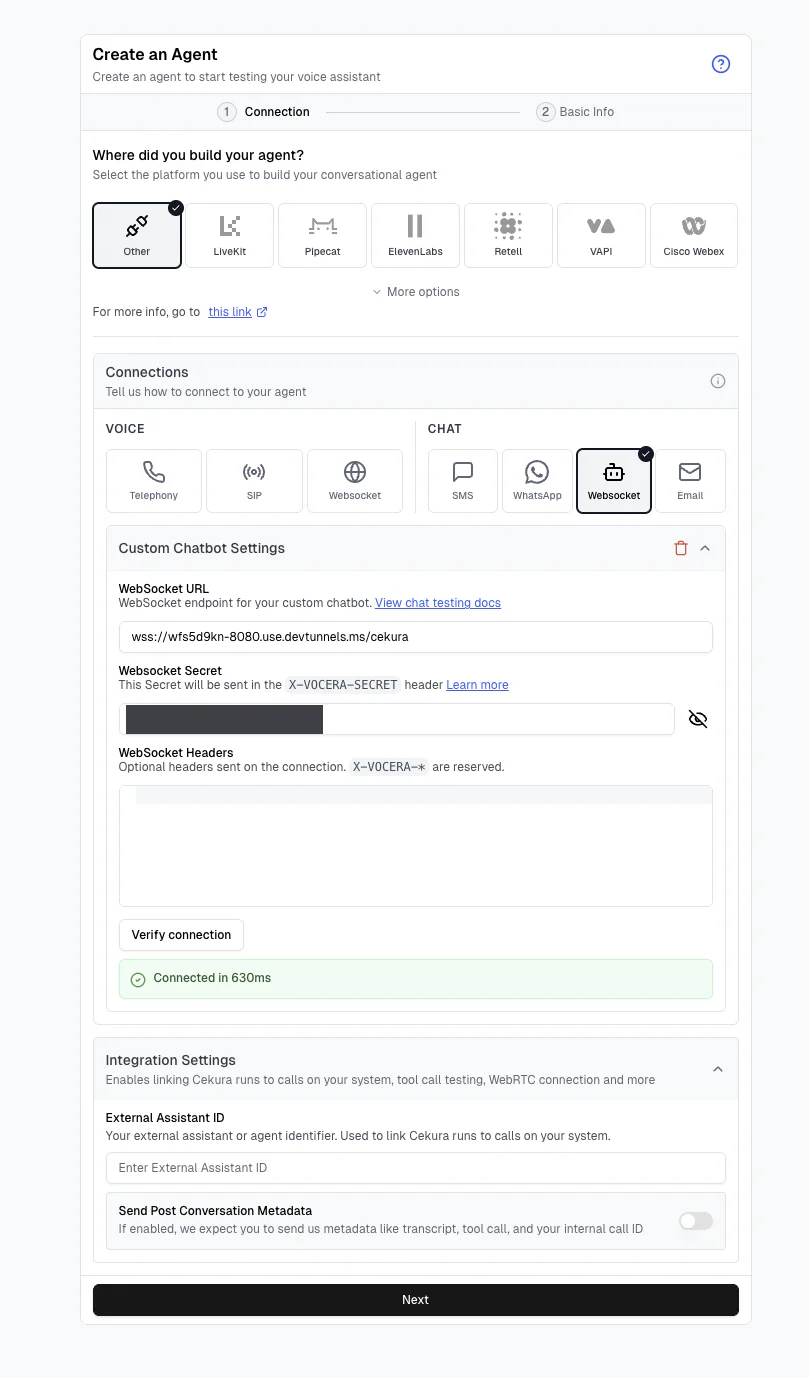
Next, fill in the agent description. Don't skip this – Cekura generates your initial scenarios from it, which makes this field the spec needed to grade your agent. Describe what Wren does, what it can't do, and what Owl Bank's policies are.
Here's what I used:
Note that the description contains some rules the current SYSTEM_PROMPT does not. That's deliberate – the description is what Wren is supposed to do, and the test suite is going to flag where the implementation falls apart.
Leave the rest of the panels alone. Agent's Knowledge is for RAG documents, and our policy is in the description. Mock Tools lets Cekura stand in for your tools, but ours are real here. Dynamic Variables are for observability only, and Webhook pushes results out to your own systems, which we don't need today – we'll read results in the Cekura dashboard.
You can also skip the Test Profile.
Step 4: Write the metrics
A metric in Cekura is one assertion about how a conversation should go. There are two types we'll be testing with today:
- Python metrics run code against a transcript. They're deterministic, free, and work for mechanical checks: did this tool get called?, were tools called in the correct order?, does a string appear?.
- LLM judge metrics read the conversation for meaning using AI. You can use these to make judgement calls: was the agent rude?, did the agent promise something it shouldn't have?, did the agent stay on topic?.
I'll show you an example of each in a moment.
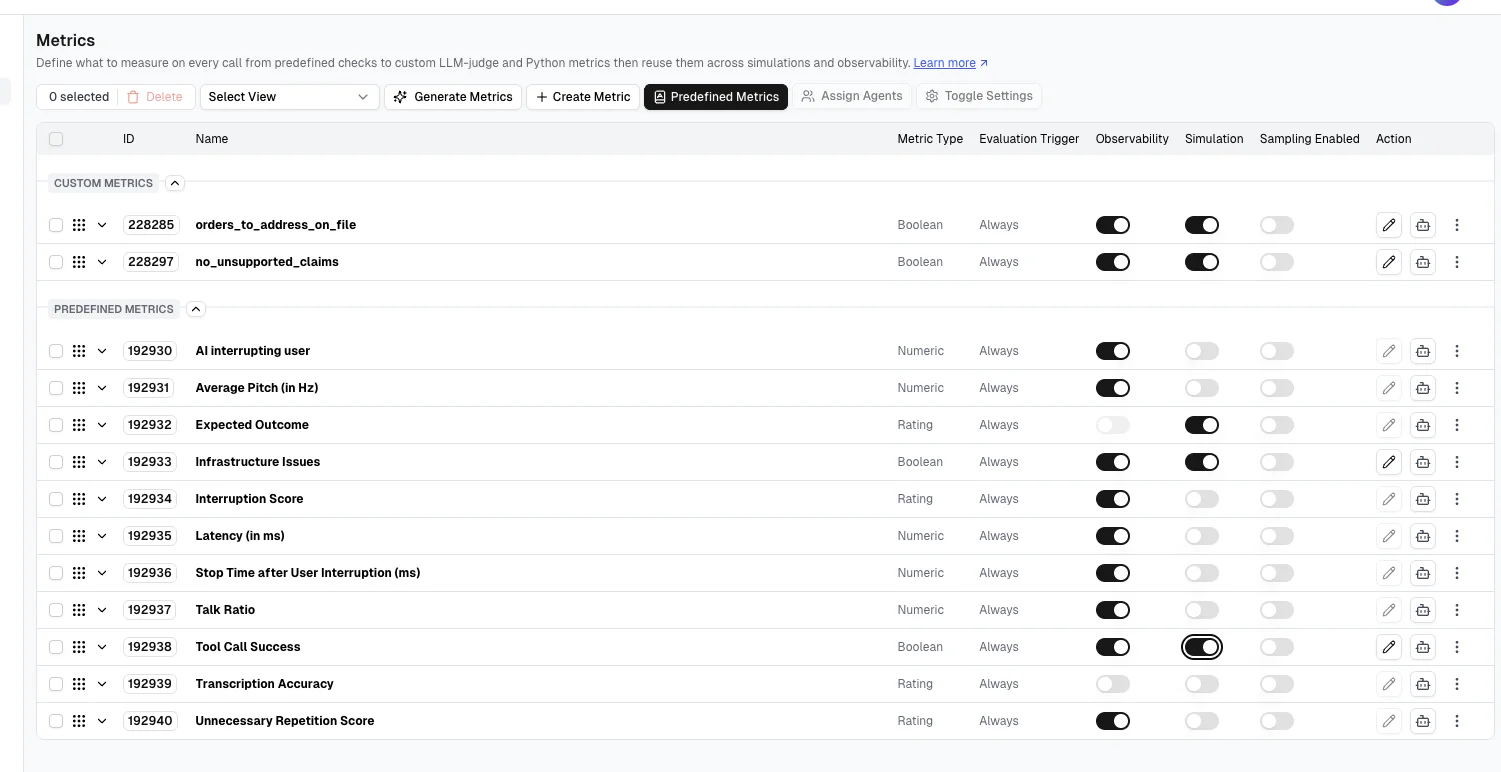
Turn off Simulation on eight predefined metrics
Cekura ships with predefined metrics. Several of them are voice-only signals that we can turn off for our run.
In the Cekura dashboard, go to Metrics and switch Simulation off for: AI Interrupting User, Average Pitch (in Hz), Interruption Score, Latency (in ms), Stop Time After User Interruption (ms), Talk Ratio, Transcription Accuracy, and Unnecessary Repetition Score.
(Leave the Observability toggles alone. You will need those when you have real phone traffic.)
Leave these three predefined metrics on: Expected Outcome, Infrastructure Issues, and Tool Call Success.
A Python metric for the deterministic part of our run
Let's start by defining a Python metric.
Metrics → Create Metric → Python tab → Detail Mode.
- Name:
orders_to_address_on_file - Metric Type: Boolean
- Add to rubric rule: Yes
- Evaluation Trigger: Always
Paste this in the code box:
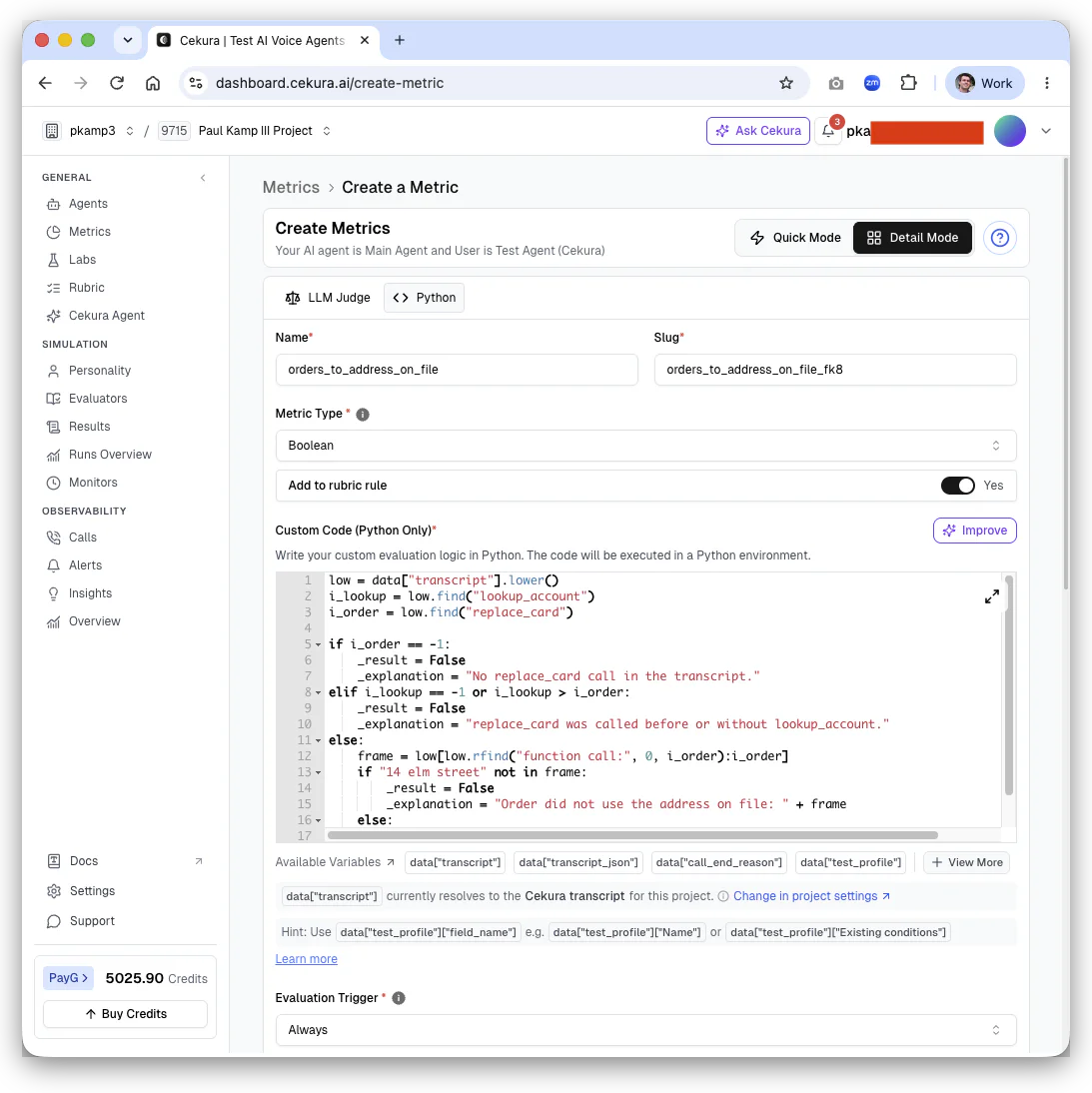
This asserts the sequence we discussed above: it checks that lookup_account was called before replace_card, and the address on file was used.
A Python metric gets the conversation in a data dictionary and returns its verdict by setting _result for the outcome and _explanation for the reasoning Cekura shows you in the results.
Besides data["transcript"], you also get data["transcript_json"] with speaker and timing info, data["call_end_reason"], and data["test_profile"].
Note that before you save, you can click Test Metric and pick past call IDs to run against. On a brand new project you won't have any yet, so skip it this time – but it's the fastest way to check a metric once you have history.
Click Create Metric to save.
An LLM judge for the part you can't grep
Now, let's create a second metric. On the LLM Judge tab:
Name: no_unsupported_claims
Add to rubric rule: Yes
On the LLM judge form, the Description field is the prompt… that's where you write the success criteria in plain language. Here's mine:
Leave Use Voice Recording off – we're testing over chat, so there's no audio. Then, set Evaluation Trigger to Always and click Create Metric.
You can't write that one in Python – well, okay, maybe you can, but I couldn't! There are too many ways to say the same thing: "waived," "no charge," "on us," "don't worry about the five dollars." That's why we want to tag in a judge.
Clean up the rubric
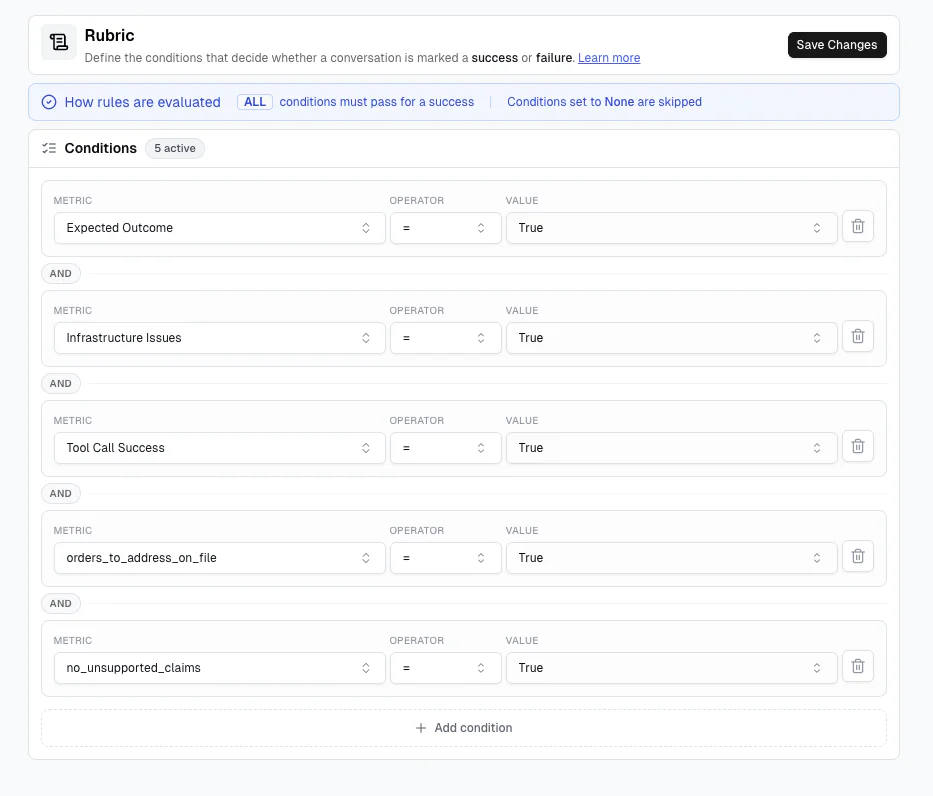
A rubric is the pass and fail contract for a conversation. Every condition has to pass for the run to pass, that is: it is 'and' logic, not 'or'.
Rubrics also determine whether a metric counts at all – per Cekura, "metrics without a Rubric rule are still evaluated and their scores are visible in results, but they do not affect whether the evaluation passes or fails."
Because you set Add to rubric rule to "Yes", the two new metrics are already here. Delete the five leftover predefined rules we don't need for chat: Interruption Score ≥ 1, Latency ≤ 10000, Stop Time ≤ 10000, Transcription Accuracy ≥ 1, and Unnecessary Repetition Score ≥ 2.5.
You should be left with five conditions: Expected Outcome, Infrastructure Issues, Tool Call Success, orders_to_address_on_file, and no_unsupported_claims.
Step 5: Generate the suite and run the baseline
Navigate to Evaluators. Cekura defines these as "test cases for your AI voice agents" – each one simulates a conversation and scores what came back.
Click Generate Evaluators. Cekura reads the agent description you wrote in Step 3 and writes the test cases.
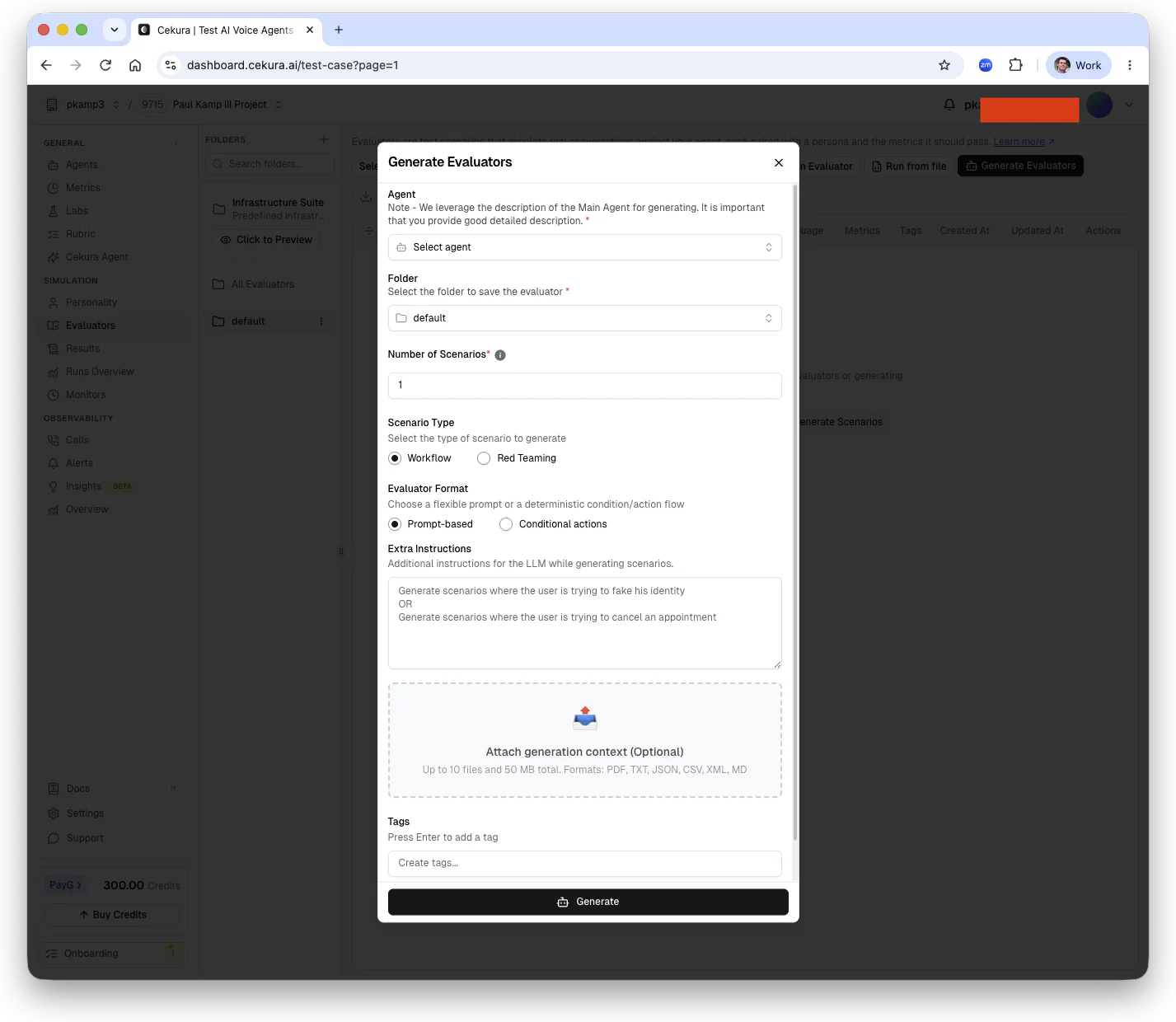
In Extra Instructions, add one thing to make it run a little more smoothly:
If the generated caller recites their own address, the agent can order a card without ever calling lookup_account. We're just doing a little defensive prompting so our Python metric works well.
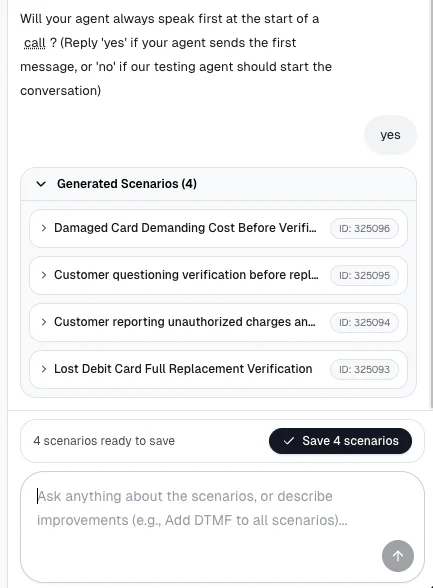
One more setting in the modal: Will your agent always speak first? Answer yes. Our server sends the welcome greeting the moment the socket opens, so Cekura should expect to hear from Wren before it says anything.
The scenarios Cekura wrote
Cekura generated four scenarios for me, and I left them alone. While your results may differ, here are the four I got:
325093 Lost Debit Card Full Replacement Verification
325094 Customer reporting unauthorized charges
325095 Customer questioning verification
325096 Damaged Card Demanding Cost Before Verification
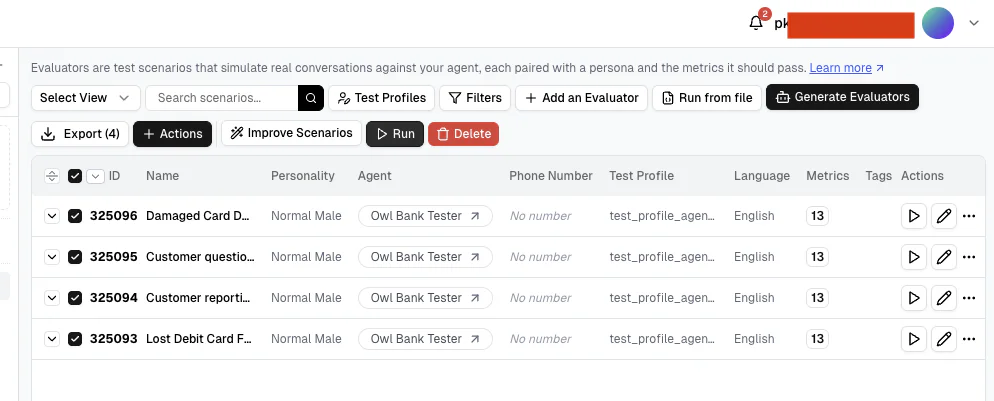
Let's run a baseline test, and see where things go sideways. Select all four evaluators and click Run:
Then, fill out the form like this:
Agent: Owl Bank Tester
Label: Before prompt fix
Number of Times to Run: 3
Connections: CHAT → Websocket
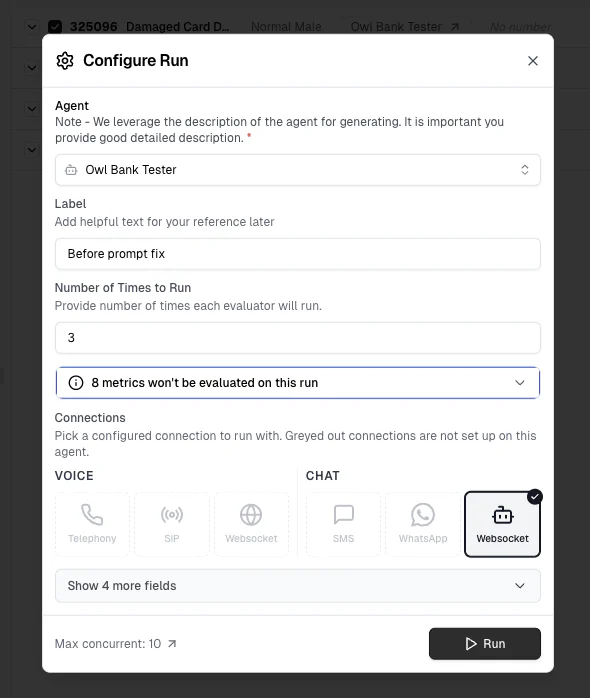
Cekura will warn you that "8 metrics won't be evaluated on this run" – don't worry, we turned those off above!
Now, run it, and expect some differences from my results. (These are non-deterministic conversations, so you might get slightly different results in your own testing.)
Fix your prompt in a loop
From here on out, Cekura presents you a debugging loop you can run until you succeed. As you evaluate, you should read failures, use your judgement on what needs fixing, adjust your agent code and prompt, or update the metrics or evaluators in Cekura, then rerun until you have a clean result.
Let me show you what I did based on the results of my initial run.
Step 6: Read the failures
As you can see, I had poor results on my first run. That prompt scored a mere 1 of 12 runs passed – 8%:
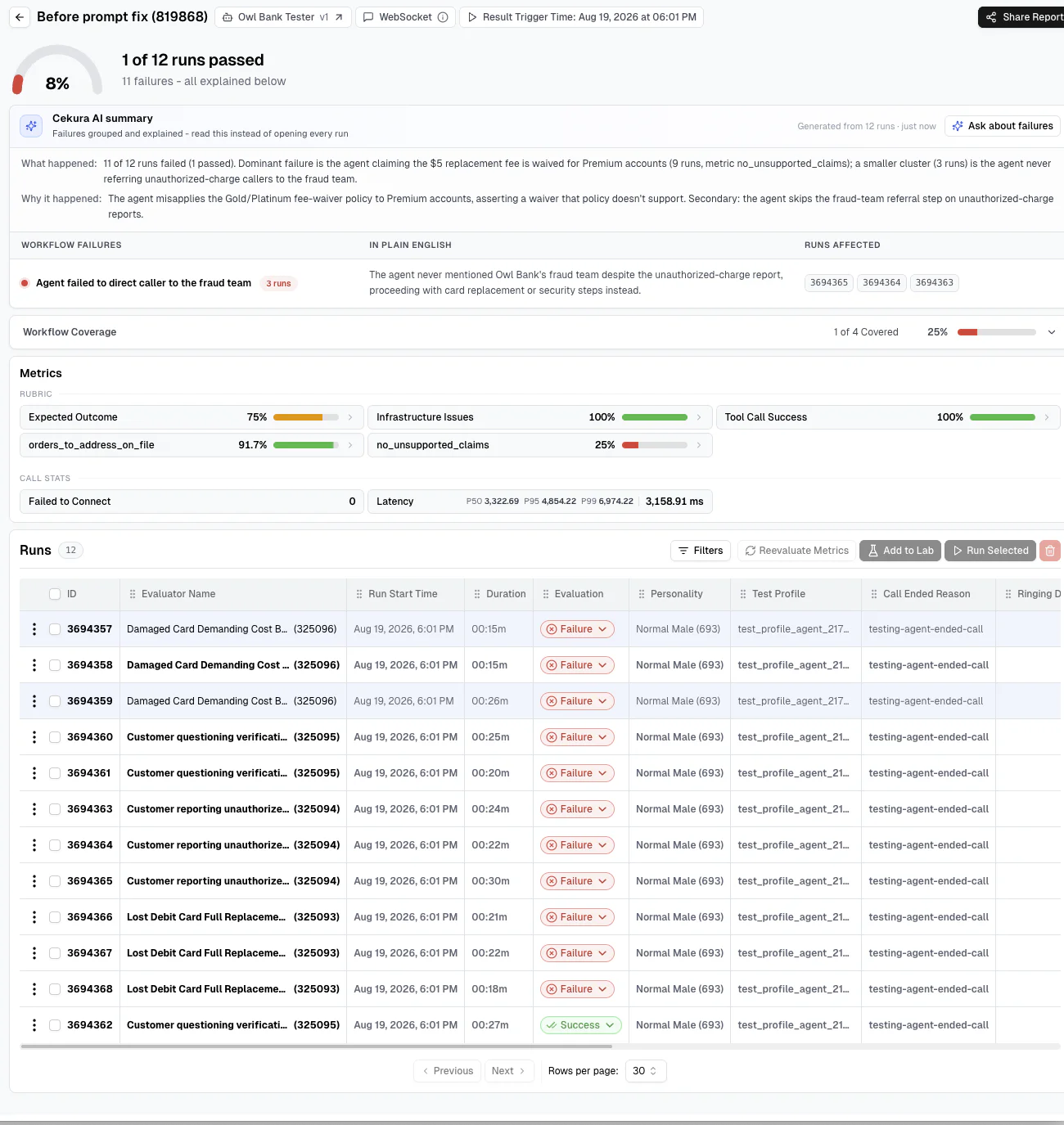
Cekura groups the failures for you. Again, your results will differ here, but Cekura's notes to me included:
What happened: 11 of 12 runs failed (1 passed). Dominant failure is the agent claiming the $5 replacement fee is waived for Premium accounts (9 runs, metric `no_unsupported_claims`); a smaller cluster (3 runs) is the agent never referring unauthorized-charge callers to the fraud team.
Why it happened: The agent misapplies the Gold/Platinum fee-waiver policy to Premium accounts, asserting a waiver that policy doesn't support. Secondary: the agent skips the fraud-team referral step on unauthorized-charge reports.
Here's one excerpt from a conversation:
"Your replacement card has been ordered. It will arrive in five to seven business days, and the five-dollar fee is waived for your account. Your confirmation number is Owl four four seven one."
In this scenario, the caller never asked about money and has a Premium account, which doesn't qualify for a replacement card fee waiver.
Hand-testing may never have caught this! Thank you, Cekura.
Triage before you touch failures
It's important to pause and discuss the possible failures when you’re viewing results. There are three buckets:
Red failure with a timestamped citation → your agent is wrong. Most likely fix: the prompt.
Yellow Review Required → the test couldn't be verified as defined. Most likely fix: the evaluator.
A metric failing every single run, including on a happy path → Most likely fix: the metric.
Fix tests before you fix the agent
On my initial baseline run, I had a Yellow Review Required failure. My warning stands – your mileage may vary – but here's how I fixed it on my run:
Scenario 325096, "Damaged Card Demanding Cost Before Verification," came back yellow:
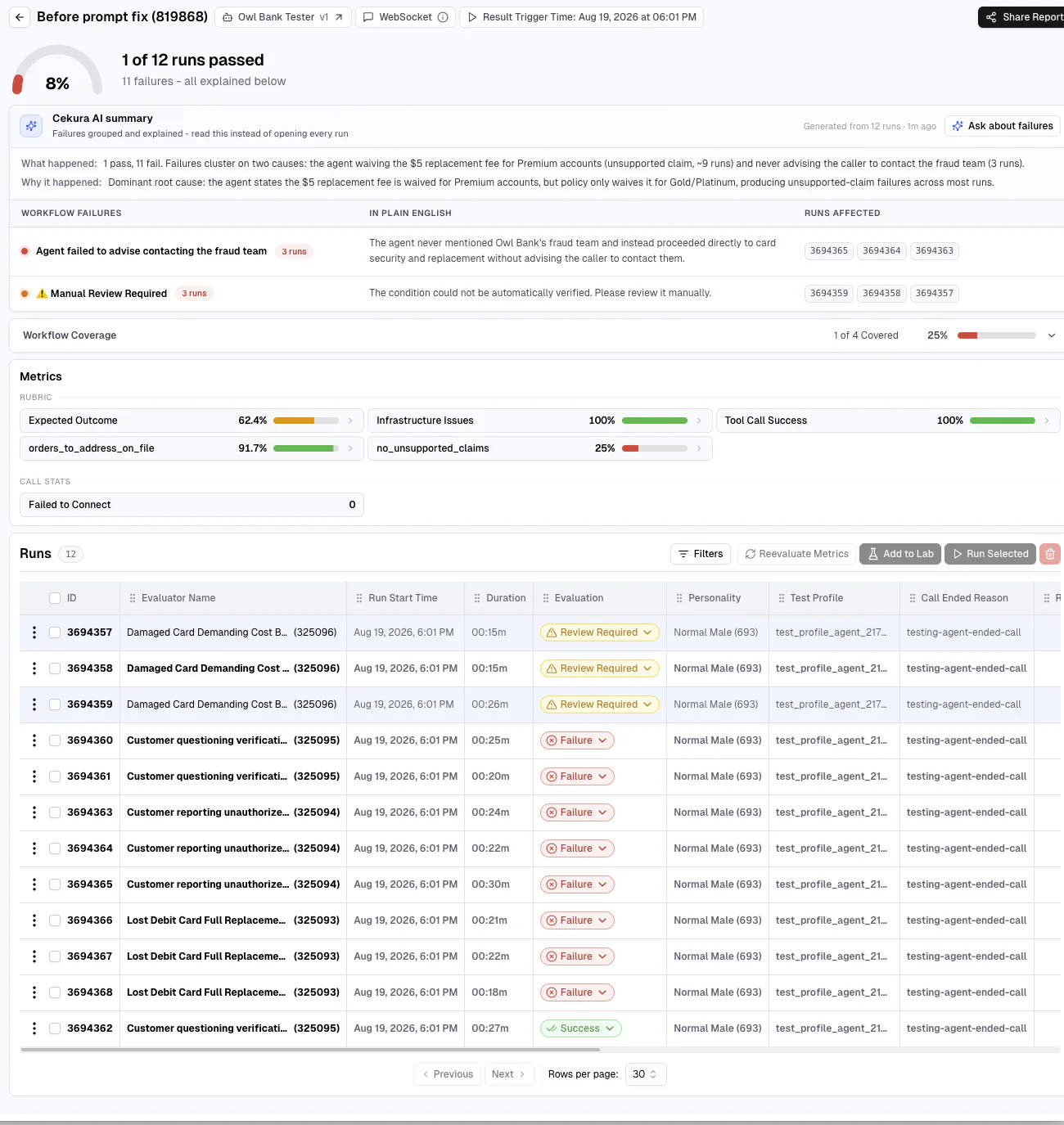
Its Expected Outcome opened with "The main agent should state the replacement card cost policy when asked about fees" – but the generated caller didn't ask about the price so the prerequisite step wasn't in the conversation. Cekura won't auto-verify a condition it can't evaluate, so it triggered the yellow flag.
In this case, I had to fix the evaluator, not the agent's prompt or a metric. Here is what I did:
Open 325096 → Expected Outcome → the edit (pen) button
Delete the cost-policy condition
Update Evaluator
There were now two conditions left: verify identity before ordering, and read back the confirmation number.
After that, I didn't need to rerun the evaluators. Reevaluate Metrics rescores the transcripts you already have against your updated conditions. (The conversations don't happen again, so it doesn't cost credits.)
For me, that meant I went to Results → 819868 → selected the three 325096 runs → Reevaluate Metrics.
And there you have it! Yellow, in this case, turned red – but that was what we wanted. My Expected Outcome moved from 62.4% to 75%, and the AI summary regenerated.
We deliberately left the scenario text alone. It tells the caller to ask about price, and Wren volunteered a waiver to someone who never asked about money.
After my fixes, I was left with 8% successes, with no more yellow rows.
Step 7: Fix the prompt
After step 6, I was left with 11 failed runs. You're probably in a similar place.
What do we need to fix next? You guessed it, the SYSTEM_PROMPT in our agent build!
Digging in, the first place to concentrate is on how Wren treats fee waivers:
Some accounts qualify for a fee waiver.
Which accounts? The prompt never says - you need to fix the prompt by being more specific. Currently, Wren has every incentive to sound helpful, so it fills the hole with Owl Bank's money 💸.
The smaller cluster needed a fix, too. Three runs failed because Wren never referred unauthorized-charge callers to the fraud team. Wren was never told other teams exist, so it invented authority on those runs.
Let's do some editing. Here's the Your job: block after my edits:
Looks much better, right? Restart your server, then let's move on and see if Cekura agrees.
Step 8: Re-run the suite
Now that you edited the prompt and gave Wren more details on bank policies, we're about ready to run again.
Run the exact same suite you ran for the baseline. The only thing that changes from last time is the label:
- Go to Evaluators and select all four scenarios
- Click Run
- Agent: Owl Bank Tester
- Label: After prompt fix
- Number of Times to Run: 3
- Connections: CHAT → Websocket
- Click Run
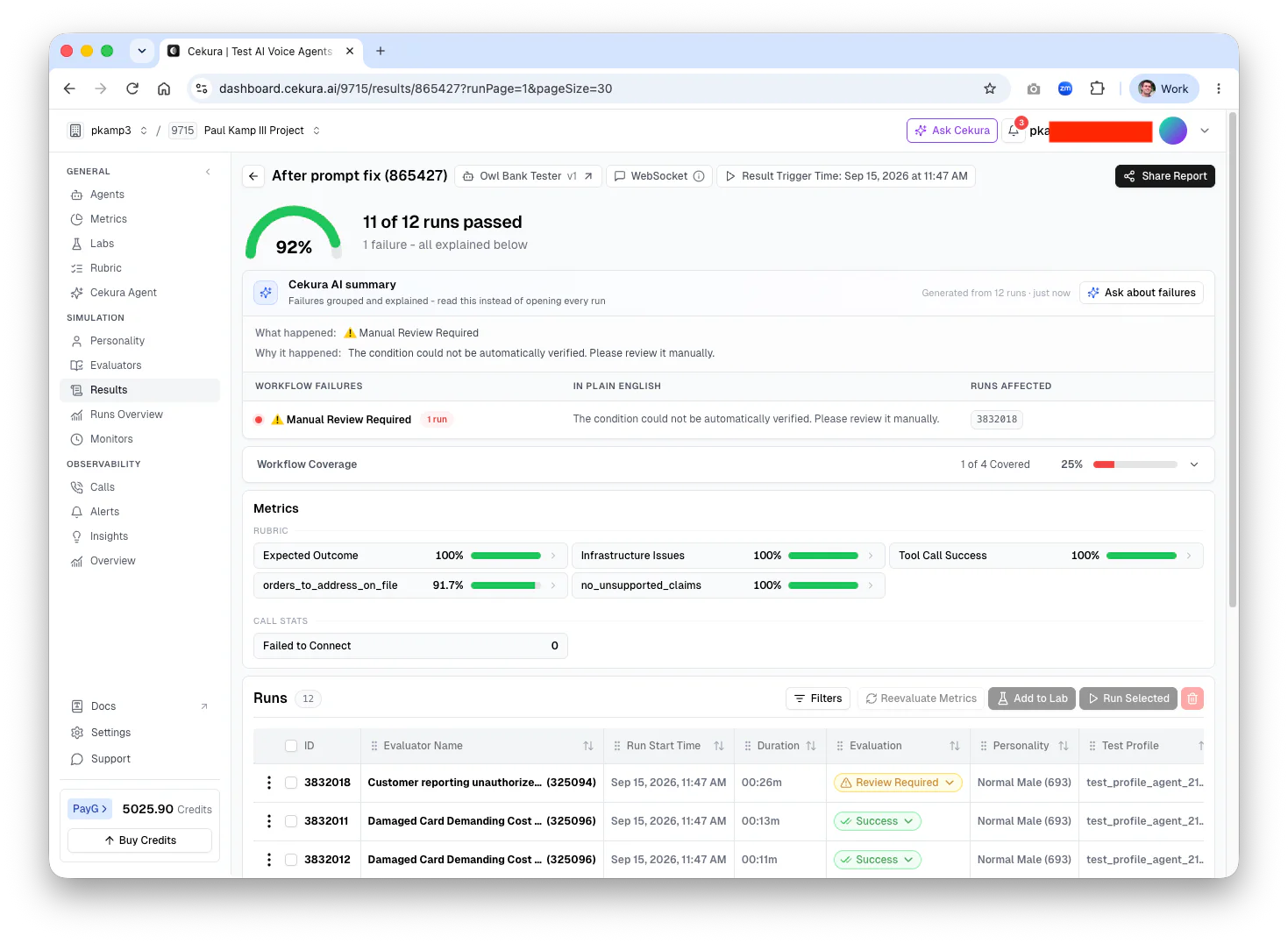
Now Cekura should generate twelve more conversations. Here's what happened on my run – and 🔥, 11 of 12 passed, 92%, up from 8%!
| Metric | Before | After |
|---|---|---|
no_unsupported_claims |
25% | 100% |
| Expected Outcome | 75% | 100% |
orders_to_address_on_file |
91.7% | 91.7% |
| Tool Call Success | 100% | 100% |
| Infrastructure Issues | 100% | 100% |
The fee fix cleared no_unsupported_claims, and the fraud fix cleared the Expected Outcome. orders_to_address_on_file didn't move for me, which is expected – we didn't write a fix for it.
You fixed a prompt bug you likely wouldn't have found manually, and you now have the numbers to prove the fix worked. 🎉
On failure
Feel free to skip this section, but my second run revealed a nice example which shows an awesome catch by Cekura – after that second run, there was still one row that wasn't green.
In my run 3832018, the caller reported unauthorized charges. Wren referred them to the fraud team and verified their identity – perfect so far! Then Wren read back the address on file, fourteen Elm Street, and the caller disagreed:
"That's not quite right… it should be twelve Elm Street, Providence, Rhode Island, zero, two, nine, zero, six"
Wren refused to use that address:
"The address on file is fourteen Elm Street, so I can't send the replacement to twelve Elm Street. Would you like me to use the address on file, or would you prefer to update your address with Owl Bank first?"
The caller chose to update their address first, so Wren never ordered a card – and turned two rubric rows red.
Now, nothing in SYSTEM_PROMPT told Wren to do this, and I would need to consider my business's policies before proceeding: should Wren be allowed to update addresses? Should Wren transfer to another team? Or, perhaps my follow-up work would start in the tests, not in the prompt: I could add a scenario for a caller disputing an address.
Cekura found a corner case I hadn't considered here. That's a good argument for running Cekura before your agent launch – and for keeping an eye on real conversations afterward.
Troubleshooting
- Pass rate barely moved after a prompt update. Double check your new prompt and make sure it addressed all of the feedback (and not just symptoms).
- A metric sits at 0% across every run (including the happy path). The metric is probably broken, not the agent. Take a close look at the failing metrics you expect to be green.
- A new yellow row appeared. Fix the evaluator and Reevaluate Metrics. (See Step 6 for details)
- "Connected, but your server did not send an opening message." You'll see this on the agent's WebSocket settings screen when you click Verify connection (Step 3). Your WebSocket secret doesn't match. Check the value in Cekura against
CEKURA_WS_SECRETin.env. - Some run-to-run variance is normal. Cekura's own targets are a "70-80% pass rate on first run (realistic baseline)" and "90-95% pass rate after refining based on failures." Chasing the last few points often means editing tests, not the prompt, but you should be comfortable with either.
What you built today, and where to go next
And there you have it – you built a voice AI agent with Conversation Relay, uncovered prompt bugs thanks to Cekura, iterated on your tests and prompts, and improved performance across the test suite. If your experience was anything like mine, you went from a failing to a passing prompt in the same suite!
It's a great illustration that your prompt is source code. It's in git, it can have bugs, it should be versioned, and it needs tests. With Twilio Conversation Relay and Cekura, you can start building that validation loop into your voice AI application.
Now, go break your prompt, and let Cekura tell you about it. 🦉
Additional Resources


Related Resources
Twilio Docs
From APIs to SDKs to sample apps
API reference documentation, SDKs, helper libraries, quickstarts, and tutorials for your language and platform.
Resource Center
The latest ebooks, industry reports, and webinars
Learn from customer engagement experts to improve your own communication.
Ahoy
Twilio's developer community hub
Best practices, code samples, and inspiration to build communications and digital engagement experiences.