Give Legacy Linux Devices a Voice
Time to read:
October 28, 2026
Written by
Reviewed by
It's 9 p.m. An elevator in an office tower stalls between the 17th and 18th floors. The only person inside is an engineer heading home after a late night. He presses the intercom button. The panel is ten years old, and the security desk it rings went dark hours ago.
Now, imagine a different ending: a few seconds after he presses the button, an AI agent picks up. Speaking his language, it asks which floor he's on, how many people are with him, and whether anyone is hurt. Once it's clear he needs help, it transfers the call to a 24/7 monitoring center and sends the elevator's location and a call summary to an on-call operator's browser.
Not a single part of that ten-year-old panel had to change.
Devices like this one are everywhere: elevator intercoms, door entry systems, factory-floor terminals, and self-service kiosks in hospitals and train stations. Many of them run Linux, have a microphone and a speaker, and sit on a network. Yet most of them can only dial a single hard-coded number, often to a desk that nobody is watching. The hardware is capable enough – what's missing is a bridge to modern communications and AI.
Ripping out and replacing these devices is expensive, slow, and disruptive. But now, there's another option: add a standard SIP client to the hardware you already have, and move the voice experience to the cloud.
In this post, I'll walk through how it can work . PJSIP, an open source SIP stack, runs on the device, and a Twilio SIP Domain connects it to IVR, the PSTN, live agents, and Voice AI. Then I'll share a small proof of concept that you can run today. Let's get started!
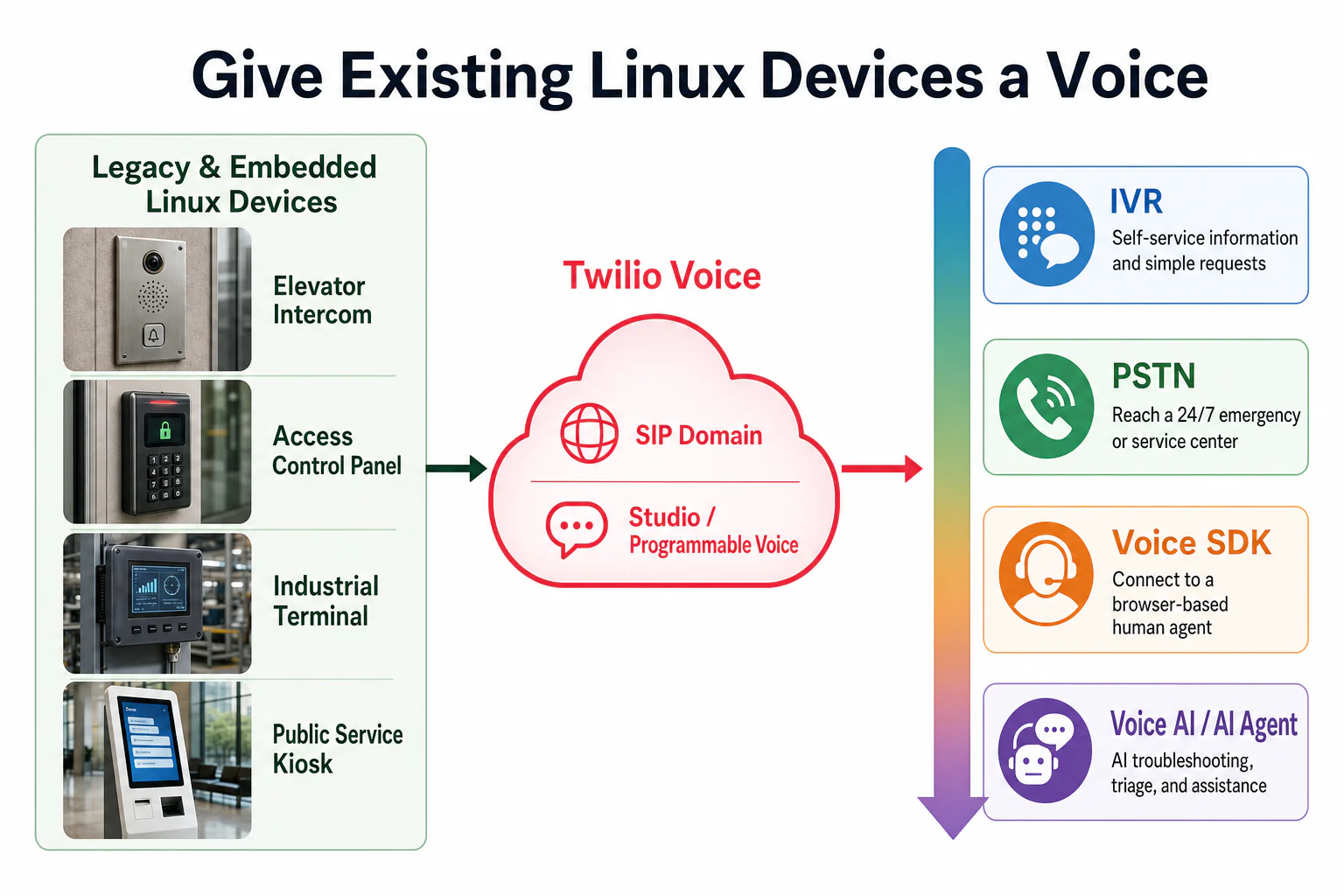
The big idea: let the device speak SIP, let the cloud do the rest
Who does what
PJSIP is an open source multimedia communication library written in C. It implements standard protocols such as SIP, SDP, RTP, STUN, TURN, and ICE, and runs on desktop, mobile, and embedded systems.
Rather than squeezing a browser-oriented SDK onto a Linux device, you’ll draw a clear protocol boundary. Every call passes through three layers:
- The device (PJSIP) captures and plays audio, registers with the SIP Domain, sets up calls, streams media, and reconnects after a network drop.
- Twilio (SIP Domain and Programmable Voice) authenticates the device, accepts the call, and provides the voice building blocks: IVR, PSTN connectivity, live agents, and AI.
- Your application logic (a Studio Flow , TwiML , or your own backend) decides what happens next.
Calls can flow both ways:o nce a device registers with your SIP Domain, you can also call it from the cloud, so an operator can call back the intercom in a stalled elevator or make an announcement on a specific terminal.
Why not WebRTC?
WebRTC is a great technology for real-time voice, but it isn't a good fit for every device.
Many legacy Linux devices have no browser and no reliable WebRTC runtime. They often combine an old distribution, a custom kernel, an ARM SoC, and a proprietary audio interface. Their CPU, memory, and update process were not designed to run a browser-grade media stack.
SIP is already the native language of the phone network, so the choice comes down to practicality :
- For browsers and modern apps, WebRTC is usually the natural choice.
- For embedded devices, legacy hardware, and anything that needs to talk to the phone network, SIP is usually the more direct path.
One SIP connection, four voice experiences
Let's go back to that elevator. Once the call reaches Twilio, it can use any of four capabilities :
- IVR self-service. Not every button press is an emergency. On an ordinary day, the same panel can play announcements and let people press a key to report a problem, reach building management, or hear service hours. Menus live in Studio, TwiML, or your backend, so you can update them without touching a single device.
- PSTN transfer. In a real emergency, the caller needs a human. With <Dial> , you can forward the call to building security, the maintenance contractor, or a 24/7 monitoring center.
- Live agents with the Voice SDK. The device doesn't run Twilio’s Voice SDK , but the person answering can. For example, you might route the call to an operator working in a browser who can see which building and which elevator is calling, along with everything the AI has already gathered, and take over from there. The operator can also call the device back from the browser.
- Voice AI. An AI agent can answer. It can gather details, translate, troubleshoot, and triage. Conversation Relay handles real-time speech recognition, text-to-speech, and turn-taking, or you can use Media Streams to send raw audio to your own AI pipeline. The AI agent guides cover both approaches. For high-risk events, the AI's job is to collect information and speed up the response, not to replace people. Always keep a path to the PSTN or a live agent.
The same building blocks work for other devices, too. A door entry panel can greet visitors with an AI receptionist and hand off to security when needed. A factory terminal can let workers ask for the operating manual by voice, and connect them to the manufacturer's remote expert when a machine fails. The devices stay the same, o nly the logic in the cloud changes.
Try it yourself on Mac or Ubuntu
Enough theory. Let's see it work!
I tested this end to end on a MacBook and on an Ubuntu virtual machine running on the same laptop. Neither is a production device, but both are good stand-ins for testing SIP interoperability. Any device that can build and run PJSIP will follow the same protocol path.
Prerequisites
To follow along, you'll need:
- A machine that can run PJSIP, such as a Linux device, a virtual machine, or a Mac (I used an Apple Silicon MacBook and an Ubuntu VM)
- The PJSIP 2.17 source code
- A Twilio account. If you don't have one yet, you can sign up for free
- A Voice-enabled Twilio number. Learn how to search for and buy one here
- Highly recommended , a coding agent such as Claude Code or Codex, which will save you a lot of time
Build an elevator help line in Studio
Start with the call experience in the cloud. For this POC, I built a simple elevator help line in Twilio Studio - the Studio Flow needs to exist and be published before the SIP Domain can route calls to it.
When a passenger presses the intercom button, they hear:
"Hello, this is the elevator help line. For elevator instructions, press 1. To report a problem, press 2. To speak with the on-call operator, press 3. If you're trapped, stay calm. You don't need to press anything. We'll connect you to someone right away."
The Flow uses only built-in Studio widgets, so there's no code to write:
One design decision matters more than the rest: when in doubt, connect to a person . A trapped passenger may be too stressed to remember which key to press. If they press nothing, say something instead, or press the wrong key, the call goes straight to the on-call operator rather than replaying the menu.
You'll find the full Flow definition in studio-flow-elevator-ivr.en.json . To use it, in the Twilio Console , create a new Flow in Studio and choose Import from JSON . Before you publish, replace the phone numbers in the connect_agent widget with your own on-call number and Twilio number.
Because the menu lives in the cloud, upgrading it doesn't touch the device. Today, it's a keypad menu. Tomorrow, you can replace welcome_menu with the Connect Virtual Agent widget, or route the call to a Conversation Relay app, and the first voice the passenger hears will be an AI agent.
Connect the PJSIP device over SIP
pjsua is PJSIP's command-line reference client, used here to test registration, calling, audio, and DTMF. In a production device, the same stack usually runs inside the product's application or background service, with hardware buttons or the device UI triggering calls.
1. Build PJSIP.
Build PJSIP 2.17 for the target platform to obtain the pjsua client. In this project, the compiled client is exposed as ./bin/pjsua; adapting the build for production hardware belongs to the device manufacturer.
2. Create a SIP Domain and connect it to Studio.
In the Twilio Console, create <your-domain>.sip.twilio.com, then create a Credential List with a SIP username and password. Map it to both call authentication and SIP Registration. These are SIP credentials, not your Account SID and Auth Token. Under A CALL COMES IN, select Studio and the Flow published above.
3. Configure PJSUA locally.
From the project directory, create a configuration directory:
Save the following as .pjsua/twilio-mac.cfg, replacing the placeholders with the SIP Domain and credentials created above. The username must exactly match the username in the mapped Credential List.
Use reg-timeout=600 because Twilio accepts registration expiry values from 600 to 3,600 seconds.
Protect the credentials before continuing:
4. Register and place the call.
From the project directory, run:
This command handles SIP registration for your configured endpoint before dispatching an initial SIP INVITE straight to a SIP URI rather than a standard telephone number. Within sip:ivr@<your-domain>.sip.twilio.com , the ivr portion designates the destination username, while the domain address targets your specific Twilio SIP Domain. Once Twilio validates the inbound request, it triggers your configured voice handler – in this case, launching the Studio Flow.
When you're on an active call, pjsua operates as an interactive terminal instead of a standard dial pad. To transmit touch-tone menu selections, enter # followed by Enter , then enter your digit – such as 1, 2, or 3 – at the prompt and confirm again.
A quick note on how I built this: coding agents did most of the heavy lifting, from build flags and dependencies to pjsua configuration and audio device troubleshooting. Porting a SIP stack to a new Linux environment used to take weeks of embedded engineering. Today, getting a working build takes far less effort. That's why I'm not listing every detail here – point your own coding agent at your target device, and let it do the same.
What the test showed
The recording shows one end-to-end run from the PJSUA terminal. I sent DTMF 1 to hear the self-service instructions, then sent 3 and confirmed that Studio transferred the call to the PSTN number and made the destination phone ring.
In the broader test, with the Flow published and the SIP Domain pointing to it, I tried all three designed paths. The client showed registration status 200 OK, followed by 180 Ringing and a call state of CONFIRMED, while Studio's execution logs captured each path:
- Pressing 1 for instructions. Studio recognized the key, played the instructions, and returned to the main menu.
- Pressing 2 to report a problem. After the beep, I described a problem and pressed # to finish. Twilio saved a recording, played a confirmation, and hung up. In production, that recording could go straight to a maintenance system or be transcribed into a ticket.
- Pressing nothing. Five seconds after the greeting ended, the Flow moved to the transfer, Studio placed a PSTN call, and my phone rang. This is the path that matters most : a real person still answers.
Keypresses worked out of the box. PJSIP and Twilio negotiated telephone-event (RFC 4733) in the SDP, so DTMF digits travel inside the media stream and the device needs no special handling.
Another test from the Ubuntu VM confirmed a few details at the protocol level, based on the Twilio Console call log and a signaling capture:
- It's a Linux client. The User-Agent is PJSUA/v2.17 Linux aarch64 glibc , and Twilio lists the connection type as sip_interface .
- Codecs are negotiated automatically. PJSIP offered Speex, iLBC, GSM, G.722, PCMU, PCMA, and more. Twilio selected PCMU (G.711 μ-law) and telephone-event , with 20 ms packetization.
- It's all standard SIP. INVITE, SDP negotiation, ACK, media, and BYE follow the standard call flow, with no proprietary extensions.
Self-service, problem reporting, and a PSTN transfer to a real person all ran over the same SIP connection.
From proof of concept to production
A coding agent can get PJSIP running on real hardware, but most of the remaining work is about audio quality and reliability in the field. On the device side, plan for:
- Microphone and speaker tuning, plus echo cancellation, so callers can be understood in noisy, echoey spaces
- Running as a background service, starting on boot, reconnecting after outages, and delivering software updates
- Unique SIP credentials for every device, with TLS and SRTP enabled in production (I left them off in this proof of concept to keep it simple)
- Licensing: PJSIP is dual-licensed under GPLv2 and a commercial license, so check which one applies before you ship it in closed-source firmware
In the cloud, your application routes each call based on the device's identity and your business rules, and orchestrates IVR, the PSTN, live agents, and AI. Put simply, PJSIP turns the device into a reliable SIP endpoint, and Programmable Voice decides what the call can do next.
What's next: every device becomes a service channel
The engineer stuck in that elevator will never need to know what SIP, PJSIP, or TwiML is – he'll only remember that when he pressed the button, someone answered.
That's the real business case: the technology stays out of sight, and the experience happens where people are. Once a device has a standard voice connection, everyone around it can benefit.
Zoom out a little further. AI agents are moving off our screens and into the physical world. The devices already mounted in elevators, at front doors, on production lines, and in lobbies are ready-made ears and voices for that AI. You don't need to replace them, and you don't need to update their firmware every time a new model comes out. As the AI in the cloud improves, every device in the field improves with it.
Your devices don't need a browser. They just need a voice, and a standard way to connect.
If you manage a fleet of silent Linux devices, start with one SIP Domain and a simple Studio Flow, and let them say their first words. To dig deeper, explore the SIP Interface docs , PJSIP's SIP features , and the Voice AI agent guides. I can't wait to see which devices you bring to life!
Hao Wang is a Solution Architect at Twilio, passionate about Voice AI and emerging technologies.



Related Resources
Twilio Docs
From APIs to SDKs to sample apps
API reference documentation, SDKs, helper libraries, quickstarts, and tutorials for your language and platform.
Resource Center
The latest ebooks, industry reports, and webinars
Learn from customer engagement experts to improve your own communication.
Ahoy
Twilio's developer community hub
Best practices, code samples, and inspiration to build communications and digital engagement experiences.