How to Approve Real Users and Block Fake Accounts at Sign Up with Lookup and Verify in PHP
Time to read:
August 31, 2026
Written by
By implementing onboarding intelligence with Twilio Lookup and phone verification with Twilio Verify, you can build seamless sign ups and higher pass rates while still blocking fraud. Combining multiple fraud checks like detecting line type and proving phone number possession into one flow creates a resilient yet frictionless defense layer to block fake accounts while ensuring a smooth path for real users.
By the end of this tutorial you will have a working PHP example that can collect a user's name and phone number and conduct a multi-step orchestrated identity verification flow. You can also find the completed code on GitHub.
Prerequisites to building with Twilio Lookup and Verify
To code along with this post you will need:
- PHP 8.5
- Your Twilio Account SID and Auth Token. Grab them from the Twilio Console
- Lookup Identity match access (no additional access requirements for US & Brazilian numbers, but may require carrier approval elsewhere)
- [Optional] Lookup Line Status access
- A Verify Service SID - create one in the console or with the following API request:
Set up your PHP project
Now create your project to build a trusted sign-up flow:
Then, create a .env file and add the following keys:
Building the Verification Pipeline
This project will codify 4 layers of checks on a phone number during sign up. The best part is that the user won't know 3 of them are happening and they get progressively more intense so we're filtering out bad actors faster and cheaply before taking more drastic actions.
Here's a look at what we're building:
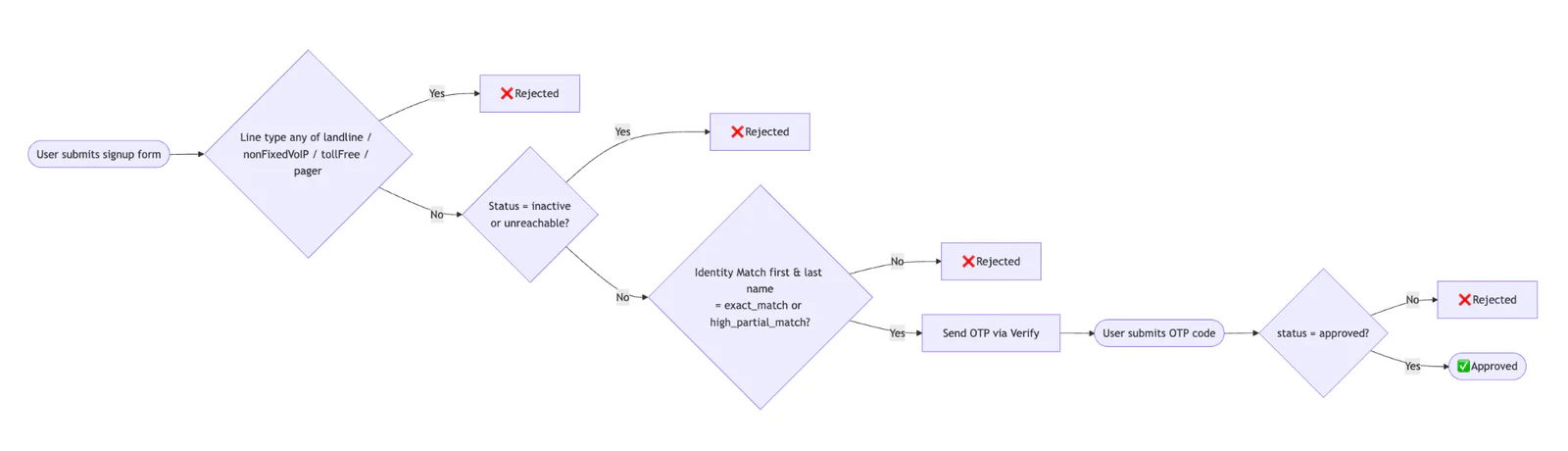
Process flow diagram for orchestrating onboarding intelligence
Step 1 - Check the line type
First, use the Lookup API line type intelligence package to make sure we're dealing with a mobile number. The code explicitly filters out landlines, nonfixed VoIP, toll free, (and pagers for fun) but you can customize this easily. Learn more about potential line types the API can return in the documentation.
Step 2 - [Optional] Check the line status
Then make sure the line is reachable. Use the Lookup API line status package to filter out inactive and unreachable numbers. Note — this is commented out by default in the code below since it is in Private Beta and requires an extra step to get access. To request access for Lookup Line Status, submit this form. After that, in .env set LINE_STATUS_ENABLED to "true".
Step 3 - Match the name to the phone number
In the last of our background checks, use the Lookup API Identity Match package to verify that the submitted name matches the phone number. Identity Match compares user-supplied data against authoritative sources for a zero-knowledge result, in other words a way to verify the data’s accuracy without revealing the underlying data. Check the individual firstNameMatch and lastNameMatch fields directly and require each to be either exact_match or high_partial_match. This allows common variations like nicknames or middle names used as a first name, while still rejecting mismatches. Any other result (a no_match, partial_match, or null) will reject the request.
You can change these requirements to fit your business logic or reduce false negatives. Learn more about Identity Match field values in the documentation.
To enable that check in the code, in .env set IDENTITY_MATCH_ENABLED to "true".
Step 4 - Phone verification
If all of the lookup steps pass, the user will receive an OTP and complete a standard phone verification flow.
To implement all four steps, first, replace the code in public/index.php with the following code:
The code initialises a new Slim Framework object, and passes that to a new Application object; which contains all of the functionality for handling requests to the application's various routes. The Application object is also initialised with a Twilio Rest Client object for making requests to Twilio's APIs, a Slim Flash Messages app for flashing information between requests, and a Monolog Logger object for application instrumentation; writing log data to data/app.log.
Then, replace the existing code in src/Application.php with the following:
The Application object's constructor adds the ability to parse JSON request bodies, as that is how Twilio packages request and response information, it loads the application's routing table (defined in setupRoutes()), and it adds error middleware for handling fatal errors and exceptions.
The setupRoutes() function defines three routes:
- The default route (
/) which is handled by thehandleSignupStage()function, accessible with GET and POST requests. - The verify route (
/verify) which is handled by thehandleVerifyStage()function, accessible with GET and POST requests. - The status route (
/status) which is handled by thehandleUserStatus()function, accessible with GET requests.
The handleSignupStage() function renders and returns src/templates/signup.html.twig if requested with the GET method. It is a simplistic form for collecting a user's phone number, first name, and last name.
If requested with the POST method, it will retrieve the phone, firstName, and lastName attributes from the request's POST data, redirecting the user to the default route if one or more of those attributes are not present or empty.
Otherwise, it will call runOnboardingIntelligence(), which we'll discuss shortly, to retrieve and validate details about the supplied phone number. If the phone number is marked as invalid, indicated by the ok element of the array returned from that function being set to false, a flash message named reason is created with the value in the reason element of the returned array, before the user is redirected to the /status route, where that information will be shown to the user.
If the phone number is marked as valid, the user will be sent an OTP code via SMS and a flash message named phone will be created with the submitted phone number, before they're redirected to the /verify route, where they can verify the OTP code that they were sent.
Now, let's step through runOnboardingIntelligence(). This function attempts to retrieve Line Type Intelligence, Line Status, and Identity Match information on the supplied phone number, using the provided first and last name.
If the phone number's type is not set to "mobile", then a flash message named status is set to "rejected", logSteps() is called to record that the Line Type Intelligence check failed, before returning an array with ok set to false, the reason for the rejection, and the check step that were completed.
If IDENTITY_MATCH_ENABLED is enabled, then that information in the returned lookup data is checked to see if either the first and/or last names were either an exact or high partial match for the phone number owner's first and last names. If not, similar to the previous, Line Type Intelligence check, a flash message named status is set to "rejected", logSteps() is called to record that the Identity Match check failed, before returning an array with ok set to false, the reason for the rejection, and the check step that was completed. If the check succeeded, then the step is logged as being successful.
Finally, if LINE_STATUS_ENABLED is enabled, then the phone number's status is checked. If it's set to either "Inactive" or "Unreachable", a flash message named status is set to "rejected", logSteps() is called to record that the Line Status check failed, before returning an array with ok set to false, the reason for the rejection, and the check step that was completed. If the check succeeded, then the step is logged as being successful.
If the respective checks all passed, a flash message named status is marked as "approved", and the returned array sets ok to true and contains the logged (checked) steps.
The handleVerifyStage() function renders src/templates/verify.html.twig with the value of the phone flash message if the request method was GET. If the request method was POST, the code and phone number are retrieved from the submitted POST request data. If either of them are not available or empty, that fact is logged before the user is redirected to the "/verify" route to try and validate the received code again.
Otherwise, the Twilio Rest Client is used to verify the supplied code. If the status is set to "approved", then a flash message named "status" is set to "approved" or "rejected" based on whether the result's status field is set to "approved" or not. After that, the user is redirected to the "/status" route.
The handleUserStatus() function renders src/templates/status.html.twig with two template variables:
- status: This is set to the value of the
statusflash message - reason: This is set to the value of the
reasonflash message
Now, create a new file called src/templates/base.html.twig and paste the code below into the new file.
This is the base template, which the remaining three will build upon. It contains the elements central to all the others, ensuring that the remaining ones contain only details pertinent to that specific template.
Then, create a new file called src/templates/signup.html.twig which will render a very basic UI to collect a phone number, first name, and last name, and paste the code below into the file.
Then, create a new file called src/templates/verify.html.twig which will render a simple form for validating the OTP code received by the user, and paste the code below into the new file.
Finally, create a new file called src/templates/status.html.twig, which will show whether the phone details and OTP code verification were successful or not:
Run and test the code
Save your files and run the project with:
Open http://localhost:3000 and test it out with your personal mobile number. Now, you should see log records in data/app.log similar to the following:
You can also test with a toll free or VoIP number like +17739857836 and you'll see an error with LINE_TYPE_BLOCKED. Or use your real phone number but with a different name and see Identity Match fail. Testing all possible outcomes of line status and identity match is a little tricker, so we recommend using test credentials and magic numbers.
Pricing considerations and next steps
One of the reasons this is 4 different API calls is that we want to be considerate of price. Line Type Intelligence and Line Status are the cheapest Lookup packages, while Identity Match and Verify are more expensive. Learn more about Lookup pricing (varies by country) and rearrange the steps to fit your use case.
Bundling Lookup and Verify is a great way to filter out unwanted bots, fake accounts, and reduce sign up fraud. It also allows you to validate real users seamlessly. For more information, check out:
I can't wait to see what you build and secure.
Matthew Setter is a PHP, Go, and Rust Editor in the Twilio Voices team. He’s also the author of Mezzio Essentials and Deploy with Docker Compose. You can find him at msetter@twilio.com. He's also on LinkedIn and GitHub.

Related Resources
Twilio Docs
From APIs to SDKs to sample apps
API reference documentation, SDKs, helper libraries, quickstarts, and tutorials for your language and platform.
Resource Center
The latest ebooks, industry reports, and webinars
Learn from customer engagement experts to improve your own communication.
Ahoy
Twilio's developer community hub
Best practices, code samples, and inspiration to build communications and digital engagement experiences.