Getting The Most for Your Money Using Automated SMS
Time to read:
April 21, 2026
Written by
Reviewed by
AI generated summary
- Using special characters in SMS can increase costs due to a switch from GSM-7 to UCS-2 encoding.
- Common pitfalls include emojis, smart quotes, long dashes, and certain accented characters.
- Twilio tools like Messaging Segment Calculator and Smart Encoding can help optimize SMS for cost-efficiency.
This summary was generated by AI.
Getting The Most for Your Money Using Automated SMS
Imagine your company is starting a new SMS campaign to target your users. You send out a marketing blast, say, 150 characters to a user base of 100,000 users. What you were expecting was to pay for 100,000 segments. But when you receive your bill, you realize you were charged three times more than expected. Why? Because the composer of your marketing text used emojis, smart-quotes, or other special characters that came at a premium price.
Rich text and Rich Communications Services can help make your marketing messages stand out. But if you're a small business on a small marketing budget, you don't want to see any sticker shock when you're billed for your automated SMS marketing pushes. And even in big business, every dollar counts. So what happened, and how can you avoid it? Read on for a look at the culprit, and at some potential solutions.
What causes surprise SMS charges
Here's the technical reason why your SMS costs more the moment your message includes an emoji or smart character.
Text messages are sent in GSM-7 encoding. When mobile networks were first developed to be able to send alphanumeric characters in texts, 128 characters were originally assigned to numerical values for network transmission. This assignment of characters to numeric values is called character encoding.
But there is a catch. As soon as you use a character outside the GSM-7 library (emojis, non-Latin scripts, or "smart quotes"), the entire message switches to 16-bit encoding instead. This type of text encoding is called UCS-2 character encoding. If you aren't using it intentionally, you may be setting yourself up for a problem.
Switching from GSM-7 to UCS-2 encoding results in every message taking up more memory space in the sent data packet. Twilio sends SMS messages in segments (not to be confused with Twilio Segment!). Each segment can contain up to 160 characters in GSM-7, or, in UCS-2, only 70 characters. Additionally, Twilio prepends a User Data Header of 6 Bytes (this instructs the receiving device on how to assemble messages), leaving 153 GSM-7 characters or 67 UCS-2 characters for your message. If your messages go over these limits, you may see a charge on your bill that you were not expecting.
Characters to watch out for
Emojis are one potential cause of this problem. If you send an emoji over text, you're automatically switched to UCS-2 encoding, because an emoji is not part of the standard GSM-7 character set. But that might seem obvious, and it is fairly easy to spot. There are other, possibly hidden culprits that might be altering your SMS's encoding, such as:
Smart Quotes and Apostrophes: Copy-pasting from Google Docs can lead to this error, where a smart-quote that curls in toward your text counts as a non-standard character. The same goes for smart apostrophes. You can strip these from your communications and your customers won't notice, but you will see a difference in billing if you forget.
Long Dashes: The dreaded em-dash (—) – a new favorite tool of AI-composed communications – can become a problem in your text if they aren't stripped clean. This is a common mistake to make if you're using modern tools, since AI systems and auto-correct both love them. But use a hyphen instead of the long dash and you're saving characters on your text.
Accents: Accents can be a bit of a grab-bag. If you are doing non-English communications, they're going to be more common. While some accents (like é) are in GSM-7, others (like â) can trigger the switch to UCS-2. Not sure if your special character is compliant? View the GSM-7 character map in the Twilio documentation to be sure.
Using Twilio's tools to solve the problem
So now you've understood the problem: how do you avoid it in the future?
There are a few ways to test your communications to make sure that they'll be compliant with GSM-7, and keep your budgets down.
Here is the simplest way: test your message yourself before sending it by using the Twilio Messaging Segment Calculator. Test your copy before you hit Send, and see how many segments your message actually requires.
Here's a basic example showing SMS with only text, and another example showing how adding a few emojis changes the encoding structure of your message:
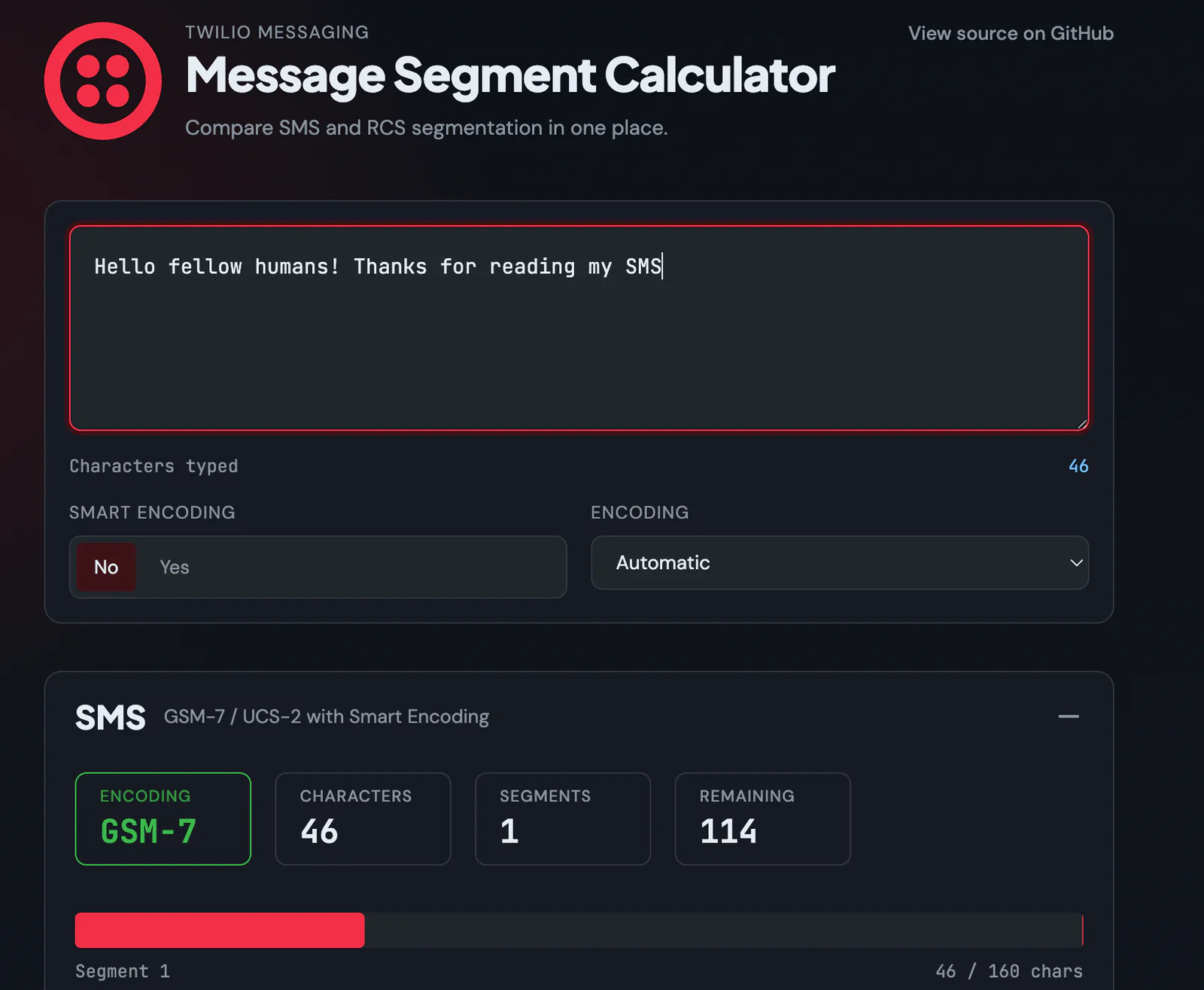
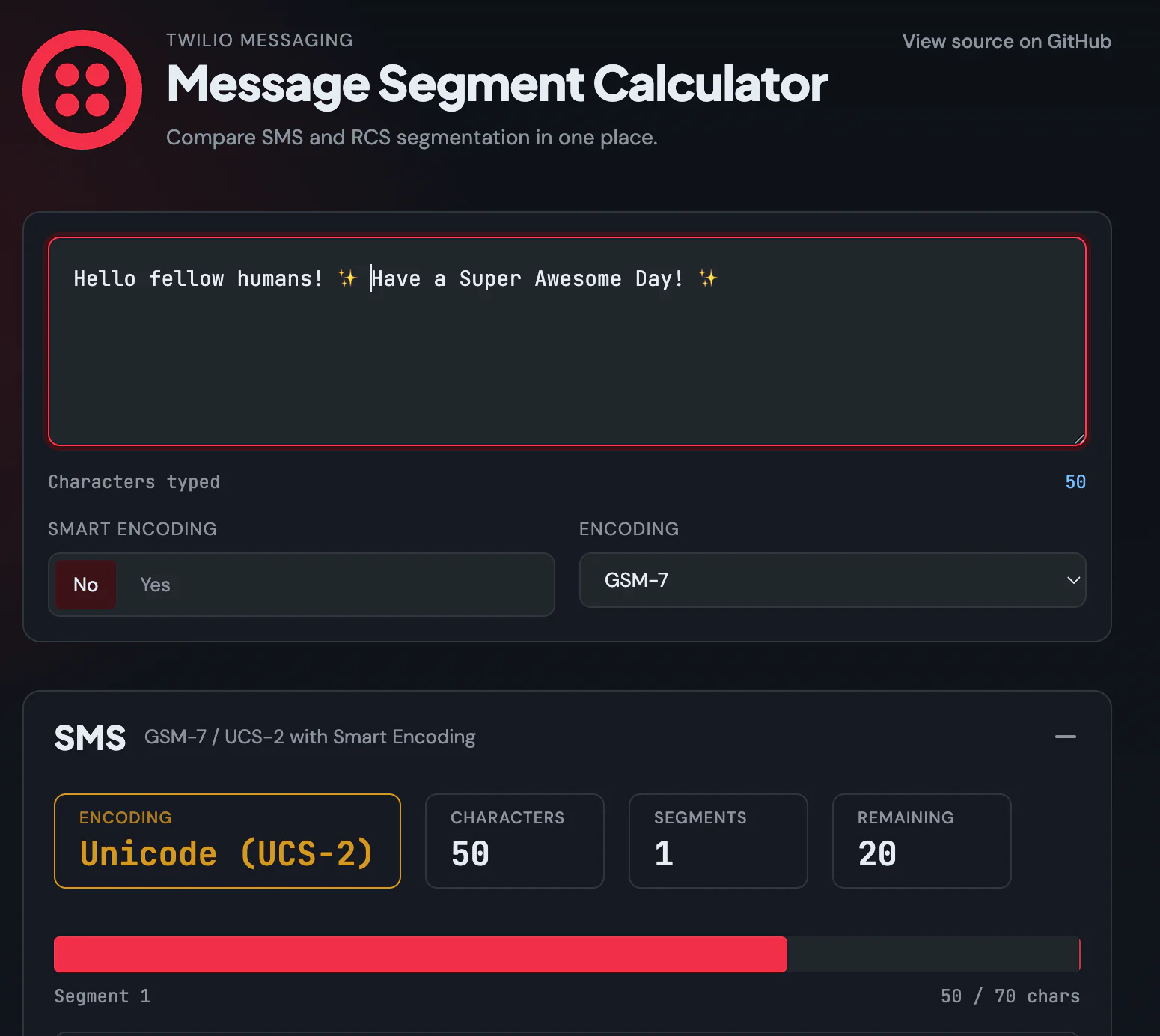
Twilio has a Smart Encoding feature that is a toggle for your SMS.
This feature automatically replaces smart quotes and other possibly problematic characters with GSM-7 equivalents. It's available whenever you send a text message using Twilio's automated SMS features. You can see the Smart Encoding toggle on the screenshots of the messaging calculator.
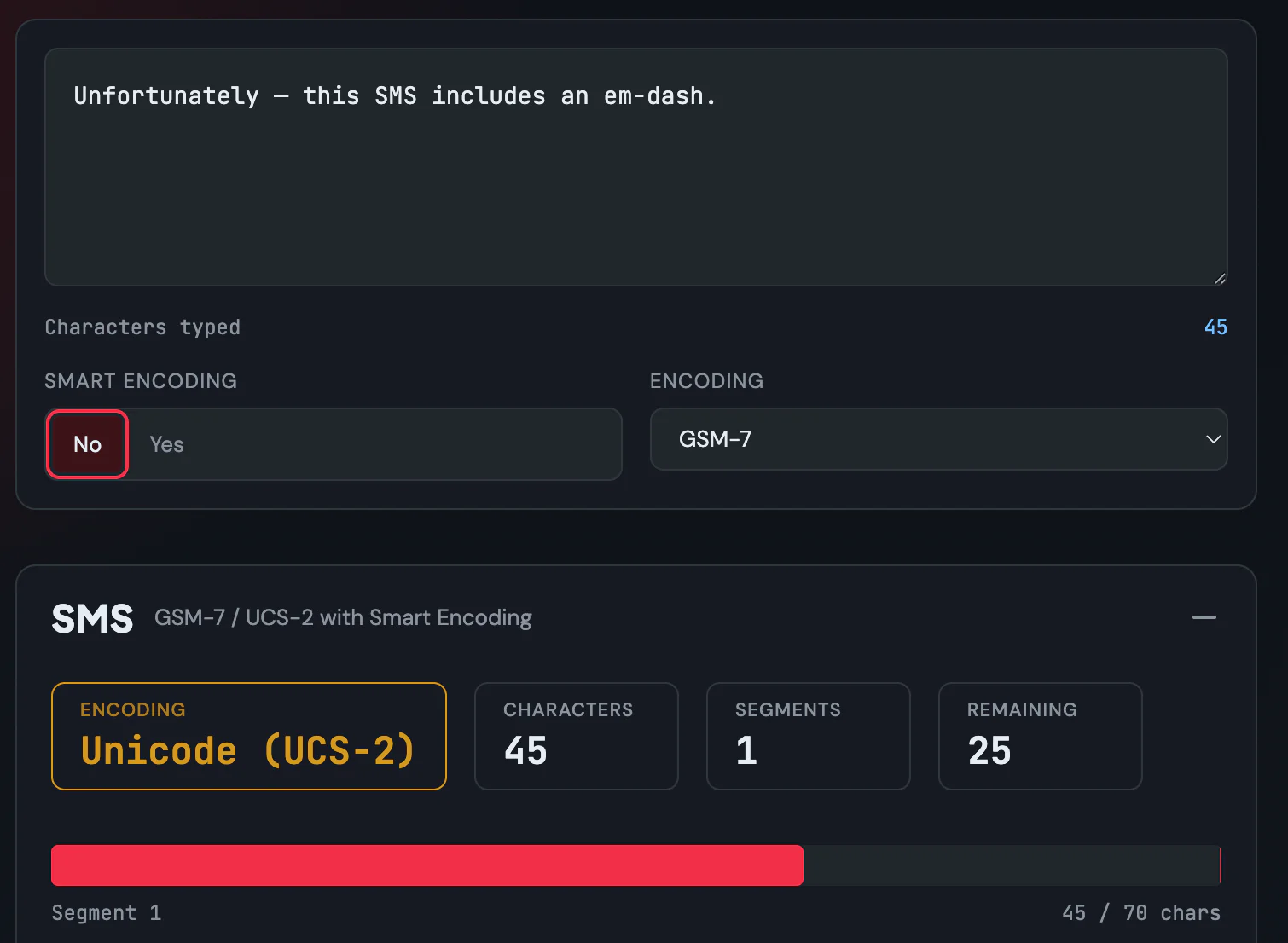
The feature won't strip emojis, but it will strip stuff that could otherwise be a problem. Here's how the toggle works in practice using one of those sneaky characters.
Without smart-encoding:
Same message but with smart encoding turned on:
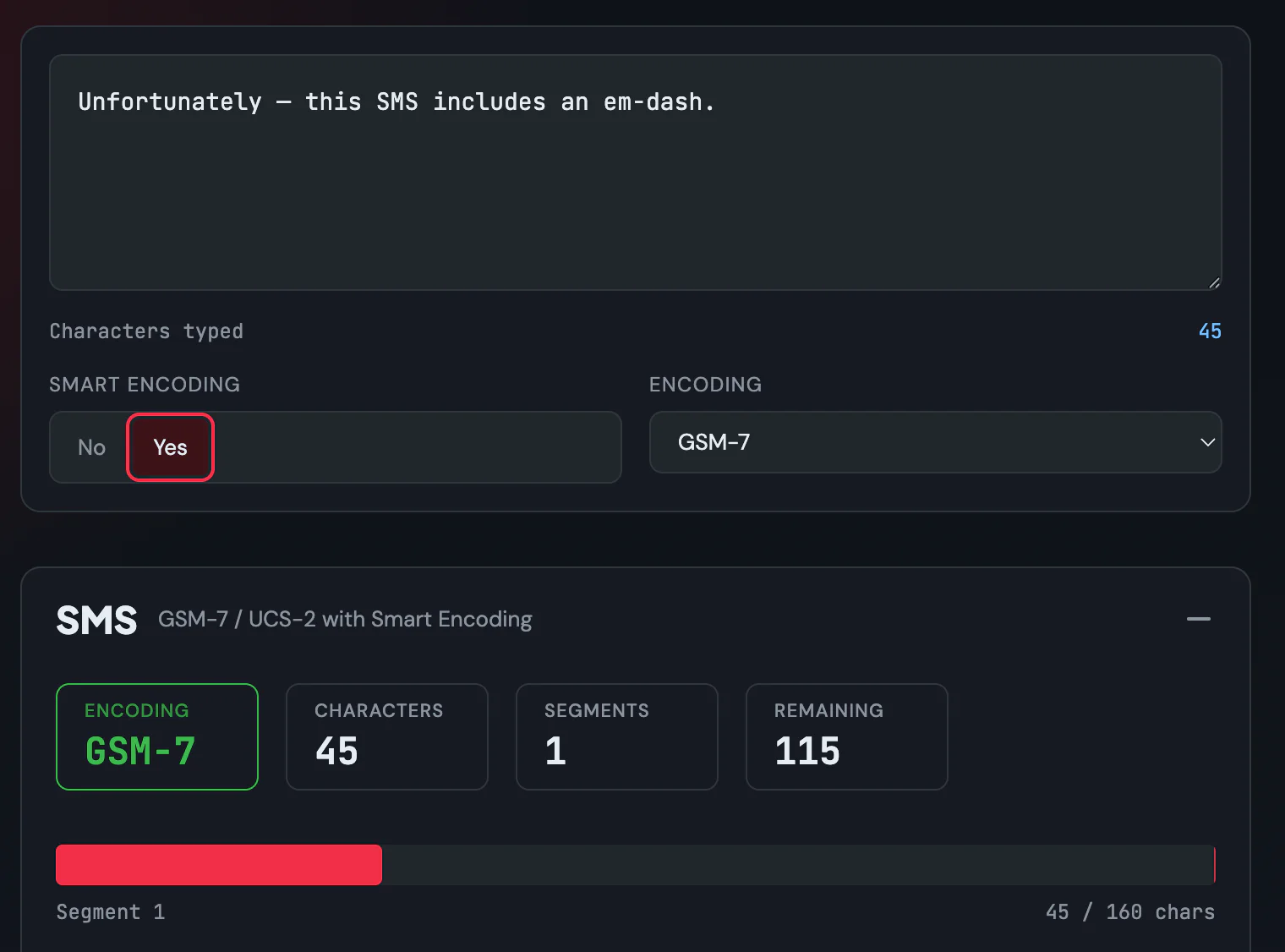
The result looks the same, but the segment length is totally different.
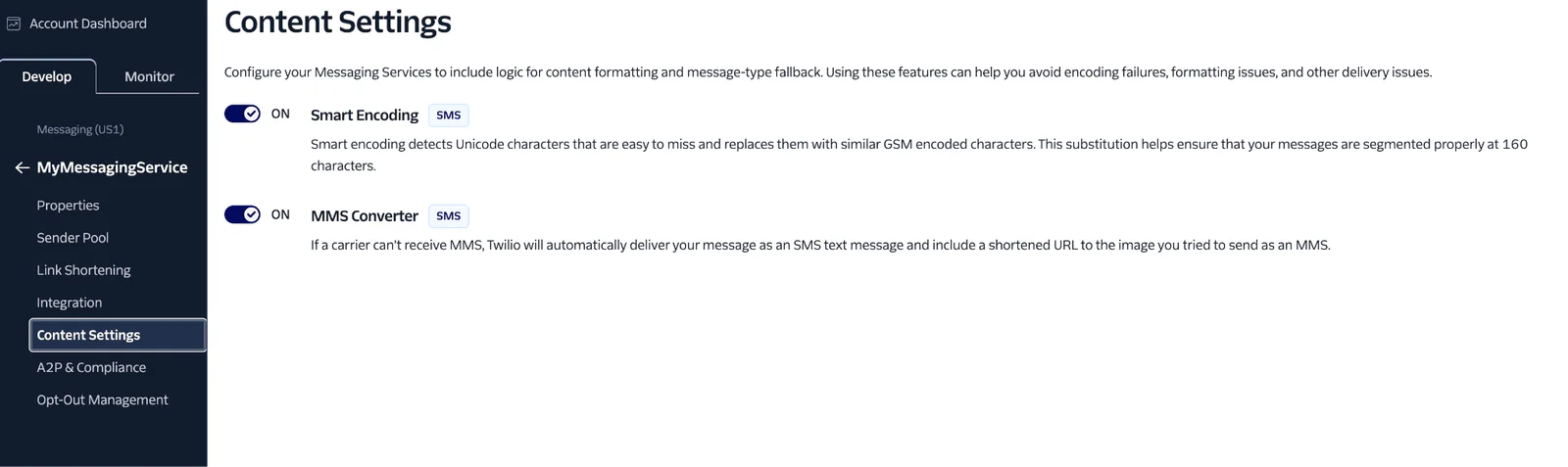
If you want to activate Smart Encoding for your Twilio messaging service, look for it in the Twilio dashboard. To reach this tab, first create a Messaging Service. Then look for Content Settings as shown in the screenshot below. Make sure the Smart Encoding toggle is set to On.
A programmatic approach
It's possible you want to handle stripping characters in your program rather than relying entirely on your messaging service. There are two good possibilities for how to handle fixing problematic characters in your automated SMS: Replacement (swapping "smart" characters for cheap ones) and Calculation (warning the user about the cost).
The GSM-7 Sanitizer Method
Creating a "Sanitizer" method is a classic defensive programming move. If you are working in .NET 10, you can use C# 14 features like ReadOnlySpan<char> and high-performance string builders to keep your methods working fast. If you use some other coding language, consider these basic principles and approaches to figure out how they might fit into your own project.
Here's an example method that you might use in your programs. This method searches for common "budget-killing" characters and replaces them with their GSM-7 equivalents.
You can integrate this directly into your Webhook or Campaign controller.
Segment Counter Logic
If you want to warn your users before they send, you need to know if the message switches to UCS-2. This involves building a calculator for your use similar to the one Twilio offers. This will use Regex to check for special characters.
Remember these limits:
- GSM-7: 160 chars for 1 segment, 153 for 2+ (7 chars used for "segment headers").
- UCS-2: 70 chars for 1 segment, 67 for 2+ (3 chars used for headers).
The above method uses a negated regex, meaning it will search for all characters that are not inside the safe window marked. Then it will tell you if you are going outside the safe character set. When in doubt, check twice before hitting send! It could save you a surprise bill.
These methods are also just examples, so you will need to integrate them into your stack. These methods work in a .NET Console app, a Web API, or a Flex Plugin backend. While Twilio's internal tools might work well for most applications, having a programmatic approach will also let you have more control over the output if you wish.
Conclusion
Good copy is concise. Cheap copy is also GSM-7 compatible. Armed with knowledge on how to count characters, you should be able to save money on your texts by knowing how many segments you're sending, which will give you peace of mind when that campaign goes live.
If you want more help with automated SMS, or you want to learn more about SMS marketing, check out a few other resources on the Twilio blog:
- Twilio SMS Marketing for Beginners
- Bulk SMS Marketing: What It Is and How to Get Started
- SMS Compliance in the US: What Every Marketer Should Know
Let's build something amazing together!
Amanda Lange is a .NET Engineer of Technical Content. She is here to teach how to create great things using C# and .NET programming. She can be reached at amlange [ at] twilio.com.
Related Resources
Twilio Docs
From APIs to SDKs to sample apps
API reference documentation, SDKs, helper libraries, quickstarts, and tutorials for your language and platform.
Resource Center
The latest ebooks, industry reports, and webinars
Learn from customer engagement experts to improve your own communication.
Ahoy
Twilio's developer community hub
Best practices, code samples, and inspiration to build communications and digital engagement experiences.