Answer Support Calls, Then Handle Them Using SMS in PHP
Time to read:
June 08, 2026
Written by
Reviewed by
AI generated summary
- Build an automated service to handle support calls and SMS queries using Twilio and PHP.
- Set up endpoints to redirect calls and send follow-up SMS with self-help options.
- Test and configure your Twilio phone number to respond accurately to voice calls and SMS.
This summary was generated by AI.
Answer Support Calls, Then Handle Them Using SMS in PHP
It would be great if every organisation — regardless of its size — could have a 24/7 support center, where customers can talk with a customer representative any time, day or night. However, the reality is that that's not always feasible.
But, that doesn't mean that, for the hours where you can't provide active support, your customers are left with no support whatsoever. With Twilio and PHP you could build an automated service which answers your customers' most-commonly-asked questions and handles basic tasks.
For example, it could answer the following questions:
- What are your company's opening hours?
- What are your support, billing, and account email addresses?
- What is your postal address?
And, some basic tasks might be booking an in-person appointment, or requesting a callback during office hours.
If that's something your business could benefit from, then in this tutorial, you're going to learn how to build such a system using TwiML (the Twilio Markup Language) and PHP.
Let's begin!
About the application
Here's how the application will work. It is a small API with three endpoints.
|
Endpoint |
Path |
Description |
|---|---|---|
|
Default |
/ |
Requests to this endpoint are made by Twilio when a phone call is received to your Twilio phone number. The endpoint returns TwiML instructing Twilio to tell the customer that they are being redirected to support, and that they will receive a follow-up SMS with the available self-help support options. Following that, Twilio is redirected to the "/send-sms" endpoint for the instructions for sending the follow-up SMS to the caller. |
|
Support |
/support |
Requests to this endpoint are made by Twilio when an SMS is received by your Twilio phone number. The endpoint returns TwiML instructing Twilio to:
Note: You won't implement the functionality for options 2 or 3. |
|
Send Explanatory SMS |
/send-sms |
Requests to this endpoint are made by Twilio after the initial phone call is received. The endpoint sends an SMS to the caller with the self-service support options. |
Prerequisites
You'll need the following to use the application:
- A Twilio account (free or paid) with a phone number that supports both SMS and calls. Create a Twilio account if you don't already have one.
- PHP 8.5 or above
- Composer globally installed
- Your preferred code editor or IDE, such as neovim or Visual Studio Code
- Some terminal experience is helpful, though not required
Set up the base PHP project
With the prerequisites in place, the first thing to do is to bootstrap a base PHP project. To save time, you'll use the Twilio / Slim Base project. If you've not heard of it, it's a small PHP app powered by the Slim framework, designed to save you time getting started building Twilio projects in PHP.
Run the following command to generate a new application from it and change into the project's top-level directory:
Add the ability to handle incoming support calls
Begin by implementing the default endpoint ("/"). It will let the caller know that they have called out of business/support hours, and start the automated support process.
To do that, in src/Application.php, replace the handleDefaultRoute() function with the following:
The code generates a TwiML Voice response and writes it as the body of the response, along with the appropriate content-type header.
The generated TwiML looks like the following example (formatted for better readability):
What it means is that when a call is made to your Twilio phone number (after it's configured) it will:
- Speak the text in the Say verb
- Redirect Twilio to the "/send-sms" endpoint
- End the call
With the function added, add the following use statements to the list at the top of the file.
Then, add the following class constant used in the function.
The last change to make is in the setupRoutes() function. Change the default route's handler to 'handleIncomingCall', to match the new name of the default handler function.
Add the ability to send a follow-up SMS
With the application able to handle incoming calls, next, add the ability to send the follow-up SMS after Twilio is redirected to the "/send-sms" endpoint.
To do that, add the following function after the handleIncomingCall() function, in src/Application.php.
The function is quite short. It also might be familiar to you if you've read some of my other Twilio tutorials, such as how to send an SMS with PHP in 30 seconds. It uses the Twilio Rest Client to send an SMS with the available, self-help options. Then, it sets an empty TwiML Voice response as the body of the response.
With the new function added, add the following use statement to the top of the class.
Then, update the setupRoutes() function as follows, to register the new "/support" route.
Add the ability to handle support questions with SMS
Finally, add the ability to respond to self-help SMS. To do that, add the following function after handleSendInitialSupportSms() in src/Application.php.
The function's a little bit verbose, but uses a match expression to determine how to respond to incoming SMS, based on the SMS' body. In short, if the message is one of the available options, it will generate TwiML with the applicable response. However, if the SMS message is not one of the available options, the generated TwiML will be a list of the available options.
In the table below, you can see the support options and their accompanying responses.
|
Support Option |
Response |
|---|---|
|
"hours" or "opening hours" |
"Our opening hours are Mon to Fri from 8:30 am to 5:30 pm, and Sat from 9:30 am to 1:30 pm." |
|
"support email" |
"For general support, email support@example.org." |
|
"account support email", "account", "billing support email", or "billing" |
"For account support, email accounts@example.org. For billing support, email billing@example.org." |
|
"postal address" |
"Our mailing address is 1234 Queen Street, Brisbane, QLD, 4000, Australia." |
|
"callback" |
"Thank you for registering for a phone callback. We'll call you within the next 30 minutes." |
|
"appointment" or "booking appointment" |
"Thank you for seeking an appointment. The next available appointment is at 9:45 am on <the following Thursday>". <the following Thursday> will be replaced by the date of the following Thursday when the SMS is sent. |
Next, add the following constants to the top of the class. These define most of the support options and their responses.
Then, add the following use statements to the existing list at the top of the class.
Finally, update setupRoutes() as follows, to define the "/support" route.
Start the application
With the application ready to go, let's test that it works and see it in action. First, start the application with the pre-defined Composer "serve" script, by running the following command:
You should see output in the terminal similar to the following, indicating that the application is listening on port 8080:
Next, make the application publicly available using ngrok, by running the following command:
You should see terminal output similar to the following:
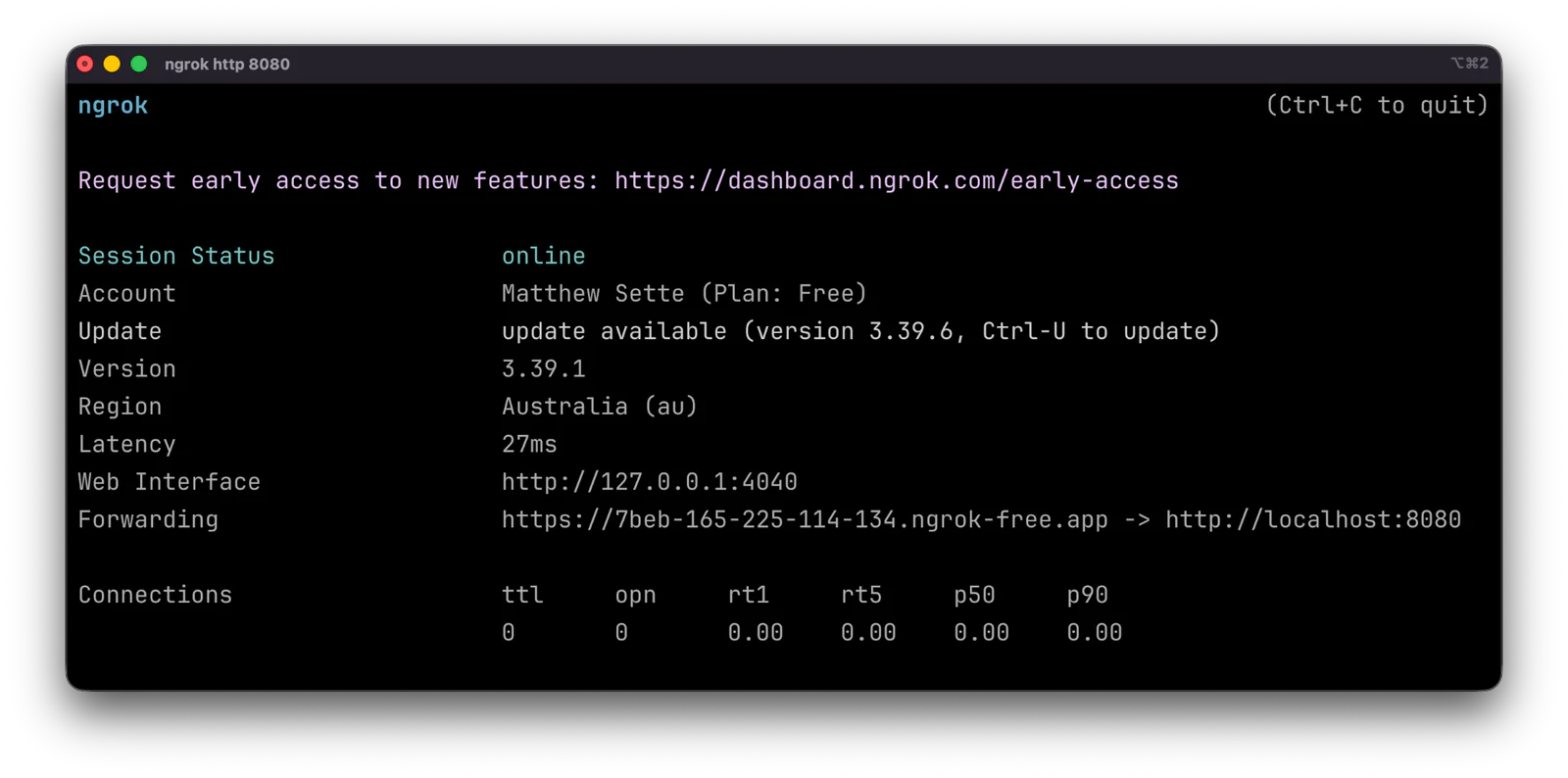
Copy the Forwarding URL, which ends with "ngrok-free.app", and keep it handy as you'll use it in the next step.
Configure Twilio to handle incoming calls and SMS
Log in to the Twilio Console in your browser of choice. Under Products & Services > Voice > Overview, click Set up Voice. Then, in TwiML Apps, click Create TwiML App.
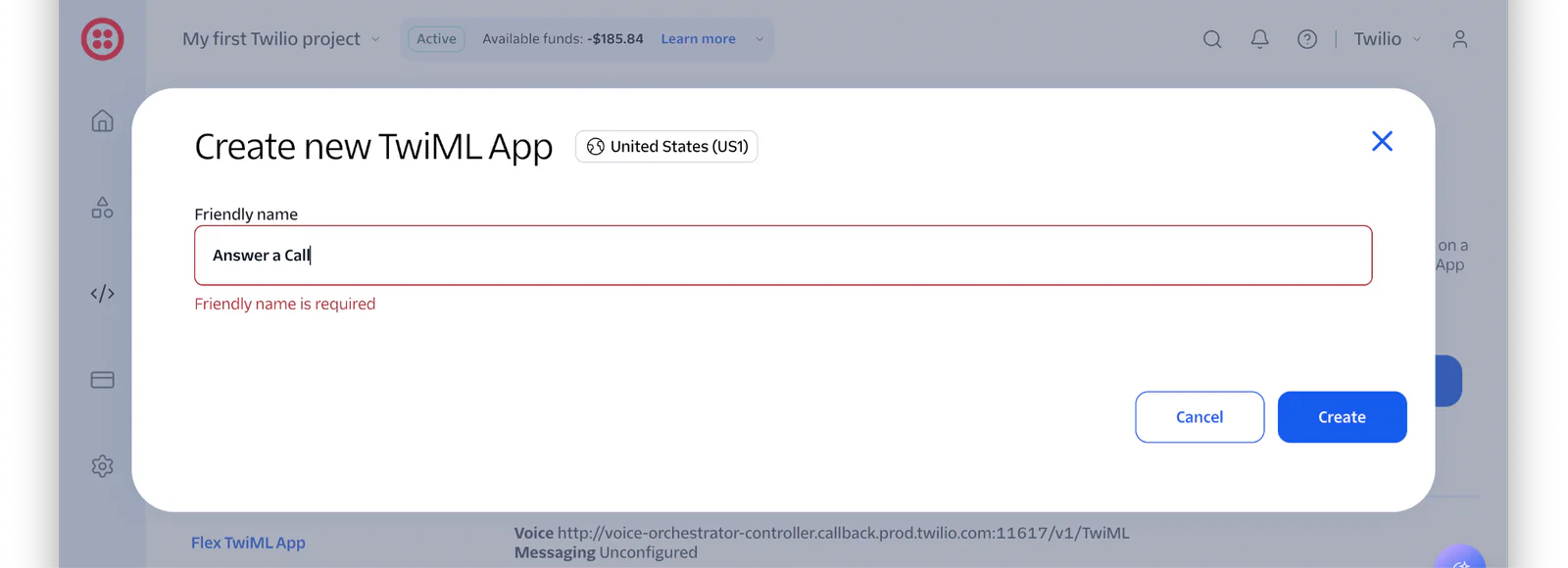
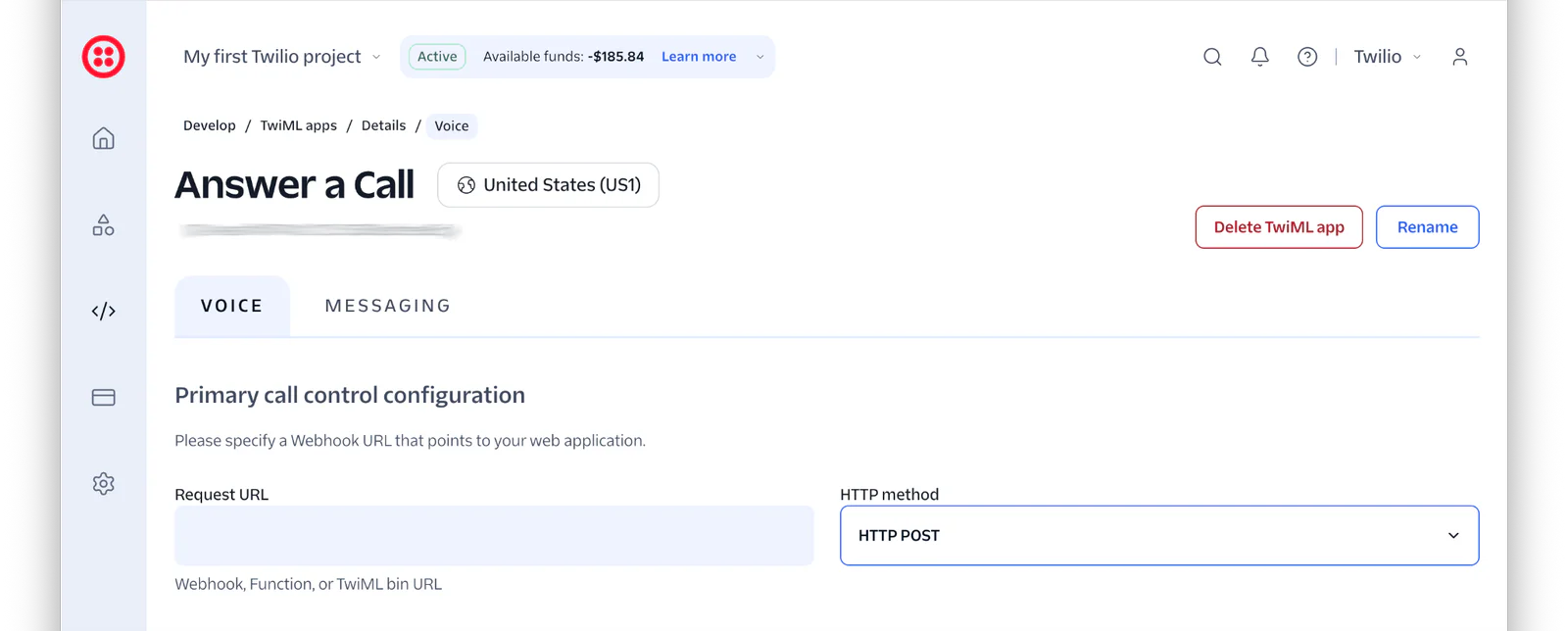
Next, in the Create new TwiML App dialog that appears, add a Friendly name for the app, such as "Answer a Call", and click Create. Now, in the Primary call control configuration section of the Voice tab, paste your ngrok Forwarding URL (which you copied earlier) as the value of the Request URL field, and leave the accompanying HTTP method field set to "HTTP POST".
Then, click the MESSAGING tab. There, set your ngrok Forwarding URL plus "/support" as the value of the Request URL field, and leave the accompanying HTTP method field set to "HTTP POST".
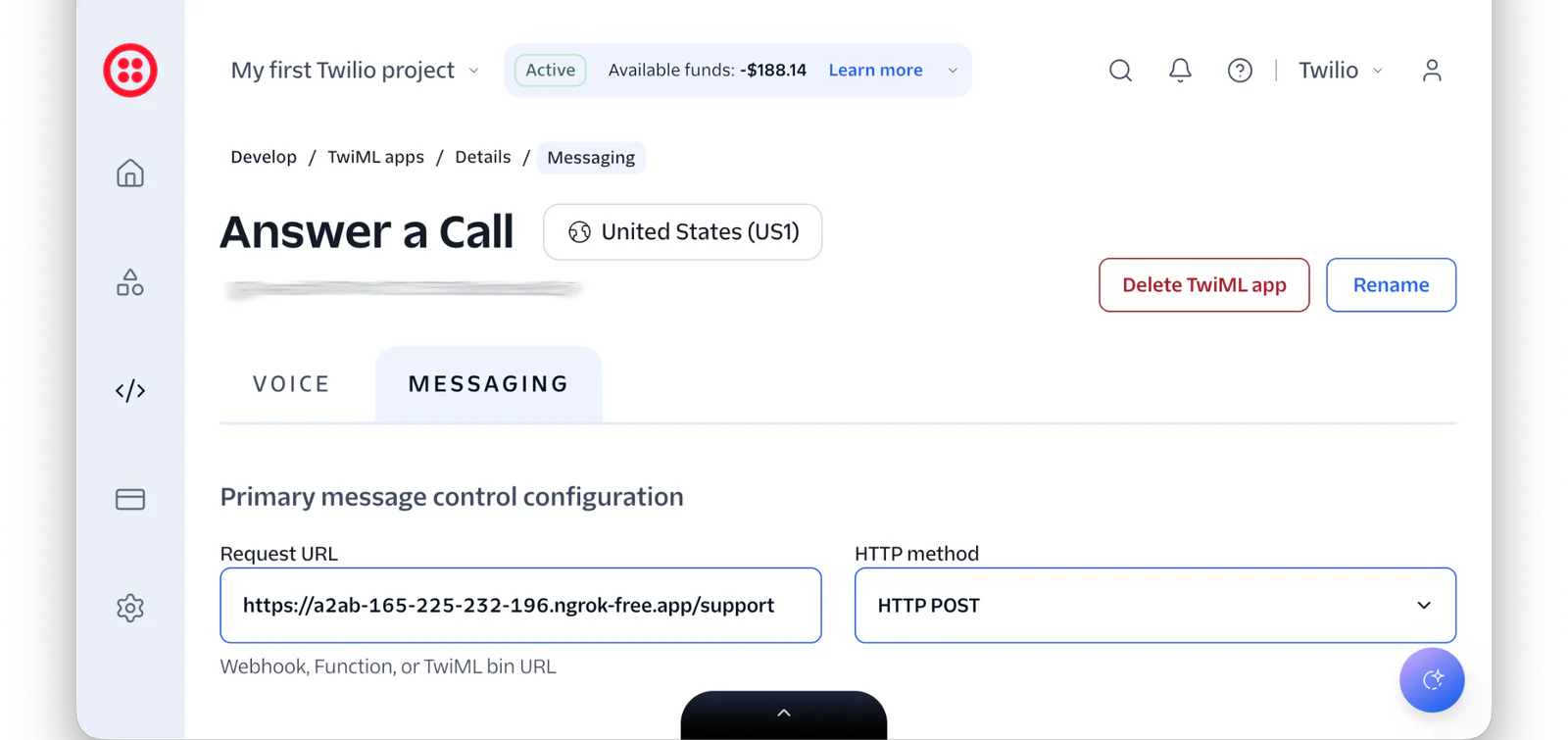
Then, scroll to the bottom of the page and click Save.
Set the required environment variables
Then, open the Twilio Console in your browser of choice, open the Workbench by clicking the black and white arrow in the middle of the bottom of the page, and copy the Account SID and Auth Token as you can see in the screenshot below.
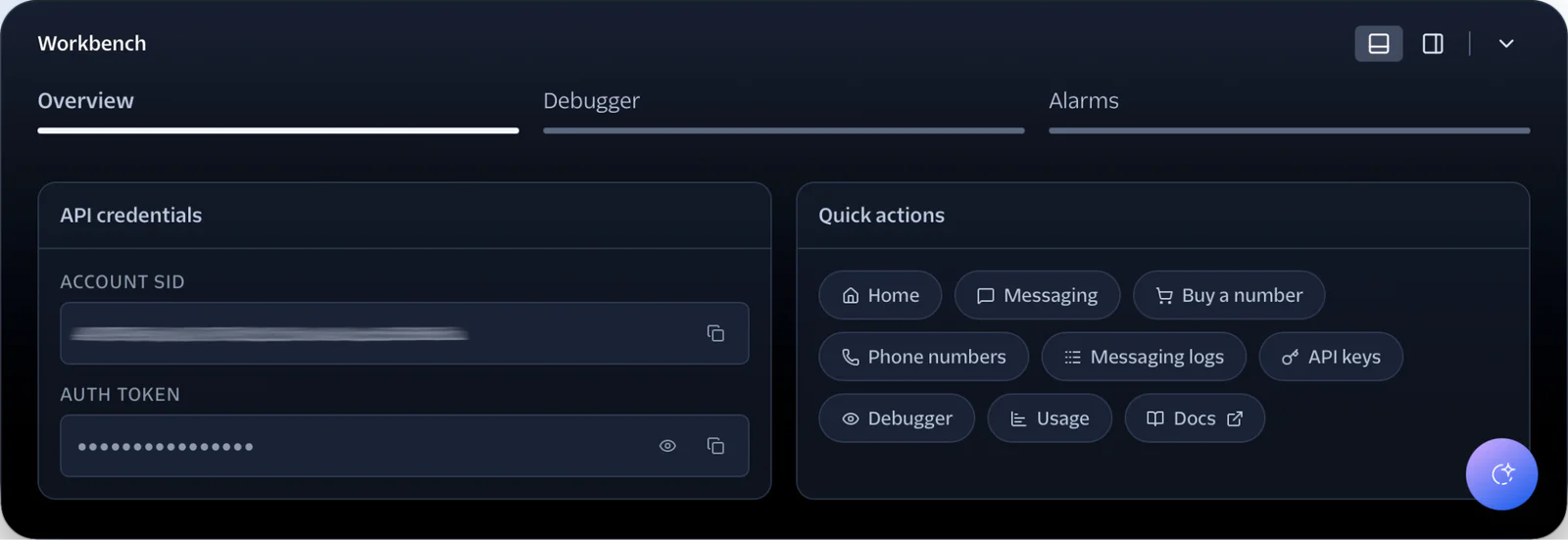
Then, set those values as the values of TWILIO_ACCOUNT_SID, TWILIO_AUTH_TOKEN, respectively, in .env.
After that, in the left-hand side navigation menu, navigate through Products & Services > Numbers & senders > Overview.
There, from the Phone Numbers tab, copy a phone number that supports both SMS and Voice, and paste it into .env as the value of TWILIO_PHONE_NUMBER.
Test that the application works as expected
Finally, it's time to use the application. Start by making a phone call to the Twilio phone number that you configured in One Console. You should hear the default message spoken to you, before the call ends. Shortly after that, you'll receive an SMS with the available support options.
After receiving it, start sending support SMS requests to your configured Twilio phone number, and seeing that the expected responses are sent back to you.
That's how to answer support calls, with a self-help SMS system in PHP
While some of the functionality was, effectively, stubbed, I hope you see just how simplistic a self-help SMS response service could be when using TwiML and PHP. If you'd like to know more, check out the links below. Otherwise, you can find the repository behind this tutorial on GitHub. Feel free to clone and play with the code, or submit issues and PRs if you'd like to improve it.
Matthew Setter is a PHP and Go Editor in the Twilio Voices team. He’s also the author of Mezzio Essentials and Deploy with Docker Compose . You can find him at msetter@twilio.com . He's also on LinkedIn and GitHub .
In the post's header image the SMS icon and the phone icon were created by Freepik on Flaticon</a>, and ElePHPant was source from: http://php.net/elephpant.php.

Related Resources
Twilio Docs
From APIs to SDKs to sample apps
API reference documentation, SDKs, helper libraries, quickstarts, and tutorials for your language and platform.
Resource Center
The latest ebooks, industry reports, and webinars
Learn from customer engagement experts to improve your own communication.
Ahoy
Twilio's developer community hub
Best practices, code samples, and inspiration to build communications and digital engagement experiences.