How I Built an Orbital Hotline with Twilio Voice, ConversationRelay, Python, and OpenAI
Time to read:
July 22, 2026
Written by
Reviewed by
AI generated summary
- Build a voice-first space guide using Twilio Voice, Conversation Relay, and Python.
- Route known intents directly to space APIs, use OpenAI for general astronomy questions.
- Keep the user experience conversational with natural language responses and real-time space data.
This summary was generated by AI.
How I Built an Orbital Hotline with Twilio Voice, ConversationRelay, Python, and OpenAI
I wanted to build a phone number that felt like calling a tiny mission control desk.
You dial in, ask where the International Space Station is, find out when it will pass over your city, get a quick sky report, hear sounds from across the universe, or ask a general question about planets, stars, missions, and the cosmos.
That became the Orbital Hotline: a voice-first space guide built with Twilio Voice, Conversation Relay, FastAPI, WebSockets, OpenAI, and a handful of live astronomy APIs.
In this post, I'll show you how I built it. By the end, you'll understand how to connect a phone call to a Python WebSocket server, route caller requests to deterministic space features, use a Large Language Model (LLM) only where it makes sense, and keep the responses friendly for spoken audio.
Let's dive in and make it happen!
Prerequisites
To follow along, you'll need:
- Python 3.11 or later
- A Twilio account and a Twilio phone number
- Conversation Relay enabled for your Twilio Voice flow
- An OpenAI API key
- An N2YO API key for ISS pass predictions
- Ngrok or another public HTTPS tunnel for local development
- A phone to place a test call
The complete app for my version uses these Python packages:
The main dependencies are FastAPI, Uvicorn, httpx, python-dotenv, OpenAI's Python SDK, Skyfield, and timezonefinder.
What the hotline can do
I did not want the app to be just another "talk to an AI over the phone" demo. I wanted it to feel like a real hotline with specific things it could do well.
The final version handles:
- ISS location right now
- Next visible ISS pass from the caller's location
- A location-aware sky report
- Curated space sound playback
- General space Q and A using OpenAI
- Follow-up prompts
- Silence handling
- Unknown intent fallback
- A small Twilio-powered stats dashboard
The important design decision was to route known intents first and only use AI fallback for open-ended space questions. If someone asks "Where is the ISS?", the app should not ask a model to guess, it should call the ISS endpoint. If someone asks "Why does Jupiter have a giant storm?", that is a great LLM turn.
How it works
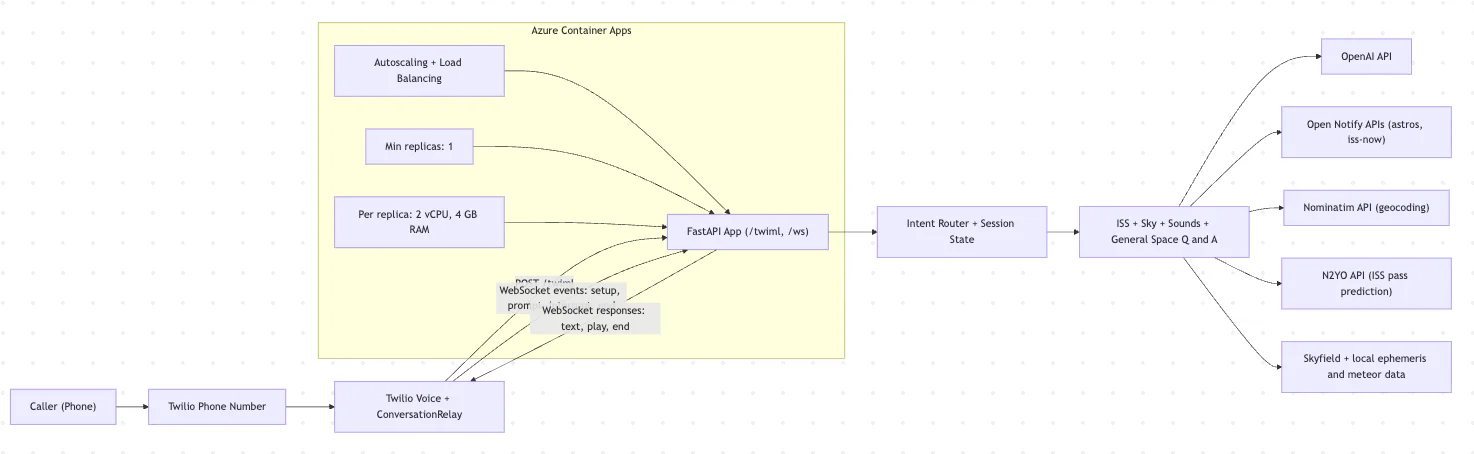
Before you build it, here's the full picture. A caller's phone connects through a Twilio phone number to Twilio Programmable Voice and Conversation Relay, which handles speech-to-text and text-to-speech. Conversation Relay exchanges events with the FastAPI app over a WebSocket, the app routes each request through an intent router, and the matched handler reaches out to OpenAI or a live astronomy API only when it needs to. The following diagram shows how the call, the app, and the external data sources fit together, along with how the app is hosted.
Project structure
This project is intentionally small:
Most of the application lives in main.py. That file includes the FastAPI routes, the WebSocket handler, the intent router, the external API calls, and the Twilio stats dashboard.
For a demo project, keeping everything in one file made iteration fast. For a production app, I would split the code into modules for routing, space data services, audio, and stats.
Configure environment variables
I used python-dotenv so local development could read configuration from a .env file.
Create a .env file:
Then add the required values:
The NGROK_URL should be the domain only. Do not include https:// and do not include a trailing slash. The app uses this value to build the secure WebSocket URL that Twilio connects to.
There are also optional values for audio clips, Twilio call stats, TTS settings, and silence timeout behavior:
Create the FastAPI app
Let's start with the foundation. The app loads environment variables and builds the public WebSocket URL:
The sessions dictionary stores per-call state. Each active call gets its own entry keyed by the Twilio callSid.
For this project, session state includes:
- The current flow path
- Whether the app is waiting for a location
- The caller's resolved location
- OpenAI message history
- Pending follow-up state
- Unknown intent count
- Silence timeout state
- Pending audio task
This is enough for a single-process demo. Note: If I scaled the app across multiple replicas, I would move the session state to Redis or use sticky routing so each call stays on the same instance.
Return TwiML for Twilio Voice
When a call reaches the Twilio number, Twilio requests instructions from the /twiml endpoint.
The app responds with TwiML (Twilio Markup Language) that connects the call to Conversation Relay:
The welcomeGreeting is generated dynamically. I use the people-in-space API so the call begins with a live detail:
This gives the caller a useful menu without making it sound like a traditional phone tree.
Handle Conversation Relay WebSocket events
Conversation Relay sends real-time events over the WebSocket. The main events I handle are:
setuppromptinterrupterrorend
Here is the shape of the WebSocket loop:
The important part is that each prompt goes through process_user_prompt(). That function decides whether to answer with deterministic data, play audio, ask for a location, call OpenAI, or reprompt the caller.
Route deterministic intents before using AI
Think of the intent router as a switchboard operator at a real hotline: it listens to what the caller asks, and connects them to the right desk before anyone bothers the AI. It normalizes the transcript, checks session state, and returns a route name.
This keeps the high-confidence paths fast and predictable.
For example:
- "Where is the space station?" goes to the ISS location API.
- "When can I see the ISS from Chicago?" goes to location capture and N2YO.
- "What is in my sky tonight?" goes to Skyfield.
- "Can I hear a black hole?" goes to a curated audio clip.
- "Why is Mars red?" goes to OpenAI.
The result feels more reliable than sending every transcript to an LLM and hoping the model chooses the right tool.
Send voice-safe text back to Twilio
Voice apps need text that sounds good when read aloud. URLs, Markdown, bullets, slashes, and punctuation-heavy formatting can become awkward.
I added a small cleanup layer before sending text back to Conversation Relay:
Then the app sends a Conversation Relay text message:
I also estimate the text-to-speech duration before starting the silence timer. That prevents the app from asking "Are you still there?" while the caller is still listening to the previous answer.
Build the ISS location path
The ISS path uses Open Notify for the station's current latitude and longitude, then tries to reverse geocode the result into a more human-friendly location.
In the full app, I also call Nominatim to convert the coordinates into a location summary. Sometimes the ISS is over land, and sometimes it is over the ocean, so the response needs to handle both.
The spoken response adds a fact and a follow-up:
Great question. The International Space Station is currently over the open ocean
at latitude 12.34 and longitude 56.78. It is traveling about seventeen thousand
five hundred miles per hour and completes an orbit around Earth in roughly
ninety minutes. Want to know when the next pass is, or would you like to explore
something else?
That pattern shows up throughout the app: answer the question, add one interesting detail, then invite the next turn.
Ask for location only when needed
For local sky reports and ISS pass predictions, the app needs a city. I did not want to ask for location at the start of every call, because many callers may only want general space facts or sounds.
Instead, the app waits until a feature actually needs it:
The next user prompt is handled by handle_location_capture(). If the caller says "Chicago, Illinois", the app geocodes the location, stores it in the session, and continues the original path.
This makes the conversation feel more natural because location capture is contextual.
Predict the next visible ISS pass
Once the app has latitude and longitude, it calls the N2YO visual passes endpoint:
Then, the hotline says something like:
For a voice app, that is the right amount of detail. It gives the caller enough to go outside and try it without reading a chart.
Build a local sky report
The sky report uses Skyfield and a local de421.bsp ephemeris file to estimate what is overhead and which planets are visible.
The app also checks a short list of planets and includes a nearby meteor shower if one is coming up.
The response is intentionally concise:
Here is what is happening in the sky above Austin, Texas tonight.
The constellation Orion is near overhead, and Orion is one of the easiest
constellations to spot because of its bright belt stars. You should be able
to spot Jupiter toward the eastern sky after sunset, and Saturn in the southern
sky later tonight.
This is where voice UX matters again. The app is not trying to read an astronomy table. It is giving the caller one useful thing to look for.
Add curated space sounds
This was my favorite part of the project.
Conversation Relay can send a play message with an audio source URL. I used that to add curated space sounds for across the universe, including NASA’s sonification of black-hole pressure waves, radio emissions recorded by Juno during its 2021 Ganymede flyby, pulsar signals from Jodrell Bank Observatory, and the sound of the cosmic microwave background. The clips are hosted online and optimized for clear playback over a phone call.
For space sounds, I set interruptible to False so the clip does not get cut off by ambient noise. Then, I schedule a delayed follow-up after the clip has had time to play:
If the caller interrupts or says something new, that pending audio task is cancelled cleanly.
I also added a small /media/jupiter-8k.wav endpoint that transcodes a Jupiter WAV into a telephony-friendly 8 kHz mono WAV. That helped make playback more reliable over a phone call.
Use OpenAI for general space questions
For general space Q and A, the app sends the caller's prompt to OpenAI with a voice-safe system prompt:
The app stores the conversation history in the session:
The app also detects topics like Mars, Jupiter, Saturn, black holes, the Moon, and exoplanets. If the caller says "yes" after a topic answer, the hotline can go deeper on the same topic instead of treating "yes" as unknown input.
For black hole questions, the app offers a related sound clip:
Want to hear what a black hole sounds like, or explore something else?
That kind of handoff makes the AI path feel connected to the rest of the hotline.
Handle silence and unknown prompts
Voice calls need recovery paths.
If the caller says something the router cannot classify, the first miss asks them to repeat:
I may have missed that. Can you repeat your question?
If the app misses again, it falls back to the menu:
You can ask me where the space station is, what is in your sky tonight,
hear sounds from across the universe, or ask questions about any planet,
star, or mission. What interests you?
Silence handling works similarly. The app waits until after the estimated TTS playback window, then starts checking whether the caller has responded.
This part is easy to overlook, but it makes a big difference. Without it, a demo can feel broken as soon as the caller pauses, talks over the assistant, or gets background noise in the transcript.
Add a stats dashboard
I also added /stats and /stats.json endpoints backed by the Twilio Calls API.
The dashboard tracks:
- Total calls
- Average call duration
- Longest call duration
- Caller country counts
- Date filters
- Rolling period filters
The stats path is intentionally separate from the live call loop. I did not want the WebSocket path to write counters or add latency during the call. Instead, the stats page reads from Twilio's REST API and caches results briefly in memory.
That means the voice app stays focused on the caller, and the dashboard can evolve independently.
Run the app locally
Start your tunnel:
Copy the forwarding domain into .env:
Then run the FastAPI app:
The server starts on port 8080 by default.
Configure Twilio
In the Twilio Console, open your phone number's Voice settings and set the incoming call webhook to:
Use HTTP POST.
Now call your Twilio number. You should hear the Orbital Hotline greeting, then you can try prompts like:
Where is the space station?
When can I see the ISS from Seattle?
What is in my sky tonight?
Can I hear sounds from space?
Tell me about black holes.
And Voila! You are now talking to your own tiny mission control desk.
Deploying it
For my deployment, I containerized the app with Docker:
For a hosted deployment, make sure your environment supports long-lived WebSocket connections and public HTTPS. I also recommend keeping at least one warm instance for demos so the first caller does not hit a cold start.
For this project, the container runs on Azure Container Apps which fits a WebSocket workload like this one well: it terminates public HTTPS, keeps long-lived connections open, and handles autoscaling and load balancing for you. The Orbital Hotline runs with a minimum of one replica so a caller never waits on a cold start, and each replica is sized at 2 vCPU and 4 GB of RAM to comfortably handle the concurrent WebSocket, audio, and astronomy-API work during a call. Because call session state lives in memory, the app is pinned to a single replica for now; scaling out horizontally would mean moving that state into a shared store first.
Note: The current app stores call session state in memory. If you run multiple replicas, use sticky routing for the lifetime of a call or move session state into a shared store like Redis.
What's next?
This project started as a fun way to make space data feel conversational, but the same pattern works for many voice apps:
- Use Conversation Relay for the live phone call
- Use deterministic routing for known tasks
- Use APIs for facts that should be fresh
- Use an LLM for open-ended questions
- Keep all output voice-safe
- Add recovery paths for silence, interruptions, and unknown prompts
The next things I would add are richer observability, a better admin view for call transcripts, more curated audio, and function-style tool calls for space data instead of a hand-written router.
But even in this version, the experience is simple: call a number, ask about space, and get an answer you can actually use.
That's the Orbital Hotline. Now it's your turn to build something that makes the cosmos feel a little closer. I can't wait to see what you build!
Rishab Kumar is a Developer Evangelist at Twilio and a cloud enthusiast. Get in touch with Rishab on Twitter @rishabincloud and follow his cloud, DevOps, and DevRel adventures on YouTube at youtube.com/@rishabincloud .

Related Resources
Twilio Docs
From APIs to SDKs to sample apps
API reference documentation, SDKs, helper libraries, quickstarts, and tutorials for your language and platform.
Resource Center
The latest ebooks, industry reports, and webinars
Learn from customer engagement experts to improve your own communication.
Ahoy
Twilio's developer community hub
Best practices, code samples, and inspiration to build communications and digital engagement experiences.