How to Approve Real Users and Block Fake Accounts at Sign Up with Lookup and Verify
Time to read:
August 31, 2026
Written by
Reviewed by
AI generated summary
- Utilize Twilio Lookup and Verify APIs to build secure onboarding flow in Node.js, blocking fake accounts and approving real users.
- Implement four defense layers: Line Type checks, Line Status, Identity Match, and SMS OTP verification to filter out fraudsters.
- Balance security and user experience by leveraging multiple checks without noticeable friction for real users.
This summary was generated by AI.
How to approve real users & block fake accounts at sign up with Lookup & Verify
By implementing onboarding intelligence with Twilio Lookup and phone verification with Twilio Verify, you can build seamless sign ups and higher pass rates while still blocking fraud. Combining multiple fraud checks like detecting line type and proving phone number possession into one flow creates a resilient yet frictionless defense layer to block fake accounts while ensuring a smooth path for real users.
By the end of this tutorial you will have a working JavaScript example that can collect a user's name and phone number and conduct a multi-step orchestrated identity verification flow. You can also find the completed code on GitHub.
Programming Language Support
This tutorial is geared towards JavaScript developers, but you can find other languages below:
Prerequisites
To code along with this post you will need:
- Node.js 18+
- Your Twilio Account SID and Auth Token. Grab them from the Twilio Console
- Lookup Identity match access (no additional access requirements for US & Brazilian numbers, but may require carrier approval elsewhere)
- [Optional] Lookup Line Status access
- A Verify Service SID - create one in the console or with the following API request:
Set up your Node.js project
Now start your project to build a trusted sign up flow:
Create a .env file and add the following keys:
Building the Verification Pipeline
This project will codify 4 layers of checks on a phone number during sign up. The best part is that the user won't know 3 of them are happening and they get progressively more intense so we're filtering out bad actors faster and cheaply before taking more drastic actions.
Here's a look at what we're building:
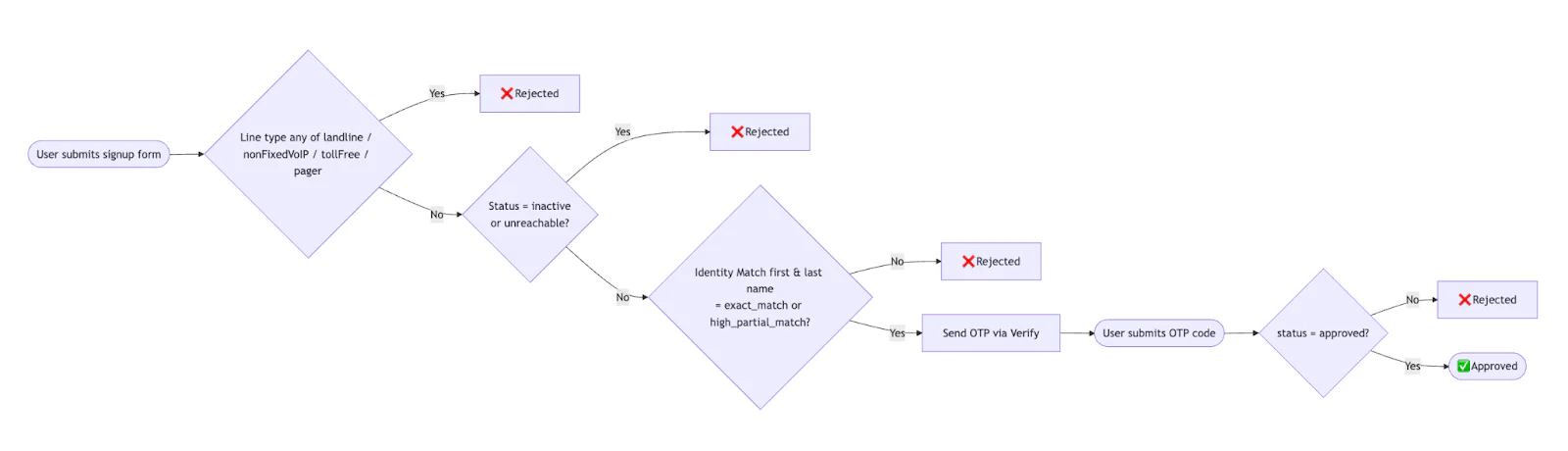
Process flow diagram for orchestrating onboarding intelligence
Step 1 - Check the line type
First, use the Lookup API line type intelligence package to make sure we're dealing with a mobile number. The code explicitly filters out landlines, nonfixed VoIP, toll free, (and pagers for fun) but you can customize this easily. Learn more about potential line types the API can return in the documentation.
Step 2 - [Optional] Check the line status
Then make sure the line is reachable. Use the Lookup API line status package to filter out inactive and unreachable numbers. Note - this is commented out by default in the code below since it is in Private Beta and requires an extra step to get access. To request access for Lookup Line Status, submit this form.
Step 3 - Match the name to the phone number
In the last of our background checks, use the Lookup API Identity Match package to verify that the submitted name matches the phone number. Identity Match compares user-supplied data against authoritative sources for a zero-knowledge result, in other words a way to verify the data’s accuracy without revealing the underlying data. Check the individual firstNameMatch and lastNameMatch fields directly and require each to be either exact_match or high_partial_match. This allows common variations like nicknames or middle names used as a first name, while still rejecting mismatches. Any other result (a no_match, partial_match, or null) will reject the request.
You can change these requirements to fit your business logic or reduce false negatives. Learn more about Identity Match field values in the documentation.
Step 4 - Phone verification
If all of the lookup steps pass, the user will receive an OTP and complete a standard phone verification flow.
To implement all four steps, copy the following code into a new file called index.js:
Then create a new file called views/index.ejs where we'll render a very basic UI to collect a phone number, first name, and last name:
Run and test the code
Save your files and run the project on your terminal with the following command:
node index.jsOpen http://localhost:3000 and test it out with your personal mobile number. You should see logs like:
You can also test with a toll free or VoIP number like +17739857836 and you'll see an error with LINE_TYPE_BLOCKED. Or use your real phone number but with a different name and see Identity Match fail. Testing all possible outcomes of line status and identity match is a little tricker, so we recommend using test credentials and magic numbers.
Pricing considerations and next steps
One of the reasons this is 4 different API calls is that we want to be considerate of price. Line Type Intelligence and Line Status are the cheapest Lookup packages, while Identity Match and Verify are more expensive. Learn more about Lookup pricing (varies by country) and rearrange the steps to fit your use case.
Bundling Lookup and Verify is a great way to filter out unwanted bots, fake accounts, and reduce sign up fraud. It also allows you to validate real users seamlessly. For more information, check out:
I can't wait to see what you build and secure.



Related Resources
Twilio Docs
From APIs to SDKs to sample apps
API reference documentation, SDKs, helper libraries, quickstarts, and tutorials for your language and platform.
Resource Center
The latest ebooks, industry reports, and webinars
Learn from customer engagement experts to improve your own communication.
Ahoy
Twilio's developer community hub
Best practices, code samples, and inspiration to build communications and digital engagement experiences.