Avoid Sending SMS to Landlines in Rust with Twilio's Lookup v2 API
Time to read:
April 22, 2026
Written by
Reviewed by
AI generated summary
- Filter out landline numbers before sending SMS to avoid errors.
- Set up a Rust project and use Twilio's Lookup v2 API to verify phone number types.
- Prevent sending undeliverable messages by using Twilio credentials.
This summary was generated by AI.
Avoid Sending SMS to Landlines with the Lookup v2 API and Rust
You have a super-successful Rust-powered web app, which you've recently added SMS notification support to. You're excited to share the new functionality with your users and push it to production.
Unfortunately, as your application starts notifying users with your beautifully crafted text messages, you start receiving intermittent errors, saying:
Message Delivery - Landline or unreachable carrier.
Shortly after this, you start getting intermittent support requests from users asking why they're not receiving notifications. What's going on?
It turns out that your application isn't filtering out landline (fixed line) numbers before sending SMS notifications to them.
So, what do you do? How can you catch undeliverable messages proactively? Better yet, how can you filter landlines from a list of phone numbers before sending messages to them — and avoid being charged for failed SMS?
This blog post will walk you through how to do so in Rust using Twilio's Lookup v2 API.
Prerequisites
You'll need the following to use the application:
- A Twilio account (free or paid). Create an account if you don't already have one.
- Rust and Cargo. Follow the installation docs if you haven't installed them yet.
- One or more phone numbers that you'd like to validate where at least one is a landline; ideally your own or those of people that you know
- Your preferred code editor or IDE, such as neovim or Visual Studio Code
- Some terminal experience is helpful, though not required
Create a new Rust project
The first thing to do is to bootstrap a new Rust binary project with Cargo, by running the following command:
Add the required crates
Like any good project larger than "hello world", the application will need to use a number of crates to simplify building it. There aren't many:
- anyhow: this crate provides a flexible concrete error type
- dotenv: this crate loads environment variables from a .env file, ideal for development and testing environments
- reqwest: this crate provides a powerful HTTP client
- rustlio: this crate simplifies interacting with Twilio's APIs in Rust applications
To add them to the project, run the following command:
Set the required environment variables
The next thing to do is to set two environment variables, required to make authenticated requests to Twilio's Lookup v2 API.
Set them in a file named .env and load them using the dotenv crate. In the project's top-level directory, create a new file named .env and paste the configuration below into the file.
Then, open the Twilio Console in your browser of choice, and copy the Account SID and Auth Token from the Account Info, as you can see in the screenshot below.
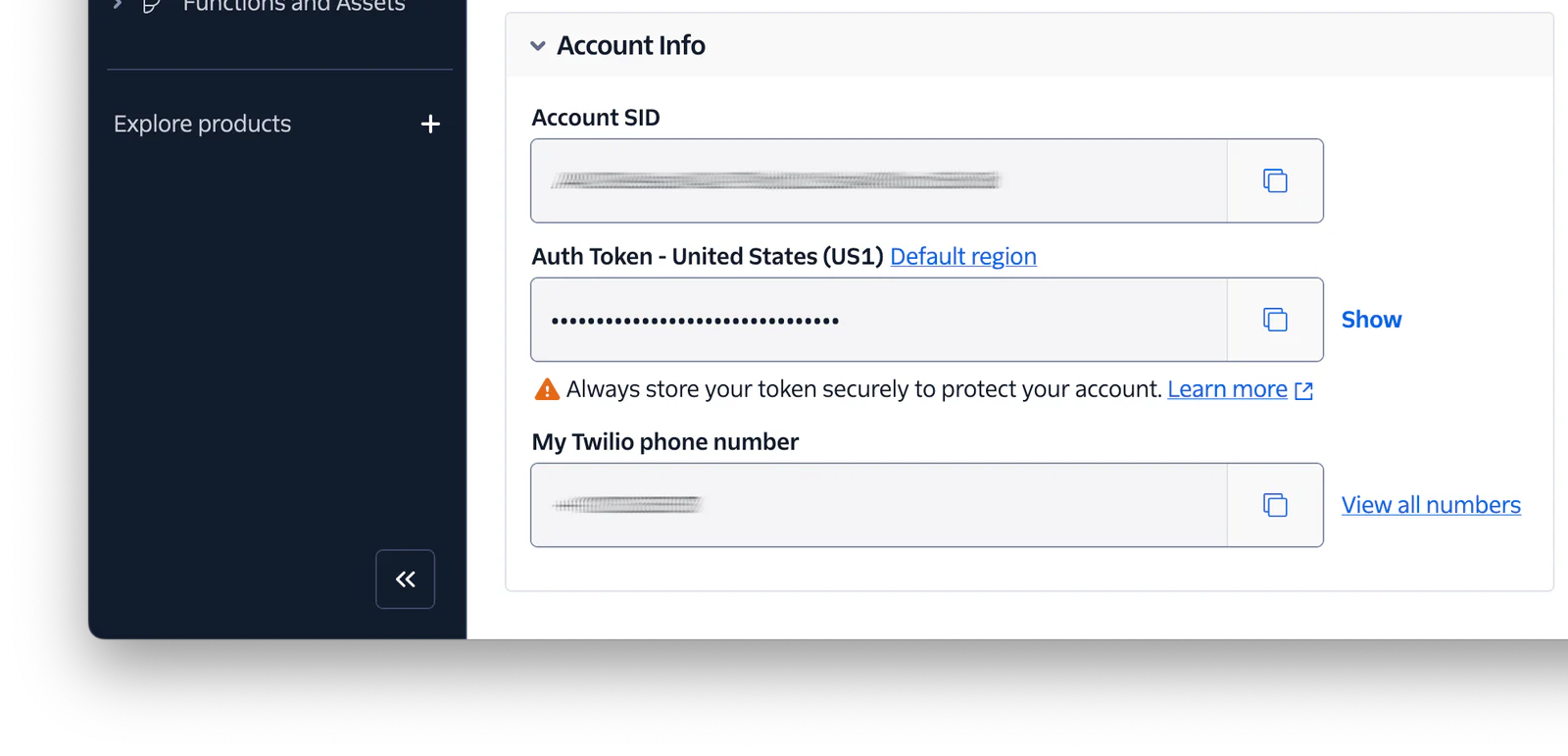
Now, set the copied values as the values of TWILIO_ACCOUNT_SID and TWILIO_AUTH_TOKEN respectively, in .env.
Update the core application
Now, it's time to write the core code, of which there isn't all that much. Replace the existing code in src/main.rs with the code in the block below.
Then, replace <YOUR PHONE NUMBERS> in the code above with a comma-separated list of string literals. These are the phone numbers in E.164 format that you want to check using the Lookup v2 API, e.g., "+614912345678", "+61402987654". Make sure that at least one is a landline.
The code starts off by loading your Twilio credentials (user and pass) from .env. It then instantiates a blocking Reqwest client to make the request to the Lookup API, and instantiates a Vector of phone numbers to check.
I deliberately used a blocking client in this tutorial as it's a simplistic example. In a production application, you'd likely use an asynchronous client for better responsiveness.
Now comes the fun part. An iterator is created from the phone numbers in phone_number_list with into_iter(). This is then filtered to only those numbers that are not landlines with the filter function. If you're not familiar with the function, it:
Creates an iterator which uses a closure to determine if an element should be yielded. Given an element the closure must return true or false. The returned iterator will yield only the elements for which the closure returns true.
So, for every phone number, the provided closure:
- Attempts to retrieve the phone number's details along with Line Type Intelligence information from the Lookup v2 API, by calling lookup_phone_data_with_line_type
- If details of the phone number are available, a fully populated PhoneNumber struct is returned, otherwise an empty/default one is returned
- If the returned phone number's line type is set to "landline" it's filtered from the returned iterator
The iterator returned from filter() is then transformed into a Vector with collect(). Finally, the remaining phone numbers are then printed to the terminal.
Test that it works as expected
Now that the code's written, it's time to test that it works as expected. To do that, run it with the following command.
After the code compiles and executes, you should see output, similar to the following, printed to the terminal.
That's how to avoid sending SMS to landlines with Twilio's Lookup v2 API and Rust
Thanks to the power of Rust's standard library and Twilio's Lookup v2 API, you can avoid sending SMS to landlines in your Rust applications. Now, you can avoid being charged for failed SMS and give your users an all-round better experience.
Want to go further
If you'd like to know more about how you can use Rust with Twilio, check out the following tutorials:
- Send an SMS with Rust in 30 Seconds
- How to Send an MMS With Rust
- How to Implement OTP Authentication in Rust with Twilio
- How to Create WhatsApp Voice Transcripts with Rust
Matthew Setter is the PHP, Go, and Rust editor on the Twilio Voices team, and a developer in each of these languages. He’s also the author of Mezzio Essentials and Deploy with Docker Compose. You can find him at msetter[at]twilio.com, and on LinkedIn and GitHub.
Telephone icon was created by Freepik on Flaticon, and the extra-cute Ferris is from rustacean.net.

Related Resources
Twilio Docs
From APIs to SDKs to sample apps
API reference documentation, SDKs, helper libraries, quickstarts, and tutorials for your language and platform.
Resource Center
The latest ebooks, industry reports, and webinars
Learn from customer engagement experts to improve your own communication.
Ahoy
Twilio's developer community hub
Best practices, code samples, and inspiration to build communications and digital engagement experiences.