Build a Proxy to Connect a Call Between Two Twilio Accounts via SIP
Time to read:
January 26, 2026
Written by
Reviewed by
AI generated summary
- Use a SIP proxy server for calls between Twilio accounts to avoid public network charges.
- Kamailio SIP Server Project and Terraform help quickly set up a working SIP proxy on AWS.
- Customize the SIP proxy for production with scalability, security, and monitoring features.
This summary was generated by AI.
If you have returned to this page after reading the post referenced above, you likely need to connect calls between two Twilio accounts using SIP and not using Application Connect. This may be due to a technical reason, or one of the owners of the Twilio Accounts does not want to use Application Connect. With this solution, customers will be able to send calls via SIP from a source Twilio account to a destination Twilio account. The destination Twilio account needs to make configuration changes (IP ACL or credentials) to be able to accept these SIP calls.
Twilio recommends that customers who have this specific need build their own SIP proxy server. Understandably, “go-build-your-own-proxy” may not be the ideal path for many – so to provide a better answer, I put together a working example of a SIP proxy server that connects calls between two Twilio accounts using the open source Kamailio SIP Server Project.
The example allows you to quickly spin up resources in AWS via Terraform and prove that this works. You then have a foundation from which to build your own production solution.
SIP vs. PSTN for Twilio to Twilio calls
Why not transfer using good old phone numbers (PSTN)? Yes, it is certainly possible and straightforward to dial between Twilio accounts using the PSTN and two phone numbers, however, you will be charged as if the call transited the public telephone network, thereby carrying higher charges.
However, SIP is an accepted method for enterprise telecom systems, and, most importantly, SIP allows the context of the call to be passed in the headers, while retaining the same high quality as any other call on Twilio. Context is key to building the best user experiences.
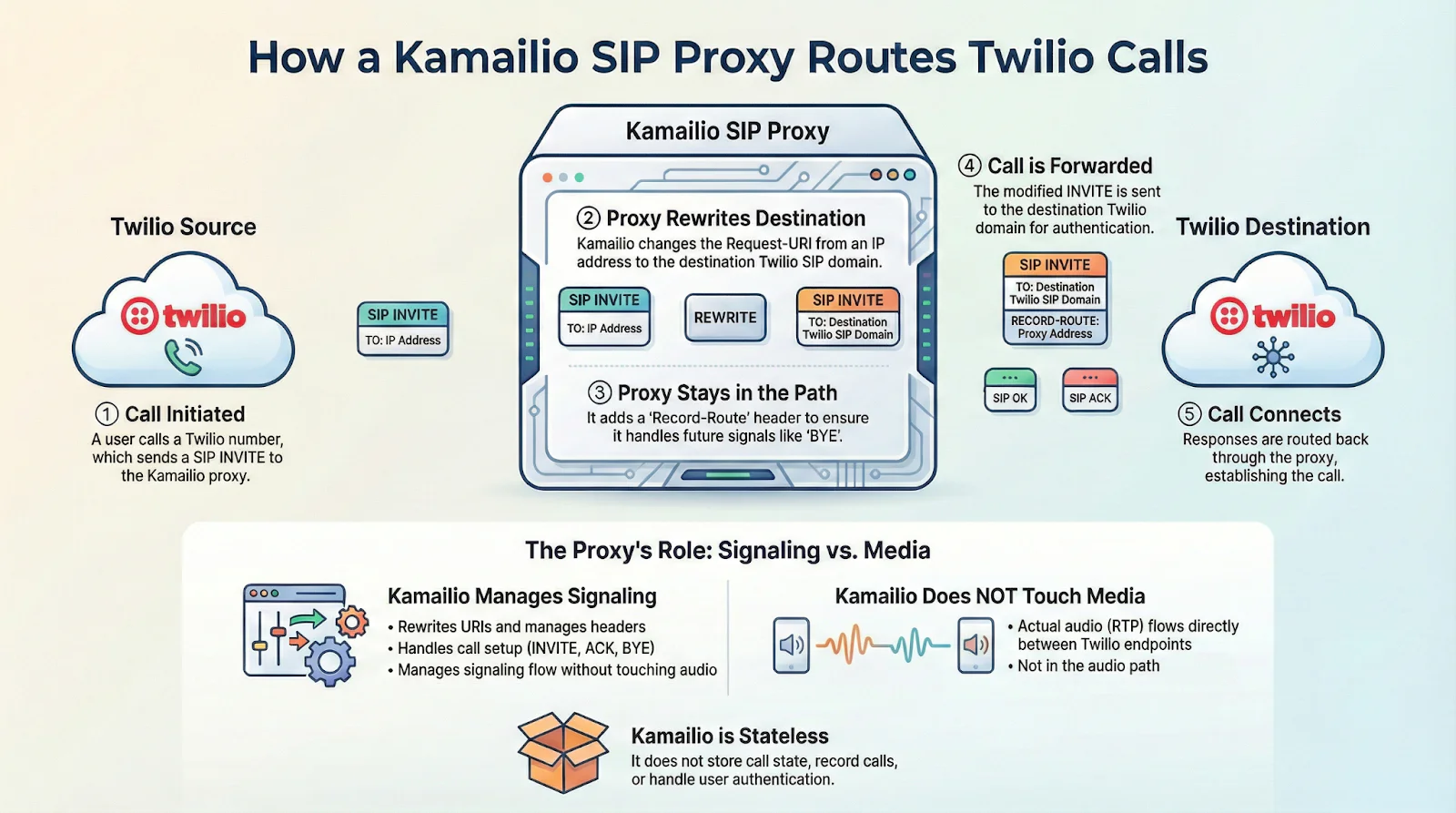
Here’s a diagram of the architecture I’ll be helping you build:
Installation and demo video
Rather watch me install and build the demo? Here you go!
Prerequisites
This is not a beginner level build! You should have some knowledge of Twilio, AWS, terraform, SIP, and programming before continuing.
- Twilio Account. If you don’t yet have one, you can sign up for a free account here.
- A voice capable phone number provisioned in your Twilio Account. You can learn more here.
- AWS Account with permissions to provision needed resources. You can sign up for an account here.
- AWS CLI installed with AWS credentials configured.
- Terraform installed. You can find instructions here.
Let’s build it!
1. Download the code for this application
Download the code from this repo, and then open up the folder in your preferred development environment.
The README.md file of the repo has extensive instructions, so this blog post covers the high-level steps. Refer to the installation video and the repo for more details.
2. Installation steps
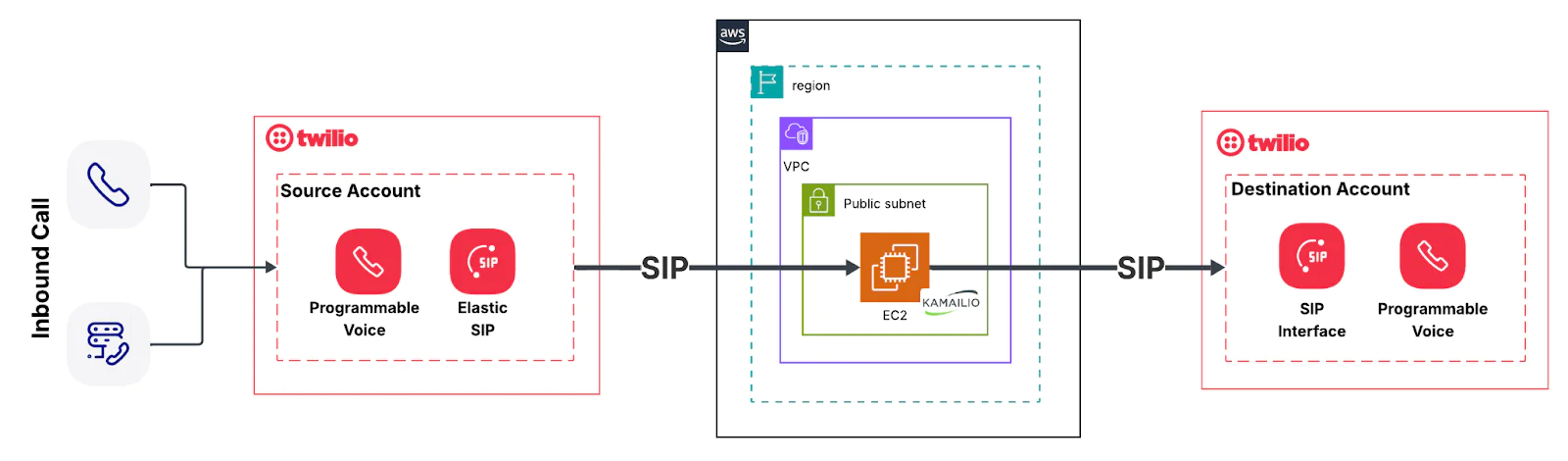
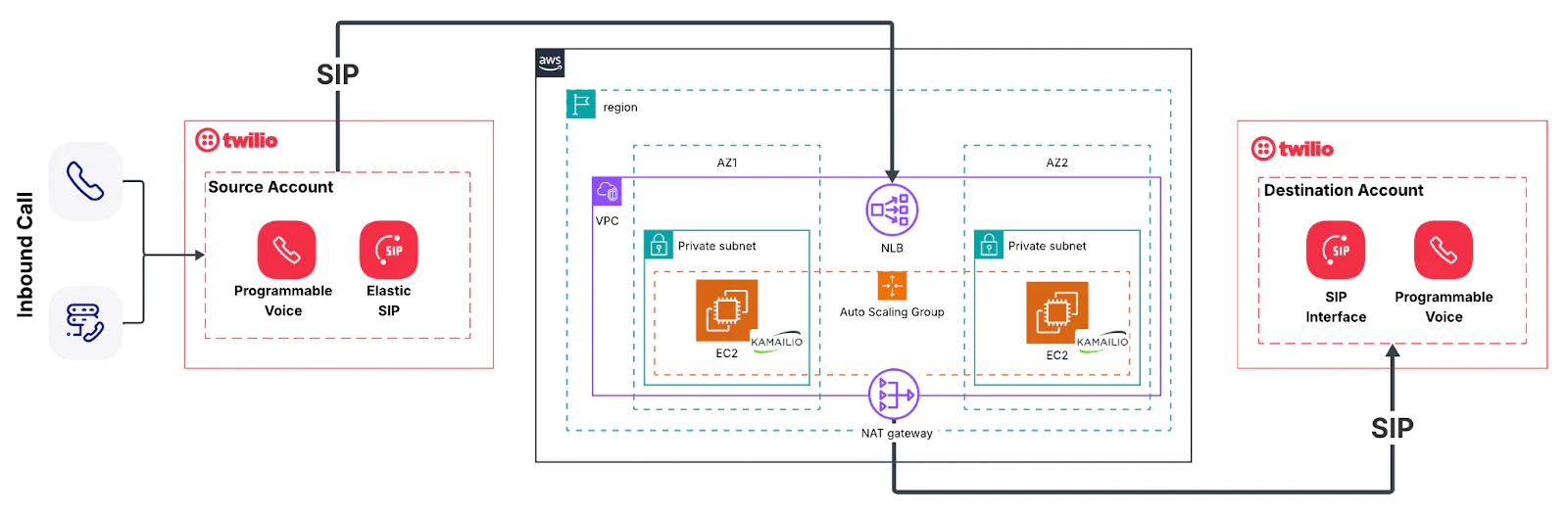
You have two installation options. Option one installs on a single EC2 instance and is useful for a quick POC. Option two uses a network load balancer with autoscaling and NAT Gateway. This option is closer to a production solution that you can build.
Here are high-level architecture diagrams:
Option 1: Single Instance
Option 2: Network Load Balancer with Autoscaling and NAT Gateway
The best way to begin is to hop to the Quick Start of my Readme. Here’s an overview of the steps you’ll take to deploy the proof of concept.
- Select
single-ec2orload-balanced. - Copy the
*/terraform/terraform.tfvars.exampleand rename the copy toterraform.tfvars - Edit
terraform.tfvarsby adding your local aws profile and the sip domain URI of the sip domain in your Twilio destination account (the account you are calling via SIP). - Run
terraform init,terraform plan,terraform apply, to deploy all of the resources in AWS. - Configure your Twilio source account to send a call via SIP to the new proxy.
- Configure your Twilio destination account to receive the call from the proxy.
3. Build and test
The README file contains specifics on building and testing your application, so be sure to review. From a high level, the application uses Kamailio, which is open source and able to be customized to meet your needs.
For testing purposes, the Twilio call logs are going to give you details, including pcaps, from both the source and destination Twilio accounts.
AWS has many alerting and monitoring patterns (Cloudwatch, Eventbridge) to keep track of your deployed resources. To troubleshoot live, you can connect directly to EC2 instances.
4. Get Production Ready
Congrats! You’ve now built the proof of concept of a SIP app to call between Twilio accounts. But now that you have a working SIP proxy server, you need to customize the solution to meet your enterprise production requirements. Consider the following:
- Do you have the ability to scale to meet potential demand?
- Are your communications secure? TLS? Credentials? (See our Twilio SIP Security Best Practices here)
- Have you considered fault tolerance and failover strategies?
- Do you have proper monitoring and alerting in place?
Conclusion
Twilio Application Connect is the best way to connect calls between two Twilio accounts. But if Twilio Application Connect does not meet your requirements, you can instead deploy a SIP Proxy Server.
The repo linked from this blog post gives you a starting point to create a POC and that points the way for you to build your own SIP proxy server solution. We’d love to hear where you are using this – and we can’t wait to call what you build!
Dan Bartlett has been building web applications since the first dotcom wave. The core principles from those days remain the same but these days you can build cooler things faster. He can be reached at dbartlett [at] twilio.com.


Related Resources
Twilio Docs
From APIs to SDKs to sample apps
API reference documentation, SDKs, helper libraries, quickstarts, and tutorials for your language and platform.
Resource Center
The latest ebooks, industry reports, and webinars
Learn from customer engagement experts to improve your own communication.
Ahoy
Twilio's developer community hub
Best practices, code samples, and inspiration to build communications and digital engagement experiences.