Generating Synthetic Call Data to Test Twilio Voice and Conversational Intelligence and Segment Integration
Time to read:
December 10, 2025
Written by
Reviewed by
AI generated summary
- Generate PII-free synthetic call data for quick, cost-effective Twilio Voice app testing.
- Validate Language Operators, stress-test webhooks, and verify end-to-end data flows without real customer data.
- Use AI-powered synthetic agents to create realistic phone conversations for comprehensive pipeline testing.
This summary was generated by AI.
I built a system where AI-powered customers and agents have realistic phone conversations—complete with recordings, transcripts, and Conversational Intelligence analytics. No real customer data, no PII concerns, just a fast way to validate your entire Twilio Voice pipeline from conference creation to Segment CDP.
This setup is perfect for testing new Language Operators, stress-testing webhooks, or validating end-to-end flows without burning expensive, single-threaded human QA bandwidth. In this post, I’ll show you how you can generate synthetic call data to test your Twilio Voice apps and Conversational Intelligence and Segment integrations.
The mission: generate high-quality, PII-free test data, quickly and at low cost using synthetic agents
You've built a Twilio Voice application with all the best practices. Conference webhooks triggering downstream workflows. Conversational Intelligence Language Operators analyzing sentiment. Event Streams piping data to Segment. Everything's architected perfectly.
But how do you test it?
You can't use real customer calls—that's PII you don't want flowing through your dev environment. You could manually make test calls, but that's single-threaded, time-consuming (and boring). You need volume to validate things like:
- "Do my new Language Operators actually detect what I think they detect?"
- "Are call completion events properly updating Segment profiles?"
- "Will my webhook infrastructure hold up under 100 concurrent calls?"
- "Does the entire pipeline—from TwiML to Segment to my data warehouse—work end-to-end?"
What you need is a method to generate realistic call data on demand, without any real PII involved.So I built one.
Mission brief
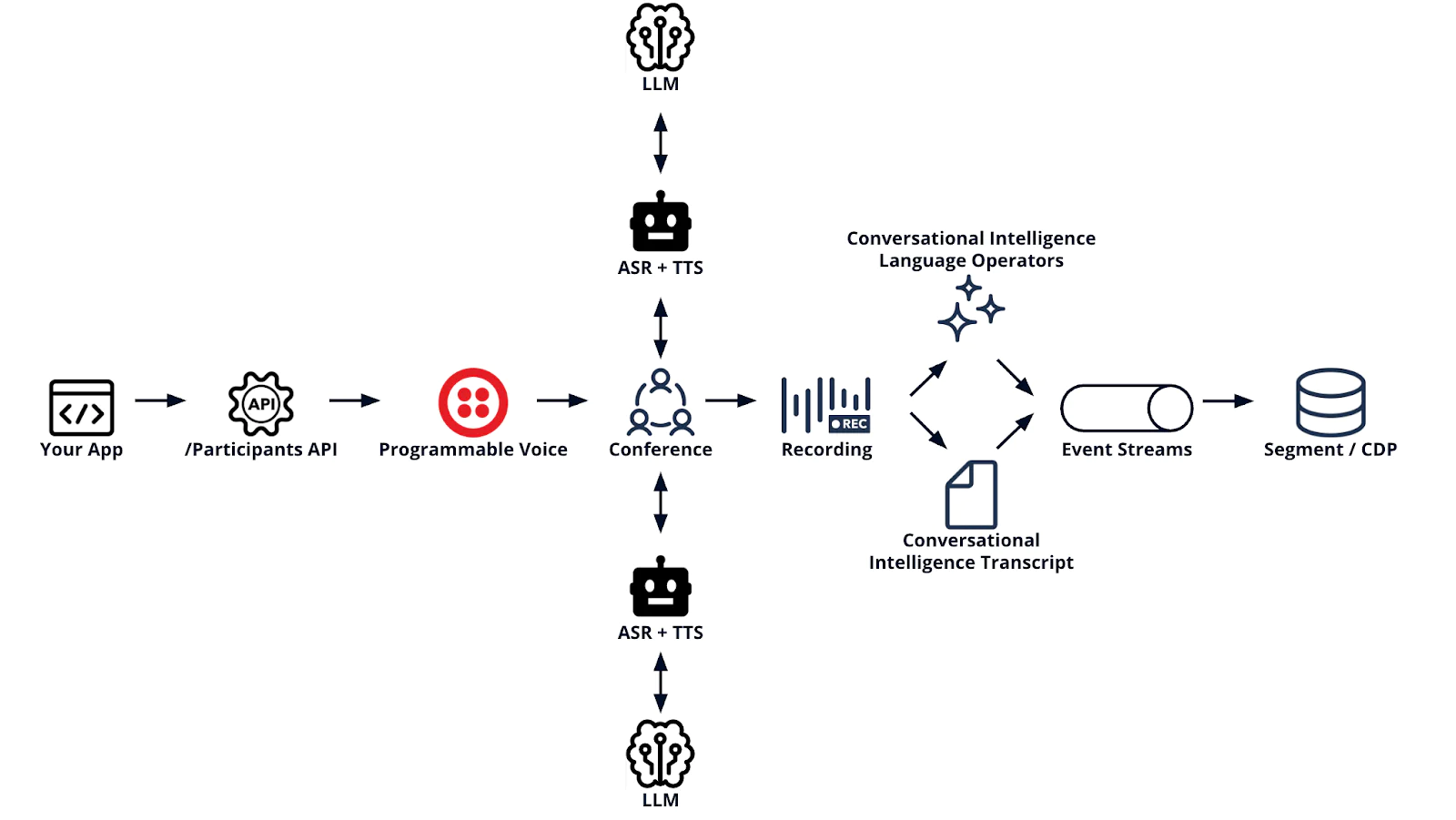
Here's what this system does:
- Generates realistic, yet cost-effective phone conversations using LLM-powered customers and agents with distinct personas
- Creates actual Twilio conferences with recordings, transcripts, and Conversational Intelligence outputs
- Produces zero real PII (all customer data is fictional from JSON files)
- Validates your entire pipeline from conference creation → Conversational Intelligence → Event Streams → Segment CDP
- Scales to generate hundreds of calls for stress testing
Think of it as a synthetic data generator for voice applications. "Synthetic" because, you know, the participants are artificial. Like Ash from Alien, just less murderous.
Prerequisites
Before you can build your own synthetic call data factory, you’ll set up a few accounts and configure a few services. You’ll need:
- Node.js version 20.0.0 or newer
- A Twilio Account – if you don’t have one yet, you can sign up for free here.
- Your Account SID and Auth token from the Console
- A Sync Service and Service ID (You can find my quickstart guide here)
- A Segment write key
- Create a new source and find it using this guide
- A new TwiML App (we’ll create this in the Get started section, below)
- Two or more Twilio phone numbers with voice capability. You can see how to search for and purchase phone numbers here
- The Twilio CLI installed
- An OpenAI Account – you can sign up here.
And with that, let me walk you through the application and the setup.
Use case 1: Testing new Language Operators
You just spent valuable time crafting the perfect Language Operators. You want them to detect escalation triggers, extract PII properly, and classify calls correctly. But manually making 50 test calls to validate is a nightmare. What if instead you make robots do it? Generate 50 synthetic calls with known scenarios (frustrated customers, billing issues, shipping delays) and validate that:
- Operators detect escalation phrases
- PII redaction works (customer names, phone numbers, addresses)
- Sentiment analysis matches expected outcomes
- Classifications are accurate
- Results appear in Segment profiles via Event Streams
No real customer PII. No manual calling. Just data.
Use case 2: Validating end-to-end pipeline changes
You've refactored your conference webhook. Or updated your Event Streams sink configuration. Or modified how call data flows to Segment. You need to verify the entire pipeline works, but you're not about to test this with production customer calls. Solution: Run synthetic calls through your pipeline and validate each hop:
Check that:
- Conferences create successfully
- Both participants join and have conversations
- Recordings are captured
- Conversational Intelligence transcribes and analyzes
- Event Streams delivers to Segment
- Segment profiles update with call data
- Your downstream systems receive events
All without touching real customer data.
Use case 3: Stress testing your webhook infrastructure
You've got a shiny new Twilio Function handling conference status webhooks. It's beautifully architected with retry logic and circuit breakers. But will it handle 100 concurrent conferences? 500? Solution: Generate bulk synthetic calls to validate performance:
You'll quickly discover if your webhook can handle scale, or if you need to optimize before production traffic hits.
The synthetic assembly line
Here's how the pieces fit together:
1. The Persona Files 📋
Two JSON files define your synthetic humans: customers.json - preloaded with 10 fictional customers with distinct demeanors:
agents.json - 10 fictional support agents with varying competence:
By default, the system randomly pairs customers with agents (no intelligent matching—we want diverse scenarios).
Sometimes you get Lucy (calm, billing issue) paired with Sarah (expert, helpful). Sometimes you get George (extremely frustrated) paired with Mark (indifferent, medium competence).That's realistic customer service data. 🔥
If you actually want intelligent matching, you can enable it.
2. The Conference orchestrator
When you run node src/main.js, the orchestrator:
- Loads customer and agent personas
- Randomly selects a pairing
- Creates a real Twilio conference
- Adds the agent participant (AI-powered via TwiML Application)
- Adds the customer participant (also AI-powered)
- Lets them talk for 10-20 conversational turns
This isn't simulated—these are real Twilio conferences with:
- Actual recordings you can listen to
- Real STT/TTS with Twilio's speech recognition
- Conversational Intelligence transcription with Language Operators
- Conference events flowing through Event Streams
3. The conversation engine
Each participant is powered by OpenAI GPT-4o with persona-specific system prompts. The conversation happens via three Twilio Functions:
/voice-handler- Routes participants when they join the conference- /transcribe - Uses <Gather> to capture speech via Twilio STT
- /respond - Sends transcript to OpenAI, speaks response with
<Say>
The key insight: conversation state lives in Twilio Sync, not URL parameters:
This gives you:
- No URL length limits
- Proper stateful conversations
- Rate limiting to prevent runaway OpenAI costs
4. The Conversational Intelligence layer
After calls complete, Conversational Intelligence automatically:
- Transcribes the full conversation
- Runs your Language Operators
- Extracts sentiment, PII, call classification
- Detects resolution and escalation
This is where you validate your operators work:
All without exposing real customer PII.
The turn-taking problem
(Or: Why Both Robots Talked at Once)
Early on, I hit a weird bug: both AI participants would speak simultaneously, or neither would speak. The transcripts were chaos.The issue? TwiML doesn't inherently know about conversational turn-taking.
Both participants were using <Gather>, which meant both were waiting for speech at the same time. Or both were speaking via <Say> at the same time.The solution: The agent speaks first, outside <Gather>:
This creates proper turn-taking:
- Agent speaks greeting (no <Gather>)
- Agent redirects to listen mode
- Customer starts in listen mode
- Both alternate: <Gather> → OpenAI → <Say> → repeat
The result? Natural conversations:
The cost math
The system enforces this via Twilio Sync rate limiting:
(This prevents surprise bills. You're welcome.)
The testing layer
Because I'm not a monster, this has tests:
Why so many? Because when you're testing end-to-end pipelines, you need confidence that:
- TwiML generation is correct (agent speaks first, customer listens)
- Persona loading works (finds the right agent/customer from JSON)
- OpenAI integration handles errors gracefully
- Sync state management doesn't leak conversations
- Rate limiting… limits
- Webhook signature validation rejects invalid requests
Test-Driven Development pays off when debugging webhook interactions at 2 AM. Example test pattern:
This validates the turn-taking logic: agent speaks first, doesn't listen.
Production-grade patterns
Because you're testing production best practices, this includes:
Retry logic with exponential backoff
AI API hiccup? The system retries with backoff. Like production should.
Rate limiting via Sync
Multiple concurrent conferences? Sync handles atomic counting.
Error handler webhook
When you test at scale, you'll hit edge cases. The error handler catches them all.These aren't just features—they're patterns you should use in production. The synthetic generator is essentially a reference implementation.
Get started
The repo is on GitHub: twilio-synthetic-call-data-generator
Quick start
Before you get started, you’ll need to create a new TwiML app. With the Twilio CLI installed, run:
And once you have a TwiML app, you’re ready to clone and generate synthetic data:
Common gotchas and debugging
You might hit a few issues getting it started. Here’s how to get past the common blockers.
Calls fail with 'busy' status
The persona JSON files contain example phone numbers. You must replace these with Twilio numbers you own. Twilio can only make calls from the numbers in your account.
You can search for and purchase Voice-enabled phone numbers here. Find them in the Active Phone Numbers section of your Twilio Console.
Tests fail on first deploy
Some tests require optional services like Conversational Intelligence. They'll skip gracefully if not configured. Core functionality works without them - but I do recommend you check them out!
What you'll get once it’s working…
If you get it running successfully, here’s what you’ll have:
- A real Twilio conference with recording
- Full conversation transcript via Conversational Intelligence (if you choose to check it out)
- Language Operator results (sentiment, PII, classification)
- Segment CDP events (if configured via Event Streams)
Validate your pipeline
- Check conference created successfully
- Listen to the recording
- Review Conversational Intelligence transcript
- Verify operator results match expectations
- Confirm Segment profile updated
- Validate downstream systems received events
Real-World validation workflow
Here's how I use this for testing:
Scenario: New language operator
Using synthetic data for testing gives you:
No PII concerns - All customer data is fictional Reproducible scenarios - Test the same customer/agent combo repeatedly Volume on demand - Generate 10 or 1,000 calls as needed Edge case testing - Create frustrated customers, difficult scenarios End-to-end validation - Test the entire pipeline without production risk Cost control - Rate limiting prevents runaway bills Fast iteration - Deploy → test → fix → repeat in minutes
Compare this to testing with real customer calls:
- Can't use in dev environments (PII compliance)
- Can't generate volume on demand
- Can't reproduce specific scenarios
- Wastes human QA time making manual calls
- Can't stress test without impacting real customers
What's next?
Curious how you'll use this? Some ideas:
- Validate Language Operators before rolling to production
- Stress-test webhook infrastructure with bulk synthetic calls
- Test Event Streams pipelines end-to-end without PII
- Train ML models on diverse synthetic call scenarios
- Benchmark Conversational Intelligence with known test cases
- QA new features without burning human time on manual calls
Or… just generate a thousand calls. Watch the magic happen. Listen to the recordings. Read the transcripts. Peep the updated profiles. Marvel at how George Pattinson escalates every. Single. Time. And – most importantly – let us know how it works for you!
Michael Carpenter (aka MC) is a telecom API lifer who has been making phones ring with software since 2001. As a Product Manager for Programmable Voice at Twilio, the Venn Diagram of his interests is the intersection of APIs, SIP, WebRTC, and mobile SDKs. He also knows a lot about Depeche Mode. Hit him up at mc (at) twilio.com or LinkedIn .
Related Posts

Related Resources
Twilio Docs
From APIs to SDKs to sample apps
API reference documentation, SDKs, helper libraries, quickstarts, and tutorials for your language and platform.
Resource Center
The latest ebooks, industry reports, and webinars
Learn from customer engagement experts to improve your own communication.
Ahoy
Twilio's developer community hub
Best practices, code samples, and inspiration to build communications and digital engagement experiences.