Handle Regular Tasks with Symfony's Scheduler Component

December 09, 2025
Written by
Joseph Udonsak
Contributor
Opinions expressed by Twilio contributors are their own
Reviewed by

Handle Regular Tasks with Symfony's Scheduler Component

When it comes to automating recurring tasks, one can be forgiven for thinking Cron jobs are as good as it gets. I recently had to automate a recurring task with a frequency of “it depends”, and while not impossible it was definitely challenging. So imagine my delight when I discovered the Symfony Scheduler component, which takes Cron jobs to a whole new level.

In this tutorial, I will show you how to use the Scheduler component to handle recurring tasks which don’t have straightforward frequencies.

What you will build

To demonstrate this, you will build a factory simulator. In terms of operations, the factory runs six days a week (Monday through Saturday). And, in addition to Sundays, the factory doesn’t run on Christmas Eve, Christmas Day, New Year’s Eve, and New Year's Day. On the days when the factory runs, it operates on 4-hour shifts starting at midnight with a 2-hour break between each shift.

To keep track of things, the factory requires reports to be generated and sent to management via email. In particular, three reports are required:

  1. A production report which is expected at the end of each day
  2. An incident report which is expected after every shift
  3. A compensation report which is expected on the last day of the month

Generating these reports is already tricky as it is, but with the added complexity of break times and down times (when the factory is closed) you can see why the process will be uncomfortable to handle with standard Cron jobs.

Prerequisites

To follow this tutorial, you will require the following.

Create a new project

Create a new Symfony project in a directory named scheduler_demo and change into the new project directory, using the following commands:

symfony new scheduler_demo --version="7.3.x-dev" --webapp
cd scheduler_demo

Next, add the project’s dependencies using the following commands:

composer require --dev maker doctrine/doctrine-fixtures-bundle 
composer require doctrine dragonmantank/cron-expression fakerphp/faker symfony/http-client symfony/mailer symfony/messenger symfony/scheduler serializer symfony/sendgrid-mailer symfony/doctrine-messenger yectep/phpspreadsheet-bundle

Docker won’t be used in this tutorial, so press the "x" key when prompted to create a compose .yaml file.

Here’s what each dependency is for:

  • Cron-expression: This is required by the Symfony scheduler to parse Cron expressions
  • Doctrine: This package will be used to handle database-related activity. The fixtures bundle is added as a dev dependency to simplify the process of seeding the database
  • Faker: This is used to generate random data. For demo purposes, it is added as a project dependency (more often than not, this is better as a dev dependency)
  • Mailer: This bundle will be used to send emails. It will be used in conjunction with the SendGrid Mailer Bridge component and the Symfony HTTP Client component
  • Maker: This bundle helps with the auto-generation of code associated with entities, messages, and schedules
  • Messenger: This adds Symfony’s messenger component to the project. This is used in your code (and by the scheduler) to dispatch messages to the message queue. For this tutorial, Doctrine will serve as the message transport hence the symfony/doctrine-messenger dependency
  • PHPSpreadsheetBundle: This bundle integrates your application with the PhpSpreadsheet productivity library, allowing you to create spreadsheets
  • Scheduler: This adds the scheduler component to your project. This component depends on Symfony’s Serializer which is also installed

Set up SendGrid API Key

As mentioned earlier, SendGrid will be used to handle emails. You will do this by making a request to the SendGrid API. However, the SendGrid API requires an API Key in the request header before it can be accepted. In this section, you will create a new key which can be used in the Symfony application. If you already have one, you can skip to the next section.

In your SendGrid console, click on the Create API Key button to create a new key. For security purposes, the key to be created will have restricted access. This limits the impact on your SendGrid account in the event that your key is leaked.

To do this, select the Restricted access option under API Key Permissions. In the Access Details section, select Full Access for Mail Send as shown below.
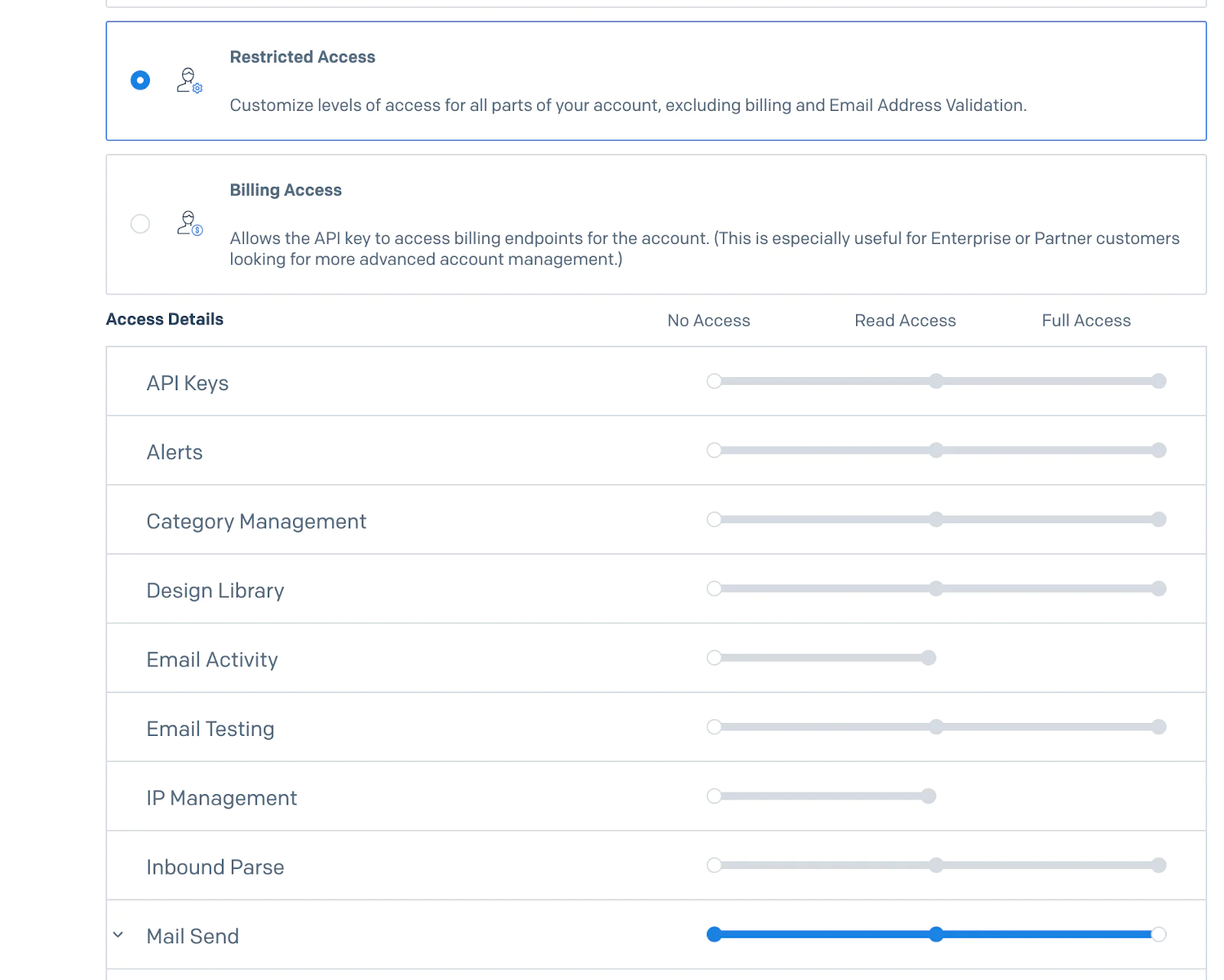
Screen showing customizable access settings for different account features with various permission levels.

Click the Create & View button in order to view your API Key.The next screen will show your API key.

For security reasons, it will only be shown once so make sure you copy it before clicking DONE.

Set the required environment variables

In the project's top-level folder, create a new file named .env.local.

Then, update the relevant values in .env.local as shown below.

DATABASE_URL="sqlite:///%kernel.project_dir%/var/data.db"
MAILER_DSN=sendgrid+api://<YOUR_SENDGRID_API_KEY>@default
SENDER_EMAIL=<YOUR_SENDGRID_EMAIL>
RECIPIENT_EMAIL=<RECIPIENT_EMAIL>

For ease of use, this tutorial uses SQLite as the database engine. However you can use any engine of your choice by using an appropriate format in the DATABASE_URLvariable.

In the MAILER_DSN variable, replace the YOUR_SENDGRID_API_KEY placeholder with the SendGrid API key you generated earlier. Next, replace the SENDER_EMAIL placeholder value with an email that matches a verified Sender Identity in your account . This is the email address that will show up in the “from section of the email. Next, replace the RECIPIENT_EMAIL placeholder with the email address you want the emails sent to.

Depending on your use case, setting the recipient email as an environment variable may not be a suitable approach as this value. However, it works in this scenario as the emails are only sent to a designated email address provided by management which doesn’t change. Also, since it is an environment variable, you can use different emails in development and production

Next, set up the database using the following command.

symfony console doctrine:database:create

Set up the Messenger transports

By default, messages are handled as soon as they are dispatched. Depending on the volume of messages generated, this could pose a bottleneck to the system. An easy way of handling this is to queue the messages to a transport and handle them in the background via a worker.

However, with this system you may encounter issues tracking messages that weren’t handled successfully. This is because once a message has been handled, it is removed from the queue whether it was successful or not. You can manage this by also creating a transport where failed messages can be sent to for subsequent investigation and resolution.

Set up an asynchronous transport and a failure transport by updating config/packages/messenger.yaml to match the configuration shown below.

framework:
    messenger:
        failure_transport: failed
        transports:
            async: 
                dsn: '%env(MESSENGER_TRANSPORT_DSN)%'
            failed: 'doctrine://default?queue_name=failed'

Set up your transports using the following command.

symfony console messenger:setup-transports

Finish the project setup

Finally, create the folders where reports will be saved to. In the project's top-level folder, create a new folder named reports, and in it three new folders named compensation, incident, and production.

Create a mailing service

Having set up the project, it’s time to build the features of the application - starting with a mailing service. In the src folder, create a new folder named Helper which will contain helper services the application will use - such as the mailing service. In the Helper folder, create a new folder named Mailing and in it a file named MailService.php with the following code in it.

<?php
namespace App\Helper\Mailing;
use Symfony\Component\DependencyInjection\Attribute\Autowire;
use Symfony\Component\Mailer\Exception\TransportExceptionInterface;
use Symfony\Component\Mailer\MailerInterface;
use Symfony\Component\Mime\Email;
use Symfony\Component\Mime\Part\DataPart;
use Symfony\Component\Mime\Part\File;
final readonly class MailService {
    public function __construct(
        private MailerInterface $mailer,
        #[Autowire('%env(resolve:SENDER_EMAIL)%')]
        private string $senderEmail,
        #[Autowire('%env(resolve:RECIPIENT_EMAIL)%')]
        private string $recipientEmail,
    ) {}
    public function sendMail(
        string $subject,
        string $message,
        string $attachmentPath,
        string $filename
    ): void {
        $email = new Email()
            ->from($this->senderEmail)
            ->to($this->recipientEmail)
            ->subject($subject)
            ->text($message)
            ->html($message)
            ->addPart(new DataPart(new File($attachmentPath, $filename)));
        $this->mailer->send($email);
    }
}

The MailService has three constructor arguments:

  1. The Symfony Mailer instance, which sends the mail
  2. The sender's email address, which is retrieved from your environment variables via the Autowire attribute
  3. The recipient's email address, which is retrieved from your environment variables via the Autowire attribute

This service has one function named sendMail() which takes the email subject and message content. This service also includes attachments in the email. To do this it requires the path to the attachment, and the name of the file. Using these, it creates a new Email object, which is sent via the mailer.

For simplicity, emails are in plaintext. Use Inky templates, if you would like to beautify your emails.

Create the entities

In the src/Entity folder, create a new file named ProductType.php and add the following code to it.

<?php
namespace App\Entity;
enum ProductType: string {
    case FOOD = 'Food';
    case BEVERAGE = 'Beverage';
    case TEXTILE = 'Textile';
    case CHEMICAL = 'Chemical';
}

Next, in the same directory, create another file named IncidentType.php and add the following code to it.

<?php
namespace App\Entity;
use Faker\Factory;
enum IncidentType: string {
    case BURN = 'Burn';
    case HARMFUL_EXPOSURE = 'Harmful exposure';
    case MACHINE_FAULT = 'Machine Fault';
    case NEGLIGENT_MANAGEMENT = 'Negligent management';
    public function getCompensationDue(): float {
        $faker = Factory::create();
        $fine = match ($this) {
            self::HARMFUL_EXPOSURE => 100000,
            self::MACHINE_FAULT => 10000,
            self::BURN => 50000,
            self::NEGLIGENT_MANAGEMENT => 1000000,
        };
        return $faker->randomFloat(null, 0.6, 4) * $fine;
    }
}

Next, create an entity to represent a worker using the following command.

symfony console make:entity Worker

Press Enter to skip adding fields via the command line.

Open the newly created src/Entity/Worker.php file and update its code to match the following.

<?php
namespace App\Entity;
use App\Repository\WorkerRepository;
use Doctrine\ORM\Mapping as ORM;
#[ORM\Entity(repositoryClass: WorkerRepository::class)]
class Worker {
    #[ORM\Id]
    #[ORM\GeneratedValue]
    #[ORM\Column]
    private ?int $id = null;
    public function __construct(
        #[ORM\Column]
        private string $name,
        #[ORM\Column]
        private int    $age,
    ) {
    }
    public function getId(): ?int {
        return $this->id;
    }
    public function getName(): string {
        return $this->name;
    }
    public function getAge(): int {
        return $this->age;
    }
}

Next, create an entity to represent a product using the following command.

symfony console make:entity Product

Press Enter to skip adding fields via the command line. Then, open the newly created src/Entity/Product.php file and update its code to match the following.

<?php
namespace App\Entity;
use App\Repository\ProductRepository;
use DateTimeImmutable;
use DateTimeInterface;
use Doctrine\DBAL\Types\Types;
use Doctrine\ORM\Mapping as ORM;
#[ORM\Entity(repositoryClass: ProductRepository::class)]
class Product {
    #[ORM\Id]
    #[ORM\GeneratedValue]
    #[ORM\Column]
    private ?int $id = null;
    #[ORM\Column(type: Types::DATETIME_IMMUTABLE)]
    private DateTimeInterface $createdOn;
    public function __construct(
        #[ORM\Column(enumType: ProductType::class)]
        private ProductType $type,
        #[ORM\Column]
        private int         $quantity,
    ) {
        $this->createdOn = new DateTimeImmutable;
    }
    public function createdOn(): ?DateTimeImmutable {
        return $this->createdOn;
    }
    public function getType(): ProductType {
        return $this->type;
    }
    public function getQuantity(): int {
        return $this->quantity;
    }
}

You also need to add a function to ProductRepository, which allows you to retrieve products for a given date. Open src/Repository/ProductRepository.php and update its code to match the following.

<?php
namespace App\Repository;
use App\Entity\Product;
use DateTimeInterface;
use Doctrine\Bundle\DoctrineBundle\Repository\ServiceEntityRepository;
use Doctrine\Persistence\ManagerRegistry;
/**
 * @extends ServiceEntityRepository<Product>
 */
class ProductRepository extends ServiceEntityRepository {
    public function __construct(ManagerRegistry $registry) {
        parent::__construct($registry, Product::class);
    }
    public function getProductionForDate(DateTimeInterface $date): array {
        return $this->createQueryBuilder('product')
                    ->where('product.createdOn > :date')
                    ->setParameter('date', $date)
                    ->getQuery()
                    ->getResult();
    }
}

Next, create an entity to represent an incident using the following command.

symfony console make:entity Incident

Press Enter to skip adding fields via the command line.

Open the newly created src/Entity/Incident.php file and update its code to match the following.

<?php
namespace App\Entity;
use App\Repository\IncidentRepository;
use DateTimeImmutable;
use DateTimeInterface;
use Doctrine\DBAL\Types\Types;
use Doctrine\ORM\Mapping as ORM;
#[ORM\Entity(repositoryClass: IncidentRepository::class)]
class Incident {
    #[ORM\Id]
    #[ORM\GeneratedValue]
    #[ORM\Column]
    private ?int $id = null;
    #[ORM\Column(type: Types::DATETIME_IMMUTABLE)]
    private DateTimeInterface $occurredAt;
    #[ORM\ManyToOne(inversedBy: 'incidents')]
    private ?Compensation $compensation = null;
    #[ORM\Column]
    private float $costToCompany;
    public function __construct(
        #[ORM\Column(enumType: IncidentType::class)]
        private IncidentType $type,
        #[ORM\ManyToOne]
        #[ORM\JoinColumn(nullable: false)]
        private Worker       $affectedWorker,
    ) {
        $this->occurredAt = new DateTimeImmutable();
        $this->costToCompany = $this->type->getCompensationDue();
    }
    public function occurredAt(): DateTimeImmutable {
        return $this->occurredAt;
    }
    public function hasBeenCompensated(): bool {
        return is_null($this->compensation);
    }
    public function getType(): IncidentType {
        return $this->type;
    }
    public function getDueCompensation(): float {
        return $this->costToCompany;
    }
    public function getAffectedWorker(): Worker {
        return $this->affectedWorker;
    }
    public function setCompensation(Compensation $compensation): void {
        $this->compensation = $compensation;
    }
}

You also need some repository functions for the incident entity. Open src/Repository/IncidentRepository.php and update its code to match the following.

<?php
namespace App\Repository;
use App\Entity\Incident;
use DateTimeInterface;
use Doctrine\Bundle\DoctrineBundle\Repository\ServiceEntityRepository;
use Doctrine\Persistence\ManagerRegistry;
/**
 * @extends ServiceEntityRepository<Incident>
 */
class IncidentRepository extends ServiceEntityRepository {
    public function __construct(ManagerRegistry $registry) {
        parent::__construct($registry, Incident::class);
    }
    public function getUncompensatedIncidents(): array {
        return $this->findBy(['compensation' => null]);
    }
    public function getIncidentsBetween(DateTimeInterface $start, DateTimeInterface $end): array {
        return $this->createQueryBuilder('incident')
                    ->where('incident.occurredAt BETWEEN :start AND :end')
                    ->setParameter('start', $start)
                    ->setParameter('end', $end)
                    ->getQuery()
                    ->getResult();
    }
}

The getUncompensatedIncidents() function is used to retrieve the list of incidents for which the victim is yet to be compensated while the getIncidentsBetween() function takes two DateTime objects and returns all the incidents that occurred within that period.

Next, create an entity to represent the compensation to a worker for an incident using the following command.

symfony console make:entity Compensation

Press Enter to skip adding fields via the command line. Then, open the newly created src/Entity/Compensation.php file and update its code to match the following.

<?php
namespace App\Entity;
use App\Repository\CompensationRepository;
use Doctrine\Common\Collections\ArrayCollection;
use Doctrine\Common\Collections\Collection;
use Doctrine\ORM\Mapping as ORM;
#[ORM\Entity(repositoryClass: CompensationRepository::class)]
class Compensation {
    #[ORM\Id]
    #[ORM\GeneratedValue]
    #[ORM\Column]
    private ?int $id = null;
    /**
     * @var Collection<int, Incident>
     */
    #[ORM\OneToMany(targetEntity: Incident::class, mappedBy: 'compensation')]
    private Collection $incidents;
    #[ORM\Column]
    private float $amount = 0;
    #[ORM\ManyToOne]
    private ?Worker $recipient = null;
    public function __construct() {
        $this->incidents = new ArrayCollection();
    }
    public function addIncident(Incident $incident): void {
        if (!$this->incidents->contains($incident)) {
            $this->incidents->add($incident);
            $incident->setCompensation($this);
            $this->amount += $incident->getDueCompensation();
            $this->recipient ??= $incident->getAffectedWorker();
        }
    }
    public function getAmount(): float {
        return $this->amount;
    }
    public function getNumberOfCompensatedEvents(): int {
        return $this->incidents->count();
    }
    public function getRecipientName(): string {
        return $this->recipient?->getName() ?? '';
    }
}

Update the app fixture

Open src/DataFixtures/AppFixtures.php and update the code to match the following.

<?php
namespace App\DataFixtures;
use App\Entity\Worker;
use Doctrine\Bundle\FixturesBundle\Fixture;
use Doctrine\Persistence\ObjectManager;
use Faker\Factory;
class AppFixtures extends Fixture
{
    public function load(ObjectManager $manager): void {
        $faker = Factory::create();
        for ($i = 0; $i < 100; $i++) {
            $manager->persist(
                new Worker($faker->name(), $faker->biasedNumberBetween(18, 50))
            );
        }
        $manager->flush();
    }
}

Using this fixture, you will be able to seed your database with 100 new workers.

Set up the database

Having created your entities and done your initial configuration, it’s time to create your database and seed it with initial data. To do this, run the following commands:

symfony console doctrine:schema:update --force
symfony console doctrine:fixtures:load -n

Create the helpers

The next thing you will do is build some helper services, which will be used with generating reports as well as determining whether the factory is operational.In the src/Helper folder, create a new file named FactoryOperationsHelper.php and add the following code to it.

<?php
namespace App\Helper;
use DateTimeInterface;
final readonly class FactoryOperationsHelper {
    public static function isBreakTime(DateTimeInterface $time): bool {
        $hour = intval($time->format('h'));
        $isEarlyBreak = $hour >= 4 && $hour < 6;
        $isLateBreak = $hour >= 10 && $hour < 12;
        return $isEarlyBreak || $isLateBreak;
    }
    public static function isDownTime(DateTimeInterface $date): bool {
        if ($date->format('l') === 'Sunday') {
            return true;
        }
        $holidays = [
            '25/12',
            '26/12',
            '31/12',
            '01/01',
        ];
        return in_array($date->format('d/m'), $holidays);
    }
}

This service contains two static functions which are used to determine whether the factory is operational. isBreakTime() takes a DateTime and checks if the factory is on break at that time, while isDownTime() takes a DateTime instance and determines whether the factory is operational that day.

Create the report writers

Next, in the src/Helper folder, create a new folder named Reporting. Then, in the src/Helper/Reporting folder, create a new file named AbstractReportWriter.php and add the following code to it.

<?php
namespace App\Helper\Reporting;
use PhpOffice\PhpSpreadsheet\IOFactory;
use PhpOffice\PhpSpreadsheet\Spreadsheet;
use PhpOffice\PhpSpreadsheet\Style\Alignment;
use PhpOffice\PhpSpreadsheet\Style\Border;
use PhpOffice\PhpSpreadsheet\Style\Color;
use PhpOffice\PhpSpreadsheet\Style\Style;
use PhpOffice\PhpSpreadsheet\Worksheet\Worksheet;
abstract class AbstractReportWriter {
    const ACCOUNTING_FORMAT = '_("₦ "* #,##0.00_);_("₦"* \(#,##0.00\);_("₦"* "-"??_);_(@_)';
    const NUMBER_FORMAT     = '#,###';
    protected int $rowIndex = 1;
    private Spreadsheet $spreadsheet;
    public function __construct(private readonly string $saveLocation) {
        $this->spreadsheet = new Spreadsheet;
    }
    public abstract function write(array $data): string;
    protected function writeHeader(string $cell, string $value): void {
        $this->writeToCell($cell, $value);
        $this->getStyle($cell)->getFont()->setBold(true);
        $this->applyThinBorder($cell);
        $this->getStyle($cell)->getAlignment()->setHorizontal(Alignment::HORIZONTAL_CENTER);
    }
    protected function writeToCell(string $cell, string|int|float $value): void {
        $this->getActiveSheet()->setCellValue($cell, $value);
        $this->applyThinBorder($cell);
        $this->getStyle($cell)->getAlignment()->setHorizontal(Alignment::HORIZONTAL_CENTER);
    }
    protected function getActiveSheet(): Worksheet {
        return $this->spreadsheet->getActiveSheet();
    }
    protected function applyThinBorder(string $range): void {
        $this->getStyle($range)->applyFromArray(
            [
                'borders'   => [
                    'allBorders' => [
                        'borderStyle' => Border::BORDER_THIN,
                        'color'       => [
                            'argb' => Color::COLOR_BLACK,
                        ],
                    ],
                ],
                'alignment' => [
                    'horizontal' => Alignment::HORIZONTAL_JUSTIFY,
                ],
            ]
        );
    }
    private function getStyle(string $cell): Style {
        return $this->getActiveSheet()->getStyle($cell);
    }
    protected function applyAccountingFormat(string $cell): void {
        $this->getActiveSheet()
             ->getStyle($cell)
             ->getNumberFormat()
             ->setFormatCode(self::ACCOUNTING_FORMAT);
    }
    protected function applyNumberFormat(string $cell): void {
        $this->getActiveSheet()
             ->getStyle($cell)
             ->getNumberFormat()
             ->setFormatCode(self::NUMBER_FORMAT);
    }
    protected function save(string $name): string {
        $this->autosizeColumns();
        $writer = IOFactory::createWriter($this->spreadsheet, "Xlsx");
        $filePath = "$this->saveLocation/$name.xlsx";
        $writer->save($filePath);
        return $filePath;
    }
    private function autosizeColumns(): void {
        foreach ($this->spreadsheet->getWorksheetIterator() as $worksheet) {
            $this->spreadsheet->setActiveSheetIndex($this->spreadsheet->getIndex($worksheet));
            $sheet = $this->spreadsheet->getActiveSheet();
            $cellIterator = $sheet->getRowIterator()->current()->getCellIterator();
            $cellIterator->setIterateOnlyExistingCells(true);
            foreach ($cellIterator as $cell) {
                $sheet->getColumnDimension($cell->getColumn())->setAutoSize(true);
            }
        }
    }
}

This class serves as the base implementation for a report writer and holds all the functionality related to writing a report. It also contains an abstract function named write() which must be implemented by child classes. The constructor takes the location where the file should be saved. For each report you will write, you will extend the AbstractReportWriter and add the report-specific code in it.

Next, create a new file named CompensationReportWriter.php in the src/Helper/Reporting folder and add the following code to it.

<?php
namespace App\Helper\Reporting;
use App\Entity\Compensation;
use DateTimeImmutable;
use Symfony\Component\DependencyInjection\Attribute\Autowire;
final class CompensationReportWriter extends AbstractReportWriter {
    public function __construct(
        #[Autowire('%kernel.project_dir%/reports/compensation')]
        string $saveLocation
    ) {
        parent::__construct($saveLocation);
    }
    public function write(array $data): string {
        $this->writeReportHeader();
        $this->writeReportBody($data);
        return $this->save((new DateTimeImmutable)->format('F Y'));
    }
    private function writeReportHeader(): void {
        $this->writeHeader("A$this->rowIndex", "Compensated Worker");
        $this->writeHeader("B$this->rowIndex", "Number of incidents");
        $this->writeHeader("C$this->rowIndex", "Compensated Amount");
        $this->rowIndex++;
    }
    /**@param Compensation[] $data */
    private function writeReportBody(array $data): void {
        foreach ($data as $compensation) {
            $this->writeToCell("A$this->rowIndex", $compensation->getRecipientName());
            $this->writeToCell("B$this->rowIndex", $compensation->getNumberOfCompensatedEvents());
            $this->writeToCell("C$this->rowIndex", $compensation->getAmount());
            $this->applyAccountingFormat("C$this->rowIndex");
            $this->rowIndex++;
        }
    }
}

As explained earlier, this service extends the AbstractReportWriter class you created earlier. Using the Autowire attribute, the save location is specified in the service constructor. Using the functionality provided in the parent class, the appropriate cells are populated and formatted, and the resulting spreadsheet is saved using the month and year of creation as the file name.

Next, create a new file named IncidentReportWriter.php in the src/Helper/Reporting folder and add the following code to it.

<?php
namespace App\Helper\Reporting;
use App\Entity\Incident;
use DateTimeImmutable;
use Symfony\Component\DependencyInjection\Attribute\Autowire;
final class IncidentReportWriter extends AbstractReportWriter {
    public function __construct(
        #[Autowire('%kernel.project_dir%/reports/incident')]
        string $saveLocation
    ) {
        parent::__construct($saveLocation);
    }
    public function write(array $data): string {
        $this->writeReportHeader();
        $this->writeReportBody($data);
        return $this->save((new DateTimeImmutable)->format('d_m_Y_H'));
    }
    private function writeReportHeader(): void {
        $this->writeHeader("A$this->rowIndex", "Time");
        $this->writeHeader("B$this->rowIndex", "Incident");
        $this->writeHeader("C$this->rowIndex", "Affected Worker");
        $this->writeHeader("D$this->rowIndex", "Age");
        $this->writeHeader("E$this->rowIndex", "Cost to company");
        $this->rowIndex++;
    }
    /**@param Incident[] $data */
    private function writeReportBody(array $data): void {
        foreach ($data as $incident) {
            $this->writeToCell("A$this->rowIndex", $incident->occurredAt()->format('H:i'));
            $this->writeToCell("B$this->rowIndex", $incident->getType()->value);
            $this->writeToCell("C$this->rowIndex", $incident->getAffectedWorker()->getName());
            $this->writeToCell("D$this->rowIndex", $incident->getAffectedWorker()->getAge());
            $this->writeToCell("E$this->rowIndex", $incident->getDueCompensation());
            $this->applyAccountingFormat("E$this->rowIndex");
            $this->rowIndex++;
        }
    }
}

The process flow is the same as that of the CompensationReportWriter — autowire the save location in the constructor, overwrite the write() function, and populate the appropriate cells using the parent functions. Because this report is generated multiple times in the same day, the day and hour of generation is used as a filename.

The last report writer you need is for the production report. Create a new file named ProductionReportWriter.php in the src/Helper/Reporting folder and add the following code to it.

<?php
namespace App\Helper\Reporting;
use App\Entity\Product;
use DateTimeImmutable;
use Symfony\Component\DependencyInjection\Attribute\Autowire;
final class ProductionReportWriter extends AbstractReportWriter {
    public function __construct(
        #[Autowire('%kernel.project_dir%/reports/production')]
        string $saveLocation
    ) {
        parent::__construct($saveLocation);
    }
    public function write(array $data): string {
        $this->writeReportHeader();
        $this->writeReportBody($data);
        return $this->save((new DateTimeImmutable)->format('d_m_Y'));
    }
    private function writeReportHeader(): void {
        $this->writeHeader("A$this->rowIndex", "Time");
        $this->writeHeader("B$this->rowIndex", "Product");
        $this->writeHeader("C$this->rowIndex", "Quantity");
        $this->rowIndex++;
    }
    /**@param Product[] $data */
    private function writeReportBody(array $data): void {
        foreach ($data as $product) {
            $this->writeToCell("A$this->rowIndex", $product->createdOn()->format('H:i'));
            $this->writeToCell("B$this->rowIndex", $product->getType()->value);
            $this->writeToCell("C$this->rowIndex", $product->getQuantity());
            $this->applyNumberFormat("C$this->rowIndex");
            $this->rowIndex++;
        }
    }
}

Create messages

The next step is to create the messages to simulate production, which will be dispatched repeatedly by the scheduler. To do that, use the following command.

symfony console make:message GenerateProducts

When prompted with the message below, select "1" for the async transport.

Which transport do you want to route your message to? [[no transport]]:
  [0] [no transport]
  [1] async
  [2] failed

Next, open the newly created src/MessageHandler/GenerateProductsHandler.php file and update its code to match the following.

<?php
namespace App\MessageHandler;
use App\Entity\Product;
use App\Entity\ProductType;
use App\Message\GenerateProducts;
use Doctrine\ORM\EntityManagerInterface;
use Faker\Factory;
use Symfony\Component\Messenger\Attribute\AsMessageHandler;
#[AsMessageHandler]
final class GenerateProductsHandler {
    public function __construct(
        private EntityManagerInterface $entityManager,
    ) {
    }
    public function __invoke(GenerateProducts $message): void {
        $faker = Factory::create();
        foreach (ProductType::cases() as $productType) {
            $this->entityManager->persist(
                new Product($productType, $faker->biasedNumberBetween(100, 50000))
            );
        }
        $this->entityManager->flush();
    }
}

The GenerateProducts message is dispatched to simulate the production of items on the factory line. Whenever a GenerateProducts message is dispatched, the message handler creates a new product entry for each of the product types with a random quantity. This entry is persisted to the database and all the changes are saved.

Next, create the message to simulate the occurrence of incidents using the following command.

symfony console make:message GenerateIncidents

When prompted with the message below, select "1" for the async transport.

Which transport do you want to route your message to? [[no transport]]:
  [0] [no transport]
  [1] async
  [2] failed

Next, open the newly created src/MessageHandler/GenerateIncidentsHandler.php file and update its code to match the following.

<?php
namespace App\MessageHandler;
use App\Entity\Incident;
use App\Entity\IncidentType;
use App\Entity\Worker;
use App\Message\GenerateIncidents;
use App\Repository\WorkerRepository;
use Doctrine\ORM\EntityManagerInterface;
use Faker\Factory;
use Symfony\Component\Messenger\Attribute\AsMessageHandler;
#[AsMessageHandler]
final class GenerateIncidentsHandler {
    public function __construct(
        private EntityManagerInterface $entityManager,
        private WorkerRepository       $workerRepository,
    ) {
    }
    public function __invoke(GenerateIncidents $message): void {
        $faker = Factory::create();
        $allWorkers = $this->workerRepository->findAll();
        $affectedWorkers = $faker->randomElements($allWorkers, $faker->numberBetween(1, count($allWorkers)), true);
        /**@var Worker $worker */
        foreach ($affectedWorkers as $worker) {
            $this->entityManager->persist(
                new Incident(
                    $faker->randomElement(IncidentType::cases()), $worker
                )
            );
        }
        $this->entityManager->flush();
    }
}

When a GenerateIncidents message is dispatched, a random number of workers are retrieved and random incidents are created. This simulates the occurrence of incidents on the factory line. These incidents are then saved to the database.

Next, create the message to generate the production report using the following command.

symfony console make:message GenerateProductionReport

When prompted with the message below, select "1" for the async transport.

Which transport do you want to route your message to? [[no transport]]:
  [0] [no transport]
  [1] async
  [2] failed

Next, open the newly created src/MessageHandler/GenerateProductionReportHandler.php file and update its code to match the following.

<?php
namespace App\MessageHandler;
use App\Helper\Mailing\MailService;
use App\Helper\Reporting\ProductionReportWriter;
use App\Message\GenerateProductionReport;
use App\Repository\ProductRepository;
use DateTimeImmutable;
use Symfony\Component\Messenger\Attribute\AsMessageHandler;
#[AsMessageHandler]
final class GenerateProductionReportHandler
{
    public function __construct(
        private ProductionReportWriter $reportWriter,
        private ProductRepository $productRepository,
        private MailService $mailService
    ) {}
    public function __invoke(GenerateProductionReport $message): void {
        $cutoffDate = new DateTimeImmutable('yesterday midnight');
        $data = $this->productRepository->getProductionForDate($cutoffDate);
        $filePath = $this->reportWriter->write($data);
        $this->mailService->sendMail(
            'Production Report',
            'The latest production report is available for your review',
            $filePath,
            "Production Report.xlsx"
        );
    }
}

When the GenerateProductionReportHandlerreport is dispatched, the products created the previous day are retrieved from the database using the getProductionForDate() function you declared earlier in the ProductRepository and passed to the ProductionReportWriter for report generation. Once the report has been generated, an email is sent with the report included as an attachment.

Next, create the message to generate the incident report using the following command.

symfony console make:message GenerateIncidentReport

When prompted with the message below, select "1" for the async transport.

Which transport do you want to route your message to? [[no transport]]:
  [0] [no transport]
  [1] async
  [2] failed

Next, open the newly created src/MessageHandler/GenerateIncidentReportHandler.php file and update its code to match the following.

<?php
namespace App\MessageHandler;
use App\Helper\Mailing\MailService;
use App\Helper\Reporting\IncidentReportWriter;
use App\Message\GenerateIncidentReport;
use App\Repository\IncidentRepository;
use DateTimeImmutable;
use Symfony\Component\Messenger\Attribute\AsMessageHandler;
#[AsMessageHandler]
final class GenerateIncidentReportHandler
{
    public function __construct(
        private IncidentReportWriter $reportWriter,
        private IncidentRepository $incidentRepository,
        private MailService $mailService
    ) {}
    public function __invoke(GenerateIncidentReport $message): void {
        $end = new DateTimeImmutable();
        $start = new DateTimeImmutable('-4 hours');
        $incidents = $this->incidentRepository->getIncidentsBetween($start, $end);
        $filePath = $this->reportWriter->write($incidents);
        $this->mailService->sendMail(
            'Incident Report',
            'The latest incident report is available for your review',
            $filePath,
            "Incident Report.xlsx"
        );
    }
}

Similar to the GenerateProductionReportmessage, when this message is dispatched, the system retrieves incidents from the last four hours and prepares a report using the respective repository and report writer service. The generated report is immediately sent as an email attachment to management.

Next, create the message to generate the compensation report using the following command.

symfony console make:message GenerateCompensationReport

When prompted with the message below, select "1" for the async transport.

Which transport do you want to route your message to? [[no transport]]:
  [0] [no transport]
  [1] async
  [2] failed

Next, open the newly created src/MessageHandler/GenerateCompensationReportHandler.php file and update its code to match the following.

<?php
namespace App\MessageHandler;
use App\Entity\Compensation;
use App\Entity\Incident;
use App\Helper\Mailing\MailService;
use App\Helper\Reporting\CompensationReportWriter;
use App\Message\GenerateCompensationReport;
use App\Repository\IncidentRepository;
use Doctrine\ORM\EntityManagerInterface;
use Symfony\Component\Messenger\Attribute\AsMessageHandler;
#[AsMessageHandler]
final class GenerateCompensationReportHandler
{
    public function __construct(
        private CompensationReportWriter $reportWriter,
        private EntityManagerInterface $entityManager,
        private IncidentRepository $incidentRepository,
        private MailService $mailService
    ) {}
    public function __invoke(GenerateCompensationReport $message): void {
        $compensations = [];
        $uncompensatedIncidents = $this->incidentRepository->getUncompensatedIncidents();
        /**@var Incident $incident */
        foreach ($uncompensatedIncidents as $incident) {
            $affectedWorkerId = $incident->getAffectedWorker()->getId();
            $compensation = $compensations[$affectedWorkerId] ?? new Compensation();
            $compensation->addIncident($incident);
            $this->entityManager->persist($compensation);
            $this->entityManager->persist($incident);
            $compensations[$affectedWorkerId] = $compensation;
        }
        $this->entityManager->flush();
        $filePath = $this->reportWriter->write(array_values($compensations));
        $this->mailService->sendMail(
            'Compensation Report',
            'The latest compensation report is available for your review',
            $filePath,
            "Compensation Report.xlsx"
        );
    }
}

When this message is dispatched, the uncompensated incidents are retrieved from the database. For each of the affected workers, a Compensation object is either retrieved or created, and the incidents are compiled to determine the final compensation due to the employee. After saving the updated compensations, they are passed on for report writing and the generated report is subsequently sent to management.

Create the triggers

Every recurring message requires a trigger which determines its frequency. In addition to that, you can decorate triggers to either introduce randomness, or skip execution at a time (as applies to this use case). It doesn’t stop there, however, as you can create your custom triggers which allow you specify the next execution time.

Start by creating the custom triggers. In the src folder, create a new folder named Trigger. Next, create a new file named ExcludeBreaksTrigger.php and add the following code to it.

<?php
namespace App\Trigger;
use App\Helper\FactoryOperationsHelper;
use DateTimeImmutable;
use Symfony\Component\Scheduler\Trigger\TriggerInterface;
class ExcludeBreaksTrigger implements TriggerInterface {
    public function __construct(private TriggerInterface $inner) { }
    public function __toString() : string {
        return $this->inner.' (except breaks)';
    }
    public function getNextRunDate(DateTimeImmutable $run): ?DateTimeImmutable {
        if (!$nextRun = $this->inner->getNextRunDate($run)) {
            return null;
        }
        while (FactoryOperationsHelper::isBreakTime($nextRun)) {
            $nextRun = $this->inner->getNextRunDate($nextRun);
        }
        return $nextRun;
    }
}

Because this trigger is a decorator for another trigger, the constructor function declares the inner trigger as a parameter. Every custom trigger must implement the TriggerInterface. This requires an implementation of the __toString() function which returns a readable representation of the trigger, and the getNextRunDate() function which is used to determine the next run date.

In this case, the next run date cannot be during a break, so a while loop is used to update the next run date until a date outside the break period is reached. It updates the next run date by calling the getNextRunDate() function of the inner trigger.

Next, create another file named ExcludeDownTimeTrigger.php in the src/Trigger folder and add the following code to it.

<?php
namespace App\Trigger;
use App\Helper\FactoryOperationsHelper;
use DateTimeImmutable;
use Symfony\Component\Scheduler\Trigger\TriggerInterface;
class ExcludeDownTimeTrigger implements TriggerInterface {
    public function __construct(private TriggerInterface $inner) { }
    public function __toString(): string {
        return $this->inner.' (except down time)';
    }
    public function getNextRunDate(DateTimeImmutable $run): ?DateTimeImmutable {
        if (!$nextRun = $this->inner->getNextRunDate($run)) {
            return null;
        }
        while (FactoryOperationsHelper::isDownTime($nextRun)) {
            $nextRun = $this->inner->getNextRunDate($nextRun);
        }
        return $nextRun;
    }
}

This trigger is similar to the ExcludeBreaksTriggerexcept that, in this case, it ensures that the next run date does not fall within a period when the factory is shut down.

Update the task schedule

With the custom triggers in place, it’s time to update the schedule that orchestrates all the tasks. Open src/Schedule.php and update its code to match the following.

<?php
namespace App;
use App\Message\GenerateCompensationReport;
use App\Message\GenerateIncidentReport;
use App\Message\GenerateIncidents;
use App\Message\GenerateProductionReport;
use App\Message\GenerateProducts;
use App\Trigger\ExcludeBreaksTrigger;
use App\Trigger\ExcludeDownTimeTrigger;
use Symfony\Component\Scheduler\Attribute\AsSchedule;
use Symfony\Component\Scheduler\RecurringMessage;
use Symfony\Component\Scheduler\Schedule as SymfonySchedule;
use Symfony\Component\Scheduler\ScheduleProviderInterface;
use Symfony\Component\Scheduler\Trigger\CronExpressionTrigger;
use Symfony\Contracts\Cache\CacheInterface;
#[AsSchedule]
class Schedule implements ScheduleProviderInterface
{
    public function __construct(
        private CacheInterface $cache,
    ) {}
    public function getSchedule(): SymfonySchedule {
        return new SymfonySchedule()
            ->stateful($this->cache) // ensure missed tasks are executed
            ->processOnlyLastMissedRun(true) // ensure only last missed task is run
            ->add(
                RecurringMessage::every(
                    'last day of this month',
                    new GenerateCompensationReport()
                ),
                RecurringMessage::trigger(
                    new ExcludeDownTimeTrigger(
                        CronExpressionTrigger::fromSpec('0 */6 * * *')
                    ),
                    new GenerateIncidentReport()
                ),
                RecurringMessage::trigger(
                    new ExcludeDownTimeTrigger(
                        CronExpressionTrigger::fromSpec('@midnight', 'Production report generation context')
                    ),
                    new GenerateProductionReport()
                ),
                RecurringMessage::trigger(
                    new ExcludeDownTimeTrigger(
                        new ExcludeBreaksTrigger(
                            CronExpressionTrigger::fromSpec('#hourly', 'Product Generation Context')
                        )
                    ),
                    new GenerateProducts()
                ),
                RecurringMessage::trigger(
                    new ExcludeDownTimeTrigger(
                        new ExcludeBreaksTrigger(
                            CronExpressionTrigger::fromSpec('#hourly', 'Incident Generation Context')
                        )
                    ),
                    new GenerateIncidents()
                ),
            );
    }
}

The Schedule class implements the ScheduleProviderInterface, which requires implementing the getSchedule() function. This function returns a Schedule object containing the messages to be dispatched recurrently. The returned schedule is stateful, so as to avoid disruptions in the event that the message consumer is restarted.

The returned schedule contains five recurring messages:

  1. The recurring message to generate the compensation report. This message will always run on the last day of the current month. Observe how you don’t need to add any extra logic for whether the month in question is February (in a leap year or not), or the number of days the month in question has.
  2. The recurring message for generating the incident report. This message is generated from a trigger. This trigger is a CronExpressionTrigger provided by Symfony which allows you to create a trigger from a Cron entry. This will run every 6 hours (except for days when the factory is closed).
  3. The recurrent message for generating the products. This message is also generated from a CronExpressionTrigger. However, instead of a Cron entry, the specification for this trigger is @midnight. This is an alias provided by Symfony to create the Cron entry easily. This will run at midnight every day (except on days when the factory is closed).
  4. The recurrent message responsible for generating products. This is also generated from a CronExpressionTrigger albeit with a different alias. This alias means that the message will be dispatched at a random minute every hour.
  5. The recurrent message responsible for generating incidents. This is similar to the product generation trigger

Test your implementation using the following command.

symfony console debug:schedule

The response should match the image shown below:
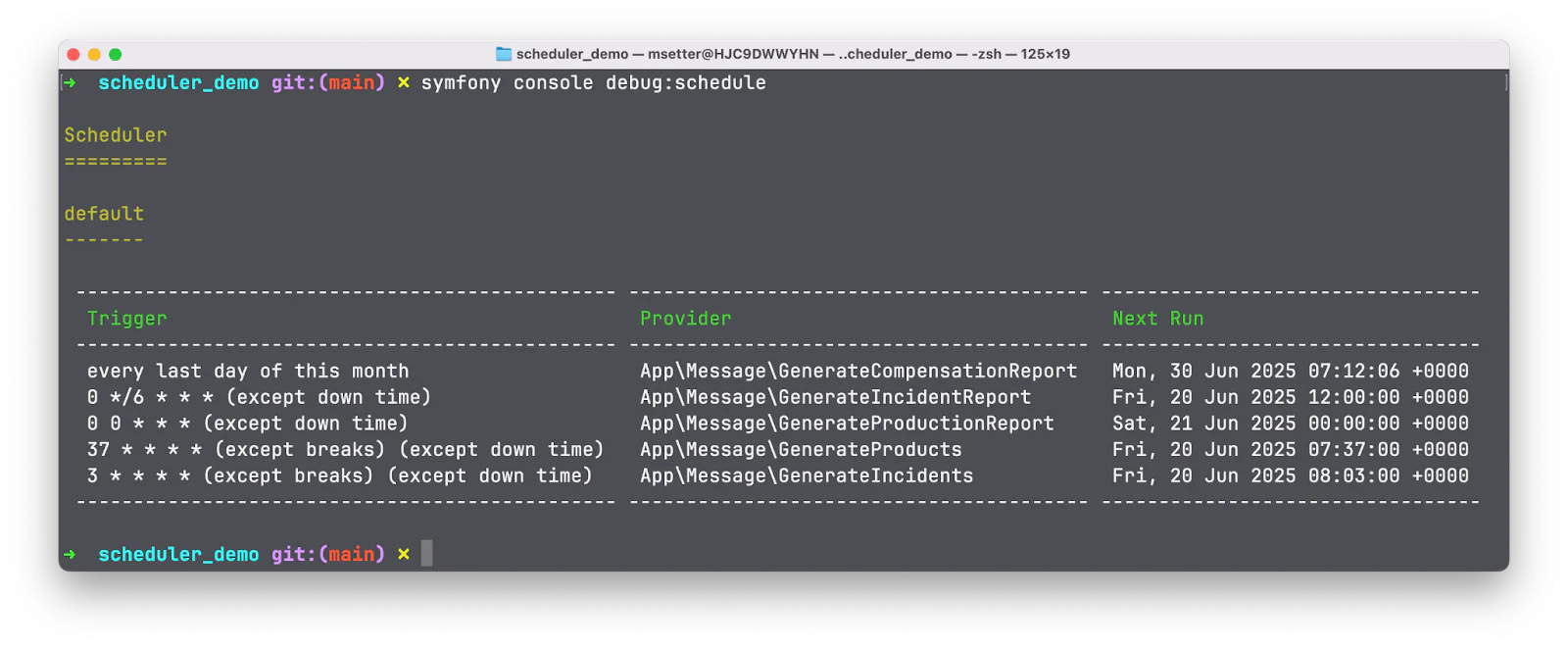
Screenshot of Symfony console displaying a list of scheduled tasks with their triggers, providers, and next run times.

To run the scheduler transport, run the following command

symfony console messenger:consume -v scheduler_default

It is important to note that the scheduler transport only dispatches messages which should be handled either synchronously or by another transport (in this case the async transport). To handle the messages dispatched by the scheduler transport, run the following command in another terminal.

symfony console messenger:consume -v async

That's how to handle regular tasks with Symfony's Scheduler component

There you have it! In this tutorial I showed you how the Scheduler component makes managing nuanced recurring tasks easier but that’s not the only benefit. With this, you don’t have to worry about managing crontab entries, a potential pain point when managing containerized applications and clusters which scale dynamically.

If you’re wondering how to deploy this, have a look at the Messenger documentation. Just remember that you will need to set up two workers - one for the async transport and a second for the scheduler transport.

You can review the final codebase for this article on GitHub, should you get stuck at any point. I’m excited to see what else you come up with. Until next time, make peace not war✌🏾

Joseph Udonsak is a software engineer with a passion for solving challenges — be it building applications, or conquering new frontiers on Candy Crush. When he’s not staring at his screens, he enjoys a cold beer and laughs with his family and friends. Find him at LinkedIn , Medium , and Dev.to .