How to Create a GraphQL Server in Go with GqlGen
Time to read:
December 09, 2025
Written by
Reviewed by
AI generated summary
- GraphQL with Go and GqlGen offers performance and flexibility over REST.
- GqlGen scaffolds GraphQL servers and simplifies defining schemas and resolvers.
- GORM and MySQL provide persistent storage for scalable backend solutions.
This summary was generated by AI.
How to Create a GraphQL Server in Go with GqlGen
For years, REST was the default standard for building APIs. While it’s simple, predictable, and well-supported, it comes with limitations such as over-fetching, under-fetching, rigid endpoints, and complex versioning. GraphQL addresses these issues by allowing clients to request exactly the data they need in a single query.
Coupled with Go’s performance, simplicity, and strong typing, GraphQL is a powerful choice for building fast and scalable backend services.
In this tutorial, we’ll walk through building a GraphQL server in Go using GqlGen. You’ll learn how GqlGen structures your project, how to define your schema and resolvers, and how to connect your API to a MySQL database using GORM.
Prerequisite
To follow along with this tutorial, you should have:
- Go version >= 1.22.1 installed
- Basic familiarity with Go
- Familiarity with GraphQL concepts such as query and mutation
- Access to a MySQL database
- Your preferred Go editor, such as Visual Studio C ode
GqlGen basics
GqlGen makes it easy to build GraphQL servers in Go. It takes care of the boilerplate, so you can focus on defining your schema and writing your business logic. And, when you need more control, it’s flexible enough to let you override and extend the defaults.
Per implementation, you mostly focus on defining your API schemas using the standard GraphQL Schema Definition Language and creating resolvers that implement these schemas.
Let’s start by creating a new folder for our project, changing into it, and initializing it as a Go module:
Next, create a new tools.go file in your project directory and paste the following code into it:
This file is a workaround to ensure that GqlGen is tracked in your go.mod, even though it’s not directly imported in your application code. Without this, Go might remove the dependency when you run go mod tidy.
Now, to add the GqlGen dependency to go.mod, run:
With the setup complete, initialize a new GqlGen project by running:
Running this command will scaffold a working GraphQL server using GqlGen’s default Todo example, and generate the necessary files and folder structure to get started. When finished, your project structure should look like the one below.
Out of all the files generated, the most important ones are:
- resolver.go
- schema.graphqls
- schema.resolvers.go
What is resolver.go?
The first file, resolver.go, is where you manage your application state and inject any dependencies your resolvers might need.
What is graph/schema.graphqls?
The schema.graphqls file is the entry point for defining your GraphQL schema. If you open it, you'll see something like this:
Here, we first define the types Todo and User to describe the shape of the data that clients can expect. Then, the Query type defines a single read operation: todos, which returns a list of Todo items.
The input NewTodo type defines the structure of the data required to create a new todo: specifically the text of the todo and the userId it should be associated with. Finally, the Mutation type defines a createTodo operation that takes the NewTodo input and returns the newly created Todo.
What is schema.resolvers.go?
The schema.resolvers.go file is where the logic for your queries and mutations lives. If you open it, you’ll see two placeholder methods: CreateTodo() for creating a new todo, and Todos() for fetching all todos. However, the logic inside these methods hasn’t been implemented yet. Let’s take care of that in the next section.
Implement the resolvers
Before we proceed to implement the logic for the Todo schema resolvers, we need to track the Todo state. As mentioned earlier, application state and dependencies are managed in the graph/resolver.go file. So, go ahead and open that file, then update its content with the code below:
This code defines a Resolver struct with a single field: todos, which is a slice of pointers to model.Todo. This serves as an in-memory store where we'll temporarily hold the list of todos while the server is running. Later on, we’ll replace this with a proper database connection.
Now, we can proceed to implement the resolver logic. Open the graph/schema.resolvers.go file and replace its content with the following code:
In this code, we updated:
- The
CreateTodo()method to generate a random ID using Go’s crypto/rand package, then used the provided text anduserIdvalues from the user input to create a new todo. This new todo is then appended to the in-memory todos array we defined earlier in graph/resolver.go. - The
Todos()method to return the current list of todos from that same in-memory store.
Test out the application
Now, let’s test it out. Start the GraphQL server by running:
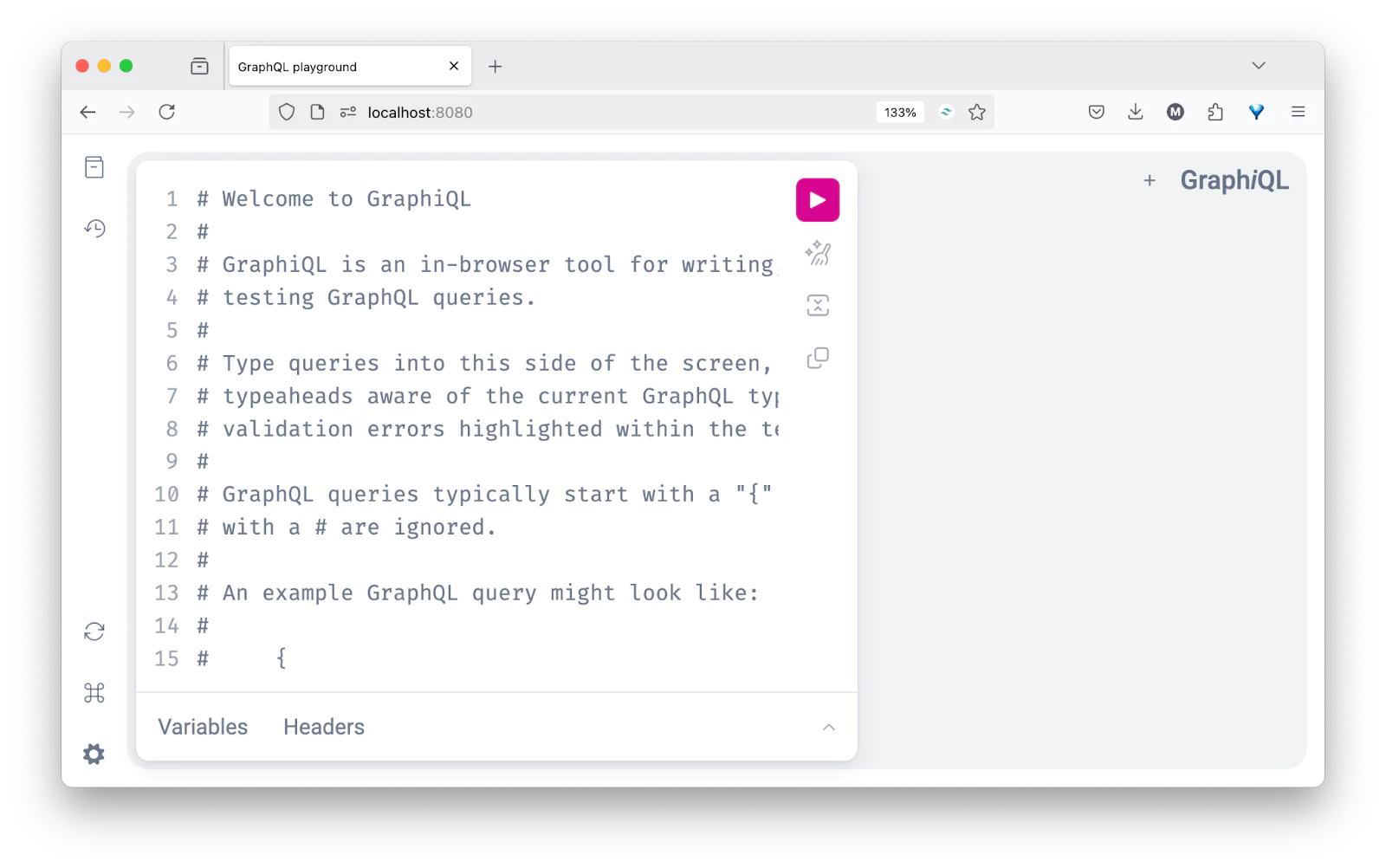
This will launch the GraphQL Playground at http://localhost:8080. When you visit that URL in your browser, you should see the following interface ready for you to run queries and mutations.
Try running the following mutation to create a new todo:
This will create a new todo and return the relevant fields, including the user ID and the "done" status (which defaults to false).
Next, query all todos with:
If everything is working correctly, you should see your newly created todo returned in the response, like so:
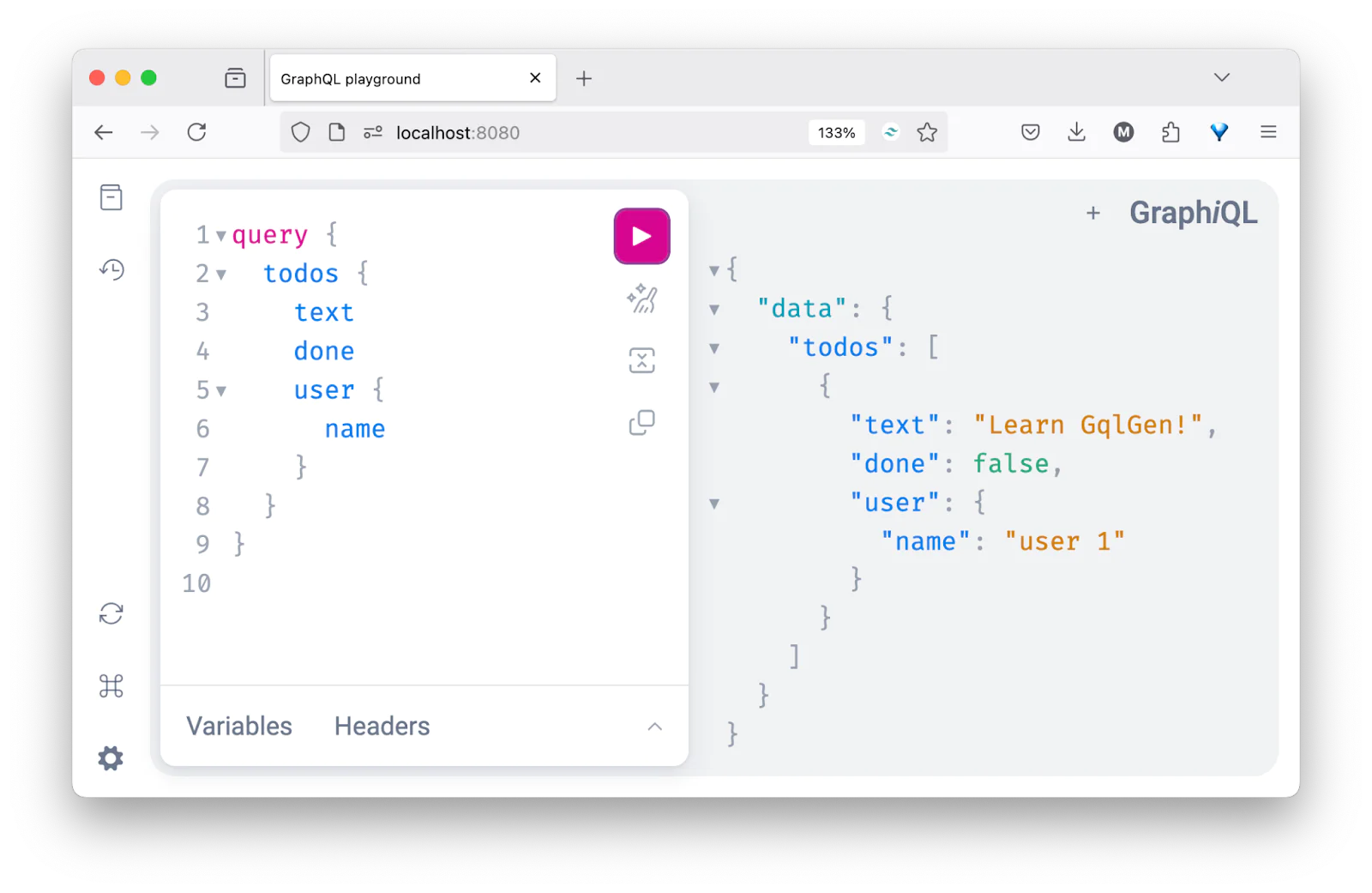
At this point, we have a functional in-memory GraphQL API using GqlGen.
Add new queries and mutations
Let’s say you want to add a new entry for blogs. You’ll follow the same steps we used earlier for todos. First, update your graph/schema.graphqls file to define the types, queries, inputs, and mutations for Blog, like so:
Once you've updated the schema, run the following command in a new terminal tab or session to regenerate the Go types and resolver method stubs:
Next, open your graph/resolver.go file and add an in-memory store for blogs:
Now, open graph/schema.resolvers.go. You’ll notice that GqlGen has automatically added stub methods for CreateBlog() and Blogs(). Update them with the actual logic, similar to what we did for todos with the code below:
And that’s it. You can now head over to the GraphQL Playground and use the createBlog mutation to add new blogs and the blogs query to fetch them.
Connect the GraphQL server with a MySQL database
So far, we’ve been storing todos and blogs in memory. That works for testing, but once the server restarts, everything disappears. Let’s fix that by hooking the GraphQL server up to a MySQL database.
We’ll use GORM, a popular ORM library in Go, to interact with the database and uuid to generate unique IDs.
Set up the GORM and MySQL integration
Run the following command to install the necessary packages:
Next, open your MySQL client or database manager and create a new database named gqlgen_demo:
Next, create a new file at database/db.go and add the following code to the file:
Make sure to replace root, the empty password, and gqlgen_demo with your actual MySQL credentials and database name.
Define GORM models
To enable GORM-based persistence, we need to define custom models that include the necessary GORM tags (like primaryKey) and structure. This ensures our application can work with a real database instead of in-memory storage.
Open your gqlgen.yml file and look for the autobind section. By default, it may be commented out. Uncomment it and update it to look like this:
This update tells GqlGen that if a type already exists in this package, it shouldn’t regenerate it but use the one we defined.
Next, delete the existing graph/model/models_gen.go file. This file contains types auto-generated by GqlGen based on your schema.
Then, create a new file at graph/model/models.go and paste in the following code:
With this setup, we now have full control over the models used in both our database and GraphQL schema. GqlGen will no longer overwrite them when generating code.
Finally, to regenerate only the remaining schema artifacts (like NewTodo, NewUser, and NewBlog inputs), run:
This will create a fresh graph/model/models_gen.go file but only for types we haven’t manually defined, skipping over User, Todo, and Blog since those now exist in our own code.
Now, our models are GORM-aware, GraphQL-safe, and ready to be persisted in the MySQL database.
Auto-migrate tables on startup
To ensure our database tables are created automatically when the server starts, we can take advantage of GORM’s AutoMigrate() function.
Update your server.go file with the code below:
In the code:
- We connect to the database using
ConnectDB() - We call
AutoMigrate()to automatically create the todos, users, and blogs tables if they don’t already exist - We set up the GraphQL handler and expose the playground at http://localhost:8080
This means you don’t need to manually write SQL or worry about table creation during development. GORM handles it for you on startup.
Update the resolvers to use the database
Finally, let’s replace the in-memory logic in the resolvers (like CreateBlog and Blogs) with actual database operations using database.DB.Create() and database.DB.Find().
Update the CreateBlog resolver in graph/schema.resolvers.go to match the following:
This method creates a new blog record using the values provided in the mutation input. It generates a UUID for the blog ID and inserts the new entry into the blogs table.
Now update the Blogs resolver in graph/schema.resolvers.go with the following code:
This queries all blog records from the database and returns them to the client.With this setup, your GraphQL server is now backed by a persistent MySQL database. You can create blog posts, restart the server, and your data will remain intact.
To test it out, run the following mutation in your GraphQL Playground to create three new blog posts:
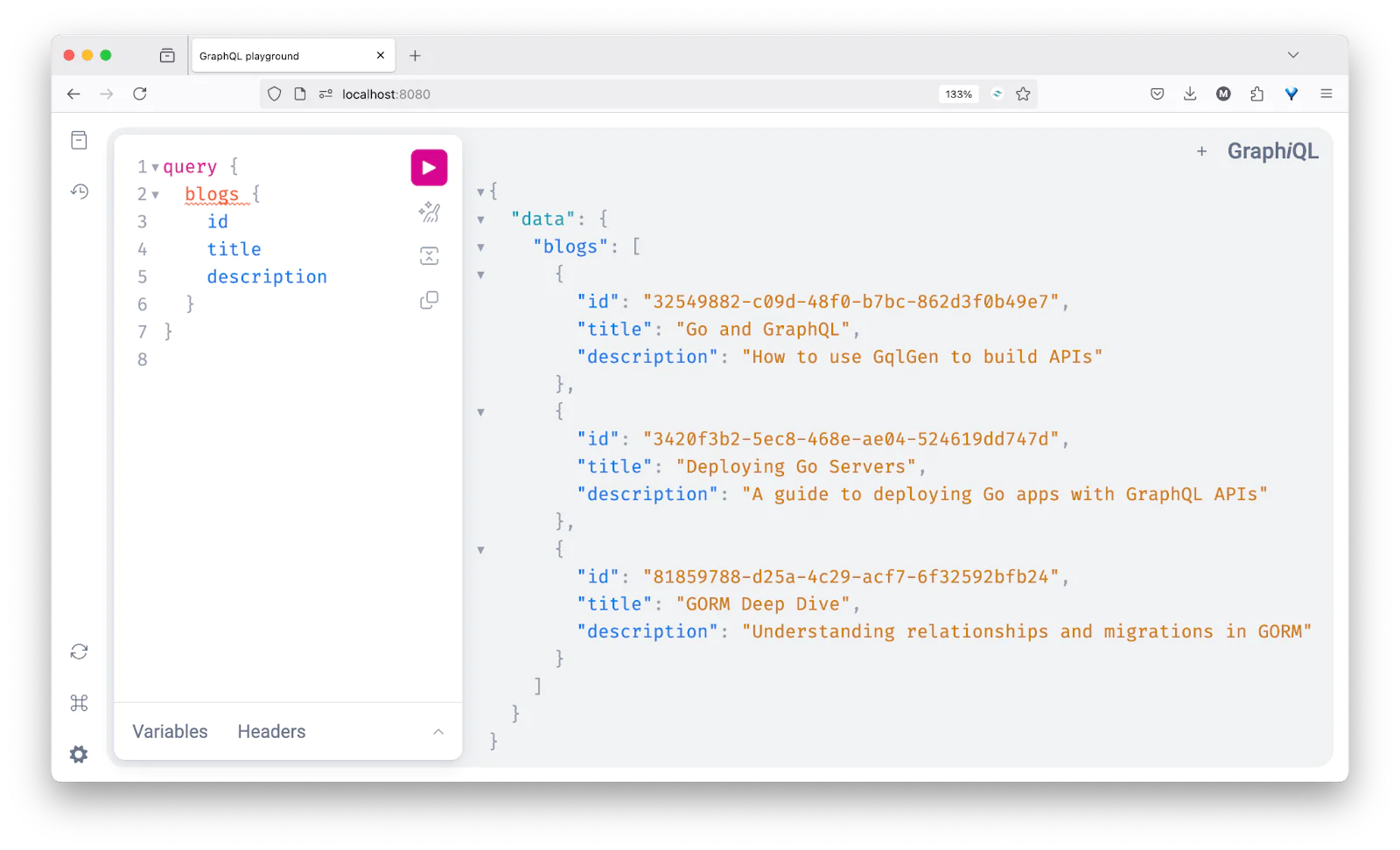
Now, restart your Go server and run the following query to retrieve all blog posts:
You should see the data fetched from your database and displayed in the playground, as shown below.
That's how to create a GraphQL server in Go with GqlGen
In this tutorial, we walked through how to build a GraphQL server in Go using GqlGen, define your schema, implement resolvers, and connect everything to a MySQL database using GORM. You learned how to create and query data, structure your models, and persist information across server restarts.
To explore the complete source code used throughout this guide, check out this GitHub repository.
Thanks for reading!
Elijah Asaolu is a technical writer and software engineer. He enjoys writing technical articles to share his skills and experience with other developers.
Related Resources
Twilio Docs
From APIs to SDKs to sample apps
API reference documentation, SDKs, helper libraries, quickstarts, and tutorials for your language and platform.
Resource Center
The latest ebooks, industry reports, and webinars
Learn from customer engagement experts to improve your own communication.
Ahoy
Twilio's developer community hub
Best practices, code samples, and inspiration to build communications and digital engagement experiences.