Rich Messages, Richer Experiences: Monetizing Chatbots on RCS and WhatsApp
Time to read:
February 12, 2026
Written by
Reviewed by
AI generated summary
- Rich messaging apps turn conversations into dynamic user interfaces.
- Integrating a paywall in chatbots allows monetization of premium content seamlessly.
- Combining Twilio for messaging and Stripe for payments creates an effective user paywall flow.
This summary was generated by AI.
Implementing Paid Access in Rich Messaging Bots Using Twilio and Stripe
Rich Messages, Richer Experiences: Monetizing Chatbots on RCS and WhatsApp
For a long time, messaging channels were treated as simple delivery mechanisms. You sent a notification, received a short reply, and the interaction ended there. From a developer perspective, messaging was mostly about transport, not functionality. That has changed. Channels like WhatsApp and Rich Communication Services (RCS) now support structured, interactive messages that behave like lightweight applications, without requiring app installation, user registration, or additional authentication. As chatbots running on these channels become more capable and increasingly powered by AI, they also start delivering real value. This naturally raises a practical question for developers: how do you monetize chatbot experiences that live entirely inside a conversation?
Rich messaging turned inboxes into mini-apps
Messaging apps now function as platforms rather than simple communication tools. Through APIs like RCS Business Messaging and the WhatsApp Business Platform, developers can deliver structured, interactive messages that turn a conversation into an interface.
The “rich” aspect comes from combining structured message formats with media and interaction. Carousels, buttons, quick replies and images can upgrade a single chat thread to support complete user flows as shown in Figure 1. Instead of exchanging plain text, a conversation can guide users through package tracking, event updates, ticket management, or assisted decision-making. All interactions remain native to the messaging client (no separate app needed) and follow patterns users already understand. Beyond interactivity, these channels provide a layer of trust through official brand verification (the 'green badge' on WhatsApp or the 'verified' checkmark on RCS), assuring users that they are transacting with a legitimate business rather than a spoofed number.
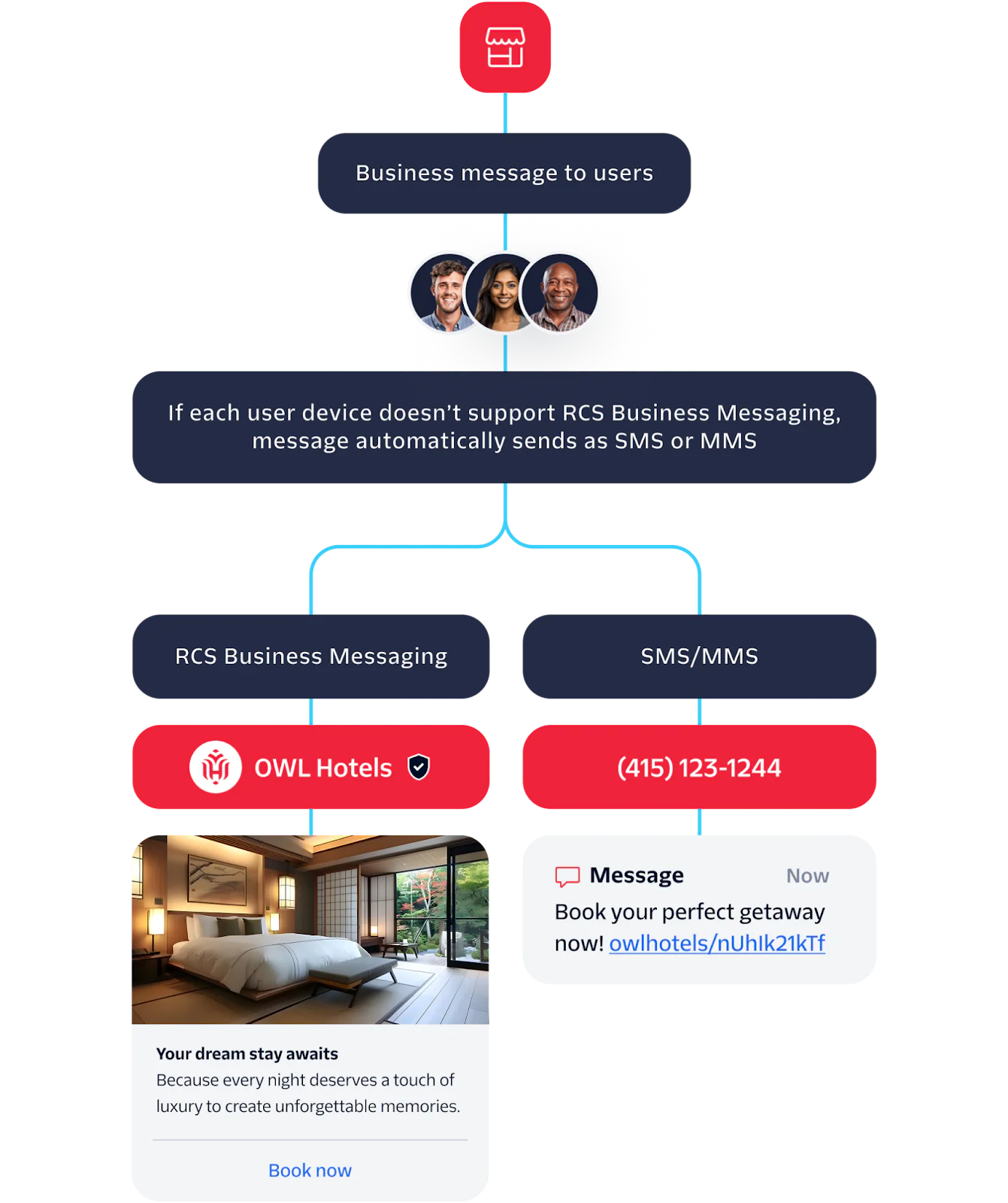
Figure 1: The comparison of a card message from a verified sender to a standard SMS
The possibilities go far beyond a small set of predefined scenarios like shipment tracking. These rich message channels enable an almost endless range of focused use cases, from content discovery and guided commerce to AI-assisted services and operational workflows. Messaging-based mini-apps can complement native applications by covering high-value interactions with minimal overhead.
Why put a paywall in a chatbot?
Not every conversation should be behind a paywall, but that doesn’t mean all chatbots need to be free. Some interactions are valuable enough that they deserve a price. Consider a bot that provides insights, generates compute-intense AI-powered content, or delivers other premium experiences. A paywall in a chatbot is not only about revenue, it is about signaling value and aligning expectations. Chatbots can handle both one-time and recurring content or services, all without requiring the user to leave the conversation.
Integrating a paywall is straightforward with modern APIs. Twilio handles the messaging and rich media interactions, while payment providers such as Stripe manage payments. This allows you to create a flow where the user selects an option, completes a payment, and receives access within the same conversation. There is no need for separate login, account management, or additional apps, keeping the user experience simple while allowing developers to expose valuable content directly in chat.
Understanding Stripe Checkout Sessions
To monetize a chatbot, you need a way to trigger payments at the right moment in the conversation and reliably associate those payments with a specific user. In Stripe, the core building block for this is the Checkout Session.
A Checkout Session represents a single payment flow created dynamically by your backend. In a chatbot scenario, you typically create a new session when the user requests access to paid content or a paid action. The session defines the product, price, currency, and quantity, and it can carry metadata that links the payment back to the messaging user. This metadata is critical, as it allows you to associate a completed payment with a WhatsApp or RCS sender ID without introducing a separate user account system. By default, stripe will also ask the user for their email address that you can use for customer communications or disputes, if necessary.
Once the session is created, Stripe returns a hosted Checkout URL like https://checkout.stripe.com/…. You can send this URL to the user as part of a rich message, for example embedded in a card with a buy button as shown in Figure 2. The user then completes the payment on Stripe’s hosted page, keeping sensitive payment details out of your system.
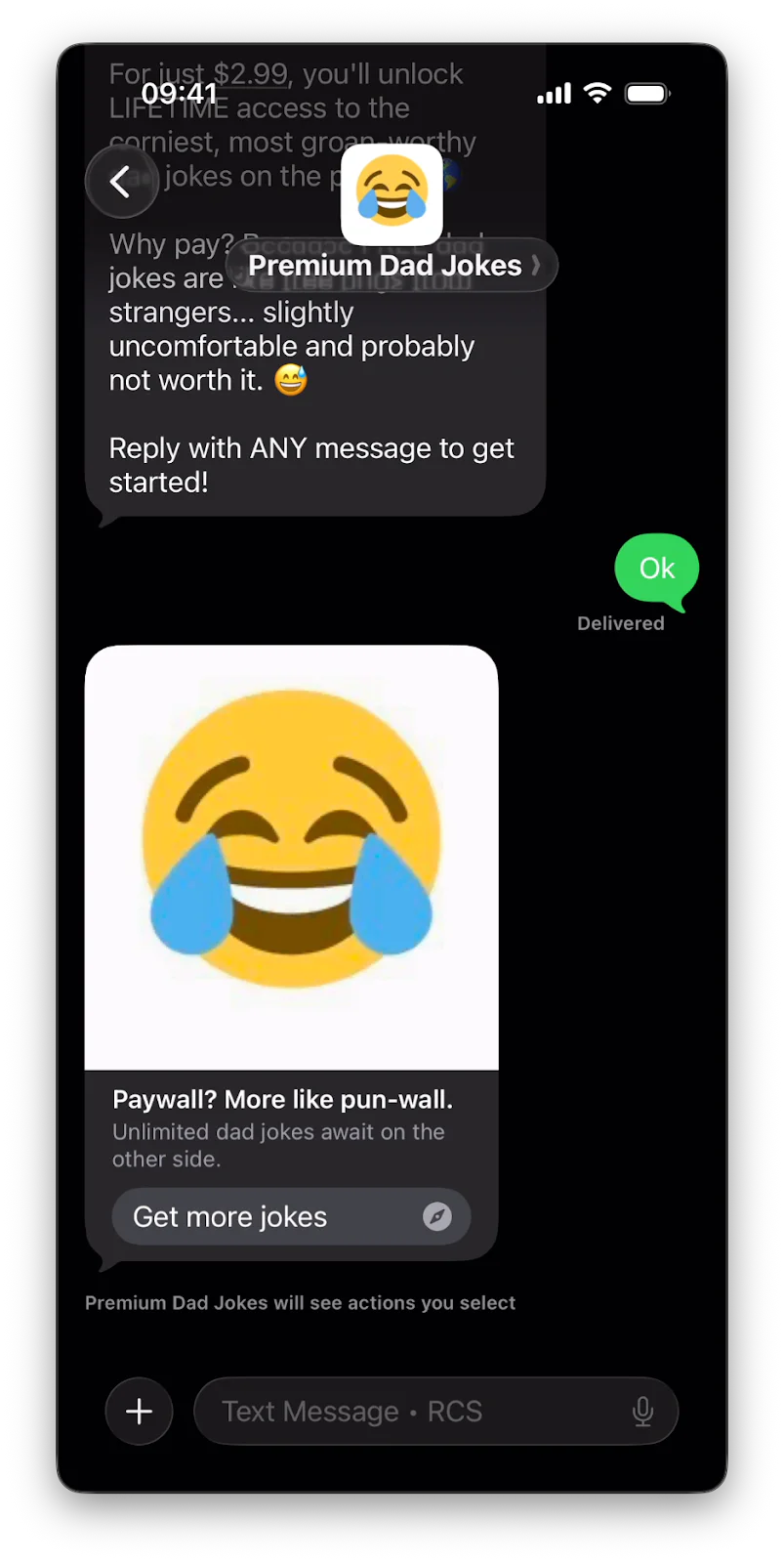
Figure 2: A rich media message that contains an image and a call-to-action button to purchase the subscription
After payment completion, Stripe emits webhook events that your backend can listen to. Alternatively, you can also make use of a redirect URL that is invoked from the client-side. The redirect URL works for basic proof of concepts but is not recommended in production as the user might close the browser before the redirect takes place. These events allow you to confirm that the payment succeeded and update your internal state, such as marking the user as paid and unlocking access in the chatbot. This event-driven approach avoids polling and keeps the payment logic clean, predictable, and well isolated from the messaging flow. Figure 3 shows this complete flow.
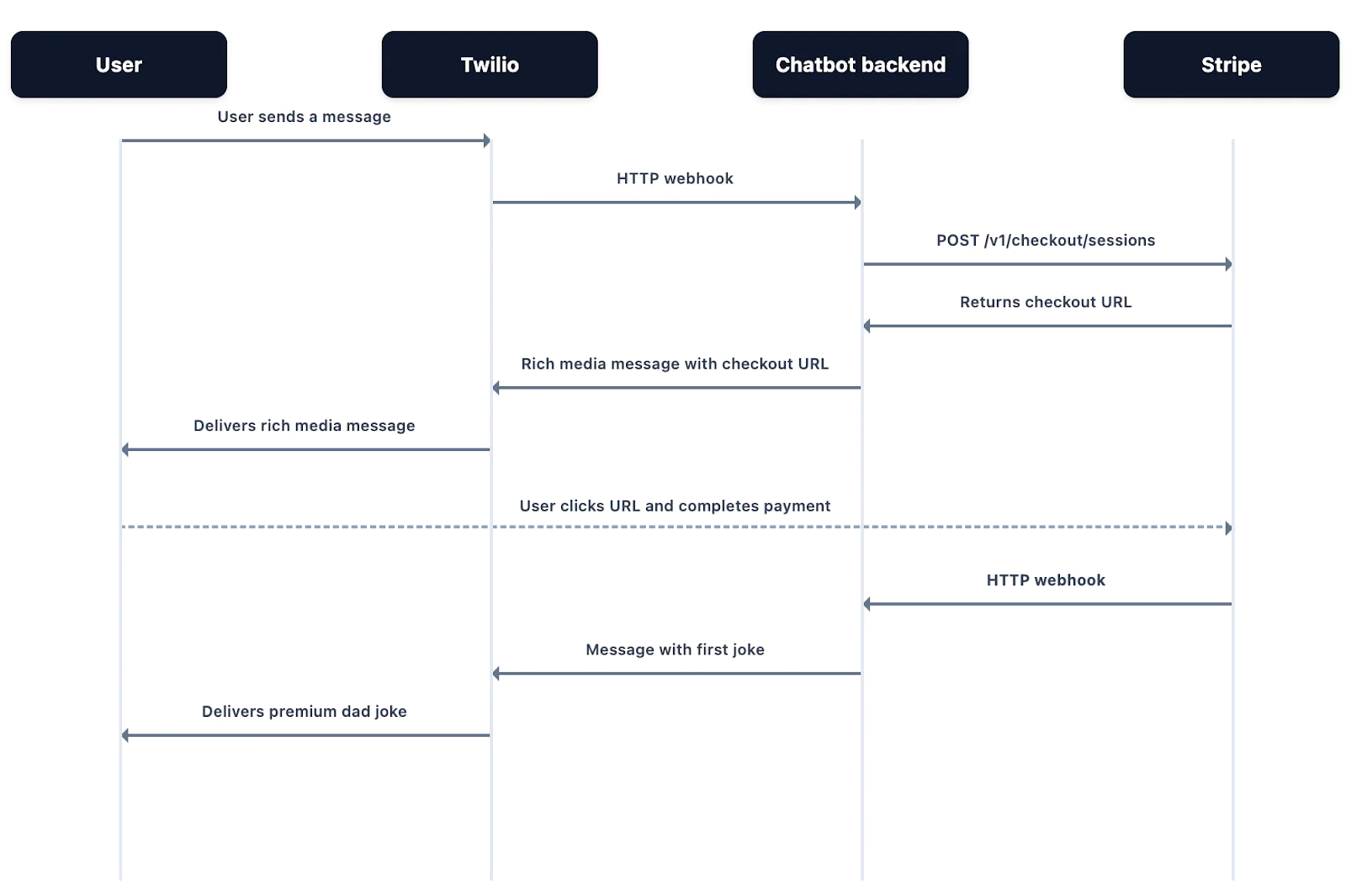
Figure 3: The payment flow across all providers
The demo scenario: an AI-powered dad joke generator
To illustrate a paywall in a chatbot, we built a simple scenario: a dad joke generator on RCS. The bot responds to user messages with premium dad jokes, but only after the user has completed a payment. The goal is to show how to combine rich messaging and payment in a single workflow.
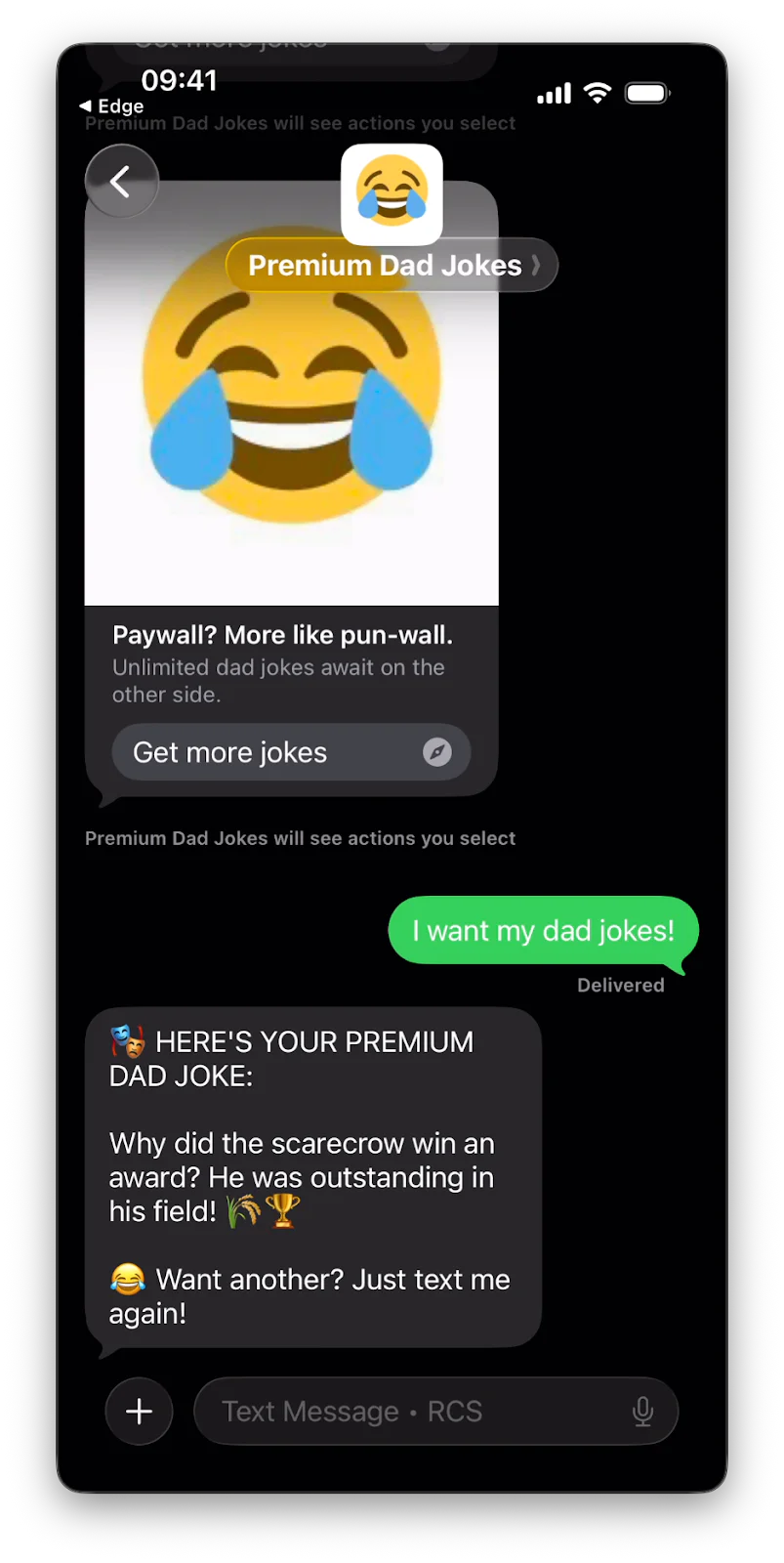
Figure 4: The user receives a premium dad joke after passing the paywall
Before diving into the code, here are the prerequisites to run this demo successfully:
- Twilio account: You need access to a Twilio project with Messaging enabled and an RCS-capable sender.
- RCS test sender: Register a test RCS sender to send and receive messages from your bot during development. You can also use the WhatsApp sandbox and adapt this code if your carrier doesn’t support RCS yet.
- Stripe account: Set up a Stripe account and use an isolated sandbox environment and create products/prices for your paywall content.
- ngrok : A tunneling service to expose your local development server to the internet, allowing Twilio and Stripe to send webhooks to your local machine.
- TypeScript runtime: The demo backend is written in TypeScript and runs on Deno for simplicity, but it can also run on Node.js with minimal changes. For readability and reference, the full TypeScript version of the code is available on GitHub alongside this post.
Once these are in place, the sample code is structured around a few key blocks:
1. Setting up your project and environment variables
Create a new directory named paywall-bot and run deno init inside it to generate the basic project files.
Before running the server, create a file named .env in your project root. This file holds your sensitive credentials and configuration. Replace the placeholder values with your actual Stripe and Twilio keys:
Note: The SENDER is the unique ID or name assigned to your RCS test sender in the Twilio console. Do not include the rcs: prefix.
2. Configuration and Initialization
To begin, the backend must be configured to securely communicate with both Twilio and Stripe. This involves loading environment variables for authentication and setting the specific Stripe API version—in this case, 2026-01-28.clover—to ensure compatibility with the latest checkout features. We also define the SENDER for RCS and the price point for our premium content.
Override the content of main.ts with this snippet:
3. In-memory storage for paid users and joke generator function
For the purpose of this demo, we use a simple in-memory Set to track which phone numbers have successfully completed a purchase. In a production environment, you would replace this with a persistent database to manage user entitlements across different sessions and devices. Besides, we also define the core of this chatbot, the getRandomJoke function.
4. Handling inbound messages
The handleTwilioMessage() function receives inbound messages via the Twilio webhook. It determines whether the user is already paid and either delivers premium content (a dad joke) or triggers the payment flow.
5. Creating a Stripe Checkout Session
The sendPaymentLink function now generates a Stripe URL and sends it as a standard message. The createCheckoutSession function generates a dynamic Checkout Session for each user interaction that requires payment. This payment link also tracks the user's phone number so we can identify them on payment.
For a more professional 'mini-app' feel, you need to create a template in the Twilio Content Template Builder as shown in Figure 5 below. This allows you to use interactive rich cards or dedicated "Go more jokes" buttons. Your template should include the static prefix https://checkout.stripe.com/c/pay/, and you must clip this prefix from the dynamic URL before passing it as a variable.
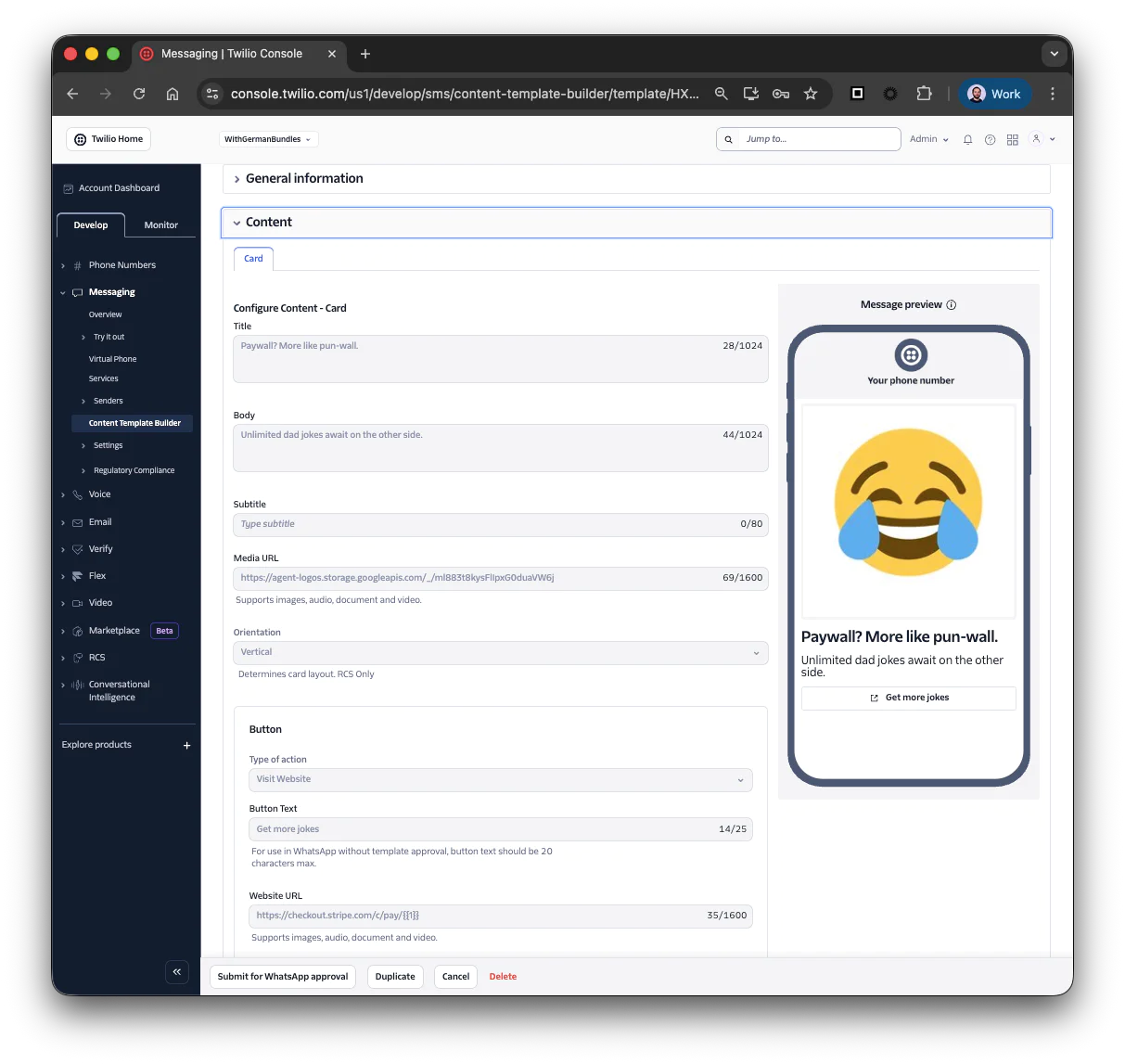
Figure 5: The setup page for a new content template that includes a button to pay
Once created, note the Content SID (which starts with HX...) and insert it in the snippet below.
6. Handling payment confirmation
Once the user completes their transaction on the Stripe-hosted page, they are redirected back to our backend. This function retrieves the session to verify the payment_status and uses the metadata we attached earlier to link the payment to the user's phone number. After updating their status to "paid," and sending the first premium content, the code uses an RCS-specific deep link (sms:<SENDER>@rbm.goog) to automatically return the user to the messaging app.
In production, developers should listen for the checkout.session.completed webhook rather than relying solely on the redirect to /success, as a user might close their browser before the redirect finishes.
7. Server routing
The final piece of the puzzle is the server handler, which routes traffic based on the incoming request path. It manages the /messaging endpoint for Twilio's webhooks and the /success endpoint for post-payment redirects from Stripe. This structure ensures that the bot remains responsive and the payment flow remains isolated from the messaging logic
8. Start the backend
Once your code is ready and your environment variables are set, you can bring the bot to life.
Then, start the development server with the following command. This enables environment variable access, network permissions, and hot-reloading so the server updates as you save your code:
Because your server is currently running on localhost:3000, it is invisible to the outside world. To allow Twilio to reach your code, start an ngrok tunnel in a separate terminal:
Finally, copy the Forwarding URL provided by ngrok (e.g., https://random-id.ngrok-free.app). Head to the Twilio Console, locate your RCS Test Sender configuration, and paste that URL followed by /messaging into the "A message comes in" webhook field with "POST" for the method.
By combining Twilio’s messaging APIs for RCS and rich message templates with Stripe’s Checkout Sessions, the mini app demonstrates a repeatable pattern for paywalling chatbots without requiring user accounts or additional authentication. The key is that all payments are handled off-platform, the chatbot only receives confirmation through webhooks, and the user experience remains seamless within the messaging channel.
9. Test the Paywall
Now for the most satisfying part: seeing the flow in action. To test the integration, you’ll need an RCS-capable Android device (or the WhatsApp sandbox if you configured it that way).
- Initiate the Chat: Open your messaging app and send a message (like "Hello" or "Start") to your RCS Test Sender.
- Receive the Invitation: The bot should respond with the welcome message and the interactive card (or link) you configured in your Twilio Content Template.
- Enter the Checkout: Click the "Buy" button. You will be redirected to the Stripe-hosted Checkout page.
- Simulate the Payment: Since you are in the Stripe sandbox environment, you don't need to use a real credit card. Use the following test card:
- Card Number: 4242 4242 4242 4242
- Expiry Date: Any future date (e.g., 12/30)
- CVC: Any three digits (e.g., 123)
- Return to Chat: Once the payment is processed, Stripe will redirect you back to your /success endpoint. Your browser should then trigger the sms: deep link, prompting you to return to your messaging app.
- Verify Access: Back in the chat, you should see the confirmation message followed by your first "Premium" dad joke. From this point on, because your phone number is in the paidUsers set, any message you send will be met with a joke rather than a paywall.
The full demo, written in TypeScript for Deno and JavaScript for Node.js, including all integrations with Twilio and Stripe, can be found on GitHub.
Closing thoughts
This basic application shows how to add a minimal paywall to a chatbot. Developers can take it further to make it production-ready by adding persistent storage, handling webhooks for payment events, supporting subscriptions, or enabling multi-device access. To further polish the experience, developers could integrate the Twilio Lookup API to identify a user's carrier and country code in real-time, allowing the backend to dynamically adjust the currency and pricing of the Stripe Checkout URL to match the user's local region. But even without these additions, the pattern clearly demonstrates how to combine Twilio and Stripe to gate content or services in a chat interface.
With this setup, you can expose high-value content, interactive features, or services directly through rich messaging channels like RCS or WhatsApp. Users interact with the bot, make payments, and receive content all within the conversation, and this is just the start. Rich messaging combined with minimal paywall logic can open the door to new ways of delivering value directly to users.
We can’t wait to see what you’ll build.
Related Posts
-
 AI-powered agents for contact center in Australia: containment quality, not deflectionAliakbar Lokhandwala
 -
AI-powered agents for contact center in India: what they can and cannot doAliakbar Lokhandwala
-
AI-powered agents for contact center in Philippines: what the term actually meansAliakbar Lokhandwala
Related Resources
Twilio Docs
From APIs to SDKs to sample apps
API reference documentation, SDKs, helper libraries, quickstarts, and tutorials for your language and platform.
Resource Center
The latest ebooks, industry reports, and webinars
Learn from customer engagement experts to improve your own communication.
Ahoy
Twilio's developer community hub
Best practices, code samples, and inspiration to build communications and digital engagement experiences.