Direct Customer to ISV Rearchitecture Guide
Time to read:
February 23, 2026
Written by
Reviewed by
AI generated summary
- Re-architecting Twilio accounts from Direct to ISV is crucial for compliance and billing accuracy.
- Each customer should be mapped to an individual subaccount with unique profiles, brands, and campaigns.
- Twilio offers dedicated onboarding support through its Fast Track package to streamline the transition process.
This summary was generated by AI.
One of the first decisions every customer makes when they’re getting started with Twilio is whether to register as a direct or ISV customer. This determination has a profound impact on how you architect your Twilio account with subaccounts, A2P campaigns, and phone numbers; if done incorrectly, it can lead to problems with compliance and billing that will only get worse as you scale.
If you’ve realized that you’re in this predicament, we’re here to help! This blog post will provide step-by-step instructions on how to change your Twilio architecture from that of a Direct customer to an ISV customer.
What is an ISV?
ISVs, or independent software vendors, are customers that embed Twilio APIs into their software solutions to power digital communications, and then resell this software to other businesses. In the context of Twilio Messaging, this typically means that when an end user receives a message sent from your Twilio account, they believe they are interacting with one of your clients and are likely unaware that the ISV is facilitating the interaction.
If you answer "yes" to the following statements, Twilio would most likely consider you an ISV:
- You provide full featured solutions to other businesses and want to offer omni-channel solutions via Twilio.
- Your business model is B2B (business-to-business) and your customers are B2C (business-to-consumer).
If you’re still unsure, check out Am I a direct customer or an Independent Software Vendor (ISV)?
The problem
Many ISV customers initially set up their Twilio accounts the same way a Direct customer would. This usually looks like using a single Twilio account to send traffic on behalf of all your customers. Here are some indications that you may be an ISV that has set up as a Direct customer:
- You don’t collect opt-in for any of your messaging traffic; end users opt-in to receive messages from your customers directly and may not know you are facilitating that traffic
- You want the messages you send to look like they came from your customer directly instead of from the ISV
- You set up A2P campaigns and use toll-free numbers on a per-customer basis instead of a per-use case basis
So what?
Not architecting correctly as an ISV can lead to major headaches (especially as you scale) related to Compliance and Billing.
Compliance
For A2P campaigns and Toll-Free Verifications, there needs to be consistency between:
- the business the end user opts into receiving messages from
- the business represented in each SMS message
- the business that is registered on the account that is sending the messages
Here are some examples of noncompliance if you have a single account with a single Brand and Primary Customer Profile that reflects the ISV:
- Sending messages that claim to be from your customer(s) directly and not the ISV
- Sending messages to end users that opted in to getting messages from your customer, but not the ISV
- Using the same toll-free number to send messages on behalf of different customers
- Using multiple toll-free numbers to send similar or the same kind of messages on behalf of different customers (this is an example of “snowshoeing”, which is prohibited by our Messaging Policy)
We also discourage registering Brands for completely separate businesses in the same account because if one customer starts sending noncompliant traffic, Twilio may need to suspend the entire account. This would affect even the compliant customers who use that account to send their SMS traffic.
The consequences of sending noncompliant traffic can include message filtering, account suspension, and fines from the FCC.
Billing
As an ISV, you likely directly or indirectly pass through the costs you incur on Twilio to your customers. In other words, a customer’s usage of Twilio affects the bill they receive from you for your services. Without separating each of your customers into their own subaccount, it’s very difficult to allocate costs to your individual customers accurately.
The recommended way to get billing information from Twilio is to use the Usage Records API. It works at the account level, which is why using subaccounts correctly is critical; there is no built-in way to get costs “by phone number”. Trying to do so requires a fair amount of data wrangling and still may not match up exactly with what’s on your invoice.
The solution
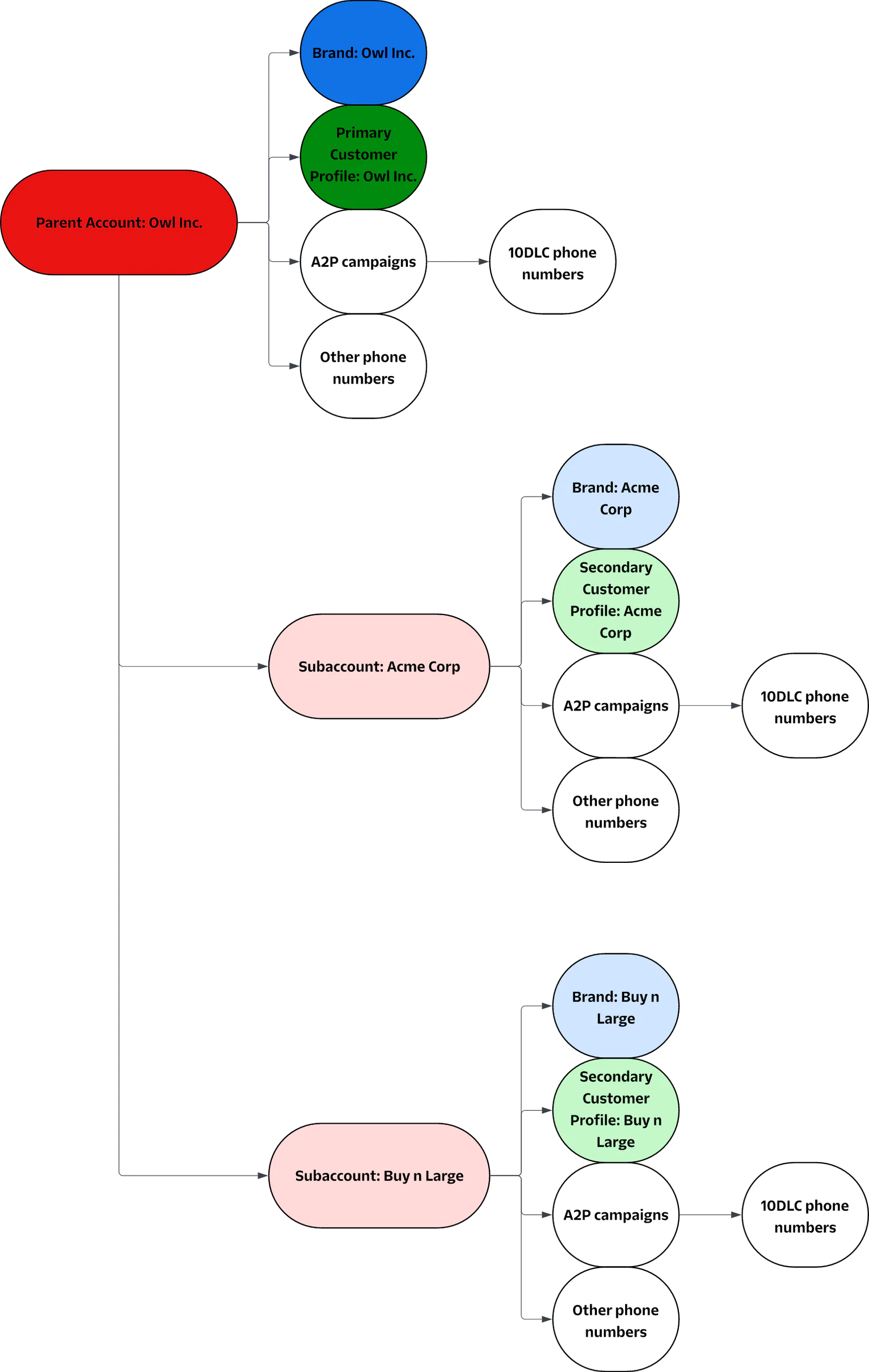
To correctly architect as an ISV, each of your customers should be mapped to an individual subaccount for their exclusive use. Each subaccount will have its own Brand, Secondary Customer Profile, A2P campaigns, and phone numbers that reflect the customer’s use case(s) on Twilio.
If your ISV has their own use cases on Twilio (sending OTPs to log into the ISV platform, account notifications, etc.), your associated Brand, Primary Customer Profile, A2P campaigns, and phone numbers will live in the parent account.
Below is a diagram of what that architecture would look like; Owl Inc. is the ISV, Acme Corp and Buy n Large are Owl Inc.’s customers:
How can I fix this?
Switch the Primary Customer Profile classification in the parent account from Direct to ISV
Submit a support case with your Primary Customer Profile SID (Account > Trust Hub > Customer Profile, the format is `BUxxxxxxxxxxxxxxxxxxxxxxxxxxxxxxxx`) and request to change the classification of your profile from “Direct Customer” to “ISV/Reseller”. This should only take a few days to complete, but the change must be in effect before you can move on to Configure each subaccount.
Create a subaccount for each customer
- Use the REST API to create a subaccount for each customer.
Configure each subaccount
Each subaccount should be mapped to an individual customer of yours, with their own unique Secondary Customer Profile and Brand that reflect their business.
Create a Secondary Customer Profile, Trust Product, and Brand that reflect the individual customer each subaccount belongs to.
Please ensure you apply for secondary vetting (even if you don’t think you need it) when you create the Brand for your customers; they should have a Standard Brand instead of a Low-Volume Standard Brand. Skipping secondary vetting is cheaper, but Low-Volume Standard Brands can only register Low Volume Mixed campaigns. These campaigns have significantly lower throughput and T-Mobile daily message limits. This may not be a problem initially, but many customers eventually send enough message volume that these limits adversely impact their business.
If you opted to skip secondary vetting but now need to complete it to raise your messaging limits on an account, you can do so by contacting our support team. Please include the subaccount’s SID when making your request.
Once secondary vetting is complete, you will then have to create Standard campaigns (see Register A2P campaigns) to take advantage of the higher messaging limits. These should replace any Low-Volume campaigns you have since those campaigns will not be able to take advantage of the higher limits. You can keep using the Low-Volume campaigns until the new Standard campaigns are approved; once that’s complete, you can move the phone numbers to the Standard campaign (see Move phone numbers). There may be some downtime after the transfer to complete Number Registration, which typically takes only a few minutes. Once the number is successfully registered, you can start sending messages again.Timeline for approval:
Secondary Customer Profile: Often only a few minutes, but can take several days. This does not need to be approved before moving forward with creating A2P campaigns or toll-free verification.
Trust Product: Often only a few minutes, but can take several days. This does not need to be approved before moving forward with creating A2P campaigns or toll-free verification.
Brand: Often only a few minutes, but can take several days. Your subaccount’s Brand registration must be approved before you start creating A2P campaigns. The Brand registration does not need to be approved before moving forward with toll-free verification.
Register A2P campaigns
A2P campaign registration does not carry over from one account to another, so the campaigns must be resubmitted in a subaccount.
Before you can create a campaign, you will need to create a Messaging Service.
You can think of a Messaging Service as a higher-level "bundling" of messaging functionality around a common set of senders, features, and configuration. The same settings and feature configuration apply to all of the senders (in this case, 10-digit long code numbers) in the Messaging Service's pool.
You should create a single Messaging Service for each campaign. Later, you will assign all 10-digit long code numbers you want to use with a specific campaign to its associated Messaging Service.
You should register a campaign for every individual use case on behalf of your customer in their subaccount. Use cases include 2FA, account notifications, marketing, and more listed here.
Each campaign submission should reflect the company in the Secondary Customer Profile, NOT the ISV. This includes the company name and branding in the opt-in flow (including any screenshots), the Privacy Policy and Terms of Service, as well as the name of the company in the sample messages.
Please ensure your campaign submissions follow the A2P 10DLC Campaign Approval Requirements as closely as possible to maximize the chances of success. It’s not uncommon to have your campaigns rejected multiple times before they’re approved.
Once your campaign is approved, you can purchase new phone numbers or move the existing phone numbers from your parent account to the subaccount and assign them to the Messaging Service associated with your new campaign (see Move phone numbers).
Timeline for campaign approval: Here are our current rough approval times (and when you should escalate your requests). A typical timeline for approval is 7 business days, but delays can occur.
My campaign got rejected. What do I do?
This is common, even if you had a similar campaign already approved in your previous account.
We offer a troubleshooting guide to walk you through how to see the feedback left by your reviewer. The guide includes an API request to fetch the errors for failed campaigns at scale. Once you remedy any applicable errors, you can resubmit the campaign for approval without having to pay additional vetting fees.
Submit Toll-Free Verifications
Toll-Free Verification does not carry over from one account to another; existing toll-free numbers must be re-verified in a subaccount before use, or you can opt to go through verification with new toll-free numbers.
There are two options for setting up toll-free numbers in your subaccounts:
Use new toll-free phone numbers
You can purchase new toll-free numbers in the subaccount and submit them for verification immediately after purchase. Once the toll-free verification is approved, you can update how you send messages to use the new toll-free number. This results in limited downtime, but may cause disruption to your customers since they may need to adjust to using a new number.
Move existing toll-free numbers to your subaccounts and resubmit Toll-Free Verification
This option allows you to keep your existing toll-free numbers to minimize disruption to your customers (see Move phone numbers), but the existing verification will not carry over to the subaccount. The phone number will have to complete Toll-Free Verification in the subaccount before it can be used to send SMS.
Architecture
For each subaccount, you should be using a single toll-free number per use case.
This is a key difference between A2P 10DLC and toll-free numbers. Using multiple toll-free numbers to send similar or identical messages from the same account is called snowshoeing, and is prohibited by the mobile carriers and Twilio’s Messaging Policy.
Submit Verifications
Please ensure you submit all the required information for Toll-Free Verification. Following the examples as closely as possible will maximize the chances of being approved. It’s not uncommon to have your verifications rejected multiple times before they’re approved.
Toll-Free Verification can be completed via the console or the REST API.
Timeline for Toll-Free Processing: Allow 3-5 business days
My toll-free verification got rejected. What do I do?
This is common, even if you had a verification with a similar use case already approved in your previous account. Why Was My Toll-Free Verification Rejected? has great information on the error codes you may see and how to remedy them.
It's best to edit and resubmit within 7 days so your resubmission will be prioritized for review.
Move phone numbers
Phone numbers can be easily moved from a parent account to a subaccount via REST API. Note that you will lose any existing Voice and Messaging webhook configurations and will need to re-verify a toll-free number or attach a 10-digit long code number to an approved A2P campaign before those numbers can be used for SMS.
If you would like to keep the existing phone numbers you have for your customers when you move them to subaccounts, you can move the numbers via REST API. This will move only the phone number; the number’s existing Messaging and Voice webhook configurations will be lost and need to be reconfigured in the subaccount.
Note: this only works if you are moving a phone number between a parent account and a subaccount or two subaccounts under the same parent account. Moving numbers between two unrelated accounts is a separate process.Transferring phone numbers to an A2P campaign in your subaccount
It can take up to 24 hours of downtime to remove the phone number from the existing campaign and successfully transfer it to a subaccount, but will likely only take a few minutes.
After transferring the number to your subaccount, you can associate the number with a campaign in the subaccount by adding the number to the campaign’s associated Messaging Service.
Transferring toll-free numbers to a subaccount
You can transfer the toll-free number via REST API, but the Toll-Free Verification attached to the phone number will not carry over to the subaccount.
To start sending SMS from the toll-free number again, you will have to complete Toll-Free Verification in the subaccount (see Submit Toll-Free Verifications).
How can Twilio help me with my messaging compliance?
Manually resubmitting A2P campaigns and Toll-Free Verifications can be a daunting task, particularly at scale. Fortunately, Twilio offers Fast Track to help offload the challenges of messaging compliance and onboarding for our customers.
With each onboarding package, you will be assigned a dedicated A2P onboarding manager and allotted Onboarding Credits that can be used across a variety of different messaging channels. Onboarding Credits can be used for both A2P 10DLC campaign reviews and Toll-Free Verifications. Your onboarding manager is an industry expert who will oversee and manage all onboarding support, provide strategic compliance feedback, provide detailed reporting on all onboarding activities and submissions, and more.
See Fast Track Package Terms for more information and reach out to your Twilio Account Manager if you’re interested in exploring how Fast Track can help you reduce downtime and frustration during your rearchitecture.
Conclusion
Architecting correctly as an ISV is critical to your company’s success with Twilio. The best time to do this is when you get started on Twilio, but the second best time is now. If you have additional questions, we recommend reaching out to your sales team so they can connect you to the right resources.
Additional resources
Justin Calloway is a Senior Presales Engineer who helps both direct and ISV customers architect for success on Twilio.
Related Posts
-
 AI-powered agents for contact center in Australia: containment quality, not deflectionAliakbar Lokhandwala
 -
AI-powered agents for contact center in India: what they can and cannot doAliakbar Lokhandwala
-
AI-powered agents for contact center in Philippines: what the term actually meansAliakbar Lokhandwala
Related Resources
Twilio Docs
From APIs to SDKs to sample apps
API reference documentation, SDKs, helper libraries, quickstarts, and tutorials for your language and platform.
Resource Center
The latest ebooks, industry reports, and webinars
Learn from customer engagement experts to improve your own communication.
Ahoy
Twilio's developer community hub
Best practices, code samples, and inspiration to build communications and digital engagement experiences.