Receiving and Processing Incoming SMS with Twilio Webhooks in Go
Time to read:
December 08, 2025
Written by
Reviewed by
AI generated summary
- Set up a Go server to handle incoming SMS with Twilio webhooks.
- Use ngrok to expose your local server to the public internet for Twilio integration.
- Test the setup by sending real SMS messages and validating responses based on message content.
This summary was generated by AI.
Receiving and Processing Incoming SMS with Twilio Webhooks in Go
SMS remains a reliable and widely used communication channel, especially for alerts, notifications, and two-way communication between users and systems. Twilio makes it easy to send and receive SMS through simple APIs and uses webhooks to notify your application when an event, like an incoming text message, occurs.
In this tutorial, you’ll learn how to receive and process incoming SMS messages using Twilio Webhooks in a Go web application. We’ll walk through setting up a basic HTTP server in Go that listens for POST requests from Twilio and logs the message content and sender. You'll also learn how to respond to incoming messages, and test your code locally with ngrok.
Prerequisites
To follow along with this tutorial, you will need the following:
- Go installed (version 1.22.6 or later)
- Basic knowledge of Go and HTTP servers
- A Twilio account (free or paid). Click here to create one if you don't have one already.
- A phone number capable of receiving SMS
- Ngrok for local testing and to expose the app to the public internet
Create a new Go project
To get started, open your terminal and run the following commands to create a new project directory, navigate into it, and initialize a Go module:
Installing Twilio Go Helper library
To enable the application to interact with the Twilio Programmable Messaging API easily, we need to install the Twilio Go Helper Library by running the command below:
Get a Twilio phone number
To receive incoming messages in your application, you need an SMS-enabled Twilio phone number. This is the number Twilio will use to forward incoming SMS to your webhook.
Log in to your Twilio Console and navigate to Phone Numbers > Manage > Buy a Number. If you already have a number, you can use that too, just make sure it supports SMS, as shown in the screenshot below.

Once you’ve picked a number, Twilio will assign it to your account. You’ll use this number when testing and configuring your webhook in the next steps.
Process incoming messages
To start, you’ll need a basic HTTP server capable of handling POST requests. This server will act as the endpoint to which Twilio sends incoming messages via webhooks.
First, create a file named main.go in the root directory of your project. Then paste the following code into it:
The Go code sets up a lightweight HTTP server to handle incoming SMS messages from Twilio using webhooks. The smsHandler() function listens on the "/sms" endpoint, parses the incoming form data, and logs the sender’s number, recipient, and message body to the console. It responds using the TwiML <Response> verb, which Twilio requires to confirm the message was received. This way, we can inspect and process incoming messages in real time.
Responding to incoming SMS
Right now, the server just logs the incoming message and sends back an empty TwiML response. That’s fine if you’re just listening, but if you want to reply to the sender, with a message such as "Hey, thanks for texting us" or some other dynamic response, you’ll need to return a valid TwiML response with a <Message> tag inside it.
To do that, update the smsHandler() function as shown below:
In this updated version of the handler, we’re still parsing the form data sent by Twilio. We extract the sender’s number (From) and the message content (Body). Based on the content of the message, we use a switch statement to decide how to respond. If the user sends “Hi”, we return a friendly greeting. If they send “Ping”, we reply with “Pong!”.
For anything else, we send a default response saying we didn’t understand the message. The server then returns a valid TwiML response that includes a <Message> tag. This tells Twilio exactly what message to send back to the user.
Make the application accessible with ngrok
Twilio needs to reach your "/sms" endpoint over the public internet, but your Go server is running locally. To make this work, we’ll use ngrok, a tool that exposes your local server through a secure public URL.
First, start your Go server by running:
This will start the server on port 8080. Next, in a new terminal, run the following command to expose it:
Ngrok will generate a public forwarding URL like "https://1234-abc.ngrok.io". This URL tunnels internet traffic directly to your local server. You’ll use it to configure the webhook in your Twilio dashboard so that Twilio knows where to send incoming messages.
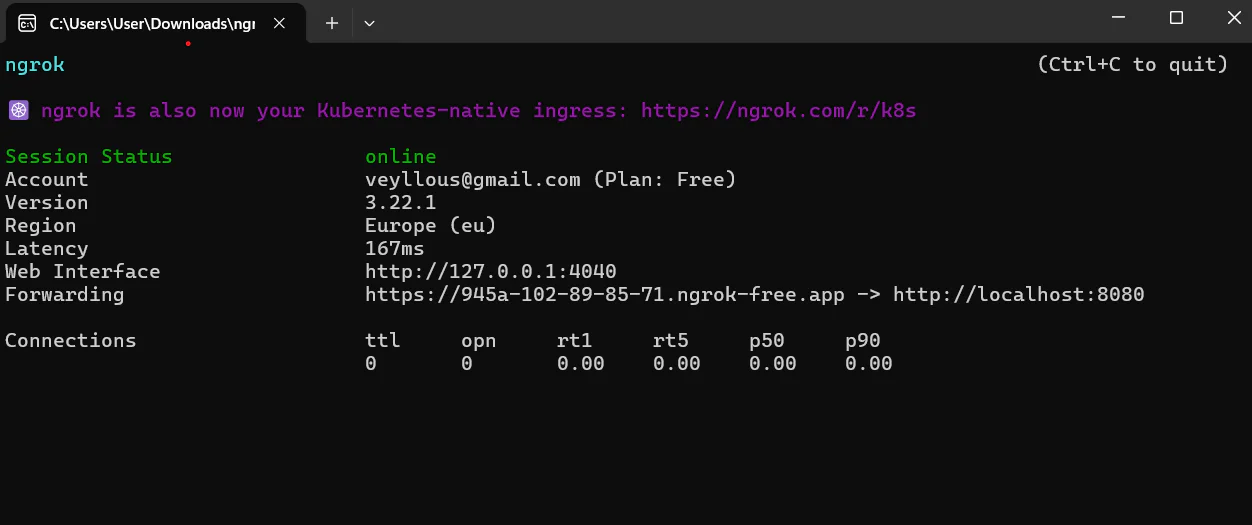
Next, copy the generated ngrok forwarding URL and go to your Twilio Console. Navigate to Phone Numbers > Manage > Active Numbers, then select your Twilio number.
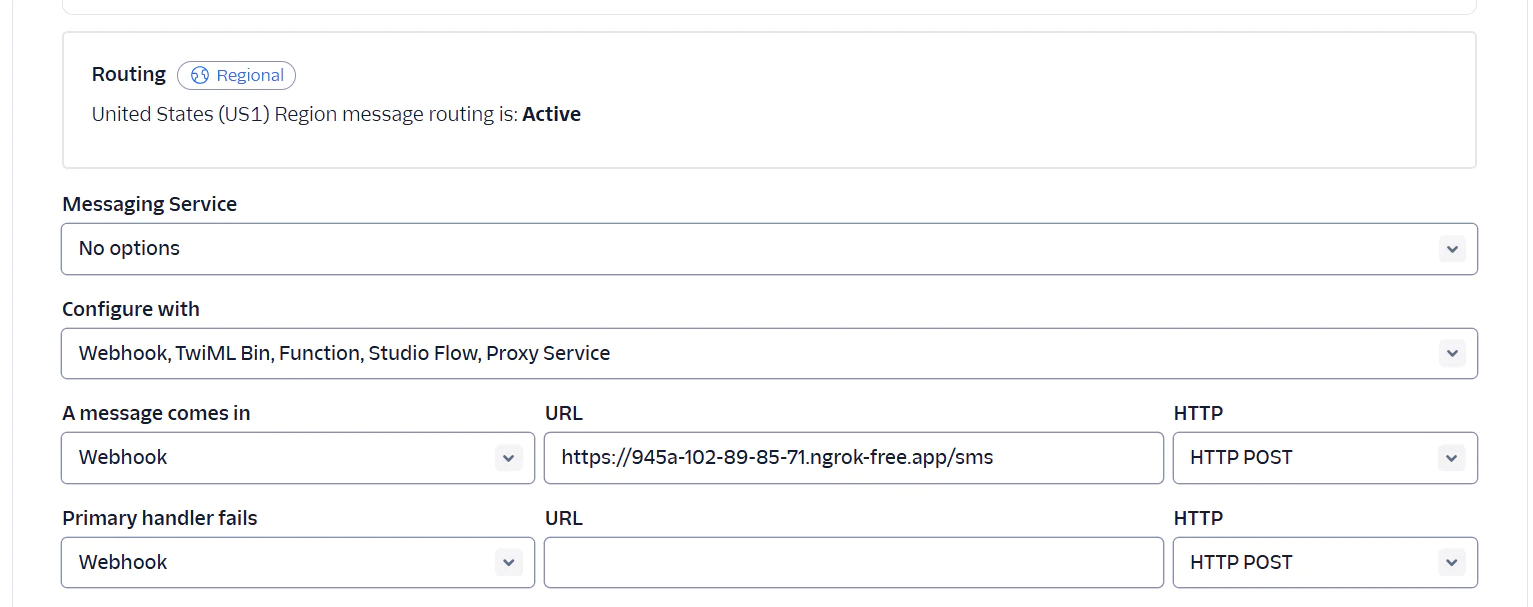
- In the Configure tab, scroll to the Messaging Configuration section. Under A message comes in:Paste your ngrok URL with "/sms" at the end (for example, https://1234-abc.ngrok.io/sms)
- Set the HTTP method to "POST"
Once that's done, click Save configuration to apply the changes.
Test the application
Since the application is already running and exposed to the internet via ngrok, you can now test it by sending a message to your Twilio number. Grab your phone and send an SMS to your Twilio number. For example, try texting "Hi" or "Ping".
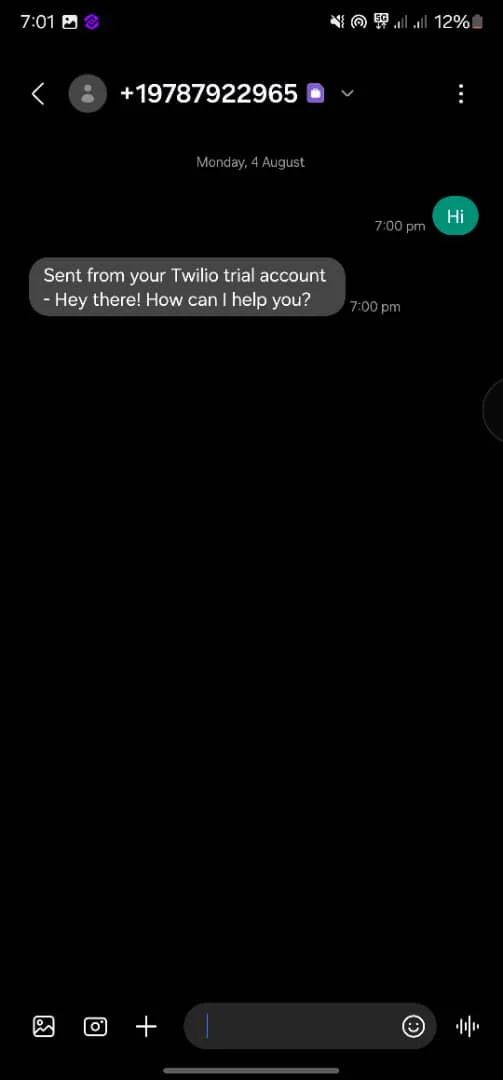
If everything is set up correctly, your server will process the incoming message and respond instantly based on the message content. You should receive a reply on your phone, like "Hey there! How can I help you?" or "Pong!", depending on what you sent.
If you see the correct response on your phone, then your webhook and auto-responder are working exactly as intended.
You can also view the message sent from your Twilio phone number directly in your terminal.

That’s how to build a service for receiving and processing incoming SMS with Twilio webhooks in Go
In this tutorial, you built a simple SMS receiver using Go and Twilio webhooks. You created a lightweight HTTP server, connected it to a Twilio phone number, and used ngrok to test it from a real mobile device. When an SMS comes in, your server reads the message and sends back an automated response based on its content.
This setup is a solid starting point for building real-world SMS applications such as auto-responders, support bots, notifications, or interactive tools. You can now expand it by storing messages, adding more advanced reply logic, integrating third-party APIs, or deploying it to a production server. With Go’s speed and simplicity, you've got a solid foundation to build something powerful.
I'm Jesuleye Marvellous Oreoluwa , a software engineer who is passionate about teaching technology and enjoys making music in my own time.


Related Resources
Twilio Docs
From APIs to SDKs to sample apps
API reference documentation, SDKs, helper libraries, quickstarts, and tutorials for your language and platform.
Resource Center
The latest ebooks, industry reports, and webinars
Learn from customer engagement experts to improve your own communication.
Ahoy
Twilio's developer community hub
Best practices, code samples, and inspiration to build communications and digital engagement experiences.