How to Bring Your Own Keys for Okta Telephony with Twilio Verify
Time to read:
July 07, 2026
Written by
Reviewed by
AI generated summary
- Integrate Twilio Verify with Okta for secure SMS and Voice OTPs.
- Provide Okta with your Twilio API keys for easy setup.
- Use Twilio's insights dashboard to monitor and optimize OTP performance.
This summary was generated by AI.
How to Bring Your Own Keys for Okta Telephony with Twilio Verify
Okta requires companies to bring their own telephony (BYOT) if they want to send SMS one-time passcodes (OTPs) or phone calls for multi-factor authentication or account recovery. Twilio Verify is an out-of-the-box solution for sending OTPs, and now Okta makes it straightforward to get set up with Verify in just a few steps.
This post will cover how to provide Okta with the necessary API keys to configure your telephony and be up and running in no time.
Prerequisites for Adding Twilio Verify to your Okta Org
Before you get started, you'll need the following account details:
- A Twilio Account ( login or create one for free if you don’t have one yet)
- Twilio Account SID (
ACxxx…, find it at twilio.com/console) - Twilio Auth Token (also find it at twilio.com/console)
- Verify Service SID (
VAxxx…, find or create one here: twilio.com/console/verify/services) - Enable Custom Code on your Verify Service.
Custom code allows Okta to set the verification code in the request. This is necessary for integrating with Okta's telephony workflows.
Bring your own key
Inside your Okta admin console, navigate to Customizations >> Telephony Providers. Select Twilio and paste in your Account SID, Auth Token, and Verify Service SID.
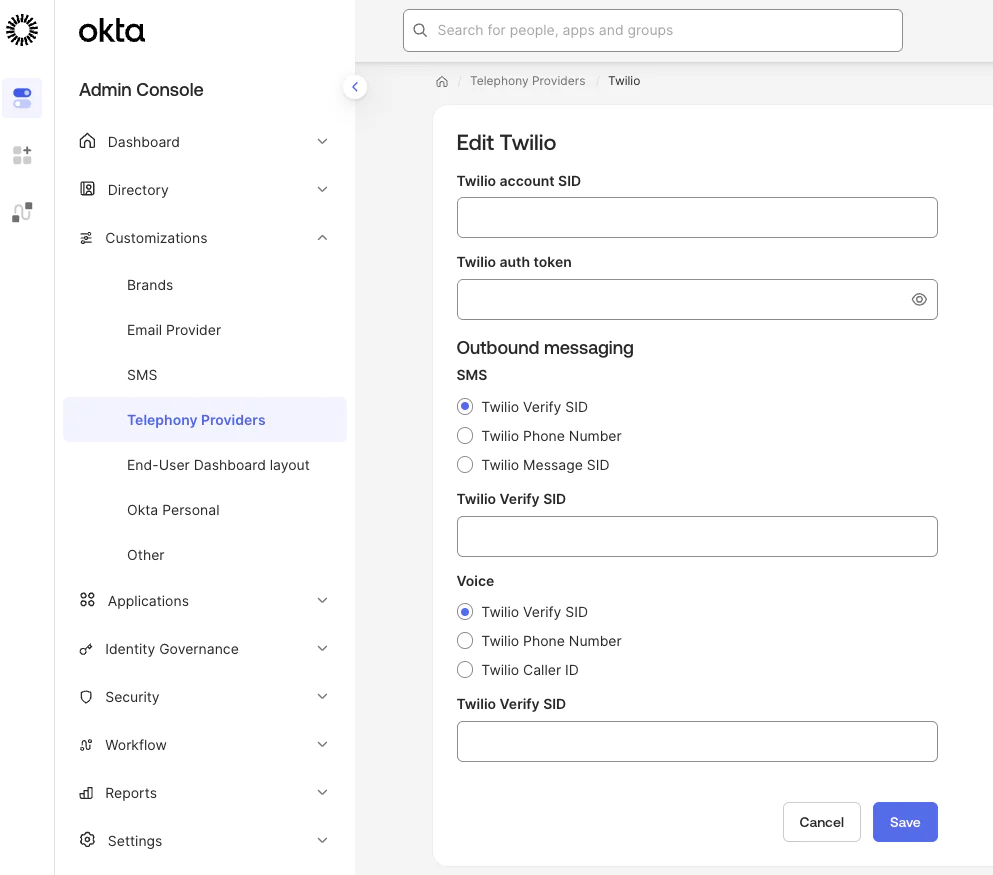
Okta encrypts and securely stores your credentials.
Test and run
After you've saved your telephony details, you can add SMS and Voice as MFA and recovery options to your Okta configuration. Learn more about configuring telephony in the Okta documentation.
Then add a phone number to your user and test the end to end flow following Okta's instructions for configuring end user phone authentication.
After end to end testing with a real login, head to the Twilio Console Verify Logs. Select a Verification ID to open its Verification details page and view more comprehensive information such as different actions and outcomes that happened during the Verification's lifecycle and any related error codes, if applicable.
Once you have the feedback enabled, you will have access to the Verify SMS Fraud Insights dashboard on Twilio Console. The dashboard illustrates the impact fraud could have had without intervention, and also allows you to discover trends and insights that you can use to better optimize your product against fraud.
To view your dashboard, go to Twilio Console and navigate to Monitor > Insights > Verify > Fraud which will open the Overview tab. There, you'll find several sections relating to your Fraud metrics
Customize your Okta telephony with Twilio Verify implementation
If you need a more customized approach, learn how to set up Twilio Verify with Okta inline hooks. The inline hook approach requires more configuration but allows you more flexibility to do things like Lookup a phone number before sending an OTP or anything else you might want to do in code.
That's it! Now you can monitor performance of your Verify OTPs with the insights dashboard and explore more options in the Verify API documentation.



Related Resources
Twilio Docs
From APIs to SDKs to sample apps
API reference documentation, SDKs, helper libraries, quickstarts, and tutorials for your language and platform.
Resource Center
The latest ebooks, industry reports, and webinars
Learn from customer engagement experts to improve your own communication.
Ahoy
Twilio's developer community hub
Best practices, code samples, and inspiration to build communications and digital engagement experiences.