Actions Pipedrive
The Actions Pipedrive destination allows customers to share Segment event data with Pipedrive. Segment events sent to Pipedrive will either create new Entities or update existing Entities in Pipedrive.
Actions Pipedrive provides the following benefits:
- Clear mapping of data. Actions-based destinations enable you to define the mapping between the data Segment receives from your source and the data Segment sends to Pipedrive.
- Maximum event measurement. Capture more events with improved accuracy across different browsers, apps, and devices to get a unified view of your customer's journey from page view to purchase.
To set up the Actions Pipedrive destination, follow these steps:
- Sign in to your Segment Workspace
- Click to the Catalog tab.
- Click on the Destinations tab.
- Use the search field to find the 'Pipedrive' destination. Click on the Actions Pipedrive tile.
- Click Add Destination.
- Select a source to connect to and click the Next button.
- Provide a name for your Pipedrive destination and click the Create Destination button.
- On the Settings tab, provide values in the Domain and API Token settings fields, then click the Save Changes button.
- Navigate to the Mappings tab to configure how Segment events will be mapped to Pipedrive Entities. By default, mappings to upsert to Pipedrive's Person, Organization and Activity Entities will already be enabled. You can configure new Mappings by clicking on the New Mapping button.
- After you've configured and enabled your Mappings, click back to the Settings tab and enable the integration using the Enable Destination toggle. Segment should now start sending event data to Pipedrive.
Segment uses the Match value field value as a key when creating or updating an Entity in Pipedrive. By default, the Match value will be mapped to the id field for the corresponding Entity. You can specify which Pipedrive field to use as a key using the Match field field.
Match field fields are dynamic and will populate with data from your Pipedrive account.
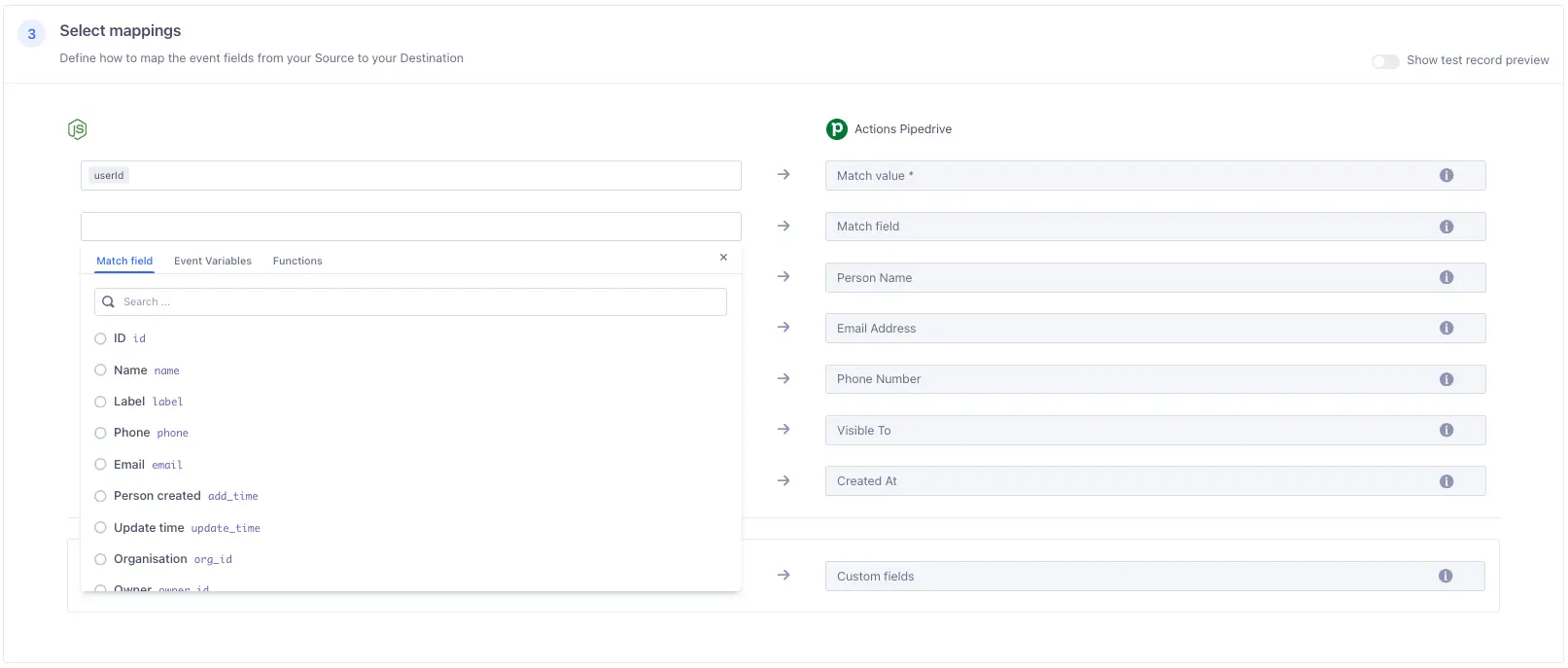
In the following example, Segment is configured to create or update Person Entities using the email field.

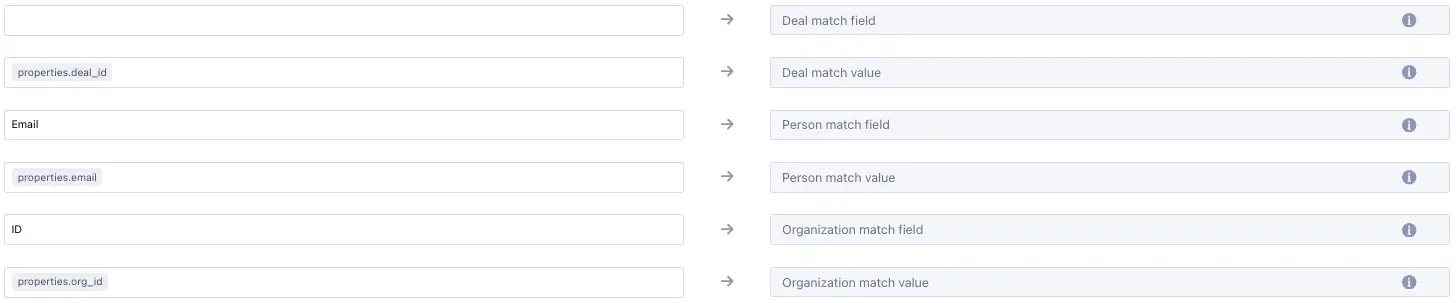
Entities such as the Deal Entity can be configured to be associated with other Entities in Pipedrive. In the example with the Deal mapping below the following will happen:
- A Person Entity with an email address matching properties.email will be associated with the Deal Entity being created or updated.
- An Organization Entity with an ID matching properties.org_id will be associated with the Deal Entity being created or updated.
Pipedrive API token. This is found in Pipedrive in Settings > Personal preferences > API > Your personal API token.
Optional
This is a key by which a Deal in Pipedrive will be searched. It can be either Deal id or has of a custom field containing external id. Default value is deal_id.
Pipedrive domain. This is found in Pipedrive in Settings > Company settings > Company domain.
Optional
This is a key by which an Organization in Pipedrive will be searched. It can be either Organization id or has of a custom field containing external id. Default value is org_id.
Optional
This is a key by which a Person in Pipedrive will be searched. It can be either Person id or has of a custom field containing external id. Default value is person_id.
Actions Pipedrive has the following presets
| Preset Name | Trigger | Default Action |
|---|---|---|
| Create or Update an Organization | Event type = "group" | Create or Update Organization |
| Create or Update an Activity | Event type = "track" and event = "Activity Upserted" | Create or update an Activity |
| Create or Update a Person | Event type = "identify" | Create or Update Person |
Build your own Mappings. Combine supported triggers with the following Actions Pipedrive-supported actions:
Mapping limits per destination
Individual destination instances support a maximum of 5 mappings.
Update a person in Pipedrive or create them if they don't exist yet.
Create or Update Person is a Cloud action. The default Trigger is type = "identify"
Optional
If present, used instead of field in settings to find existing person in Pipedrive.
Value to find existing person by
Optional
Name of the person
Optional
Email addresses for this person.
Optional
Phone numbers for the person.
Optional
Visibility of the Person. If omitted, visibility will be set to the default visibility setting of this item type for the authorized user. 'Owner's visibility group and sub-groups' and 'Entire company' options only available with Professional or Enterprise plans
Optional
If the person is created, use this timestamp as the creation timestamp. Format: YYY-MM-DD HH:MM:SS
Optional
New values for custom fields.
Update an organization in Pipedrive or create it if it doesn't exist yet.
Create or Update Organization is a Cloud action. The default Trigger is type = "group"
Optional
If present, used instead of field in settings to find existing organization in Pipedrive.
Value to find existing organization by
Optional
Name of the organization
Optional
Visibility of the Organization. If omitted, visibility will be set to the default visibility setting of this item type for the authorized user. 'Owner's visibility group and sub-groups' and 'Entire company' options only available with Professional or Enterprise plans
Optional
If the organization is created, use this timestamp as the creation timestamp. Format: YYY-MM-DD HH:MM:SS
Optional
New values for custom fields.
Update an Activity in Pipedrive or create one if it doesn't exist.
Create or update an Activity is a Cloud action. The default Trigger is type = "track" and event = "Activity Upserted"
Optional
ID of Activity in Pipedrive to Update. If left empty, a new one will be created
Optional
If present, used instead of field in settings to find existing person in Pipedrive.
Optional
Value to find existing person by
Optional
If present, used instead of field in settings to find existing organization in Pipedrive.
Optional
Value to find existing organization by
Optional
If present, used instead of field in settings to find existing deal in Pipedrive.
Optional
Value to find existing deal by
Optional
Subject of the Activity. When value for subject is not set, it will be given a default value Call.
Optional
Type of the Activity. This is in correlation with the key_string parameter of ActivityTypes. When value for type is not set, it will be given a default value Call
Optional
Additional details about the Activity that is synced to your external calendar. Unlike the note added to the Activity, the description is publicly visible to any guests added to the Activity.
Optional
Note of the Activity (Accepts plain text and HTML)
Optional
Due date of the Activity. Format: YYYY-MM-DD
Optional
Due time of the Activity. Format: HH:MM
Optional
Duration of the Activity. Format: HH:MM
Optional
Whether the Activity is done or not.
Update a Lead in Pipedrive or create it if it doesn't exist yet.
Create or update Lead is a Cloud action. The default Trigger is type = "identify"
Optional
ID of Lead in Pipedrive to Update. If left empty, a new one will be created
Optional
If present, used instead of field in settings to find existing person in Pipedrive.
Optional
Value to find existing person by. Required unless organization_match_value present
Optional
If present, used instead of field in settings to find existing organization in Pipedrive.
Optional
Value to find existing organization by. Required unless person_match_value present
The name of the Lead
Optional
Potential value of the lead
Optional
Three-letter code of the currency, e.g. USD
Optional
The date of when the Deal which will be created from the Lead is expected to be closed. In ISO 8601 format: YYYY-MM-DD.
Optional
Visibility of the Lead. If omitted, visibility will be set to the default visibility setting of this item type for the authorized user. 'Owner's visibility group and sub-groups' and 'Entire company' options only available with Professional or Enterprise plans
Update a Note in Pipedrive or create it if it doesn't exist yet.
Create or update a Note is a Cloud action. The default Trigger is type = "track" and event = "Note Upserted"
Optional
ID of Note in Pipedrive to Update. If left empty, a new one will be created
Optional
ID of Lead in Pipedrive to link to. One of Lead, Person, Organization or Deal must be linked!
Optional
If present, used instead of field in settings to find existing person in Pipedrive.
Optional
Value to find existing person by. One of Lead, Person, Organization or Deal must be linked!
Optional
If present, used instead of field in settings to find existing organization in Pipedrive.
Optional
Value to find existing organization by. One of Lead, Person, Organization or Deal must be linked!
Optional
If present, used instead of field in settings to find existing deal in Pipedrive.
Optional
Value to find existing deal by. One of Lead, Person, Organization or Deal must be linked!
Content of the note in text or HTML format. Subject to sanitization on the back-end.
Update a Deal in Pipedrive or create it if it doesn't exist yet.
Create or update a Deal is a Cloud action. The default Trigger is type = "track" and event = "Deal Upserted"
Optional
If present, used instead of field in settings to find existing deal in Pipedrive.
Optional
Value to find existing deal by
Optional
If present, used instead of field in settings to find existing person in Pipedrive.
Optional
Value to find existing person by. Required unless organization_match_value present
Optional
If present, used instead of field in settings to find existing organization in Pipedrive.
Optional
Value to find existing organization by. Required unless person_match_value present
Deal title (required for new Leads)
Optional
Value of the deal. If omitted, value will be set to 0.
Optional
Currency of the deal. Accepts a 3-character currency code. If omitted, currency will be set to the default currency of the authorized user.
Optional
The ID of a stage this Deal will be placed in a pipeline (note that you can't supply the ID of the pipeline as this will be assigned automatically based on stage_id). If omitted, the deal will be placed in the first stage of the default pipeline.
Optional
Deal status - open, won, lost or deleted. If omitted, status will be set to open.
Optional
The expected close date of the Deal. In ISO 8601 format: YYYY-MM-DD.
Optional
Deal success probability percentage. Used/shown only when deal_probability for the pipeline of the deal is enabled.
Optional
Optional message about why the deal was lost (to be used when status=lost)
Optional
Visibility of the deal. If omitted, visibility will be set to the default visibility setting of this item type for the authorized user. 'Owner's visibility group and sub-groups' and 'Entire company' options only available with Professional or Enterprise plans
Optional
If the deal is created, use this timestamp as the creation timestamp. Format: YYY-MM-DD HH:MM:SS
Optional
New values for custom fields.