Freshsales Suite - CRM Destination
Destination Info
- Accepts Page, Identify and Track calls.
- Refer to it as Freshsales Suite - CRM in the Integrations object
- This integration is partner owned. Please reach out to the partner's support for any issues.
Freshsales Suite is a cloud CRM software that breaks organizational silos across sales, marketing, and support, allowing businesses to connect with customers across all touchpoints in one system.
Freshsales maintains this destination. For any issues with the destination, contact the Freshsales support team.
The Freshsales Suite - CRM destination supports the identify, page, and track methods, which let you create and update Freshsales contacts through Segment. To enable the Freshsales Suite - CRM destination:
- Navigate to Freshsales Admin Settings > Third Party Integrations > Segment on the Freshsales platform.
- Click Install and select the Segment source you wish to connect to your Freshsales Suite - CRM destination.
You can also add the Freshsales Suite - CRM destination from the Segment destinations catalog.
- From the Segment web app, navigate to Catalog > Destinations and click Add Destination.
- Find the Destinations Actions item in the left navigation, and click it.
- Search for Freshsales Suite - CRM and select it.
- Click Configure Freshsales Suite - CRM.
- Select the Source you want to connect to Freshsales Suite - CRM.
- Provide the subdomain and API key in the destination settings that are found in your Freshsales account.
Freshsales Suite - CRM supports the following methods.
You can use identify to create a contact when a website visitor fills a webform. When you identify a user, Segment passes that user's information to Freshsales.
userId is a mandatory field which is used to identify the contact in Freshsales. If your user identifier is not email, then email has to be a part of traits.
1{2"userId": "97980cfea0067",3"type": "identify",4"traits": {5"firstName": "John",6"lastName": "Doe",7"email": "john.doe@example.com",8"cfAlternateNumber": "98765432",9"company": {10"name": "Example.com"11}12}13}14
Traits are pieces of information you know about a user. They are a mandatory part of the Identify method.
Segment reserved some traits that have semantic meanings for users. You should only use reserved traits for their intended meaning. Check the Segment Spec to get a list of reserved traits.
All attributes that are a part of traits should correspond to the internal names of those fields in Freshsales. Segment ignores attributes that aren't mapped with their corresponding fields.
However, Segment makes an exception for two attributes: title and phone, which are reserved traits in Segment. They automatically map to the Freshsales attributes of job_title and work_number respectively.
As part of traits, you can send custom fields created in Freshsales by using their internal names in camel case. You can find internal names in the corresponding field settings page.
Custom fields won't automatically create. You have to create them in Freshsales before proceeding to send data from Segment. Learn more about creating custom fields in Freshsales.
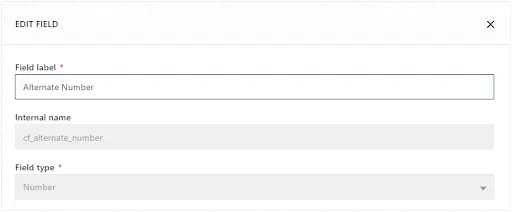
You can also update Accounts and Deals associated with a contact in Freshsales. The company and deal objects in the identify payload correspond to the Accounts and Deals objects in Freshsales. When you use the identify method to create a contact, it's possible to also create the corresponding Account and Deal and Freshsales. To do this, pass the company or the deal objects within traits in the identify call.
1{2"userId" : "97980cfea0067",3"type": "identify",4"traits" : {5"firstName": "John",6"lastName": "Doe",7"email": "john.doe@example.com",8"company": {9"name": "Example.com"10},11"deal" :{12"name" : "Sample Deal",13"amount": 123414}15}16}
You can track activities of your website visitors. If a user is subscribing to a newsletter and you want to track it, use the track method.
1{2"userId" : "john.doe@example.com",3"event": "Email Bounced",4"type": "track",5"properties" : {6"emailId": "110688",7"emailSubject": "Welcome to Example.com",8"campaignId": "123",9"campaignName": "New Customer Discount"10}11}
Segment standardized a series of reserved event names that have special semantic meaning. Segment maps these events to tools that support them whenever possible. See the Semantic Events docs for more detail. Custom events are supported as well.
If you want to track users visiting your sites, you can use the page method. When you call a page event, Segment sends a pageview to Freshsales. You can send extra data parameters within properties in the event payload. See the reserved properties for more details.
1{2"userId": "john.doe@example.com",3"name": "Page view",4"type": "page",5"properties": {6"title": "Welcome to pricing page | Example.com",7"url": "http://example.com/pricing"8}9}
Make sure that the traits you're passing through match the custom field's internal name and data type.
You can send computed traits and audiences generated using Engage to this destination as a user property. To learn more about Engage, schedule a demo.
For user-property destinations, an identify call is sent to the destination for each user being added and removed. The property name is the snake_cased version of the audience name, with a true/false value to indicate membership. For example, when a user first completes an order in the last 30 days, Engage sends an Identify call with the property order_completed_last_30days: true. When the user no longer satisfies this condition (for example, it's been more than 30 days since their last order), Engage sets that value to false.
When you first create an audience, Engage sends an Identify call for every user in that audience. Later audience syncs only send updates for users whose membership has changed since the last sync.
Real-time to batch destination sync frequency
Real-time audience syncs to Freshsales Suite - CRM may take six or more hours for the initial sync to complete. Upon completion, a sync frequency of two to three hours is expected.
Segment lets you change these destination settings from the Segment app without having to touch any code.
You can find your Freshsales Suite API token under Profile Settings -> API Settings.
If your domain is mycompany.myfreshworks.com, then your subdomain is 'mycompany'.