Yahoo Audiences Destination
The Yahoo Audiences integration connects Engage Audiences to Yahoo DSP and lets you configure your data delivery preferences within the Segment platform.
The integration supports several identifiers, including email, phone, and MAIDs (mobile advertising IDs, such as the iOS IDFA and Android Advertising ID). To protect data, the integration hashes email and phone identifiers and formats phone numbers to comply with E.164 requirements.
The integration runs on the Yahoo DataX platform and uses the Yahoo Realtime API for audience synchronization. You can sync both realtime and batch audiences, with incremental batches supporting a maximum of 1000 user records. Each synchronized user record can include the individual's membership in multiple audiences.
The integration also supports Trait Activation, specifically Trait Enrichment and ID Sync.
To connect your Yahoo Audiences Destination:
-
Create your Engage Audience.
-
Navigate to Engage > Engage Settings > Destinations and click Add Destination.
-
Select Yahoo Audiences, select your Engage space as the source, and name your destination.
-
Configure global destination settings on the Settings tab:
Settings Details Name Specify the destination name, for example "Yahoo Audiences Production". This value is only available in Segment. MDM ID Specify the MDM ID provided by your Yahoo DSP representative. Engage Space ID Specify the Engage Space ID. To locate Engage Space ID navigate to Unify > Unify Settings > API Access. This value identifies your customer node in Yahoo Data Taxonomy. Don't provide arbitrary values in this field, or any values other than your Engage Space ID.
Note: The destination displays an error if the provided value includes any characters other than [a-zA-Z0-9] and "_" (underscore). This is to prevent passing values not supported by Yahoo.Customer Description Provide an optional description for the integration. -
Turn on the Enable Destination toggle.
-
Click Save Changes to save the destination.
-
Configure destination Action Mappings. Action Mappings determine the information sent from Engage to the Yahoo Audiences destination.
- On the Mapping tab click Add Mapping and select Sync to Yahoo Ads Segment.
- Within the mapping's Select events to map and send configure whether the mapping should be triggered for all audiences connected to the destination, or for specific audiences only.
-
Note: Action mapping settings apply to all audiences that are processed by the mapping. The mapping can be configured to process all audiences connected to the destination, or only specific audiences. This can be helpful when enabling the GDPR flag only for specific audiences.
-
To apply the mapping only to specific audiences, modify the trigger as follows:

-
To apply the mapping to all audiences, modify the trigger as follows:

-
- Configure the mapping for Email, Phone, Mobile Advertising Id and Device Type fields. You can keep default mapping for these fields, if your data matches default mappings.
- Note: The destination expects the mobile advertising ID to be a combination of 2 fields: advertising ID and device type. If device type field is not available in your data, the destination deduces the platform (iOS /Android) based on advertising ID value formatting. If the value is capitalized - the destination assumes that this is iOS IDFA, otherwise the destination assumes that is Android DSP ID.
- Configure whether GDPR Flag should be sent.
- Note: GDPR Flag setting applies to the entire audience. Set this setting to TRUE if the audience is subject to GDPR regulations. If you set the GDPR Flag to YES, then populate GDPR Consent Attributes setting with the following IAB user consent attributes: "Access of Information" and "Personalization". See more in Yahoo DSP API documentation. If the GDPR Flag setting is set to YES, and GDPR Consent Attributes is not populated, the audience sync fails.
- Provide GDPR Consent Attributes if you opted to send a GDPR Flag.
- Save the mapping.
-
Connect the Destination to the Audience and configure the Audience Sync settings.
- Navigate to Engage > Audiences > (your audience). Click Add Destination and select the destination you just created.
- Configure how the audience should be synced. Enable Send Track and disable Send Identify.
- Select the identifiers to be synced to Yahoo:
- Default Setup: Sends all email IDs available on a user profile.
- Customized Setup: Configure the identifiers to be sent to Yahoo DSP.
- If you'd like to send iOS IDFA and Android Advertising ID - turn on Send Mobile IDs and map MAIDs using Customized Setup.
- Don't modify the Placeholder setting.
- Click Save Settings.
Info
Yahoo DSP supports the following identifiers: email, phone, iOS IDFA, Android Advertising Id. Segment hashes email and phone per Yahoo DSP requirements, so you don't have to hash email and phone. Segment formats the phone to meet E.164 requirements: removes non-digit characters and adds "+" sign. Your phone trait/identifier must include country code, as Segment does not prepend phone with country code.
Once the Audience is connected to the Destination, Segment makes a request to Yahoo DSP to create an 'audience' ('segment') node in Yahoo Data Taxonomy. The node is identified by Audience ID, and named with Audience Key. After Engage has computed the audience, the Destination syncs the audience to Yahoo DSP.
Optional
Engage space name and description
Engage Space Id found in Unify > Settings > API Access
Yahoo MDM ID provided by Yahoo representative
Build your own Mappings. Combine supported triggers with the following Yahoo Audiences-supported actions:
Mapping limits per destination
Individual destination instances support a maximum of 5 mappings.
Sync Segment Audience to Yahoo Ads Segment
Sync To Yahoo Ads Segment is a Cloud action. The default Trigger is type = "identify" or type = "track"
Event traits or properties. Do not modify this setting
Optional
Phone number of a user. If not hashed, Segment will hash this value.
Optional
Email address of a user. If not hashed, Segment will hash this value.
Optional
User's mobile advertising Id
Optional
User's mobile device type
Optional
GDPR Settings for the audience
Email, phone, iOS IDFA and Android Advertising ID are available as Engage Identifiers.
| Setting | Details |
|---|---|
| Action Mappings | Keep default field mappings. |
| Audience Sync settings | Select Customized Setup, and map available identifiers under the Identifiers section. You can select whether Engage should send First, Last, or All Available identifiers. |
Email, phone, iOS IDFA and Android Advertising ID are available as Engage Identifiers and/or Traits.
| Settings | Details |
|---|---|
| Action Mappings | Modify the mapping to reflect your custom trait names. For example, if you're planning to send email_addr trait as email to Yahoo Audiences, map email_addr trait in the User Email field. |
| Audience Sync settings | Click Customized Setup and select the Identifiers and Traits that you plan to send to Yahoo Audiences. For example, if you plan to send phone identifier and email_addr trait, map these fields as shown below: 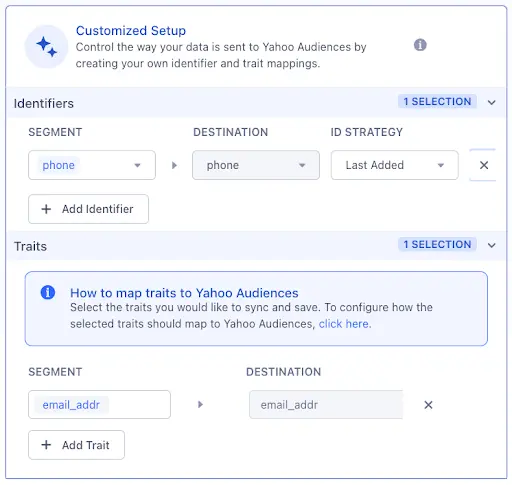 |
Send mobile advertising ID custom traits to Yahoo Audiences.
| Settings | Details |
|---|---|
| Action Mappings | The destination expects 2 fields for mobile advertising ID: 1) advertising ID field (trait) storing the ID value itself, and 2) device type field (trait) storing mobile platform name (ios or android). * If your Engage data includes these 2 fields, you can map them as: traits.advertising_id_trait → User Mobile Advertising ID and traits.device_type_trait → User Mobile Device Type. * If your data doesn't include a field with the device type, you can only map the advertising ID trait. The destination detects device type based on the ID value format. Apple IDFA is typically capitalized, and Android advertising ID is typically lowercase. * If you have separate traits for iOS IDFA and Android Advertising ID, you can map them using the coalesce() function: coalesce( traits.ios_ad_id_trait, traits.android_ad_id_trait) → User Mobile Advertising ID |
| Audience Sync settings | Use Customized Setup to map custom advertising ID and, if available, device type traits. 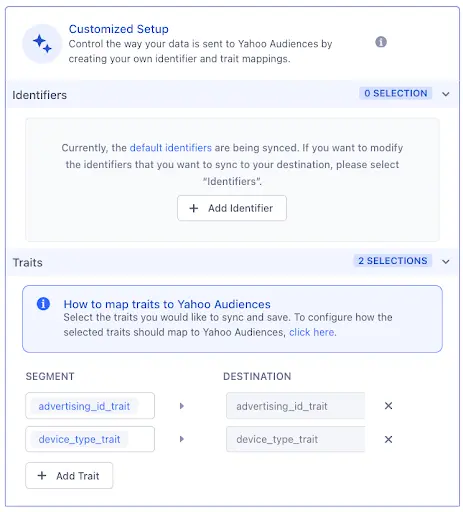 |
The difference between audience size in Segment and in Yahoo DSP is expected due to ID matching. Yahoo DSP will recognize only users it has matching ID (email / phone / MAID) for.
As soon as user records land in Yahoo DSP, users become targetable in minutes. However, Yahoo DSP reporting is not realtime, and might take 24-48 hours to catch up. This delay does not affect targeting. Because of that you might see 0 users in the Yahoo DSP audience immediately after the sync.
You can send computed traits and audiences generated using Engage to this destination as a user property. To learn more about Engage, schedule a demo.
For user-property destinations, an identify call is sent to the destination for each user being added and removed. The property name is the snake_cased version of the audience name, with a true/false value to indicate membership. For example, when a user first completes an order in the last 30 days, Engage sends an Identify call with the property order_completed_last_30days: true. When the user no longer satisfies this condition (for example, it's been more than 30 days since their last order), Engage sets that value to false.
When you first create an audience, Engage sends an Identify call for every user in that audience. Later audience syncs only send updates for users whose membership has changed since the last sync.
Real-time to batch destination sync frequency
Real-time audience syncs to Yahoo Audiences may take six or more hours for the initial sync to complete. Upon completion, a sync frequency of two to three hours is expected.
Segment lets you change these destination settings from the Segment app without having to touch any code.
Optional
Engage space name and description
Engage Space Id found in Unify > Settings > API Access
Yahoo MDM ID provided by Yahoo representative