Wisepops Destination
Wisepops offers an end-to-end platform to help all types of online brands deliver a personalized experience to their visitors through multiple formats: popups, bars, embeds and notifications feed. Wisepops powers 2,000 brands in 53 countries and delivers 2 billion personalized onsite messages each year to convert visitors into loyal customers.
When you use the Wisepops destination, Segment loads Wisepops on your website for you. With no development, you can target your users based on their traits or events, display personalized messages, and track the revenue generated by your campaigns.
-
From the Segment web app, click Catalog, then click Destinations.
-
Find the Wisepops item in the catalog, and click it.
-
Click Configure Wisepops.
-
Select an existing Source to connect to Wisepops.
-
Give the destination a name.
-
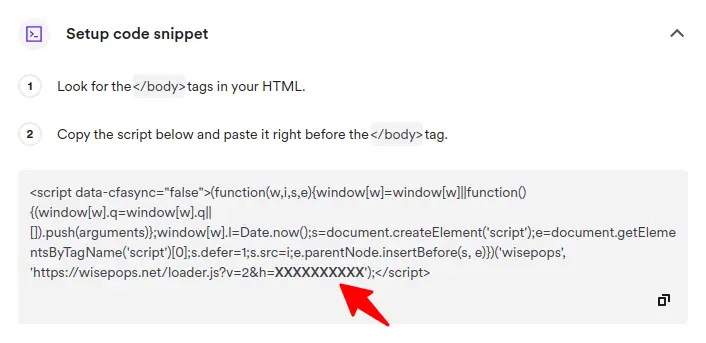
In the Basic Settings page, enter your Website Identifier. It can be found in your Wisepops setup code. It's the bolded string that's 10 characters long.
-
Toggle Enable Destination and click Save Changes.
Wisepops Destination is device mode only (web)
This destination is compatible only with Analytics.js 2.0. Server-side identify and track calls don't trigger Wisepops' actions.
The Wisepops destination comes with mapping presets. You can adjust each default mapping by going to the Mapping tab of the destination in the Segment web app.
By default, when you identify a user, their traits are set as custom properties. A great use case is to display the user first name in your campaign:

Success!
The user ID is set as the custom property userId. For example, use {{userId}} as a hidden field value to know who responds to your Wisepops surveys.
By default, when you identify a group, its traits are set as custom properties in a nested object group.
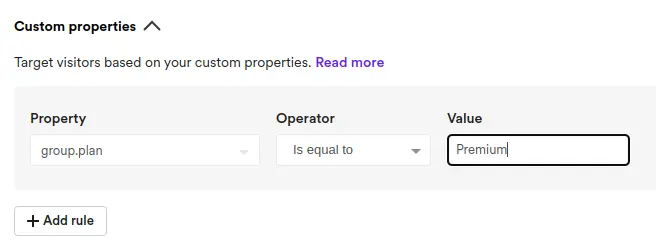
You must use the prefix group. when you refer to a group trait in Wisepops.
For example, you can target the users of groups subscribed to your "Premium" plan:
Success!
The group ID is set as the custom property group.groupId.
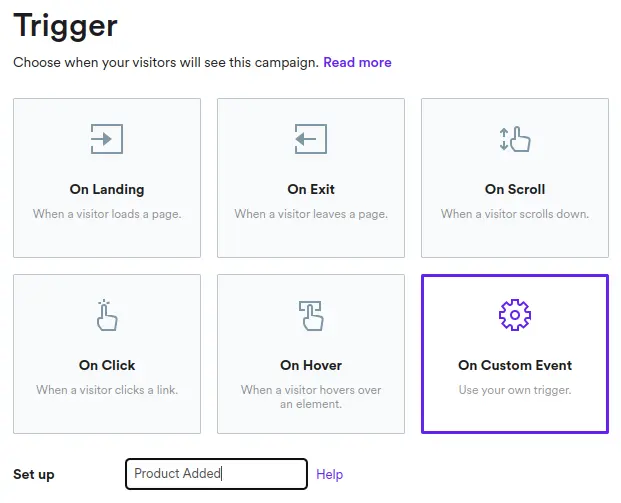
By default, when you track an event, Segment sends a custom event to Wisepops. To show a campaign when a custom event is emitted, enter the event name as the campaign trigger. For example, you can display a popup when a product is added to the cart:
Custom events count as page views in your Wisepops' monthly quota
If you track a lot of events with Segment, you may want to edit this mapping to send only the relevant events to Wisepops.
The Track Goal action is not mapped by default. You can enable it to track goal completion and revenue on Wisepops.
To track a JavaScript goal using Segment:
-
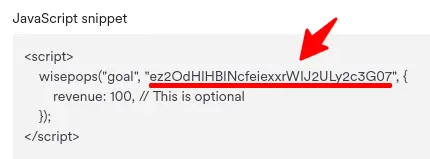
Copy the goal identifier. It is a 32-character string visible after the goal is created:
-
In Segment, create a new mapping with the action Track Goal.
-
In the first section, configure when the goal should be tracked.
-
In the third section, paste the goal identifier, without quotes, into the Goal Identifier field.
-
Save the new mapping.
By default, when you track a page, Segment sends a page view to Wisepops. This mapping is required for Wisepops to display campaigns at page change.
The identifier of your Wisepops' website. You can find it in your setup code on Wisepops.
Wisepops has the following presets
| Preset Name | Trigger | Default Action |
|---|---|---|
| Track Event | Event type = "track" | Track Event |
| Set User Traits as Custom Properties | Event type = "identify" | Set Custom Properties |
| Set Group Traits as Custom Properties | Event type = "group" | Set Custom Properties |
| Track Page | Event type = "page" | Track Page |
Build your own Mappings. Combine supported triggers with the following Wisepops-supported actions:
Mapping limits per destination
Individual destination instances support a maximum of 5 mappings.
Let Wisepops know when the visitor goes to a new page. This allows Wisepops to display campaigns at page change.
Track Page is a Web action. The default Trigger is type = "page"
This action does not have any fields.
Define custom properties to let Wisepops target them in your scenarios.
Set Custom Properties is a Web action. The default Trigger is type = "identify"
The custom properties to send to Wisepops.
Optional
A unique identifier. Typically, a user ID or group ID.
Optional
How to name the entity ID among the other custom properties?
Optional
This lets you define the properties as a nested object. If you set the property "name" with the prefix "group", you'll access it in Wisepops as "group.name".
Send a custom event to Wisepops. Keep in mind that events are counted as page views in your Wisepops' monthly quota.
Track Event is a Web action. The default Trigger is type = "track"
The name of the event to send to Wisepops.
Track goals and revenue to know which campaigns are generating the most value.
Track Goal is a Web action. The default Trigger is type = "track" and event = "Order Completed"
Optional
This is a 32-character identifier, visible when you create the JS goal in Wisepops.
Optional
The revenue associated with the goal.