Criteo App & Web Events Destination
Destination Info
- Accepts Page and Track calls.
- In Cloud-mode, refer to it as Criteo, or Criteo App & Web Events in the Integrations object
- In Device-mode, refer to it as Criteo in the Integrations object
Components
- Browser
- Server
Information about Criteo App & Web Events and Analytics.js
If you connect the Criteo App & Web Events destination to an Analytics.js source, the connection defaults to Device-mode. Cloud-mode connections are not available with Analytics.js.
This destination supports events originating from Mobile or Web sources (not Server). For more information, see Sources.
To get started with Criteo Events and Segment, you'll need:
- An existing account with Criteo.
- A data source integrated with either one of our mobile SDK's (iOS or Android) or JavaScript library (Analytics.js)
Criteo Events is built to help you track key purchase funnel events and details. To accomplish that, you'll want to track your user's actions using the following spec'd events to ensure you're following Criteo's best practices.
We use the context fields that we capture with our SDKs automatically to populate Criteo Events' tag with the app's name, user's language, locale, userId, deviceType and deviceId so you just need to make sure that the event names and properties match up! Refer to our common fields guide to identify which context fields we collect automatically for each of our client-side libraries (analytics.js, analytics-ios or analytics-android).
When a user views a particular product or offering inside your application, you should call our Product Viewed event and we'll map that to Criteo Events' viewProduct tag. You'll need to make sure that the products on your Product List Viewed event have a productId property. As with all our integrations, casing does not matter! Your properties can be camelCase or snake_case, both will work.
1analytics.track('Product Viewed', {2product_id: '507f1f77bc',3sku: 'G-32',4category: 'Games',5name: 'Monopoly: 3rd Edition',6brand: 'Hasbro',7variant: '200 pieces',8price: 18.99,9quantity: 1,10coupon: 'MAYDEALS',11currency: 'usd',12position: 3,13value: 18.99,14url: 'https://www.example.com/product/path',15image_url: 'https://www.example.com/product/path.jpg'16});
On web, the previous JavaScript example would result in the firing of the following Criteo Events tag:
window.criteo_q.push({ event: 'viewItem', item: '507f1f77bc' })
When a user views a list of products inside your application, you should call our Product List Viewed event and we'll map that to Criteo Events' viewListing tag. Same as above, make sure you have your item's productId or product_id on the event!
1analytics.track('Product List Viewed', {2list_id: 'hot_deals_1',3category: 'Deals',4products: [5{6product_id: '1',7sku: '45790-32',8name: 'Monopoly: 3rd Edition',9price: 19,10position: 1,11category: 'Games',12url: 'https://www.example.com/product/path',13image_url: 'https://www.example.com/product/path.jpg'14},15{16product_id: '2',17sku: '46493-32',18name: 'Uno Card Game',19price: 3,20position: 2,21category: 'Games'22}23]24});
On web, the previous JavaScript example would result in the firing of the following Criteo Events tag:
window.criteo_q.push({ event: 'viewList', item: ['1', '2'] })
When a user views their Cart or Order details inside your application, you should call our Cart Viewed event and we'll map that to Criteo Events' viewBasket tag.
You will need to have a products array of product objects in your Segment Cart Viewed event with at least id, price and quantity properties on each product object in that array.
1analytics.track('Cart Viewed', {2cart_id: 'd92jd29jd92jd29j92d92jd',3products: [4{5product_id: '507f1f77bcf86cd799439011',6sku: '45790-32',7name: 'Monopoly: 3rd Edition',8price: 19,9position: 1,10quantity: 6,11category: 'Games',12url: 'https://www.example.com/product/path',13image_url: 'https://www.example.com/product/path.jpg'14},15{16product_id: '505bd76785ebb509fc183733',17sku: '46493-32',18name: 'Uno Card Game',19price: 3,20position: 2,21quantity: 2,22category: 'Games'23}24]25});
On web, the previous JavaScript example would result in the firing of the following Criteo Events tag:
1window.criteo_q.push({ event: 'viewBasket', item: [2{3id: '507f1f77bcf86cd799439011',4price: '19',5quantity: 66},7{8id: '505bd76785ebb509fc183733',9price: '3',10quantity: 211}12]})
When a user completes an order or purchase inside your application, you should call our Order Completed event and we'll map that to Criteo Events' trackTransaction tag.
You will need to have a products array of product objects in your Segment Order Completed event with at least id, price and quantity properties on each product object in that array. You also must pass an orderId.
1analytics.track('Order Completed', {2checkout_id: 'fksdjfsdjfisjf9sdfjsd9f',3order_id: '098dsf098f',4affiliation: 'Google Store',5total: 27.50,6subtotal: 22.50,7revenue: 25.00,8shipping: 3,9tax: 2,10discount: 2.5,11coupon: 'hasbros',12currency: 'USD',13products: [14{15product_id: '507f1f77bcf86cd799439011',16sku: '45790-32',17name: 'Monopoly: 3rd Edition',18price: 19,19quantity: 1,20category: 'Games',21url: 'https://www.example.com/product/path',22image_url: 'https:///www.example.com/product/path.jpg'23},24{25product_id: '505bd76785ebb509fc183733',26sku: '46493-32',27name: 'Uno Card Game',28price: 3,29quantity: 2,30category: 'Games'31}32]33});
On web, the previous JavaScript example would result in the firing of the following Criteo Events tag:
1window.criteo_q.push({ event: 'trackTransaction', id: '098dsf098f', currency: 'USD', item: [2{3id: '507f1f77bcf86cd799439011',4price: '19',5quantity: 16},7{8id: '505bd76785ebb509fc183733',9price: '3',10quantity: 211}12]})
This is only relevant if you are using this integration for mobile. For the equivalent on web, see below.
Segment's Application Opened event maps to Criteo Events' viewHome tag. Current versions of Segment's SDKs collect this event automatically, so update your SDK if you haven't already.
Criteo Events' viewHome tag tracks top of funnel visits to your site's home page. We integrate with this functionality on web using the use of our .page method.
There are two ways of letting Segment know which .page event should trigger this tag:
- You can define the
nameargument in the.pagemethod as 'Home':
analytics.page('Home')
- You can give us the URL of your home page as an integration setting. Reference the settings section for more info.
This functionality is only available using Segment's web integration with Criteo.
Criteo Events supports the ability to send extra data with events about a page or user to supply your events with more context (This is a feature that is set up with the assistance of your Crtieo Account Manager).
To enable this functionality, you will need to provide us with the names of the Criteo Events data parameters you would like us to pass along as well as the name of the properties or traits of the Segment .page or .identify events that you would like us to map them from.
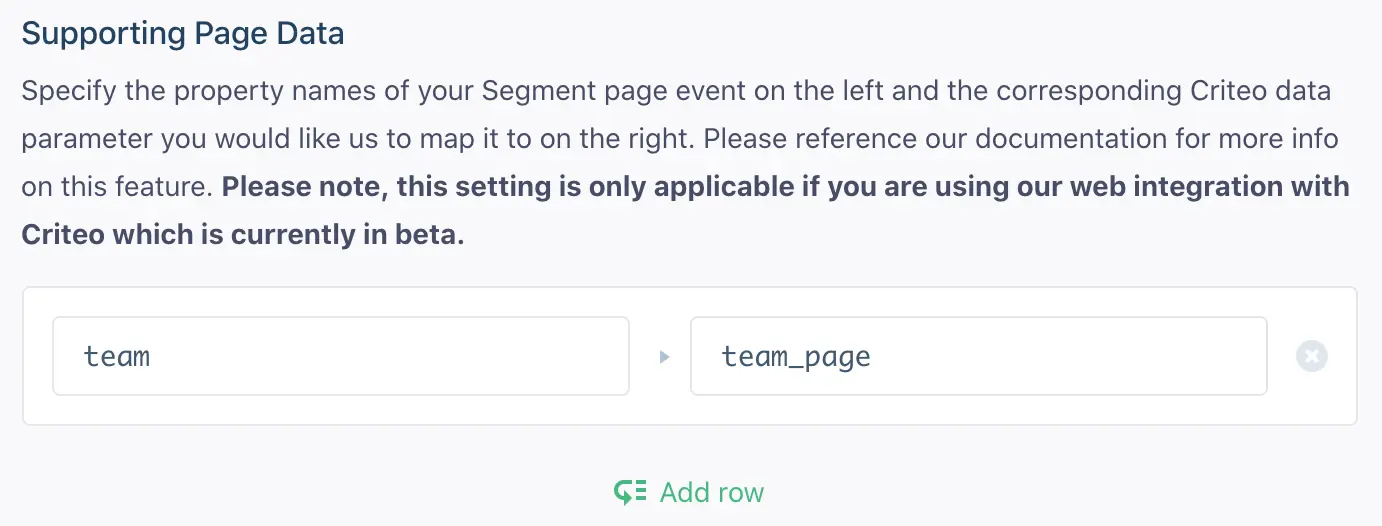
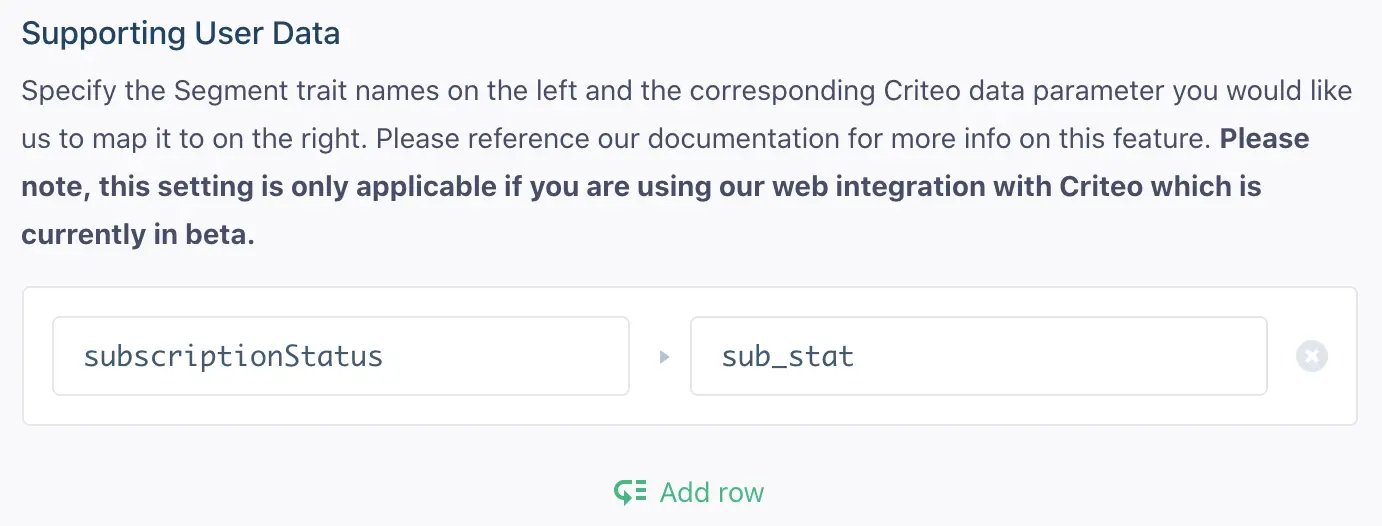
This is set up using the Supporting User Data and Supporting Page Data settings in your Criteo Events integration settings. In each of these, you can provide us with a list of key/value mappings designating the name of the Segment property/trait on the left and the corresponding Criteo Events parameter it should map to on the right.
Here is an example of Supporting Page Data:
Here is an example of Supporting User Data:
Once this is complete, we will do the following:
We will compare the properties of any .page events you invoke with the Supporting Page Data mappings. If a match is found, we will set the values of those properties as the values of Criteo Events data parameters you defined and pass them along with any future events that occur on the page. If you are using this functionality, make sure the .page event is being invoked on the page before any subsequent .track events.
For example, if you set the page event mappings defined above and triggered a page event like this:
analytics.page('Team Page', { team: 'New York Giants' })
And then on that same page triggered one of the .track events documented above (Product Viewed for example) the subsequent Criteo tag would look like this:
window.criteo_q.push({ event: 'viewItem', item: 'PRODUCT-ID', team_page: 'New York Giants' })
Because identify events cache any user traits you've specified in localstorage, we can do a similar lookup as above with the Supporting User Data mappings. If there are any matches, we will pass that data along as their corresponding Criteo data parameters.
For example, if you set the trait mappings defined above and had, at some point, previously triggered an identify event like this:
analytics.identify('userId', { subscriptionStatus: 'trial' })
Any future .track events documented above would have sub_status as an extra data parameter (assuming the user had not cleared their localstorage). Here's the same viewItem event as an example:
window.criteo_q.push({ event: 'viewItem', item: 'PRODUCT-ID', sub_status: 'trial' })
Note: Of course if you later change the user's subscriptionStatus to be a different value using the use of another identify call, the sub_status value will also be updated.
If you make an identify call that has an email trait in the payload, this email is stored as a customer trait. We then include a hashed version of this email in subsequent track calls by pushing the setHashedEmail event to Criteo along with your event. Segment takes care of hashing customer emails for you.
Criteo has multiple data centers to better serve global companies and we will automatically infer from your users' devices which data center to send the data to for you so you don't need to worry about it!
Criteo Events can receive dates in a specific format, in order for us to pass along dates to Criteo, make sure you follow the spec laid out in our Spec
Even though we don't support integrating with Criteo Events using Segment from a server source, it's still not necessary for you to bundle the Criteo Events SDK into the Segment SDK! This is because while our mobile integration with them is powered from our servers, the integration requires metadata that can only be supplied by the user's mobile device (which is collected and passed along automatically by the Segment mobile SDK).
Segment lets you change these destination settings from the Segment app without having to touch any code.
Criteo Account ID
Optional
Specify the events you would like to map to Criteo's OneTag event types. Input your event name (case sensitive) on the left and choose the event type from the dropdown. If you do not define these mappings we will fall back on the default mappings defined in our documentation.
Optional
The full URL of your website's Home page. This settings is only necessary if the path of your home url is not the standard root path (ie. '/'). Navigation to this page will trigger Criteo's viewHome tag.
Optional
Specify the property names of your Segment page event on the left and the corresponding Criteo data parameter you would like us to map it to on the right. Please reference our documentation for more info on this feature. Please note, this setting is only applicable if you are using our web integration with Criteo which is currently in beta.
Optional
Specify the Segment trait names on the left and the corresponding Criteo data parameter you would like us to map it to on the right. Please reference our documentation for more info on this feature. Please note, this setting is only applicable if you are using our web integration with Criteo which is currently in beta.