StackAdapt Events and Conversions Destination
Setting up StackAdapt as a Segment destination forwards your Segment events to StackAdapt. This lets you generate retargeting and lookalike audiences, track conversions, and measure return on ad spend using your Segment events - bypassing the need to install the StackAdapt pixel on your website and write code to send events to StackAdapt.
This destination is maintained by StackAdapt. For any issues with the destination, submit a ticket to StackAdapt's support team.
-
Log in to your StackAdapt account and navigate to the Pixels page.
-
Click Install StackAdapt Pixel.

-
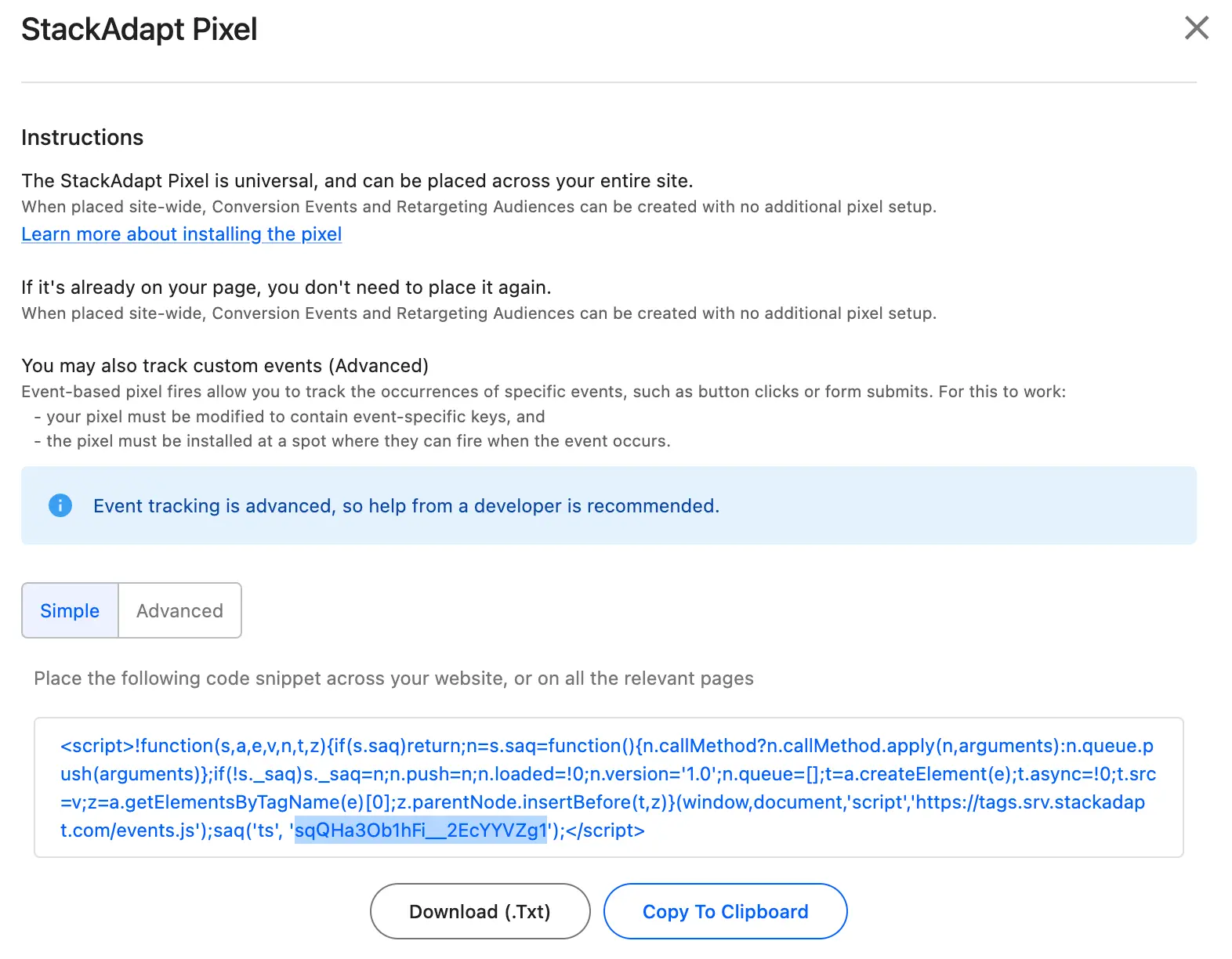
In the instructions that appear, copy the universal pixel ID from the code snippet. For example, the universal pixel ID in this code snippet is
sqQHa3Ob1hFi__2EcYYVZg1.
- From the Segment web app, navigate to Connections > Catalog > Destinations.
- Search for and select the "StackAdapt" destination.
- Click Add Destination.
- Select an existing source to connect to the StackAdapt destination.
- Give the destination a name.
- On the Settings screen, provide your StackAdapt Universal Pixel ID. This can be found on the Pixels page in StackAdapt.
- Toggle on the destination using the Enable Destination toggle.
- Click Save Changes.
Segment events that are forwarded to StackAdapt can be used to track ad conversions, and to generate retargeting and lookalike audiences. Review the StackAdapt documentation for the general setup of these if you are not already familiar:
- Creating Conversion Events
- Creating Retargeting Audiences
- How to Generate and Target a Lookalike Audience
Setup of conversion events, retargeting audiences, and lookalike audiences that fire on Segment events is largely the same as the setup in the StackAdapt documentation, with a few caveats:
- You must select "Universal Pixel" as the pixel type. This is because the StackAdapt destination in Segment uses your Universal Pixel ID to send events to StackAdapt.
- There is no need to install the StackAdapt pixel on your website as instructed in the "Installation" step. Segment will forward events to StackAdapt that would normally be tracked by the StackAdapt pixel.
- If you choose to set up event rules, ensure that you use the event keys supported by the StackAdapt destination.
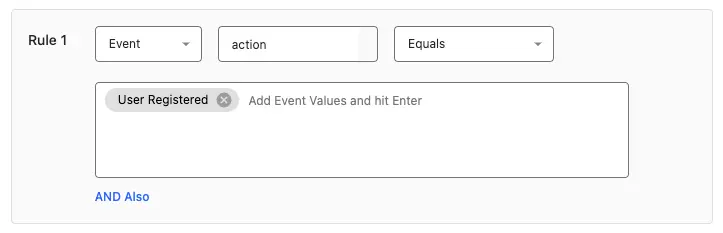
The StackAdapt Segment destination sends an action event key which by default is mapped to the Segment event name. Creating rules on this action key should be sufficient most simple event rule use cases. For example, if you fire a Segment event when a user fills out a registration form on your website and want to track this as a conversion event in StackAdapt, you can create a rule in StackAdapt that matches the action key with the Segment event name.
A Segment event fired with the code analytics.track("User Registered") can be tracked as a conversion event with an event rule that matches an action of User Registered as shown below:
The StackAdapt destination also supports forwarding ecommerce fields for the purpose of creating event rules that match ecommerce events, with default mappings to properties specified in the Segment v2 Ecommerce Event Spec as described in the table:
| Segment Ecommerce Event Property | StackAdapt Event Key |
|---|---|
order_id | order_id |
revenue | revenue |
product_id | product_id |
category | product_category |
name | product_name |
price | product_price |
quantity | product_quantity |
For events that can involve multiple products, such as checkout events, StackAdapt forwards a JSON array of product objects with a products key and fields that map by default to following Segment product array fields:
| Segment Ecommerce Event Property | StackAdapt Product Object Key |
|---|---|
products.$.product_id | product_id |
products.$.category | product_category |
products.$.name | product_name |
products.$.price | product_price |
products.$.quantity | product_quantity |
For example, to create a conversion event when an order is completed with a revenue value greater than 10, you could set up an event rule matching an action value of Order Completed and a revenue value greater than 10:
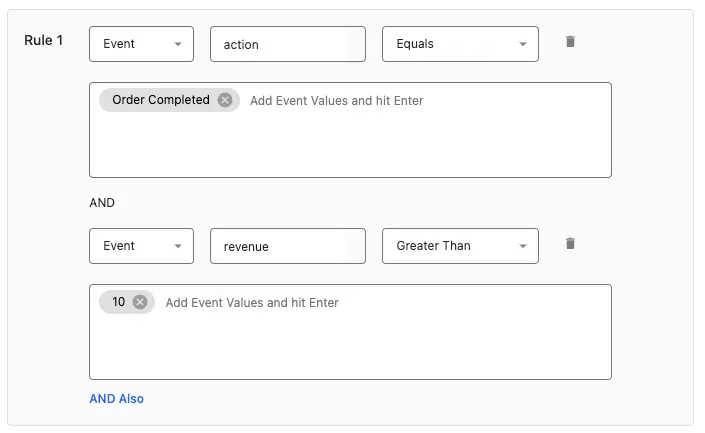
This rule would match a Segment event fired with code such as:
1analytics.track('Order Completed', {2order_id: '50314b8e9bcf000000000000',3revenue: 11.5,4products: [5{6product_id: '507f1f77bcf86cd799439011',7name: 'Monopoly: 3rd Edition',8price: 11.5,9quantity: 1,10category: 'Games'11}12]13});
Although trait fields are not frequently used in event rules, the StackAdapt destination forwards them and they can be used if desired.
| Segment Trait Property | StackAdapt Event Key |
|---|---|
traits.email | email |
traits.first_name | first_name |
traits.last_name | last_name |
traits.phone | phone |
For example, to create a conversion event when a user with the domain example.com completes an order, you could set up an event rule matching an action value of Order Completed and an email containing @example.com as shown below:
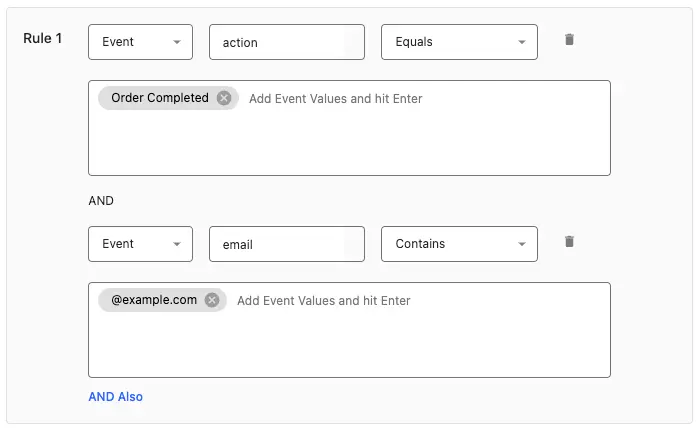
This rule would match a Segment event fired with code such as:
1analytics.track("Order Completed", {2order_id: "50314b8e9bcf000000000000",3traits: {4email: "john.smith@example.com",5first_name: "John",6last_name: "Smith",7phone: "+180055501000"8}9});
If you are using URL rules, these will be matched whenever Segment sends an event to StackAdapt with a url matching the URL rule. This should be accomplished by the page event Segment automatically fires when a page is viewed, so setup of URL rules should be identical to setting up URL rules with the StackAdapt pixel.
When you send events to Segment from your backend, which are forwarded to StackAdapt using Segment's backend SDKs, the user agent and IP address of the user who originated the event must be included in the event context for conversions to be tracked. StackAdapt uses the user agent and IP address to attribute the conversion to the correct event to a user who has interacted with your ads. Examples of how to do this can be found in the documentation for Segment's SDKs. For example, for the Python SDK this can be done as follows:
1analytics.track('user_id', 'Order Completed', context={2'ip': '203.0.113.1',3'userAgent': 'Mozilla/5.0 (Linux; U; Android 4.1.1; en-gb; Build/KLP) AppleWebKit/534.30 (KHTML, like Gecko) Version/4.0 Safari/534.30'4})
This is necessary when using backend SDKs but not for events sent from the frontend with analytics.js, because analytics.js automatically includes the user agent and IP address in the event context.
When sending past events to StackAdapt using a Reverse ETL tool, the user agent, IP address, event type, and either the page URL (for conversion trackers with URL rules), or the fields the event rules match on, must be included in your mappings. For example, the mapping for a Snowflake source can be used to match a conversion tracker with an event rule that matches an action of User Registered:
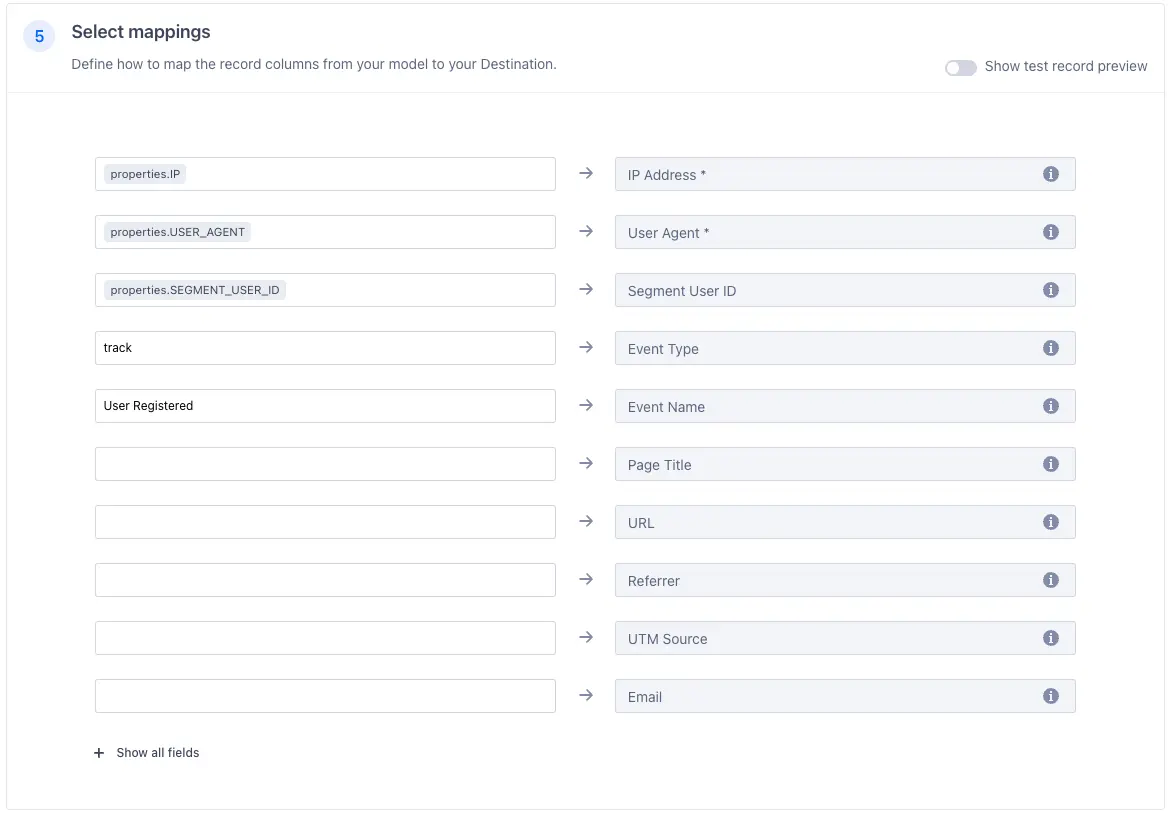
Rows forwarded to StackAdapt with this mapping will be matched by the User Registered event rule shown below:
When forwarding past events using Reverse ETL, only users who have interacted with an ad from an associated campaign within the conversion tracker's configured view-through expiry window (for impressions) or click-through expiry window (for clicks) will count as conversions. These windows can be set to up to 180 days in the conversion tracker configuration.
Your StackAdapt Universal Pixel ID
StackAdapt Events & Conversions has the following presets
| Preset Name | Trigger | Default Action |
|---|---|---|
| Forward Event | Event type = "identify", Event type = "page", Event type = "screen", Event type = "track" | Forward Event |
Build your own Mappings. Combine supported triggers with the following StackAdapt Events & Conversions -supported actions:
Mapping limits per destination
Individual destination instances support a maximum of 5 mappings.
Forward Segment events to StackAdapt for conversion tracking
Forward Event is a Cloud action. The default Trigger is type = "identify" or type = "page" or type = "screen" or type = "track"
Optional
The ID of the user in Segment
Optional
The Segment event type (page, track, etc.)
Optional
The event name (e.g. Order Completed)
IP address of the user
Optional
The title of the page where the event occurred.
Optional
The URL of the page where the event occurred.
Optional
The referrer of the page where the event occurred.
Optional
UTM source parameter associated with event
User-Agent of the user
Optional
Email address of the individual who triggered the event.
Optional
Phone number of the individual who triggered the event
Optional
First name of the individual who triggered the event.
Optional
Last name of the individual who triggered the event.
Optional
Additional ecommerce fields that are included in the pixel payload.
Optional
The list of products associated with the event (for events with multiple products, such as Order Completed)
Review StackAdapt's Data Processing Agreement to learn more about StackAdapt's privacy and data terms.