Facebook Conversions API Destination
A new version of this destination is available
A new version of this destination is available. See Facebook Conversions API (Actions) for more information.
Facebook Conversions API (formally known as Facebook Pixel Server-Side) lets advertisers send events from their servers directly to Facebook. Server-side events are linked to a pixel and are processed like browser pixel events. This means that server-side events are used in measurement, reporting, and optimization in the same way as browser pixel events.
As of Facebook Marketing API v13.0+, Facebook began enforcing new requirements for customer information parameters (user data). To ensure your events don't throw an error, Segment recommends that you review Facebook's new requirements.
On February 15th, 2021, Facebook began enforcing new requirements for server event parameters. Events sent to the Conversions API that don't meet the requirements might not be available for optimization, targeting, or measurement. For details on how to implement these requirements, see the server event parameter requirements.
This page is about the Facebook Conversions API destination. For documentation on other Facebook destinations, including Facebook Pixel, see the following table:
| Facebook Destination | Supported by Engage |
|---|---|
| Facebook App Events | Yes |
| Facebook Custom Audiences | Yes |
| Facebook Offline Conversions | Yes |
| Facebook Pixel | No |
Next, set up your Pixel to work with the Facebook Conversions API destination. You can use an existing Facebook Pixel that you already have set up, or create a new one. If you don't already have a Facebook Pixel configured, follow the New Pixel instructions to create one.
To create a pixel to work with the Facebook Conversions API destination::
- Go to the Facebook Business Events Manager and click Connect Data Sources.
- Choose Web, App, or Offline and then click Get Started.
- Select "Conversions API" and then click Connect.
- Choose "Segment" from the list of partners.
- Enable the setting to "Authorize Segment Connection" and then click Continue.
If you already have a Facebook Pixel set up, follow these steps to configure it to work with the Facebook Conversions API destination:
- Go to the Facebook BusinessEvent Manager Pixel Settings.
- Scroll down to the Set up through a partner integration section and click Choose Partner.
- Choose "Segment" from the list of partners.
- Enable the setting to "Authorize Segment Connection" and then click Continue.
Now, to set up the Facebook Conversions API destination in Segment:
- From the Destinations catalog page in the Segment App, click Add Destination.
- Search for "Facebook Conversions API" in the Destinations Catalog, and select the "Facebook Conversions API" destination.
- Choose which source should send data to the "Facebook Conversions API" destination.
- Go to the Facebook Business Event Manager Pixel Settings, find and copy the "Pixel ID".
- Enter the "Pixel ID" in the "Facebook Conversions API" destination settings in Segment.
Next steps
See the Configuration options section below for additional implementation steps.
The Segment Facebook Conversions API destination gives you several ways to implement your conversion tracking. You can use it as a compliment to Facebook Pixel, or as a stand-alone alternative.
The following implementation options are available:
- Send the same events from both the browser and the server.
- Send different events - some from the browser others from the server.
- Only send events from the server.
This approach provides a redundancy that ensures maximum signal reliability. Events that previously could have been lost (for several different reasons) when sent from browser, are now captured using the conversions API. You can use this if you do not want to miss any events coming from the browser.
For this option to work best, pass the same external_id from the browser and the server. To achieve this, go to the Facebook Pixel destination settings in Segment and enable the Enable Advanced Matching and Use User ID or Anonymous ID as External ID settings. By default, the Facebook Conversions API destination uses the userId (or anonymousId if not present) to set the external_id, so when you configure Facebook Pixel to use the same settings, Facebook matches users by those IDs.
You can also increase the match rate for events from a server source by sending user traits in the context object of the track events. Collect other fields from the browser, such as userAgent, ip address, and Facebook's parameters (fbp, fbc), pass them to the server, and manually add them to the events.
Events are only deduplicated if the same event is sent first from the browser and then from the server. When events are received in this order, the server event is discarded. If the events are sent from the server and then the browser, they create a duplicate. If you send two consecutive browser events with the same information, neither is discarded. If you send two consecutive server events with the same information, neither is discarded.
Use this approach if you want to separate tracking events completed on a user's browser from events completed outside the browser, such as a server-based payment system. Sensitive information is best kept out of browsers, so any data you don't want exposed to users should only be sent using a server source. You can also set up the Conversions API to measure customer actions that are deeper in your marketing funnel. Seeing these deeper funnel events means you can more accurately measure how your ads are helping you reach your business goals.
For this option to work best, the same external_id needs to be passed from the browser and the server. To achieve this, go to your Facebook Pixel destination settings in Segment and enable the Enable Advanced Matching and Use User ID or Anonymous ID as External ID settings. By default the Facebook Conversions API destination uses the userId (or anonymousId if not present) to set the external_id, so when you set up Facebook Pixel to use the same settings, Facebook can then match the users.
You can also send user traits in the context object of the track events to increase the match rate for events from a server source. Collect other fields from the browser, like userAgent, ip address, and Facebook's parameters (fbp, fbc), pass them to the server, and manually add them to the events.
If you choose this option, each source sends different events and no deduplication is needed.
Use this approach if you don't want to track users from the browser with Facebook Pixel. By default, Facebook Pixel collects cookie data, as well as browser data such as the IP Address and the User Agent, some of which you might not want to collect. By sending from a Segment server source to Facebook's Conversions API, you can control which identifiers you pass to Facebook.
If you use Facebook Conversions API as a stand-alone without certain data fields collected from the browser, the match rate might not be as high as if you included them.
You can also increase the match rate for events from a server source by sending user traits in the context object of the track events. Collect other fields from the browser, such as userAgent, ip address, and Facebook's parameters (fbp, fbc), pass them to the server, and manually add them to the events.
If you choose this option, you are only sending events once, and no deduplication is needed.
Currently, Facebook Conversions only supports Track calls.
For more information about Track calls, see the Track method in the Segment Spec.
Facebook requires the action_source server event parameter for all events sent to the Conversions API. This parameter is used to specify where the conversions occurred. If action_source is set to 'website' then the client_user_agent and the event_source_url parameters are also required. Events sent to the Conversions API that do not meet the requirements might not be available for optimization, targeting, or measurement.
| Server Event Parameter | Requirement | Implementation |
|---|---|---|
action_source | Always required | It is set automatically but it can be set manually. |
client_user_agent | Only required if action_source = "website" | It must be set manually if using a server library. It is set automatically if using the Segment web library. |
event_source_url | Only required if action_source = "website" | It must be set manually if using a server library. It is set automatically if using the Segment web library. |
action_source is set to "website" as a default value.
You can set action_source manually by passing it as a property of a Track event. You can use either snake case or camel case to include action_source as a property in Track events.
| Action Source Values | Description |
|---|---|
chat | Conversion was made through a messaging app, SMS, or online messaging feature. |
email | Conversion happened over email. |
other | Conversion happened in a way that is not listed. |
phone_call | Conversion was made over the phone. |
physical_store | Conversion was made in person at your physical store. |
system_generated | Conversion happened automatically, for example, a subscription renewal that's set on auto-pay each month. |
website | Conversion was made on your website. |
client_user_agent is set by including context.userAgent in the track event. The value used should be the user agent of the browser where the conversion event occurred. If you're using a server library, set client_user_agent manually. If you're using the Segment web library, client_user_agent is set automatically.
event_source_url is set by including context.page.url in the track event. The value used should be the browser URL where the conversion event occurred. If you're using a server library, set event_source_url manually. If you're using the Segment web library, event_source_url is set automatically.
If action_source is set to 'website', the context.userAgent and the context.page.url fields are required. Segment server-side libraries do not collect context.userAgent or context.page.url by default. This data must be retrieved manually from the client and passed to the server.
The following snippet provides an example of a Product Added event using Node.js. Notice in this example that the action_source parameter has not been set manually by passing this field into the event. The action_source parameter will default to "website". Since action_source = "website" the client_user_agent and the event_source_url parameters are required. Therefore the context.userAgent and the context.page.url fields have been manually passed into the event.
1analytics.track({2context: {3userAgent: "Mozilla/5.0 (Macintosh; Intel Mac OS X 11_1_0) AppleWebKit/537.36 (KHTML, like Gecko) Chrome/88.0.4324.96 Safari/537.36",4page: {5url: "https://segment.com/"6}7},8userId: "97980cfea0067",9event: "Product Added",10properties: {11brand: "Hasbro",12cart_id: "skdjsidjsdkdj29j",13category: "Games",14coupon: "MAYDEALS",15image_url: "https://www.example.com/product/path.jpg",16name: "Monopoly: 3rd Edition",17position: 3,18price: 18.99,19product_id: "507f1f77bcf86cd799439011",20quantity: 1,21sku: "G-32",22url: "https://www.example.com/product/path",23variant: "200 pieces"24},25});
The following mappings are automatic and require no additional set up. Any of the Segment Ecommerce Events listed in the table will be sent as the corresponding Facebook Standard Event. You learn more about these in the Facebook pixel standard events documentation.
| Segment E-commerce Event | Facebook Standard Event |
|---|---|
Checkout Started | InitiateCheckout |
Order Completed | Purchase |
Product Added | AddToCart |
Product List Viewed | ViewContent |
Product Viewed | ViewContent |
Products Searched | Search |
Currency requirement for Purchase events
Facebook requires a currency for "Purchase" events — if you leave it out, Segment will set a default value of "USD".
To map any of your Segment Events (not listed in the table above) to a Facebook Standard event, use the Segment destination setting labeled Map Your Events to Standard FB Events. Then, when Segment receives an event that appears in that mapping, the event is sent to Facebook as the standard event you specified. All properties included in the event are sent as event properties.
Any unmapped events are automatically sent to Facebook Conversions as a custom event. If Facebook's predefined standard events aren't suitable for your needs, you can track your own custom events, which also can be used to define custom audiences for ad optimization. Custom events also support parameters, which you can include to provide additional information about each custom event.
Custom event name length limit
Custom event names cannot exceed 50 characters in length.
Segment maps the following Segment traits to Facebook properties:
| Segment Property | Pixel Property | Notes |
|---|---|---|
context.ip | user_data.client_ip_address | |
context.page.url | event_source_url | |
context.traits.address.city | user_data.ct | hashed |
context.traits.address.postalCode | user_data.zp | hashed |
context.traits.address.state | user_data.st | hashed |
context.traits.birthday | user_data.db | hashed |
context.traits.email | user_data.em | hashed |
context.traits.firstName | user_data.fn | hashed |
context.traits.lastName | user_data.ln | hashed |
context.traits.phone | user_data.ph | hashed |
context.userAgent | user_data.client_user_agent | |
event | event_name | |
messageId | event_id | |
properties.action_source | action_source | |
properties.currency | custom_data.currency | Defaults to USD if not set |
properties.fbc | fbc | |
properties.fbp | fbp | |
properties.products[x].price | custom_data.contents[x].item_price | Must be an integer |
properties.products[x].product_id | custom_data.contents[x].id | Must be a string |
properties.products[x].quantity | custom_data.contents[x].quantity | Must be an integer |
properties.products | custom_data.contents | Must be an array. num_items is set to the length of this |
properties.query | custom_data.search_string | |
properties.revenue | custom_data.value | Customizable, see Alternative Value Properties |
properties.status | custom_data.status | |
timestamp | event_time | |
userId | external_id | Any unique ID from the advertiser, such as membership IDs, user IDs, and cookie IDs. See Alternative External IDs. |
About hashing
For each of the hashed properties above, Segment's integration code hashes the values before they're sent to the destination.
To access the contexts and context.traits objects in a Track call, you can use the context-traits format as follows:
1analytics.track("Clicked Email", {2emailCampaign: 'First Touch'3},4{5traits: {6name: "John Doe"7}8});
Any properties you send that aren't listed above are sent in the custom_data part of the Segment payload to Facebook.
By default, Segment sends the userId as external_id, and if userId is absent falls back to anonymousId. To use a different field in your payload as the external_id, use the Alternative External ID Field setting. An example value for this setting would be properties.externalId.
For most events Segment sends revenue for the Pixel value field, but for the pre-purchase events Product Viewed and Product Added, Segment
uses the value of the Value Field Identifier setting to determine which property to use for the value field. This field defaults to
price.
In July 2020, Facebook released Limited Data Use feature to help businesses comply with the California Consumer Privacy Act (CCPA). This feature limits the way user data is stored and processed for all California residents who opt out of the sale of their data. You can send Limited Data Use data processing parameters to Facebook on each event so that Facebook can appropriately apply the user's data choice. Segment recommends that you first familiarize yourself on this feature and the Data Processing Options Facebook accepts.
This destination supports the following parameters:
- Data Processing Options
- Data Processing Options Country
- Data Processing Options State
You can enable the feature using the Use Limited Data Use destination setting and control it using Data Processing Initialization Parameters.
Use Limited Data Use setting
The Use Limited Data Use destination setting is disabled by default for all Facebook destinations except for Facebook Pixel. This must be enabled manually from the destination settings if you're using other Facebook destinations.
You can change the Use Limited Data Use destination setting to enable or disable Limited Data Use. This must be enabled (set to "on") if you want to send data processing parameters as part of the the Limited Data Use feature.
The Data Processing parameters you set are the Data Processing Options Segment uses when sending data to Facebook. By default, Segment uses the following Data Processing Parameters:
| Data Processing Parameter | Default Value | What it means |
|---|---|---|
| Data Processing Options | ["LDU"] | Use Facebook's Limited Data Use processing |
| Data Processing Options Country | 0 | Use Facebook's geolocation to determine country |
| Data Processing Options State | 0 | Use Facebook's geolocation to determine state |
Facebook uses the context.ip to determine the geolocation if it exists on the event.
You can manually change the Data Processing parameters by adding settings to the integrations object. The example below shows how you might set custom Data Processing parameters in Node.
1// node.js library example23analytics.track({4event: 'Membership Upgraded',5userId: '97234974',6integrations: {7"Facebook Conversions API": {8"dataProcessingOptions": [[], 1,1000]9}10}11})
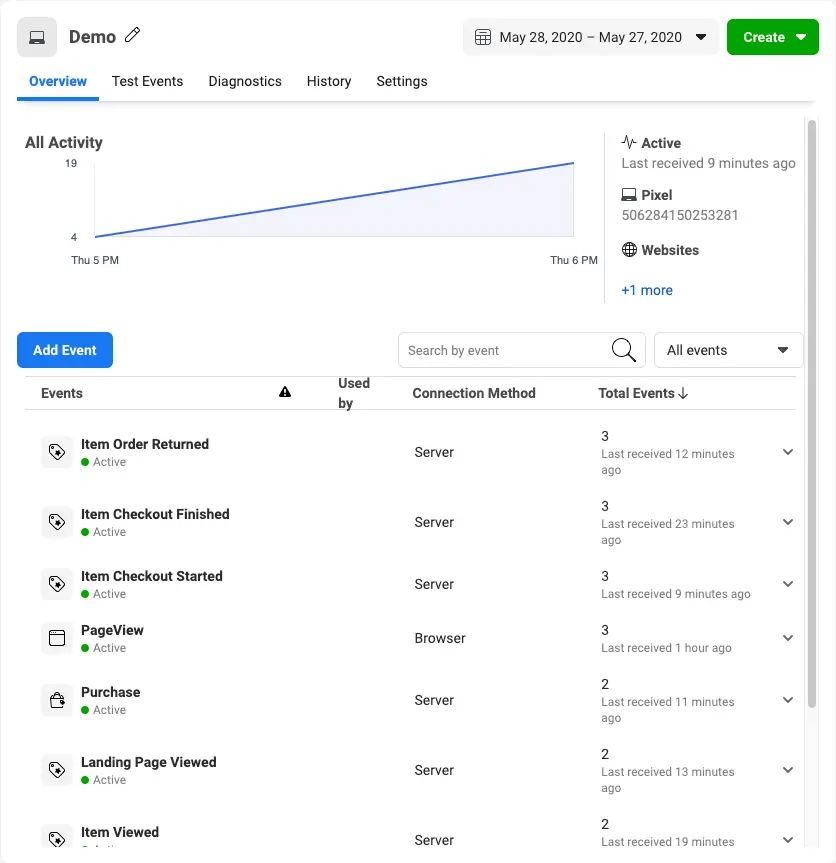
After you start sending events, you should start seeing them within twenty minutes. To confirm that Facebook received them:
- Go to the Events Manager.
- Click on the corresponding pixel.
- In the Overview tab, look for events where the "Connection Method" is
Server.
Note that it might take a few minutes before events appear in the Events Manager.
Why do I see a "Mismatched IP Address" warning in Facebook after enabling the Facebook Conversions API alongside Facebook Pixel?
When you enable both Facebook Pixel and the Facebook Conversions API, you might see a "Mismatched IP Address" warning in Facebook reports. This happens because:
- Facebook Pixel collects the user's IP address directly from the browser, including IPv6 addresses when available, independently of Segment. Even though Segment's Analytics.js defaults to collecting only IPv4 addresses, Facebook Pixel automatically collects IPv6 if available, and sends it to Facebook.
- Events sent to Facebook through the Conversions API may include an IPv4 address collected by Segment Analytics.js, which results in both IPv4 and IPv6 addresses being sent for the same event.
Since these two addresses don't match, Facebook flags it as a "Mismatched IP Address." To resolve this, you can manually collect and send the IPv6 address (when available) in the event payload to Segment, and map it to the Facebook Conversions API destination. This ensures consistency between the IP addresses received by Facebook.